Healthcare Workflow Automation Software: A Practical Guide to RPA in Healthcare
 By Ashwani Rana
QSS Technosoft
October 12, 2026
15 min read
By Ashwani Rana
QSS Technosoft
October 12, 2026
15 min read
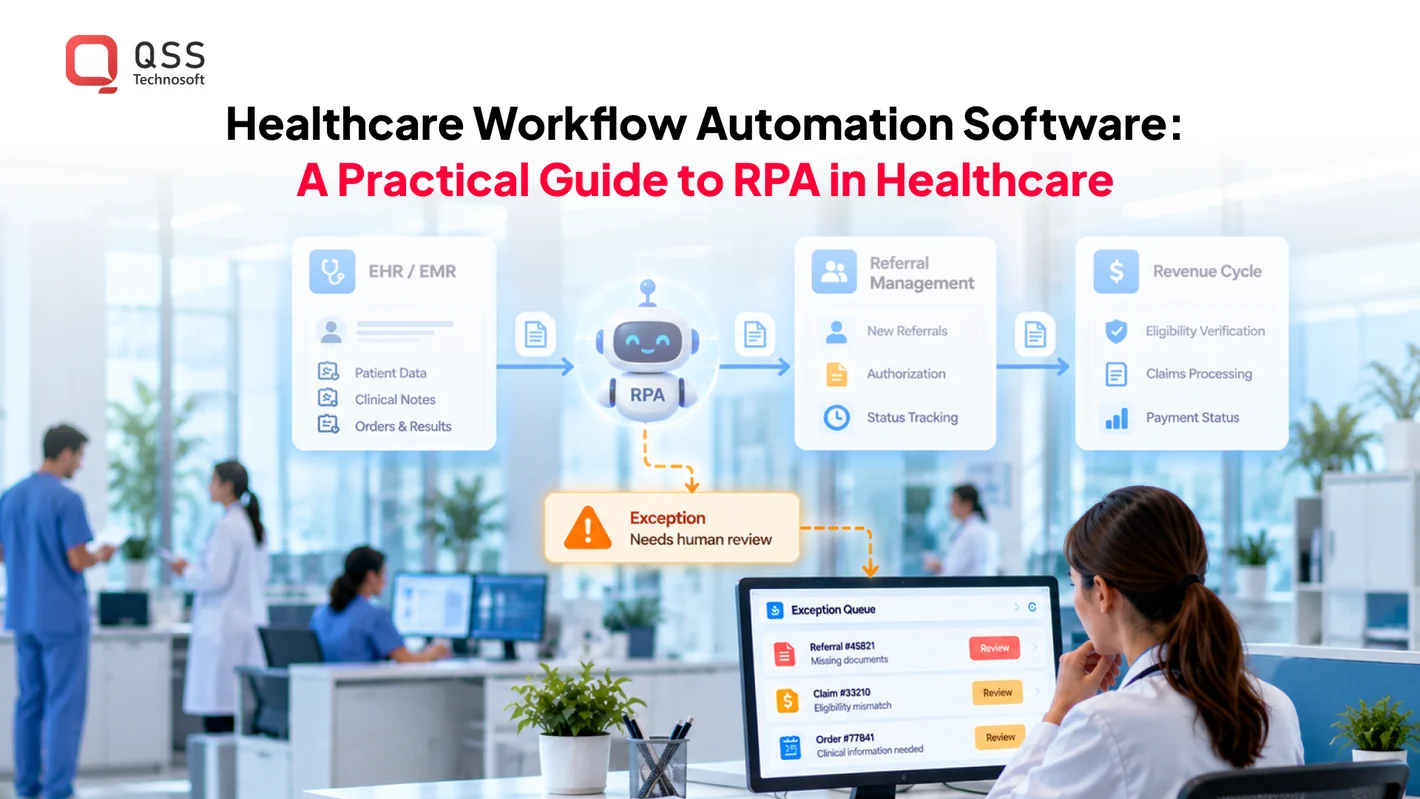
Healthcare workflow automation software coordinates repeatable tasks and handoffs across healthcare operations. Robotic process automation (RPA) can handle stable, rules-based steps such as transferring approved information or routing a task. It is most useful when the workflow, data, and exception rules are clear, with people retaining responsibility for decisions that require clinical or operational judgment.
When skilled staff spend time rekeying information, especially across legacy platforms with inconsistent interfaces, automation may help reduce repetitive handling. It does not remove the need to understand how data moves, where exceptions occur, and who reviews the result.
This guide explains where RPA fits within broader workflow automation, how to select a practical, bounded use case, and what to assess before connecting automation to EHRs and other healthcare systems. It also covers why human oversight, access controls, auditability, and maintenance belong in the implementation plan from the start. The goal is to automate stable handoffs, evaluate the workflow, and keep people responsible for judgment.
Quick Answer
Healthcare workflow automation software coordinates repeatable tasks and handoffs, while RPA in healthcare automates a single rule-based digital action, such as moving approved data or updating a status. Start with a stable, repetitive administrative workflow that has clear rules, usable data, and a named owner for exceptions; keep clinical judgment with people. Map the trigger, rule check, system update, validation and logging, and the exception route to staff before building. For EHR integration, prefer a supported API or HL7/FHIR interface where one fits, and use screen-based automation only when no interface is available, since screen changes break it. Run a bounded pilot against a baseline, keep a manual fallback, restrict data access, and review HIPAA responsibilities with privacy and security leads rather than assuming any bot is compliant.
What Is Healthcare Workflow Automation Software, and Where Does RPA Fit?
Healthcare workflow automation software coordinates digital tasks and handoffs across healthcare operations. Robotic process automation (RPA) is software that follows defined rules to perform repetitive actions in digital systems. RPA can handle a bounded task, while broader workflow automation can coordinate steps, approvals, and exceptions across a process.
• Use RPA for repeatable administrative actions with predictable inputs. • Use workflow automation to coordinate steps, approvals, and handoffs. • Keep clinical judgment and exception decisions with accountable people.
How Is RPA Different From Workflow Automation?
RPA automates a task; workflow automation connects tasks into a process. A bot might copy an approved data field into another system. A broader workflow could route a request, track its status, and send it for human review when needed. Neither approach replaces clinical decision-making or resolves every exception without human oversight.
A task-level bot performs a defined action; an end-to-end workflow coordinates actions, handoffs, and oversight across a process.
| Dimension | RPA | Workflow automation |
|---|---|---|
| Scope | A bounded, repetitive digital task | Multiple steps and handoffs across a process |
| Typical work | Copying approved data or updating a status | Routing work, applying process rules, and coordinating approvals |
| Human oversight | Staff handle errors or cases outside the bot’s rules | People review exceptions and decisions requiring judgment |
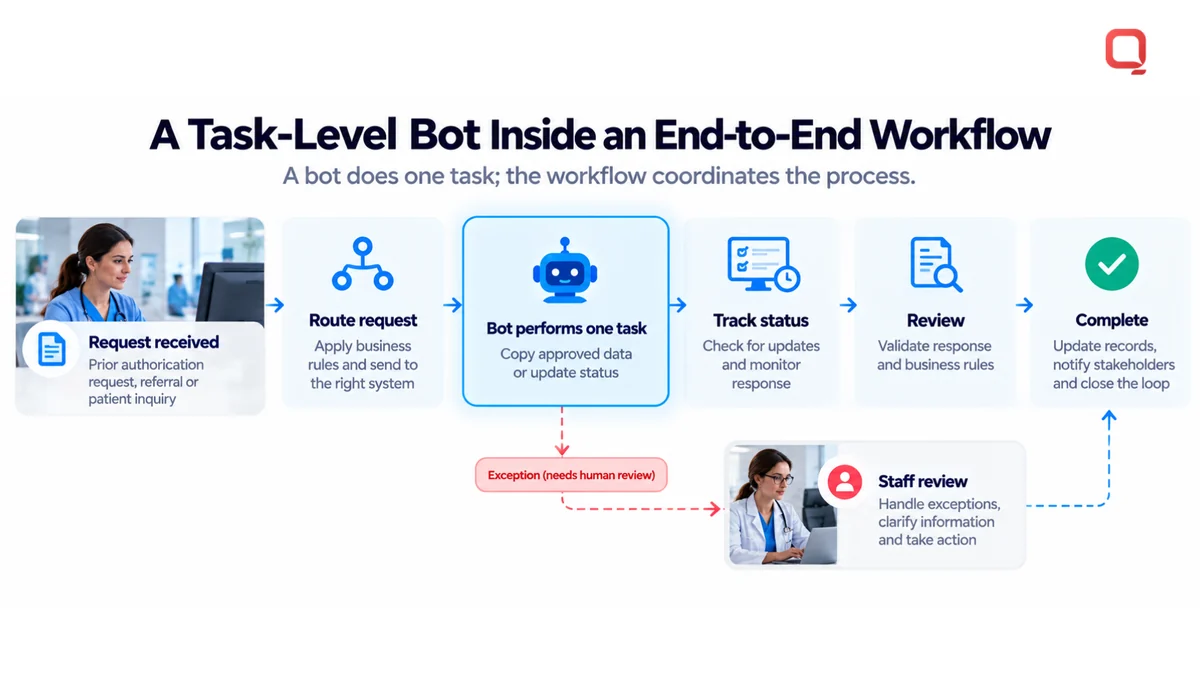
These approaches can work together, but they solve different problems. A bot may perform one action within a larger process, while workflow automation determines what happens before and after it. Healthcare workforce management is another operational context. API Healthcare provides an example of software focused on healthcare workforce management, a distinct area of operational workflow support.
Which Healthcare Workflows Could Be Candidates?
Administrative tasks are stronger candidates when the rules are stable, the inputs are usable, and staff know how exceptions should be handled. Examples include:
- Routing a complete administrative request to the right queue.
- Entering approved information from one system into a corresponding field in another.
- Updating a task status after a defined operational step is complete.
These are examples of operational handling, not decisions about diagnosis, treatment, or patient-care priorities. A workflow involving ambiguous records or judgment calls needs an explicit human review point. If a process changes often, relies on inconsistent data, or has no clear owner for exceptions, automation may simply shift the friction into a less visible part of the system.
Before selecting a candidate, map the current steps. Identify where information comes from, what rule permits the next action, and who handles an unexpected result. The goal of healthcare workflow automation software is to make a defined process more consistent, not to remove accountability from the people responsible for it.
How Does Healthcare RPA Work Across Systems and Handoffs?
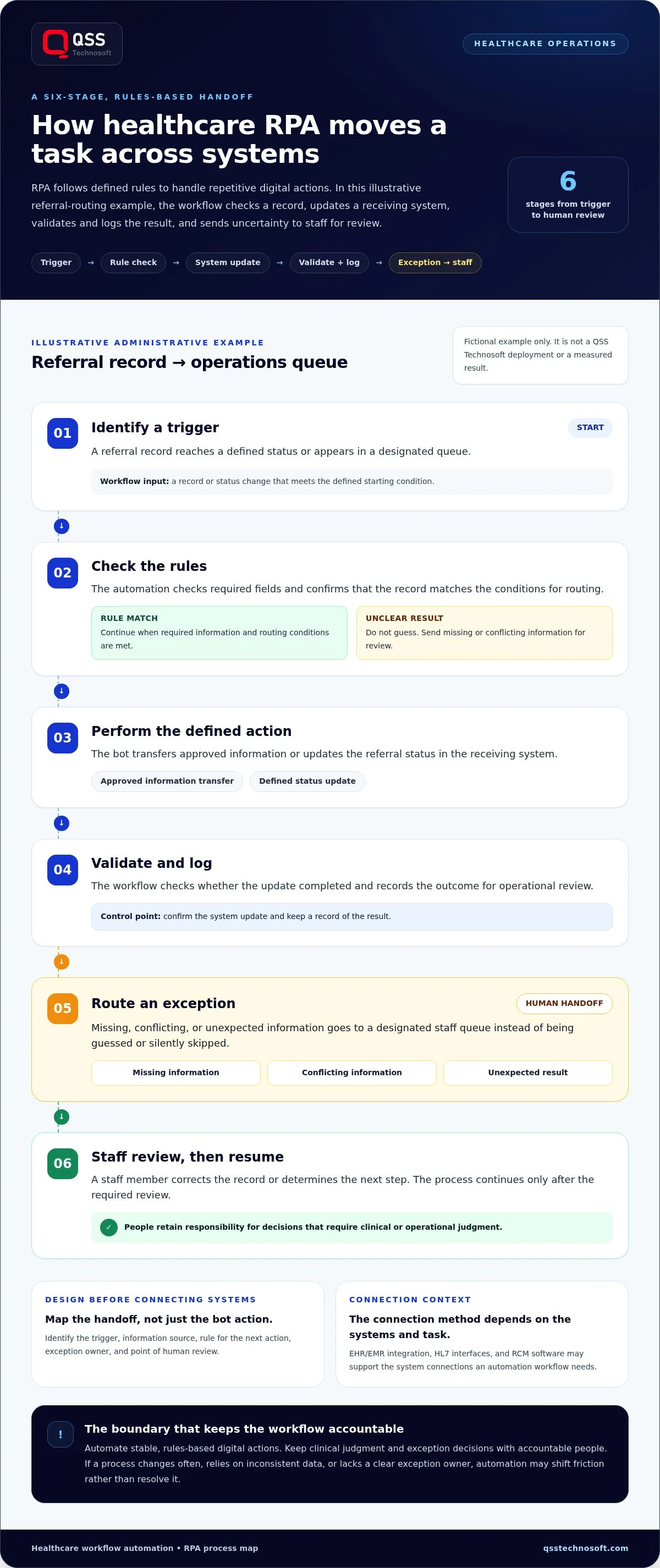
Healthcare RPA follows a defined sequence: a trigger starts a rule-based action, the system is updated, and the result is validated and logged. If the information does not meet the expected rules, the workflow routes the exception to a staff member for review. The connection method depends on the systems involved and the task being automated.
What Are the Main Steps in an RPA Workflow?
Consider this fictional administrative example: routing a completed referral record to an operations queue. It is illustrative only, not a QSS Technosoft deployment or a measured result. A workflow could proceed as follows:
- Identify a trigger. A referral record reaches a defined status or appears in a designated queue.
- Check the rules. The automation checks required fields and confirms that the record matches the conditions for routing.
- Perform the action. The bot transfers approved information or updates the referral status in the receiving system.
- Validate and log. The workflow checks whether the update completed and records the outcome for operational review.
- Route an exception. Missing, conflicting, or unexpected information goes to a designated staff queue instead of being guessed or silently skipped.
- Review and resume. A staff member corrects the record or determines the next step. The process continues only after the required review.
Exception handling belongs in the workflow design, not as an afterthought. Without a safe way to stop and route uncertainty, a small data issue can become an operational error.
How Do EHR, HL7, and FHIR Integrations Affect Automation?
An electronic health record (EHR) or electronic medical record (EMR) is a digital system used to manage patient and care-related records. HL7 is a set of standards used to exchange health information between systems. Fast Healthcare Interoperability Resources (FHIR) is a standard for exchanging health data through defined resources and interfaces. Depending on the workflow, these systems may connect with billing, scheduling, referral, or other operational platforms.
An application programming interface (API) is a defined way for software systems to exchange data or request actions. Where a supported API or interface fits the task, automation can exchange structured information without relying on screen clicks. That approach still needs monitoring and testing as system behavior and requirements change. UI-based automation interacts with screens and fields as a user would. It can be useful when direct interfaces are unavailable, but screen layout changes, pop-ups, and timeouts can disrupt it and require maintenance.
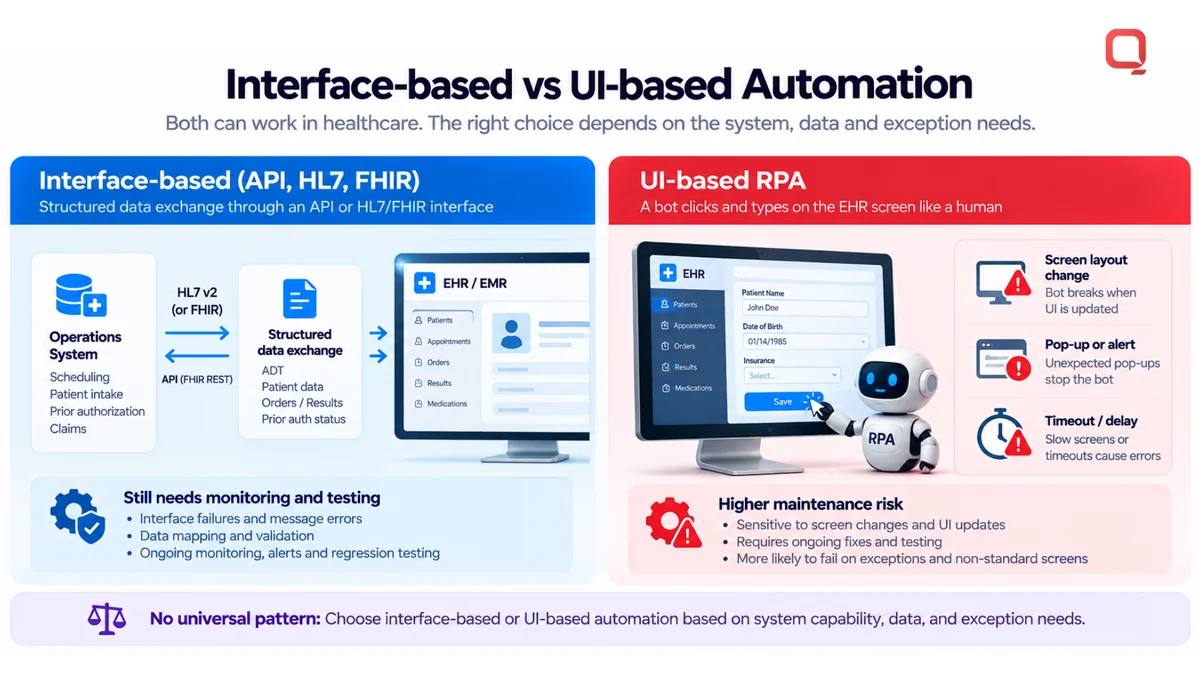
There is no universal connection pattern. The choice depends on system capabilities, the data involved, and the workflow’s validation and exception requirements. EHR/EMR integration and HL7 interface development can provide building blocks for these connections. When comparing HL7 and FHIR approaches, consider which systems need to exchange data and which interfaces they support.
Before release, test the workflow with expected records and known edge cases. Confirm that a failed update is visible to staff, that a repeated trigger does not create an unintended duplicate, and that the process can be stopped or handled manually if an interface changes. These checks make the handoff observable after deployment, not just functional in a controlled test.
What Does a Healthcare Workflow Automation Case Study Look Like?
A useful healthcare workflow automation case study explains the original problem, the process change, the automation boundary, and how results were measured. The scenario below is hypothetical, not a real client case or a measured outcome. It illustrates how a bot might flag an incomplete administrative record while leaving review and correction to authorized staff.
Illustrative Scenario: Routing an Incomplete Administrative Record
Imagine an administrative record arrives in an operations queue with a required field missing or information that conflicts with an existing entry. Staff must locate the issue, determine who should address it, and track the record until it can move forward. Automation’s role here is to identify and route the exception, not decide what the information means.
- Starting problem: Records arrive through an established intake process, but some need administrative correction before processing can continue.
- Workflow map: Document the source, required fields, receiving queue, status changes, and staff responsible for review.
- Automation boundary: A rule-based bot checks for defined missing or inconsistent fields and flags the record. It does not interpret clinical information or make care decisions.
- Exception handling: The bot routes the flagged record to an authorized staff member, who reviews and corrects the administrative information or determines the next operational step.
- Evaluation plan: Compare the documented baseline with the changed process, including how often records are flagged, routed, corrected, and returned for rework.
The right design may be a small bot, a broader workflow redesign, or continued manual handling. Compare these options against the actual process rather than assuming one will always perform better.
| Approach | Scope | Human role |
|---|---|---|
| Manual handling | Staff inspect and route each record using existing procedures. | Staff identify issues and decide how to resolve them. |
| Rule-based bot | Automates defined checks and administrative routing. | Staff review flagged exceptions and correct records. |
| Workflow redesign | Revises steps, ownership, approvals, and system handoffs across the process. | Staff retain accountability for exceptions and decisions requiring judgment. |
How Should Buyers Read Automation Results?
A credible case study separates the starting baseline, the process changes made, and the outcomes measured. Without that separation, readers cannot tell whether results came from the bot, a redesigned workflow, changed staffing, or another factor. A useful account states its measurement method and timeframe before presenting improvements.
- Baseline: Describe the existing steps, record types, known failure points, and the period used to observe the process.
- Process changes: Explain what was automated, what remained manual, how exceptions were assigned, and whether other workflow changes occurred.
- Measured outcomes: Name the measures, data source, comparison period, and limits of the analysis. Possible measures include handling time, correction frequency, or unresolved exceptions, if they were tracked.
Do not treat an illustrative scenario as evidence. Any reported customer outcome, quote, or implementation detail needs permission and support from the underlying records. This helps healthcare teams assess what healthcare workflow automation software changed, what remained under human control, and whether the evidence supports the conclusion.
alt text: Healthcare workflow automation software infographic: how healthcare RPA moves a referral record across systems in six stages, from trigger and rule check to system update, validation, exception routing, and staff review
How Should Healthcare Teams Evaluate and Implement RPA?
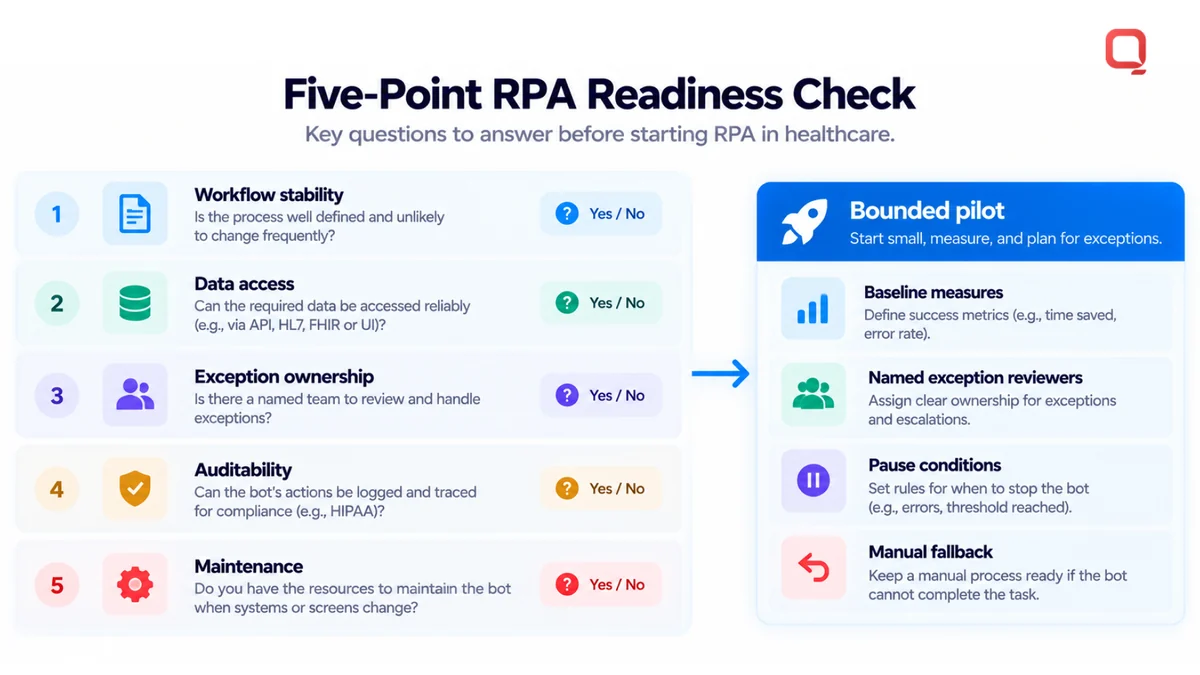
Healthcare teams should start with a stable, repetitive administrative workflow that has clear rules, usable data, and an accountable owner. RPA can fail when processes change without notice or exceptions have nowhere to go. A bounded pilot, baseline measures, and a manual fallback help teams assess fit before relying on automation in production.
Which Workflow Should a Team Automate First?
Choose work that follows documented steps and produces observable results, such as routing a complete administrative request or updating a defined status. Avoid starting with processes that depend on clinical judgment or contain frequent, undocumented exceptions. Clarify those workflows before automating any bounded part of them.
Evaluation rule: Automate only when the process is stable, exceptions have named owners, and people remain accountable for decisions outside the rules.
Before a pilot, document the current workflow and establish a baseline using measures relevant to the task, such as completion status, rework, or exception volume. Define the pilot’s boundaries, the staff who will review exceptions, and the conditions for pausing the automation. Compare results against the baseline without assuming the bot caused every observed change.
- Workflow stability: Are the steps and rules documented, and are process changes communicated to the automation owner?
- Data access: Can the automation access only the information and systems required for its task?
- Exception ownership: Is a specific team or role responsible for reviewing flagged items?
- Auditability: Can staff trace what action occurred and review the outcome?
- Maintenance: Is there an owner for testing and updating the automation when interfaces or business rules change?
What Can Go Wrong After Deployment?
Deployment does not make a workflow permanent. A changed screen can disrupt UI-based automation. Poor data quality can lead to incorrect routing. A retry may create a duplicate action if the system does not distinguish a completed task from a failed one. An exception without an assigned owner can sit unnoticed.
Plan for these failure modes before rollout. Monitor completed actions and exceptions, restrict access to what the task requires, and document who approves changes to the workflow. Keep a manual fallback that staff can use if the automation stops or behaves unexpectedly. These controls support operational continuity, but they do not replace a review of privacy and security responsibilities.
If the automation handles electronic protected health information, assess the design against applicable HIPAA requirements with the organization’s privacy and security leads. The U.S. Department of Health and Human Services describes the HIPAA Security Rule and its safeguards for electronic protected health information. The details depend on the system and organization, so involve appropriate compliance expertise rather than treating a bot as compliant by default. Legacy interfaces may also need modernization planning when maintenance becomes a recurring source of workflow risk.
How Can QSS Technosoft Support Healthcare Workflow Automation?
QSS Technosoft supports healthcare workflow automation through healthcare software engineering, interoperability, and system integration. For teams assessing RPA, this work can include examining how EHR/EMR systems, HL7 interfaces, and revenue cycle management software fit the workflow, then engineering around its rules, data, handoffs, and exceptions.
Where Do Healthcare Engineering and Interoperability Fit?
Automation depends on more than a bot. The surrounding systems must exchange the right information, and the workflow must define what happens when expected data is missing or a system update fails. QSS Technosoft provides healthcare interoperability, EHR/EMR development and integration, and HL7 interface development to support this engineering work.
In a workflow project, start by connecting process requirements to system behavior. Identify the source and destination of each data element, determine how an update can be made, and define how exceptions are surfaced for human review. Depending on the systems and requirements, teams may use an existing interface, an API, or a user-interface-based approach. Consider maintenance alongside initial implementation.
For a revenue cycle workflow, RCM software and related operational systems may support processes for tracking administrative status or routing work. Keep the automation boundary explicit: a technical integration can move or update information, while staff remain responsible for review and decisions that require judgment.
QSS Technosoft has more than 250 in-house engineers and more than 15 years in business. Its stated credentials include CMMI Level 3 and ISO 27001:2013. These facts describe the company’s engineering background, not a promise of a particular project result or a claim that an automation is compliant by default.
What Should a First Automation Discussion Cover?
Start with the process, not the bot. A useful project discussion gives the engineering team enough context to assess the workflow against the existing architecture and operational constraints.
- Workflow: Describe the current steps, trigger, intended outcome, and measures that could establish a baseline.
- Systems: Identify the EHR/EMR and operational systems involved, along with the interfaces currently used to exchange information.
- Handoffs: Clarify which teams or roles act at each stage and who owns an exception.
- Constraints: Note known data issues, process changes, access boundaries, and any required manual fallback.
That detail helps shape a bounded project around the existing environment, including legacy systems and operational practices. QSS Technosoft brings healthcare interoperability, EHR/EMR integration, and RCM software engineering capabilities to this work. To discuss a specific workflow and its integration requirements, talk with QSS Technosoft about your healthcare automation challenge.
Build the Next Step on What Your Workflow Can Support
The next opportunity is not necessarily a bigger bot. It may be a clearer process boundary, a more reliable system connection, or an agreed way to handle the exception that currently stalls work. Treat healthcare workflow automation software as an operational capability that can mature alongside your systems and teams, not a one-time script left to run unattended.
Once a bounded workflow has a clear owner and a way to assess its performance, your team can use what it learns to decide whether to refine the process, extend automation, or address an underlying integration gap first. That keeps the roadmap grounded in actual workflows rather than assumptions about what automation should do.
QSS Technosoft brings healthcare interoperability, EHR/EMR development and integration, and RCM software experience to healthcare engineering projects. If you’re ready to define a practical next step, discuss your healthcare workflow automation needs with QSS Technosoft. Start with one real workflow and build forward with clarity.
Pick One Workflow to Automate, the Right Way
Bring the workflow, the systems it touches, and the exceptions that stall it today. Our engineers combine healthcare software development services and custom healthcare software development with EHR integration and HL7 and FHIR interface work to scope a bounded RPA pilot, with a baseline, a manual fallback, named exception owners, and HIPAA-compliant software development practices reviewed with your privacy and security leads.
Discuss your healthcare workflow automation needs →