iPhone 18 & iOS 27: What Your Business App Must Do Before 2027
 By Rashmi KantiDigital Marketing StrategistSeptember 16, 202610 min read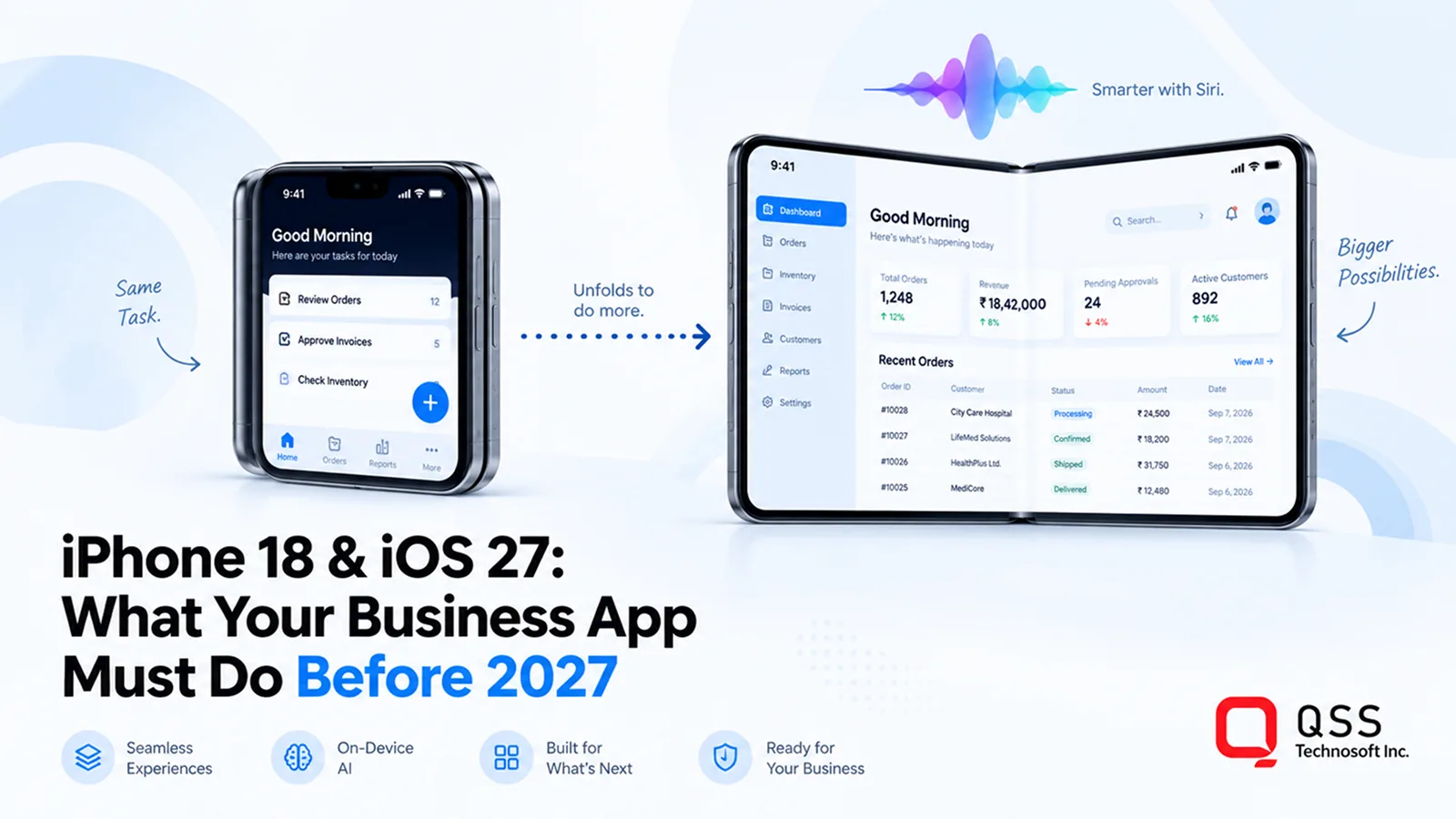
Quick Answer. The iPhone 18 Pro is a hardware refresh; the iPhone Duo and iOS 27 are a platform shift. Almost every existing business app will still run on both. The risks are different: losing state when the Duo is unfolded mid-task, phone layouts stretched across a 7.6-inch screen, and being invisible to the new Siri, which from iOS 27 can only act inside apps through App Intents. The work that follows is a lifecycle and layout migration, an App Intents project, a decision on on-device AI, and a technical-debt audit, and most of it fits inside a 90-day plan.
Key Takeaways
- The iPhone 18 Pro is a refresh; the iPhone Duo and iOS 27 are a platform shift. Compatibility is not the question; adaptation and visibility are.
- Foldable support is structural: the UIScene lifecycle, no fixed-size or fixed-orientation assumptions, and adaptive layouts tested on the Duo’s two displays and in Split View.
- From iOS 27, Siri reaches into third-party apps only through App Intents. SiriKit still compiles but receives no traffic. The functional deadline is now.
- The Foundation Models framework gives apps on-device generation, summarisation and tool calling with no data leaving the phone, on iPhone 15 Pro and later.
- iOS 27 retires more than usual: SiriKit, the AppDelegate-only lifecycle, non-adaptive layouts, Intel Macs. A technical-debt audit belongs before the feature roadmap, not after.
- Start with one workflow a customer would ask Siri for, and one where on-device AI removes a data-transfer problem. Sequencing beats scope.
Why 'It Still Runs' Is the Wrong Test
Apple’s September keynote delivered a refresh and a platform shift on the same stage. The iPhone 18 Pro is the refresh: a faster A20 Pro chip, better cameras, a bigger battery. The iPhone Duo and iOS 27 are the shift. A phone that opens like a passport into a 7.6-inch screen, and an operating system where Siri, now rebuilt on a large language model, acts inside apps rather than merely opening them.
Most existing business apps will still run on both. That is not the question. The question is whether they will feel dated on day one, break the moment a user unfolds the phone mid-task, and stay invisible to the assistant your customers are about to start talking to. This article sets out what we know, what it means for an app your business depends on, and what to fix before the 2027 planning cycle.
Sources: Apple Newsroom (9 September event, WWDC 2026), Apple developer documentation for App Intents, Foundation Models and UIScene, and independent reporting. Where Apple has signalled a direction but not a date, we say so.
What actually launched
Three things matter for anyone who owns an app.
- iPhone Duo. Apple’s first foldable: a 5.4-inch cover screen that opens to a 7.6-inch, iPad-like display. It starts at $1,999, so the people buying it first are the executives, field managers and clinicians whose approval your app needs.
- iPhone 18 Pro and Pro Max. The A20 Pro chip with an upgraded Neural Engine for on-device AI, Apple’s largest single-generation battery jump, and a $100 price increase.
- iOS 27. The headline is the new Siri; the developer story is bigger. App Intents is now the only way Siri can reach into a third-party app, SiriKit is formally deprecated, the Foundation Models framework gives every app on-device AI, and new layout APIs exist for the fold.
iOS 27 runs on iPhone 11 and later. The Apple Intelligence features need an iPhone 15 Pro or an iPhone 16 or newer, and the new Siri is not available in the EU or China at launch pending regulatory approval. Both facts shape what you can promise customers and where.
The four sections below are ordered by urgency, most time-sensitive first. For each one: what it is, why it matters to the business, and what the software has to do.
1. The Foldable Readiness Test
What it is. Here is the test. A user is halfway through a task in your app on the closed Duo: scrolling a list of orders, a keyboard up, a half-typed message in a field. They unfold the phone. Does your app show the same list at the same scroll position, with the keyboard still up and the message intact? Or does it restart, lose state, or stretch a phone layout across a tablet-sized screen?
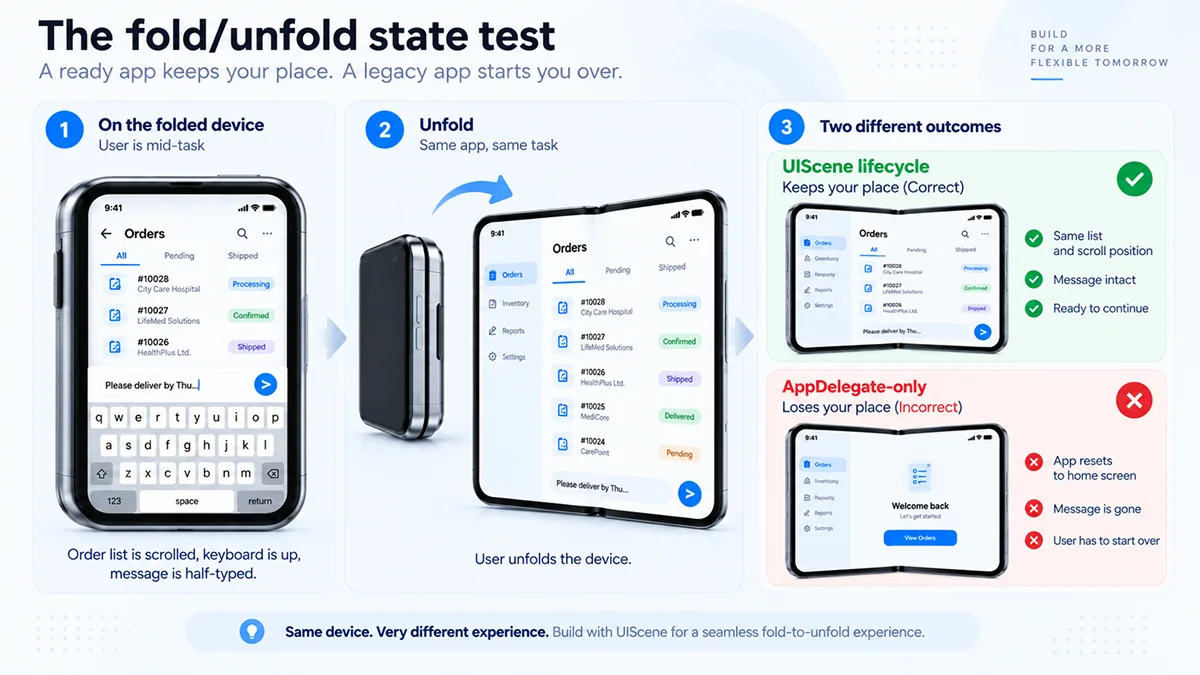
Why it matters. For most apps built before 2024, the honest answer is the second one, and the reason is structural. Apps on the old AppDelegate lifecycle treat the screen as fixed. iOS 27 requires the UIScene lifecycle, which treats it as something that can change size, orientation and count while the app runs. Cross-platform frameworks are moving too: Flutter now defaults to UIScene, but custom app delegates, older framework versions and plugins on the old lifecycle still need work.
What the software has to do. Three engineering changes cover most of it.
- UIScene lifecycle migration. Move app state out of the app delegate and into scenes, so a fold, unfold or Split View is a scene change, not an app restart.
- Remove fixed-orientation and fixed-size assumptions. Hard-coded portrait locks, pixel-based layouts and ‘if iPad then’ branches all break on a device that is a phone and a tablet in the same session.
- Adaptive layouts across a dynamic range of sizes and aspect ratios. Size classes, Auto Layout or SwiftUI’s adaptive containers, tested on the Duo simulator’s cover and inner displays, and on Split View, where your app may share the inner screen with another.
Five-point self-audit you can run this week
Run these five checks on your current build in Xcode 27’s iPhone Duo simulator.
- Fold and unfold mid-task on your three most-used screens. Does state survive, including scroll position, form input and keyboard?
- Rotate the unfolded device. Does every screen re-layout, or do some lock to portrait?
- Open your app in Split View beside Mail. Is it usable at half width, or does it truncate or overlap?
- Search your codebase for
UIDevice.current.userInterfaceIdiomand fixed frame sizes. Every hit is a candidate for a layout bug on the Duo. - Check whether your app still uses the AppDelegate-only lifecycle. If it does, the migration is your first work item, because everything else depends on it.
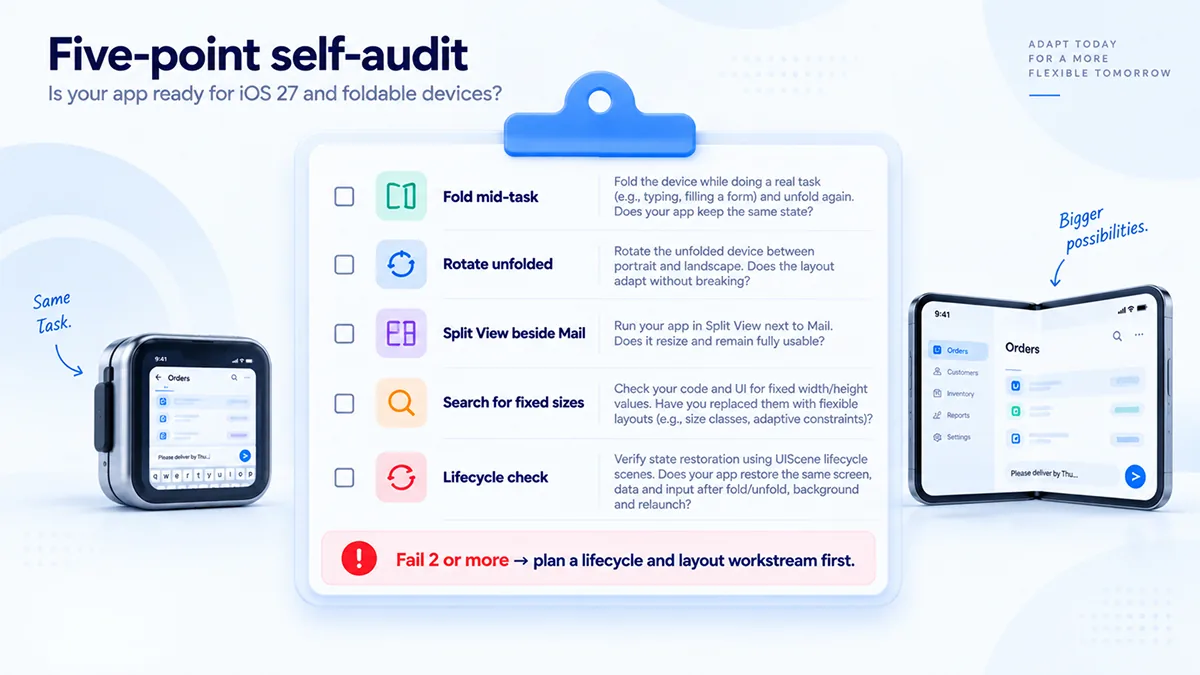
If your app fails two or more, plan a layout and lifecycle workstream before adding any new feature. Apple has signalled that apps which do not adapt will no longer be presented in a letterboxed compatibility mode on the new devices; treat that as the direction of travel even where the timing is not yet confirmed.
This is the work our iOS app development team does first on every modernisation engagement: lifecycle migration, layout audit and a Duo test pass, before any new feature is scoped.
2. On-Device AI Without the Privacy Trade-Off
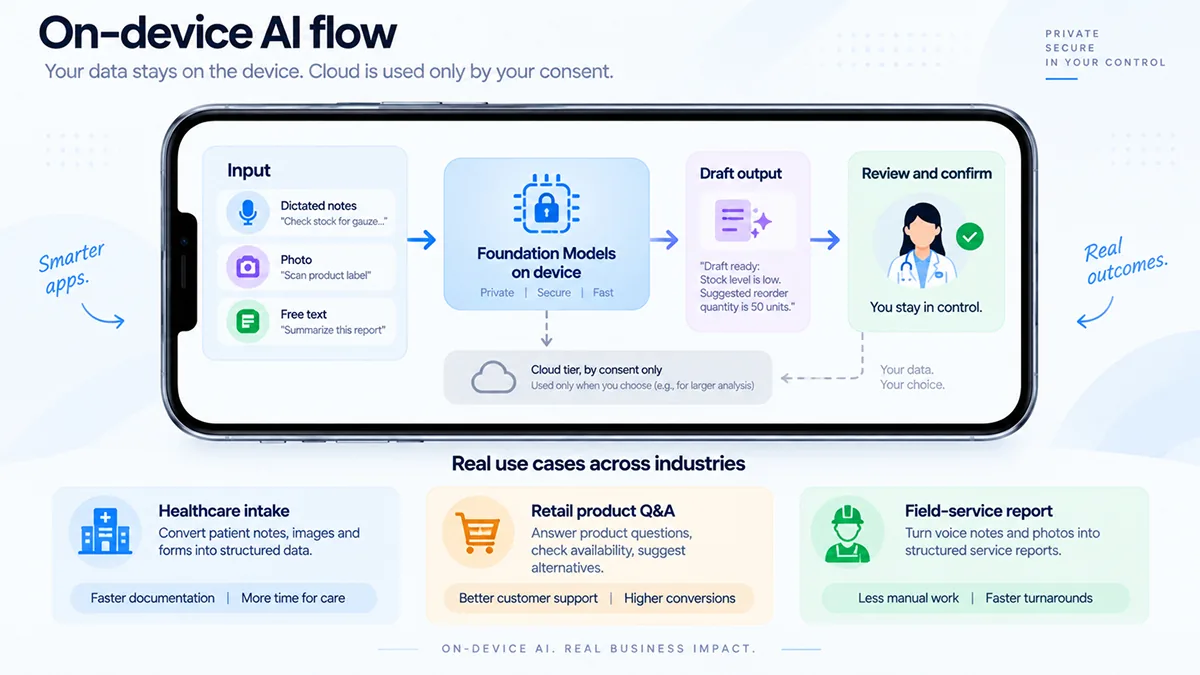
What it is. The Foundation Models framework lets an app use Apple’s on-device language model for generation, summarisation, structured suggestions and tool calling, with the data never leaving the phone.
Why it matters. For a regulated business, that last clause is the point: no cloud round-trip, no new data-processing agreement, no latency, no per-request cost. A new model abstraction layer lets the same code route to Private Cloud Compute or a third-party model when a task needs more capacity.
What the software has to do. Three examples from work we do.
- Healthcare intake. A patient describes symptoms in free text; the app produces a structured intake summary for the clinician on-device, so protected health information is never transmitted for the summary step. The clinician reviews and confirms before anything reaches the record.
- Retail product Q&A with vision. A customer photographs a product or a shelf label and asks a question. The framework now accepts image input, so the app answers from the catalogue on the device, with no image uploaded.
- Field-service report drafting. An engineer dictates notes at the site; the app drafts the job report, flags missing fields and proposes parts, offline, then syncs when there is signal.
Set expectations correctly. On-device inference needs an iPhone 15 Pro or later; on those devices it runs at roughly 30 tokens per second, which is fine for summaries and suggestions and not for long documents. For fleets on older hardware, design the feature to degrade gracefully or to route to a cloud tier with the user’s consent.
Healthcare intake is the pattern behind the patient apps we build; the same reviewable, on-device approach sits under our healthcare AI work.
3. Siri Is Now a Front Door, and App Intents Is the Only Key
What it is. This is the change with a deadline attached. From iOS 27, the new Siri can only act inside a third-party app through App Intents. SiriKit still compiles, with deprecation warnings in Xcode 27, but it receives no traffic from the assistant. Apple has indicated a support window of roughly two to three years before removal; the practical cut-off is now, because that is when customers start asking Siri to do things.
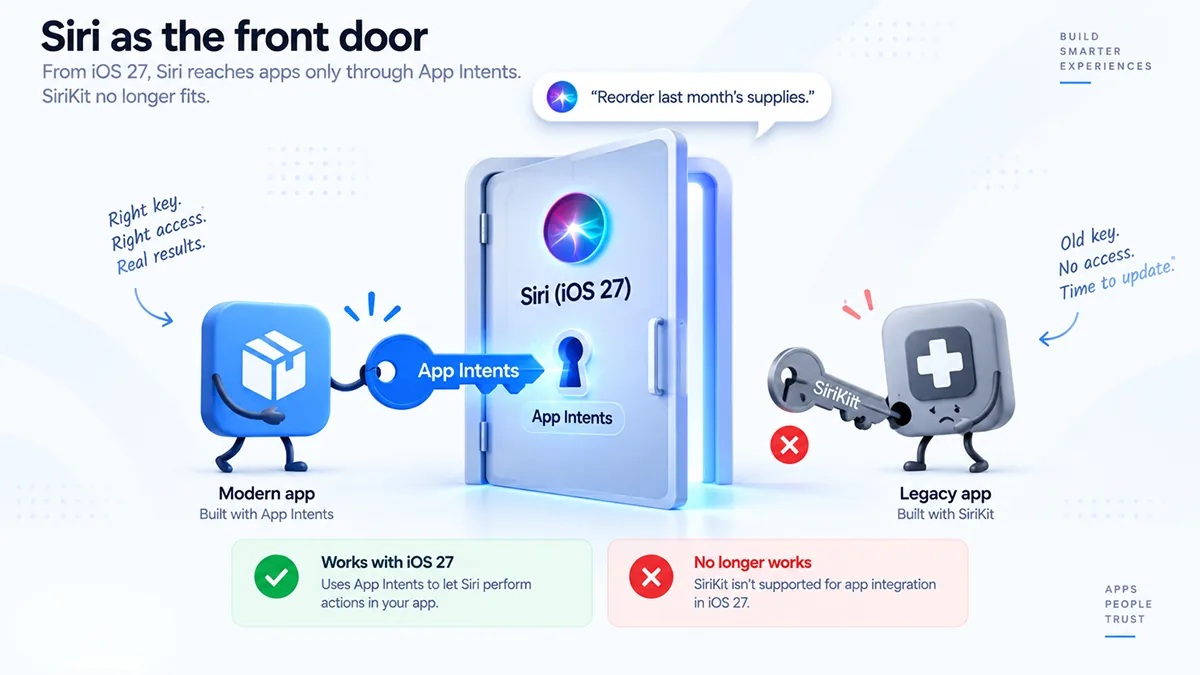
Why it matters. A customer says, ‘Reorder last month’s supplies’ or ‘Book my usual appointment.’ If your app exposes those actions as intents, Siri performs them in your app. If it does not, Siri finds a competitor’s app that does. App Intents 2.0 makes the migration worth doing properly: richer entity types, streaming responses, multi-turn follow-ups, and a per-intent privacy declaration. The same intents surface in Spotlight and Shortcuts, so the work pays back three times.
What the software has to do. Treat it as a scoped project: inventory the actions a customer would ask for, model them as intents with typed parameters, add the privacy declarations, and test through Apple’s AppIntentsTesting framework. For most business apps that is four to eight weeks of focused work.
4. Legacy Risk and Technical Debt
What it is. Every major iOS cycle retires something, and this one retires more than usual.
- SiriKit deprecated. Covered above. Any app with INIntent or INExtension code has a migration to plan.
- AppDelegate-only lifecycle. Required to move to UIScene. This is also the prerequisite for foldable support.
- Non-adaptive layouts. Apple’s direction is that apps must adapt rather than be letterboxed. Confirm timing against the iOS 27 release notes, but plan on it.
- macOS 27 is Apple silicon only. Intel Macs are out. If your business ships a Mac companion app or a Catalyst build, your testing matrix and your minimum-spec statement both change.
- Regional feature gaps. Siri AI is unavailable in the EU and China at launch. Apps that lean on it need a fallback path for those markets.
Why it matters. Each of these is small on its own and expensive together, because they land in the same codebase in the same year and compete with the feature roadmap for the same engineers.
What the software has to do. Our recommendation is a technical debt audit before the feature roadmap. We run it as a fixed-scope, two-week engagement covering lifecycle, layout, Siri integration, AI readiness and platform dependencies, delivered as a prioritised backlog with effort estimates you can put in front of a budget owner.
Modernising an app that has accumulated several years of platform debt is the core of our legacy system modernization practice.
What iOS 27 Readiness Actually Costs
The question every one of these work items eventually reaches is what it costs. There is no single number, but the drivers are consistent, and knowing them is the difference between a budget you can defend and a guess.
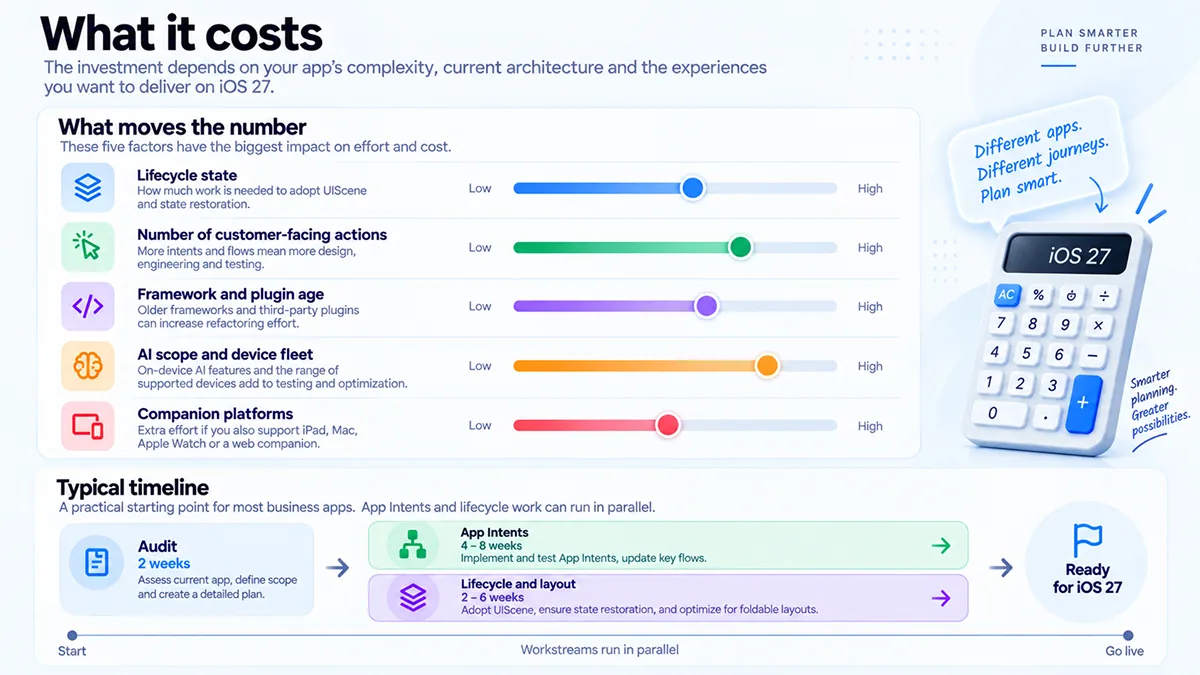
In our experience these are the ones that move it most
- Lifecycle state. An app already on UIScene needs a layout pass; an app on the AppDelegate-only lifecycle needs a migration first, and everything else waits for it.
- Number of customer-facing actions. Five App Intents is a sprint; fifty, with entities, follow-ups and privacy declarations, is a project.
- Framework and plugin age. Cross-platform apps on recent Flutter or React Native versions inherit much of the work; older versions and custom native plugins do not.
- AI scope and device fleet. An on-device summary feature for iPhone 15 Pro and later is modest; the same feature with a cloud fallback, consent flow and EU behaviour is not.
- Companion platforms. A Mac or iPad build multiplies the test matrix and, on macOS 27, removes Intel from it.
As rough guidance for a typical business app in reasonable shape: two weeks for the audit, four to eight weeks for App Intents, and two to six weeks for lifecycle and layout work, often in parallel. Apps with heavy legacy code or a Mac companion take longer. Our own approach is a paid discovery that produces a prioritised backlog and a cost model before anyone commits, and a phased first release against the item with the nearest deadline, which for most apps is App Intents.
What Separates the Apps That Adapt
Across the four work items, the same three factors decide the outcome, and none are about the phone.
State survives the screen. If a fold, a rotation or a Split View resets what the user was doing, they will stop trusting the app for anything that takes more than a moment. Lifecycle first; everything else is built on it.
The app is describable to a machine. Siri can only do what an app declares it can do. The teams that win the next two years are the ones that model their core actions as intents with typed parameters and honest privacy declarations, not the ones with the best icon.
AI stays on the device unless there is a reason. On-device first, cloud by consent, and a clear fallback for older hardware and restricted regions. That is what a compliance officer will sign, and what a user will not notice, which is the point.
The apps that get this right usually pick one customer-facing action, wire it through App Intents end to end, ship it, and then extend the pattern. The second intent is always cheaper than the first, because the plumbing already exists.
How QSS Technosoft Builds These
We are a mobile app development company that builds and modernises iOS, Android and cross-platform apps for enterprises in healthcare, retail, logistics and financial services.
On iOS 27 that means UIScene and foldable readiness, App Intents migration, Foundation Models integration with on-device-first design, and the technical-debt audit that decides the order. Where an app sits inside a regulated workflow, such as a patient or clinician app, the same team does the HIPAA controls and the EHR integration, so the app store review and the compliance review are planned together rather than in sequence.
Mobile has been part of our engineering practice for 16+ years, delivered under CMMI Level 3 processes with a US office in Bloomington, Minnesota. The platform work and the product work are done by the same engineers, which matters because the handoff between them is where most modernisation projects lose time.
The Bottom Line
The phones are shipping. iOS 27 is already on customers’ devices. What decides whether your app looks current on the iPhone Duo and answers when a customer talks to Siri is a short list of engineering work that is invisible on a product roadmap and very visible when it is missing.
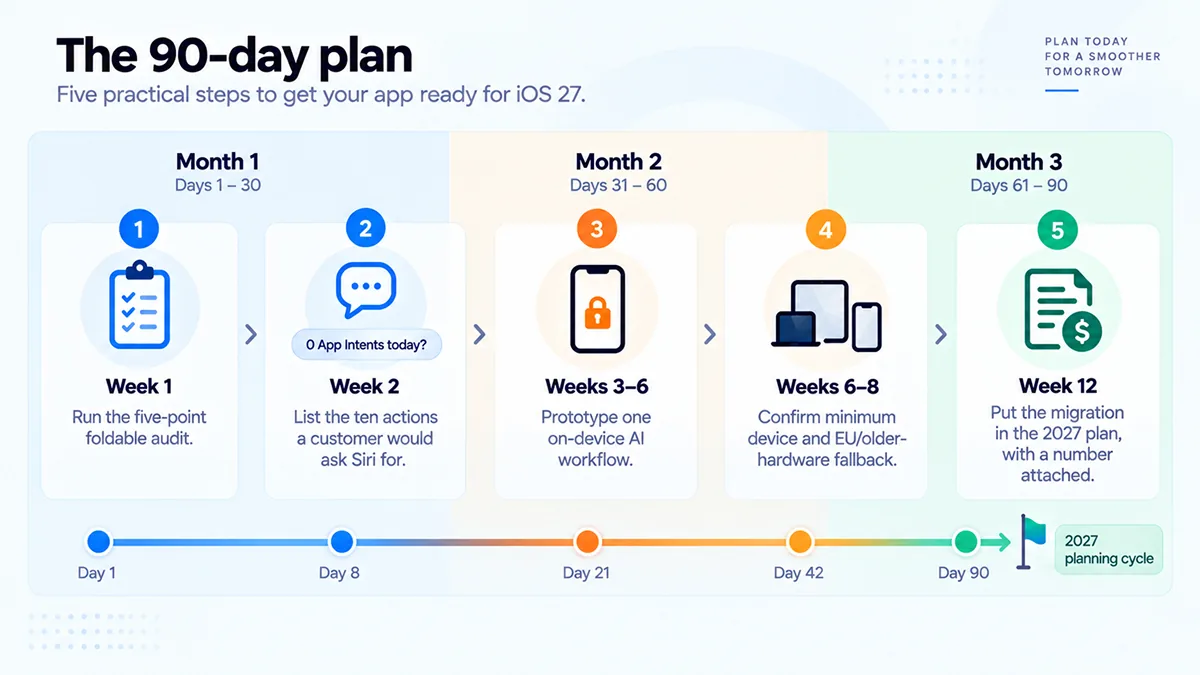
In the next 90 days:
- Run the five-point foldable audit on your current build.
- List the ten actions a customer would ask Siri to perform in your app, and check how many exist as App Intents today. For most apps the answer is zero.
- Identify one workflow where on-device AI removes a data-transfer or latency problem, and prototype it with the Foundation Models framework.
- Confirm your minimum supported device, and decide how AI features behave on older hardware and in the EU.
- Put the migration work in the 2027 plan with a number attached, so it competes for budget on equal terms with new features.
Not sure where your app stands on iOS 27?
A 30-minute review with an iOS engineer who has shipped on the new platform. You bring your app; we bring Xcode 27 and the Duo simulator. You leave with a written summary of where the app stands on fold state, App Intents, on-device AI and legacy dependencies, with a rough effort estimate for each. It is yours whether or not you work with us.
Book your iOS 27 readiness review →