Mobile App Development Guide for Healthcare and SaaS
 By Rashmi Kanti
QSS Technosoft
October 7, 2026
12 min read
By Rashmi Kanti
QSS Technosoft
October 7, 2026
12 min read
Mobile application development services take an app from discovery and design through engineering, integration, testing, release, and ongoing support. For healthcare and SaaS teams, the goal is a production-ready product that fits real user workflows, connects with existing systems, and can be maintained after launch.
A polished prototype can look convincing and still fail when it meets clinical workflows, EHR integrations, or day-to-day operational demands. Technical choices need to account for how people use the app and the systems it must work with.
This guide explains what a complete development engagement includes, how to compare native and cross-platform approaches such as React Native, and what to plan for integrations and ongoing support. It also outlines what your team can prepare to move from an app idea toward a product built for real use.
Quick Answer
Complete mobile application development services cover discovery, UX and interface design, engineering, integration, testing, release, and post-launch maintenance, so a prototype becomes a production-ready app. For healthcare mobile app development services, start with users and workflows, map which system owns each piece of data, and plan EHR/EMR connections through APIs or HL7/FHIR interfaces only where they fit the use case. Choose between native development and mobile application development with React Native based on platform reach, device capabilities, integration needs, and who will maintain the app. Build security into the architecture as part of HIPAA-compliant software development rather than adding it before release, and assign ownership for monitoring, defects, and updates before launch.
What do mobile application development services include?
Mobile application development services are the connected activities required to plan, design, build, integrate, test, release, and maintain a mobile app. For CIOs, CTOs, product leaders, and healthcare technology teams, a complete engagement links user workflows to technical architecture and production support. A prototype is a starting point, not a substitute for a working system.
Which workstreams belong in a complete mobile app engagement?
Discovery defines the problem before implementation begins. The team identifies users, tasks, constraints, and existing systems, then turns those findings into product requirements and technical decisions. Discovery reduces uncertainty, but it does not replace engineering, integration, or operational planning.
The workstreams connect:
- UX and interface design: Map user tasks into flows and screens, including error states and accessibility needs.
- Engineering: Build the app interface and the application logic that governs actions, data, and state.
- Integration: Define how the app exchanges data with APIs and other systems, including what happens when a service is unavailable.
- Testing and release: Validate workflows, integrations, and app behavior before deployment, then prepare the release process.
- Maintenance: Plan for defect resolution, platform changes, security updates, and future product needs.
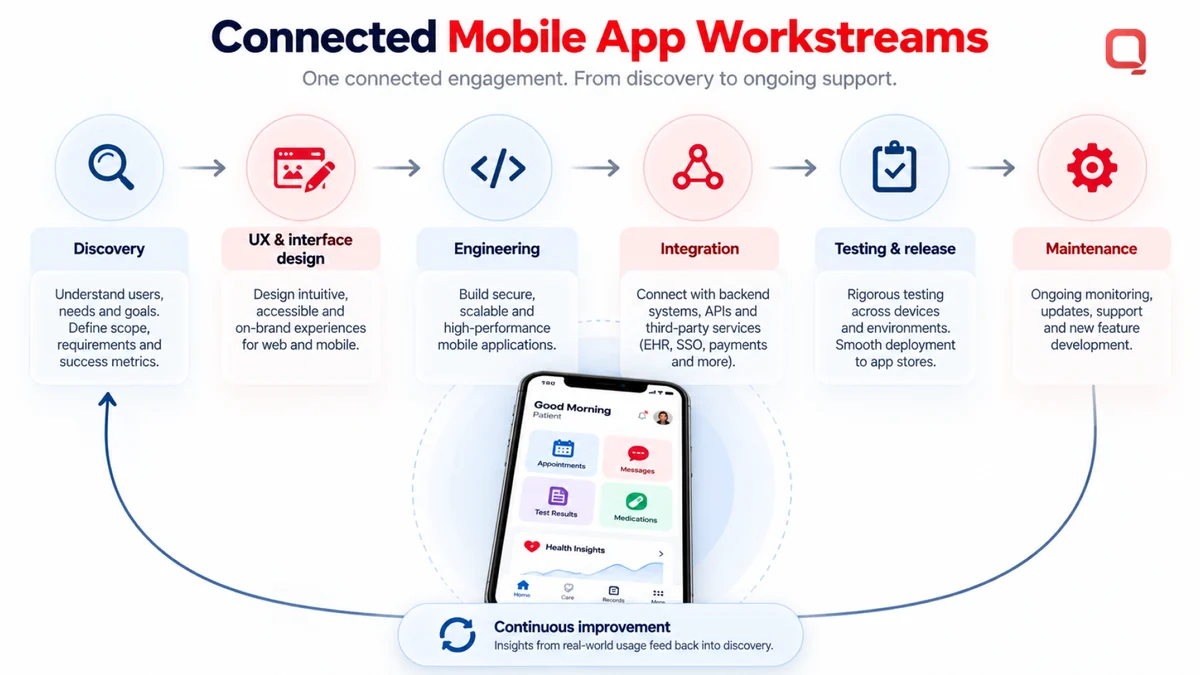
These activities depend on one another. A screen can look complete while its underlying API flow fails or returns data in a format the app cannot use. In healthcare, the team must also account for clinical workflows and connected systems. Plan post-launch ownership early so monitoring, updates, and support are not left as afterthoughts once the app is live.
When do healthcare teams need specialized mobile development?
Healthcare teams need specialized mobile development when an app supports care-related workflows or connects with healthcare systems. The workflow shapes the design: patient engagement may center on viewing information or managing appointments; telemedicine supports remote visits; remote monitoring collects or presents information from ongoing care. These are distinct use cases, not interchangeable feature labels.
When a workflow depends on patient or clinical data, map what information moves, which system owns it, and which users need access. An app may connect with EHR/EMR systems through APIs or healthcare interoperability interfaces such as HL7 or FHIR, when those interfaces fit the systems and use case. Choose the integration approach based on the actual data flow, not the assumption that every app needs the same connection.
HIPAA-compliant app development is the practice of designing and building an app with safeguards appropriate to its handling of protected health information. It does not make an app automatically compliant: security controls, configuration, organizational policies, and ongoing operation all matter. Define those responsibilities alongside the workflow and architecture, before implementation decisions are locked in.
How does the mobile application development process work?
The mobile application development process moves from understanding user workflows to planning, building, testing, releasing, and monitoring the app in production. Each stage should produce decisions the next stage can use, such as documented requirements, interface designs, API contracts, test results, and release procedures. This structure helps healthcare teams surface integration and operational risks before launch.
What happens during discovery and technical planning?
Discovery turns user needs into workflows and an initial product scope. Technical planning maps how the app will interact with existing systems, what data must move, and where API boundaries sit. Mobile application development services should connect these findings to implementation rather than leave them as a standalone strategy document.
- Discover workflows: Identify users, their tasks, pain points, and the conditions in which they use the app. The output is a set of mapped workflows and requirements.
- Set scope and design: Prioritize what the app must do, then create user flows and interface designs. Document accessibility needs and key error states, not just the ideal path.
- Plan architecture and data flows: Map the mobile app, APIs, and existing systems. Define data ownership, exchange points, access needs, and what the app should do when an integration is unavailable.
- Record operational requirements: Identify security expectations, release dependencies, and the people responsible for ongoing support before implementation begins.
How do engineering, testing, and release fit together?
Engineering turns approved designs and technical plans into working app functionality through iterative implementation. Code review helps teams examine changes before they are integrated, while integration testing checks whether the app and connected systems exchange data as intended.
- Build and integrate: Implement app features in manageable increments, connect them to APIs, and review code as the system takes shape.
- Test realistic use: Check key workflows across relevant devices and platforms, including error handling and integration behavior. Testing should reflect actual user workflows because a feature that passes an isolated check can still fail when users, data, and connected systems interact.
- Prepare and release: Confirm release procedures, document known issues, and define how the team will handle problems after deployment.
- Monitor and learn: Review production issues and user feedback, then prioritize fixes and improvements. Release starts an operational feedback loop; it does not end the work.
For apps with functions that may fall under medical device oversight, teams can review the FDA guidance on mobile medical apps as part of planning. The QSS Technosoft contact page is available for project discussions.
Native development or React Native: how should teams compare approaches?
Native development builds an app specifically for an operating system, while cross-platform development uses a shared framework to create apps for multiple platforms. Neither approach is right for every project. For healthcare teams, workflow complexity, existing systems, user experience needs, and long-term maintenance ownership should guide the choice.
Mobile application development services should assess project constraints before selecting a stack. Compare the options against the app’s required capabilities and the team that will support it after release, not just the amount of code that can be shared.
| Decision area | Native development | Cross-platform development |
|---|---|---|
| Platform reach | Separate implementations target each operating system. | A shared framework can support apps across multiple operating systems. |
| Shared code | Platform-specific codebases are maintained separately. | Code can be shared, though some platform-specific work may remain. |
| Integration needs | May suit requirements that depend heavily on platform-specific capabilities. | Can support API and system integrations, with the approach shaped by the capabilities and constraints involved. |
| Team considerations | Requires skills for each target platform. | Requires framework expertise and a plan for platform-specific tasks and maintenance. |
What should buyers compare before choosing an approach?
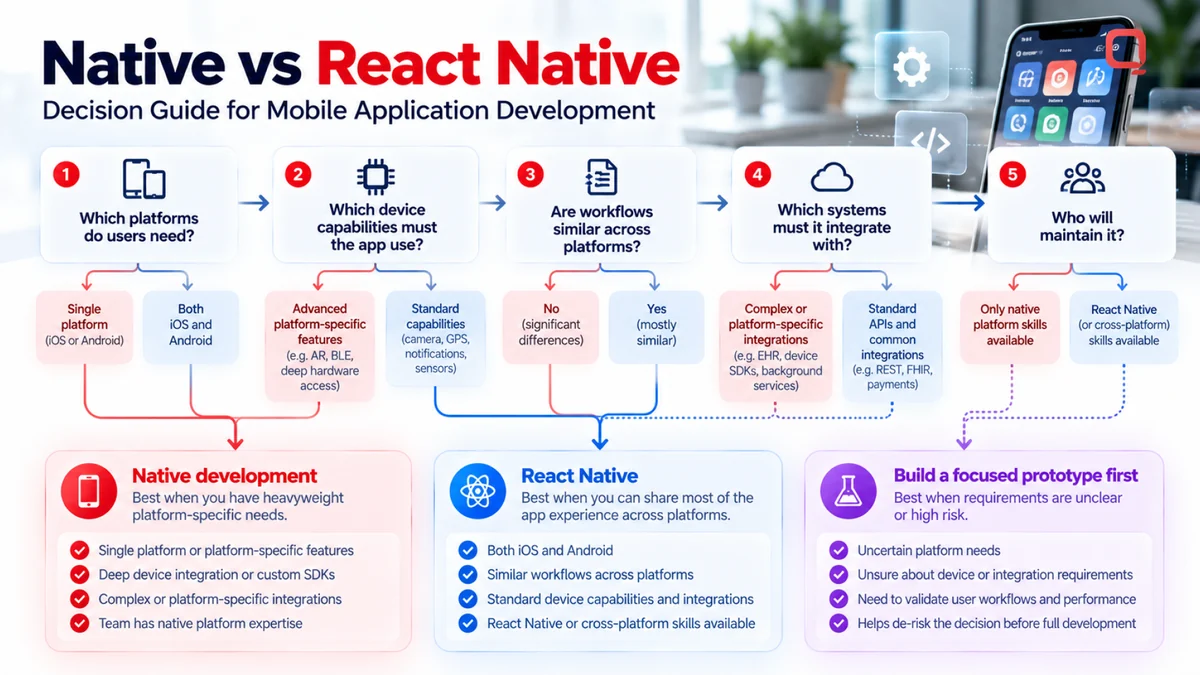
Start with the user experience and technical requirements. Identify which platforms users need, what device capabilities the app must use, which systems it must connect to, and who will own updates and support. Separate hard constraints, such as a required platform capability, from preferences that a focused prototype can test.
A shared-code approach may simplify development when workflows and core functionality are substantially similar across platforms. It does not eliminate platform-specific work: integrations, device behavior, or interface details may still require targeted implementation. The mobile application development overview from IBM also describes native and cross-platform approaches, but the project’s requirements should settle the decision.
Where does mobile app development React Native fit?
React Native is a cross-platform framework for building mobile applications using React and JavaScript or TypeScript. It is one option for teams seeking shared code across platforms, not a universal shortcut or a guarantee of lower cost or faster delivery.
Evaluate React Native against the app’s workflows, integration boundaries, platform requirements, and the skills available to maintain it. A small prototype can help test uncertain technical assumptions before architecture decisions become expensive to change. Choose for the system you need to operate, not the framework name. The QSS Technosoft contact page provides a route for discussing mobile app architecture.
How should healthcare teams plan integrations, security, and ongoing support?
Healthcare teams should plan mobile integrations around user tasks, data flows, and system boundaries, then define security and support requirements before release. HL7 or FHIR may be appropriate for some connections, but the right interface depends on the systems involved and the information the workflow needs. Production readiness depends on integration design, realistic testing, and clear operational ownership.
How do mobile apps connect with healthcare systems?
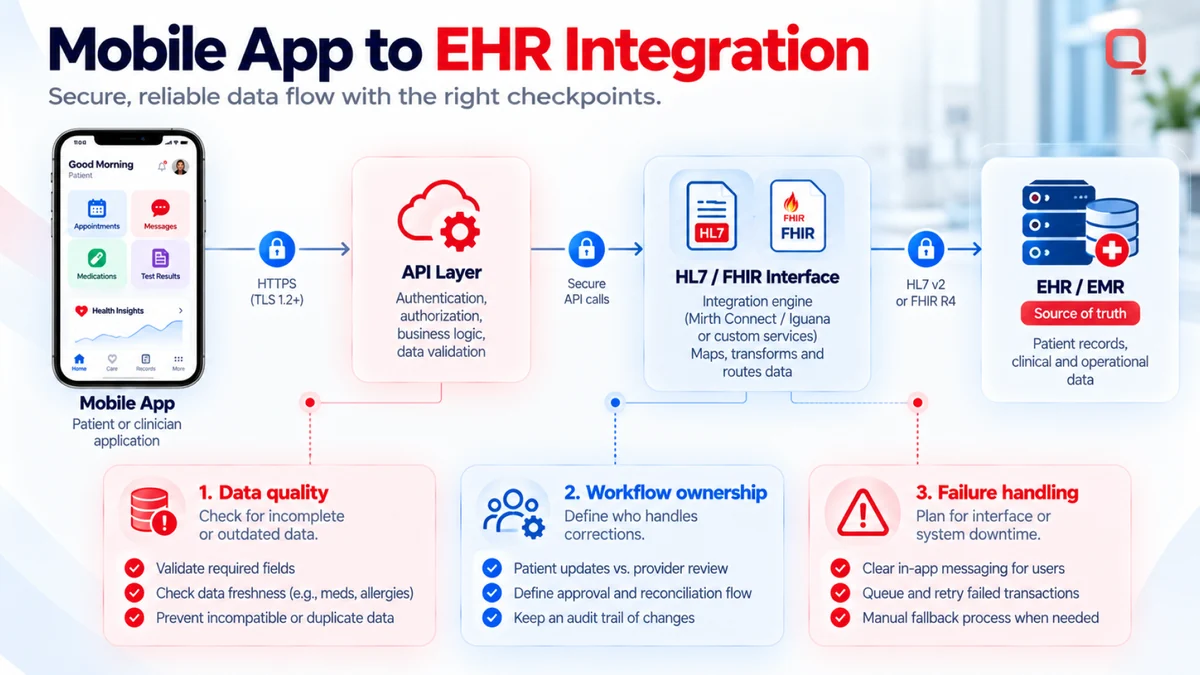
Start by tracing each task from the mobile interface to the system that owns the relevant data. For example, a patient-facing workflow may need to retrieve information from an EHR/EMR system through an API or an established interface. Document what the app sends and receives, how information is mapped, and which system remains the source of truth.
HL7 and FHIR are interoperability standards that can support healthcare data exchange. They are relevant when the connected systems and use case support them, but not every mobile app needs the same interfaces. Healthcare interoperability planning should account for:
- Data quality: Define how the app handles incomplete, inconsistent, or outdated information.
- Workflow ownership: Identify which team or system is responsible for each step, including corrections and exceptions.
- Failure handling: Specify what users see when an API or interface is unavailable, and how incomplete exchanges are surfaced for follow-up.
Security and privacy requirements belong in the architecture and design, not in a final pre-release checklist. Define what sensitive information the app handles, which users need access, and how access and data movement will be controlled. HIPAA-compliant app development requires attention to implementation and operating context; a technical design alone does not establish compliance.
What should teams plan for after launch?
Ongoing support includes monitoring production behavior, resolving defects, updating dependencies, and reviewing user feedback. Teams should assign ownership for investigating reported issues and deciding which changes need testing before deployment. Without that plan, a working release can become difficult to maintain as connected systems and user needs change.
Quality assurance can continue after go-live by validating fixes and changes against important workflows and integrations. Managed services may provide an operating structure for routine maintenance and support, with responsibilities defined for the app and its dependencies. Set those responsibilities and escalation paths in advance; don’t assume a release ends the need for engineering attention.
QSS Technosoft’s contact page includes information for discussing healthcare app integrations and ongoing engineering needs.
How can QSS Technosoft support mobile application development services?
QSS Technosoft provides Healthcare Mobile App Development Services for teams building mobile products around real users, healthcare workflows, and connected systems. Its work can bring product planning, engineering, integration, testing, release, and ongoing support into one delivery effort, with architecture decisions shaped by the app’s requirements.
What distinguishes QSS's healthcare engineering approach?
Healthcare mobile apps often depend on data and workflows that already exist across an organization. QSS’s healthcare capabilities include HL7/FHIR interoperability and EHR/EMR integration, which can inform how teams define system boundaries, data exchange, and integration behavior for a particular product. The interface should serve the workflow, while the integration design accounts for the systems behind it.
QSS considers compliance during planning and engineering rather than treating it as a final review. That means addressing security needs, integration risks, and operational responsibilities as part of the product’s technical decisions. These practices support deliberate implementation, but compliance still depends on the app’s full technical and organizational context.
What should a team bring to an initial project discussion?
A useful first discussion starts with the work the app needs to do, not a finished feature list. Bring what you know about:
- Users and workflows: Who will use the app, what tasks they need to complete, and where the current process breaks down.
- Systems and integrations: Which EHR/EMR or other systems are involved, what data needs to move, and any known API or interface constraints.
- Product boundaries: Required platforms, existing technology, accessibility needs, and features that belong in an initial release versus later phases.
- Security and operations: Sensitive data involved, access expectations, testing needs, and who will own monitoring, issue handling, and maintenance after launch.
Unanswered questions are useful to surface early. They help the team distinguish confirmed requirements from assumptions and identify where technical discovery is needed before scope is fixed.
Project scope, workflows, integration needs, and delivery constraints help shape a discussion with QSS Technosoft about the app’s next steps.
Build for the workflows your app must support
Production-ready mobile apps start with clear user workflows, realistic integration plans, and an architecture that fits the product’s platform and operational needs. The right mobile application development services connect discovery and engineering with testing, release, and ongoing ownership. In healthcare, that means planning for the systems and data the app must work with, not just the screens users see.
QSS Technosoft is a USA-based software engineering company focused on SaaS and healthcare. Its healthcare capabilities include HL7/FHIR interoperability and EHR/EMR integration, relevant when those connections fit the app’s workflows and systems.
Your team doesn’t need every detail finalized before starting. Bring the target users, core tasks, known integrations, security needs, and post-launch ownership questions. Clear assumptions give product and engineering teams a practical foundation for shaping scope and technical decisions.
Discuss your mobile application development needs with QSS, including the workflows, integrations, and delivery requirements your app must support.
Plan a Production-Ready Healthcare or SaaS App
Bring your users, core workflows, and known integrations to a working session with our mobile and healthcare engineers. QSS Technosoft is a software development company in USA, based in Bloomington, Minnesota, and a healthcare software development company delivering custom healthcare software development, native and React Native mobile apps, EHR/EMR and HL7/FHIR integration, and HIPAA-compliant software development practices from discovery through post-launch support.
Discuss your mobile app project →