Physical Therapy Practice Management Software: Build, Buy, or Customize?
 By Deepak Rathaur
QSS Technosoft
October 11, 2026
14 min read
By Deepak Rathaur
QSS Technosoft
October 11, 2026
14 min read
Physical therapy software development should start with the clinic’s workflows and the systems a new platform must connect to. A well-scoped solution links scheduling, clinical documentation, billing, and patient-facing functions while defining who owns the data and maintains each integration. This guide covers requirements, build options, and practical steps to prepare for delivery.
Custom software is not automatically the right answer. Base the decision on documented requirements, existing systems, and your team’s capacity to operate and maintain the solution.
This article is for healthcare technology and practice leaders evaluating a custom platform for physical therapy. It focuses on practical design decisions, from system connections to launch readiness.
Quick Answer
Buy physical therapy practice management software when its standard scheduling, documentation, billing, and patient portal workflows fit your clinic and its integrations cover your systems. Customize when a specific, contained gap can be closed without owning the whole platform. Build only when documented requirements can’t be met another way and you’re ready to own the software, integrations, testing, security, and maintenance. Whichever route you take, map each role’s workflow and handoffs first, decide which system owns scheduling, clinical records, and billing data, and document every EHR integration (including HL7 or FHIR interfaces) with failure handling. Then plan testing, data migration, training, and post-launch ownership before go-live; no custom build is automatically HIPAA compliant.
What Should Physical Therapy Practice Management Software Handle?
Physical therapy practice management software supports the operational work of outpatient rehabilitation practices, including appointment booking, staff coordination, billing, and reporting. Front-desk teams, clinicians, billing staff, administrators, and patients may all use it, but each role needs different information and permissions. Define its scope around the clinic’s care model and existing systems.
Which workflows belong in a physical therapy platform?
Start with the core workflows: scheduling, clinical documentation handoffs, patient communication, billing, and operational reporting. These tasks cross roles. A clinician’s schedule affects front-desk availability, while completed visit details may be needed by billing staff before they prepare a claim.
A typical patient journey helps reveal where information changes hands:
- Book: A patient requests an appointment through staff or a patient-facing scheduling function. The system records the visit and makes the relevant slot visible to the practice.
- Prepare: Front-desk staff confirm the appointment and collect required intake information. Clinicians review relevant details before the visit.
- Document: The clinician records the encounter in the clinical record. The workflow makes the visit status clear to staff handling billing.
- Follow up: The practice sends appropriate appointment or care communications. Administrators use reports to review scheduling, visit completion, and billing operations.
Staff-facing tools typically include schedule management, documentation workflows, claim preparation, and reports. Patient-facing functions may include appointment requests, intake forms, reminders, and access to visit-related information. Keep core practice operations distinct from optional connected-care capabilities, such as telehealth or remote therapeutic monitoring. Include those when they fit the care model and their workflows are defined.
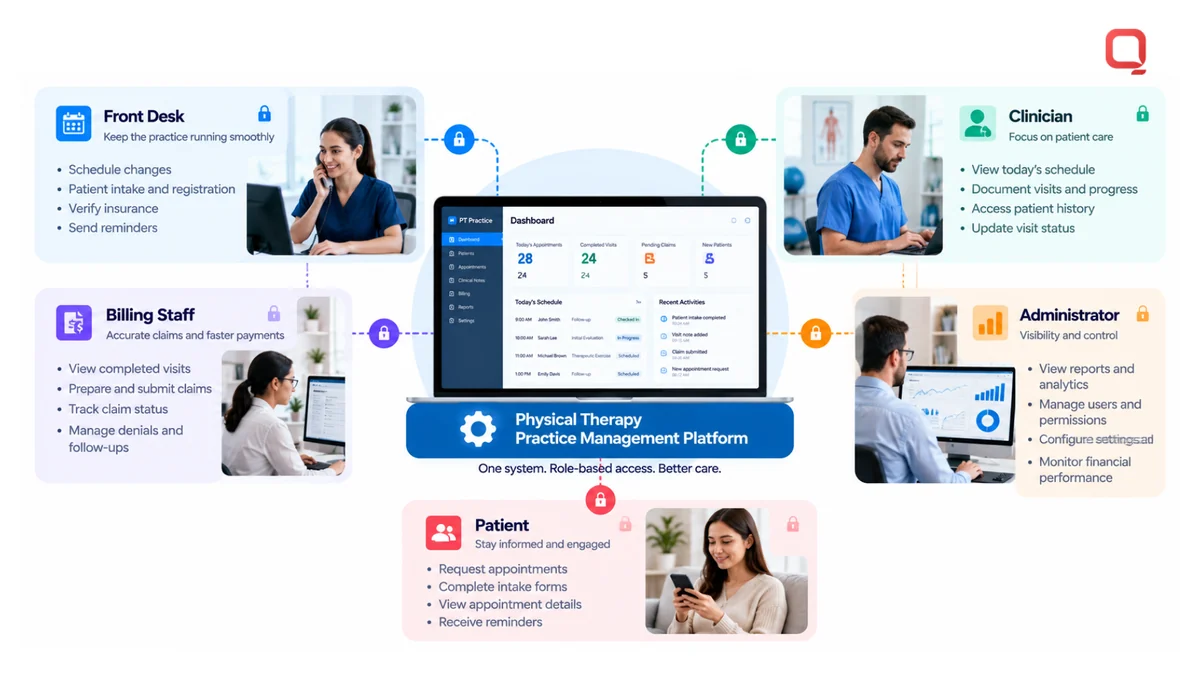
Requirements depend on the practice model, current systems, and user roles. A cash-based clinic may prioritize booking and patient communication, while an insurance-heavy practice may need closer links between documentation and billing. In physical therapy software development, mapping each handoff before choosing features helps identify where staff might otherwise have to bridge gaps manually.
How does practice management differ from an EHR?
Practice management software supports operational workflows, such as scheduling, billing coordination, and administrative reporting. An EHR or EMR manages electronic health records, including clinical documentation and patient information. These describe different functions, even when one product includes both.
The functions can connect in an integrated workflow. For example, an appointment in practice management may link to an encounter documented in the EHR, with visit information then supporting billing. That connection requires clear data ownership and reliable handoffs. Putting both functions in one interface does not automatically make their records or workflows interchangeable.
For a broader grounding in the types and context of medical software, see the Medical Software Overview. Use the distinction to set scope: decide which system owns scheduling, clinical records, and billing data, then define how the systems exchange updates.
How Do You Turn Physical Therapy Workflows Into Software Requirements?
Turn clinic workflows into software requirements by identifying who performs each task, documenting the normal path and exceptions, and defining how the system should respond at each handoff. Include clinicians, administrative staff, billing teams, and patients in discovery. Their input gives product and engineering teams a shared, testable basis for scope, integrations, and launch decisions.
- Map users: Identify each user group and the information or actions it needs. Define role-based access around the practice’s staffing model.
- Document workflows: Trace key tasks from trigger to outcome, including appointment changes, clinical documentation, patient follow-up, and billing.
- Prioritize requirements: Separate capabilities needed for launch workflows from enhancements that can follow later.
- Validate integrations: Identify connected systems, data exchanged, ownership, and what should happen when a transfer fails or arrives incomplete.
- Define acceptance criteria: Specify observable results that let users and testers confirm whether each requirement works as intended.
A testable software requirement identifies the actor, trigger, action, expected system response, and acceptance condition. Include relevant permissions and exception handling so a tester can reproduce the workflow and verify the result.
Which users and day-to-day tasks should discovery cover?
Follow the work across roles instead of collecting feature requests from managers alone. Ask clinicians how they document visits and make corrections, administrative staff how they handle schedule changes, billing teams what information they need to process a visit, and patients how they complete intake or respond to follow-up.
Map handoffs and exceptions. Record who updates an appointment after a cancellation, how staff identify an incomplete clinical record, and what happens when a billing task needs correction. Specify who can make each change and how the next user sees it. These details inform permissions and notifications without assuming every clinic operates the same way.
How should integration and data requirements be documented?
Inventory connections to EHR/EMR systems, billing tools, patient-engagement platforms, and reporting systems. For each connection, record the data exchanged, which system is authoritative, when updates occur, and how the teams handle errors or duplicate records. HL7 publishes healthcare data-exchange standards, and FHIR is one of its standards for exchanging health information. Refer to HL7’s official FHIR overview when defining the standard’s role in an interface. The actual exchange also depends on the systems involved.
Maintain an integration register that captures the workflow, data elements, exchange direction, and owner for each connection. For example, specify whether an appointment update must appear in another system and how staff resolve a mismatch. This turns “integrate with billing” into a testable requirement. To translate workflows and interfaces into a delivery plan, discuss your healthcare software requirements with the engineering team.
In physical therapy software development, prioritization helps control scope. Include essential workflows in the launch plan when they are needed to operate. Defer optional connected-care features until their users, data flows, and success criteria are clear.
Should You Buy, Customize, or Build Practice Management Software?
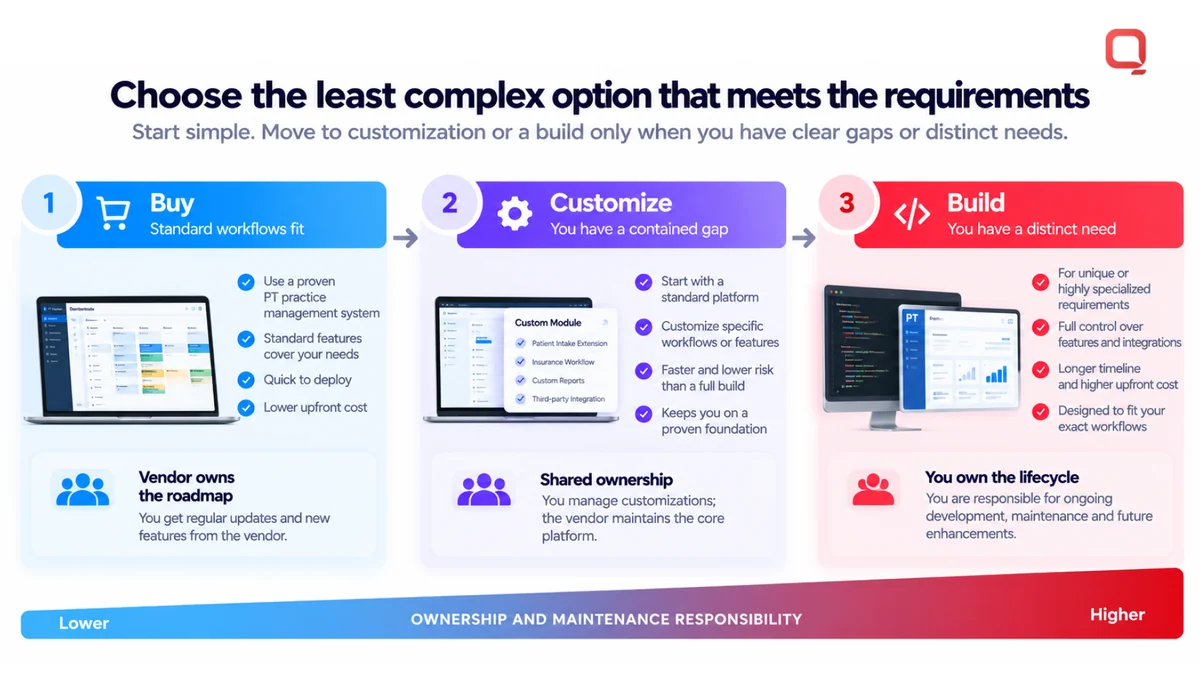
Buy practice management software when its standard workflows and integrations meet your needs. Customize it when a specific, contained gap can be addressed without taking ownership of the whole platform. Build when documented requirements cannot be met another way and your organization is prepared to own the software, integrations, testing, security, and ongoing maintenance.
Compare the options against the work your practice needs to support, not just a feature checklist. Each option also carries different responsibilities after launch.
| Decision area | Buy | Customize | Build |
|---|---|---|---|
| Workflow fit | Fits common workflows with limited change | Closes defined workflow gaps | Supports distinct workflows identified in discovery |
| Configuration | Uses available settings and vendor options | Adjusts selected functions or components | Requires product design and implementation |
| Integrations | Uses supported vendor connections | Adds or adapts specific interfaces | Requires planned and maintained connections |
| Ownership | Vendor owns the product roadmap | Ownership is shared across the platform and custom work | Your organization owns product decisions and lifecycle |
| Maintenance | Vendor maintains the platform | Vendor changes and custom components both need attention | Your team or engineering partner maintains the system |
When is an existing platform the practical choice?
An existing platform is practical when its scheduling, documentation, billing, and patient communication workflows align with your practice and its integrations cover the systems you rely on. Buying can limit the amount of software your organization must design and maintain. Before choosing a platform, confirm how configuration limits affect real workflows, what data you can access or export, and how much your operations depend on the vendor’s roadmap and continued service.
Adoption matters. A configured system only works when staff can use it reliably within their roles. Validate key tasks with representative users before committing, including routine work and exceptions such as correcting a record or changing an appointment.
When does custom development make sense?
Custom development may fit when a documented workflow gap or integration constraint blocks an important operational outcome and configuration cannot address it cleanly. Custom healthcare software development is an option to assess, not a default answer. Compare the value of a tailored capability with the engineering effort and long-term responsibility it creates.
Custom work brings ongoing obligations. The system needs testing, support, security controls, and a maintenance plan as workflows and connected systems change. Decide who owns product decisions, defect resolution, and integration updates before development starts. Project estimates depend on scope and requirements, so define workflows, interfaces, and operational responsibilities before estimating.
For physical therapy software development, choose the least complex option that meets the requirements. Buy for standard workflows, customize contained gaps, and build only when a distinct need justifies taking on product ownership.
How Can You Reduce Delivery Risk Before Launch?
Reduce launch risk by treating implementation as a sequence of decisions, tests, and operational handoffs, not just a software release. For physical therapy software development, plan scope, data flows, access controls, testing, migration, training, support, and maintenance before deployment. Readiness depends on tested workflows and integrations, plus clear operational ownership.
- Scope: Confirm launch-critical workflows and document what will wait for a later release.
- Data flows: Trace information between the platform and connected systems, including who owns each record and how updates are reconciled.
- Access controls: Define role-based permissions and verify that users can access the information and actions required for their work.
- Testing: Test complete workflows, integrations, data migration, and failure paths using realistic scenarios.
- Training: Prepare role-specific guidance and practice exercises so staff can complete daily tasks in the new system.
- Ownership: Assign responsibility for deployment decisions, support requests, defects, and post-launch maintenance.
What should a physical therapy software implementation plan include?
Stage delivery from discovery and architecture through development, validation, deployment, and support planning. Assign decision owners for clinical workflows, technical integrations, and operational processes so open questions have a clear route to resolution. Set acceptance criteria around actual tasks, such as completing a visit workflow or correcting an incomplete record, rather than counting screens or features.
Plan data migration as a separate workstream. Identify which records will move, how they will be checked, and how staff will handle discrepancies. Define training and support before go-live, including where users report problems and who triages them. The release plan should also explain how the team will monitor issues and deliver fixes after launch.
How should security and interoperability be handled?
Use HIPAA-aware engineering practices, such as defining access permissions, protecting data flows, and maintaining reviewable activity records. These are design considerations, not a guarantee of compliance. The HHS Security Rule guidance provides official context for organizations assessing safeguards for electronic protected health information. Implementation decisions should also reflect the organization’s own policies and responsibilities.
For HL7 or FHIR interfaces, document which system owns each data element, what triggers an exchange, and how failures, duplicates, and mismatches are surfaced for reconciliation. Test the complete workflow, not just whether an interface returns a successful response. A delayed update or rejected message can leave staff working from conflicting information.
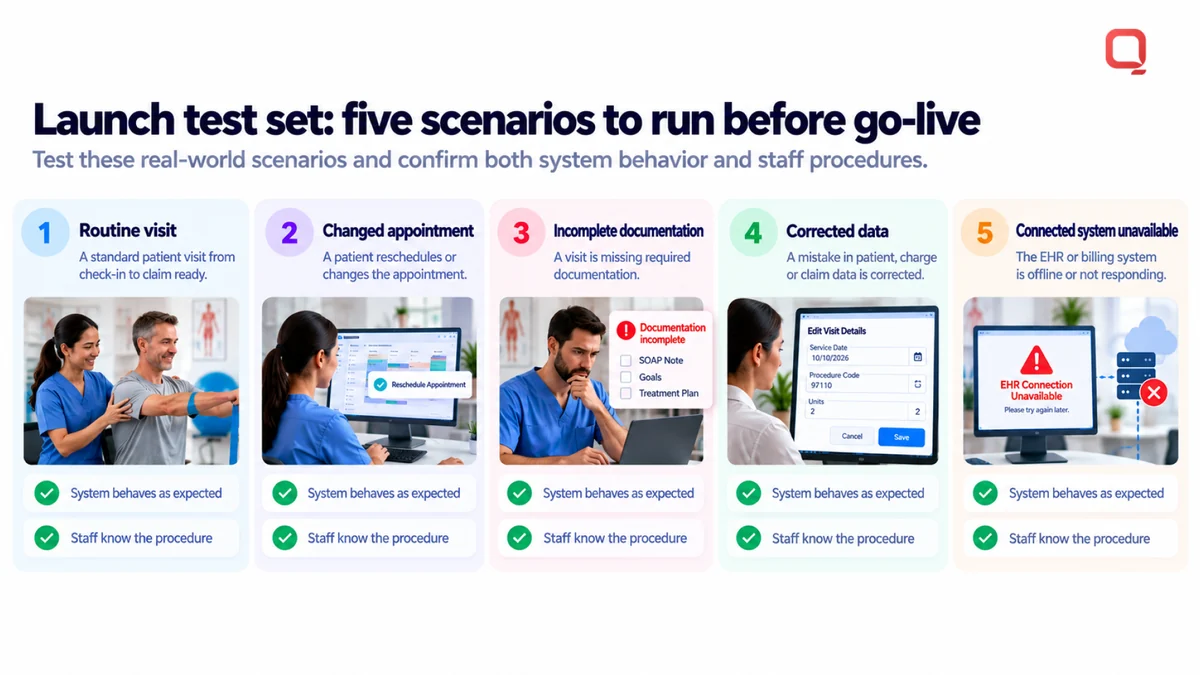
Build a launch test set that includes routine visits, changed appointments, incomplete documentation, corrected data, and unavailable connected systems. Use the results to check both system behavior and staff procedures. To plan healthcare integrations and launch readiness, discuss your implementation requirements with the QSS team.
How Can QSS Support Custom Physical Therapy Software Development?
QSS supports physical therapy software development by helping healthcare organizations turn documented workflows into technical requirements, architecture, custom software, and connected systems. The work can include EHR/EMR development and integration, patient engagement, and Healthcare Interoperability. Scope should reflect the practice’s users, existing systems, and the operational responsibilities it is prepared to own.
What relevant healthcare engineering capabilities does QSS bring?
QSS Technosoft Inc. is a US-focused software engineering firm with healthcare IT capabilities. Its company profile states that it has 250+ in-house engineers, has delivered 400+ projects, and has been in business for 15+ years. The profile also identifies QSS as CMMI Level 3 and ISO 27001-certified.
For a physical therapy platform, Custom Healthcare Software Development can address defined workflow needs, while Healthcare Interoperability supports data exchange between systems. Related capabilities include EHR/EMR development and integration, HL7/FHIR interoperability, and patient engagement. Revenue Cycle Management software capabilities may also be relevant when billing workflows are in scope.
These capabilities can support requirements, architecture, development, integration, and ongoing engineering. That does not mean every practice needs a wholly custom platform. A focused integration or bounded enhancement may be more appropriate when existing software already supports the core workflows.
Build security and compliance considerations into design and delivery, including how access and data flows are handled. Engineering controls contribute to a compliance approach, but software development alone cannot guarantee that an organization meets its regulatory responsibilities.
What should buyers bring to an initial project discussion?
Bring practical evidence of how the practice operates. This gives the team a clearer starting point for assessing whether the need calls for custom development, integration, or a narrower change to existing software.
- Workflow map: Show the current process, key handoffs, and exception paths.
- User roles: Identify who performs clinical, administrative, billing, and patient-facing tasks.
- System inventory: List the EHR/EMR, billing, patient-engagement, and reporting systems involved.
- Prioritized requirements: Separate launch-critical outcomes from later enhancements.
- Integration dependencies: Note which systems exchange data, what information moves, and where the authoritative record lives.
- Operational constraints: Describe support expectations, ownership, deployment considerations, and maintenance capacity.
These inputs help frame project scope around workflow outcomes rather than a broad feature wish list. They also surface open questions early, such as who resolves data mismatches or approves changes to clinical workflows.
If you’re evaluating custom physical therapy software development, QSS can discuss your workflows, integration needs, and project scope. Bring the current-state map and the gaps that matter most. Start with the operating problem, then determine the smallest durable solution that addresses it.
Turn Your Requirements Into a Practical Next Step
Choose one operational friction point and define what a better outcome looks like for the people doing the work. This keeps physical therapy software development tied to a practice need rather than a growing feature list. Then decide whether the existing platform can support that outcome, needs a targeted change, or leaves a gap that warrants custom engineering.
Before committing, align clinical, technical, and operational owners on what must work at launch and who will maintain it afterward. Clear ownership helps prevent disconnected workflows from being rebuilt in a different form.
QSS can help your team assess requirements and plan an engineering path. Discuss your physical therapy software requirements with QSS to define a practical scope.
Start with the workflow. Build only what you can support. A durable platform begins with that discipline.
Decide Whether to Buy, Customize, or Build, With Engineers Who Know PT Workflows
Bring your workflow map, user roles, and the systems your clinic runs today. Our team offers healthcare software development services and custom healthcare software development for physical therapy and outpatient rehab, from practice management software and patient portal software to EHR software development company expertise in EHR/EMR and HL7/FHIR integration, so you build only what your practice can support.
Discuss your physical therapy software requirements →