Medical Billing Software Development: How Fintech Workflows Connect Claims, Payments, and Healthcare Data
 By Vineet Bhardwaj
QSS Technosoft
October 14, 2026
15 min read
By Vineet Bhardwaj
QSS Technosoft
October 14, 2026
15 min read

Medical billing software development connects patient and encounter information with coding, claims, remittance, and payment workflows. Fintech capabilities can support payment processing and financial operations, but they work as part of a broader system. Reliable billing workflows also depend on consistent data exchange, clearly assigned exception handling, and appropriate access controls.
When billing spans an EHR, clearinghouse, payer, and patient payment tools, the challenge is keeping information consistent across systems. Teams also need a defined process for incomplete claims, unmatched payments, and other exceptions that require review.
This article examines core billing workflows, the role of fintech, integration decisions, and delivery trade-offs for US healthcare providers and health-tech teams. It offers practical criteria for assessing what to document before changing or building revenue cycle software.
Quick Answer
Medical billing software development is about connecting a workflow, not adding a payment screen. The software should carry encounter and coding inputs through charge capture, claim preparation, submission tracking, and exception handling to payment reconciliation, across the EHR, clearinghouse, payers, and patient payment tools. Fintech handles payment collection, transaction processing, and reconciliation, but it doesn’t manage claims by itself. Before choosing to extend existing software, configure a product, or commission custom medical software development, document users, exception owners, an interface inventory (data, source of record, direction, error owner), access and audit controls, and success measures. Test normal and exception cases before rollout, and treat HIPAA-compliant design as a project responsibility, not a product label.
What Does Medical Billing Software Development Cover?
Medical billing software development is the design and implementation of software that supports the financial workflow connecting encounter information, claim preparation, claim handling, and payment reconciliation. It covers more than a payment interface. Provider, health-tech, and billing operations decision-makers need to consider the information and work moving between clinical and financial systems.
A payment interface collects or displays a payment. Billing workflow software supports the steps that prepare charges, submit claims, track responses, and help staff resolve exceptions. Those functions may sit in one product or span several connected systems. The right boundary depends on the organization’s existing tools, responsibilities, and workflows.
At a high level, encounter information and coding inputs inform charges and claim preparation. Claims then move through submission and status tracking. Payer responses, adjustments, and payments feed follow-up and reconciliation. This is not necessarily a fully automated pipeline: staff may need to review missing information, correct a claim, investigate a denial, or follow an outstanding balance.
Medical practice management software commonly brings billing functions into a broader operational context that can include practice administration and links to electronic medical records. Billing software can be a focused workflow component, while practice management software may cover a wider range of day-to-day operations.
Which Billing Workflows Can Software Support?
Billing workflow software can organize charge capture, claim preparation, submission tracking, and exception handling. These workflows connect work across teams, but they do not replace the clinical record or the professional judgment involved in documenting and coding care.
- Charge capture: Gather charge information associated with an encounter and make it available for billing review.
- Claim preparation: Bring relevant administrative, encounter, and coding inputs together for review before a claim is submitted.
- Submission tracking: Record claim status and responses so staff can identify items that need attention.
- Exception handling: Give billing staff a way to review denials, corrections, incomplete information, and outstanding balances.
Keep the boundaries clear. Clinical documentation describes the care provided, while coding translates relevant information into billing codes. Financial operations use those inputs to prepare and follow claims. Software can route information and surface exceptions, but teams still need defined review steps for cases that require correction or investigation.
Where Do Fintech Capabilities Fit in Healthcare Billing?
Fintech is financial technology used to support products and workflows such as payment collection, transaction processing, and reconciliation. In healthcare billing, these capabilities can connect a patient payment or payer remittance to the corresponding account or claim activity.
Fintech is one part of the workflow, not the entire billing system. A payment tool may accept funds, but it does not by itself determine how encounter data becomes a claim, how claim responses are handled, or how unresolved balances reach staff for follow-up. Those connections need to reflect the organization’s systems and operating model.
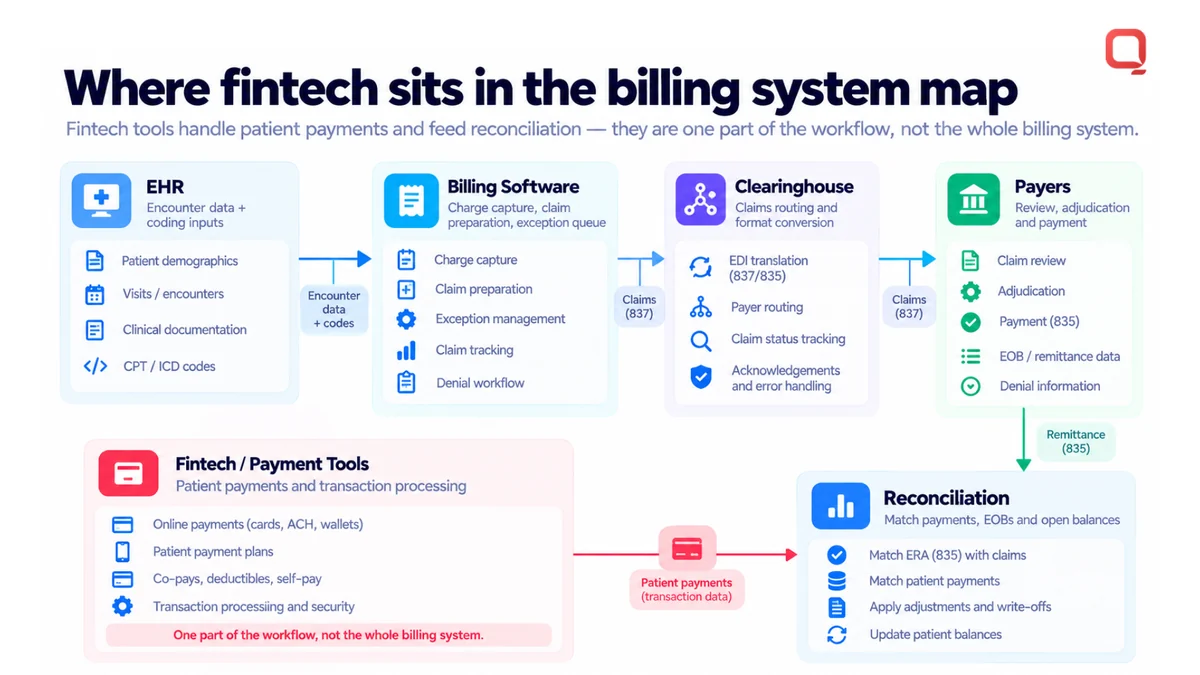
Define scope before choosing technology. Identify the users, existing systems, payment processes, and operational goals the software must support. This keeps the project focused on real workflow needs instead of adding financial integrations that increase complexity without addressing a defined problem.
How Does Medical Billing Software Work Across Healthcare Systems?
Medical billing software works across healthcare systems by receiving relevant information, checking it, routing work, tracking claim status, and reconciling results. This sequence is a conceptual model, not a universal implementation. The actual steps depend on the organization’s users, systems, and operational processes.
Think of the workflow as a series of handoffs. A patient or encounter record may begin in a clinical system, while billing work continues in separate applications. Medical billing software development needs to account for those boundaries, including how records are matched and what happens when an expected response is missing.
- Receive data: Collect relevant information from connected clinical and administrative systems.
- Validate: Check whether the information is usable for the next step, based on the organization’s defined rules.
- Route work: Send records or tasks to the appropriate billing process or staff queue.
- Track status: Make the current state and available responses visible to the people handling the work.
- Reconcile results: Compare payments, adjustments, or other outcomes with the related billing record.
Consistent healthcare data gives billing teams a more reliable basis for moving a claim from source information through financial follow-through. Teams should also decide how to identify a record when information arrives from different systems, and how to handle discrepancies rather than allowing them to pass unnoticed.
What Information Moves Between Billing and Clinical Systems?
Encounter, patient, and billing records are related but serve different purposes. Clinical systems hold information about the patient and care encounter. Billing workflows use relevant information to support charge and claim activity. The precise data exchanged depends on the systems and process involved, so teams should define the information required for each workflow instead of assuming one interface fits every organization.
HL7 and FHIR are standards used in healthcare information exchange. They can inform how a connection is designed, but neither label alone determines which information, events, or workflows an implementation must support. For federal program context, the Centers for Medicare & Medicaid Services (CMS) publishes information about its programs and related claims processes.
How Should Teams Handle Exceptions and Reconciliation?
Design for cases that do not follow the expected path. An exception queue, clear status visibility, and traceable changes are useful design considerations, not automatic features of every billing product. Unmatched or incomplete information needs an assigned review path, with enough context for staff to investigate and correct the issue.
Illustrative example, not a QSS deployment: A billing record arrives without information needed for the next step. The system flags it for review rather than treating it as complete. A staff member checks the source record, corrects or routes the item, and the workflow retains a trace of the change. A related payment that cannot be matched can follow a separate reconciliation path.
Define who reviews each exception, what information they need, and how the item returns to the workflow. These decisions help prevent automation from simply moving unclear data faster.
Custom Development or Existing Billing Software: How Should Teams Compare the Options?
Teams evaluating medical billing software should compare extending an existing system, adopting a configurable product, and commissioning custom development against their actual workflows and operating constraints. Custom software is not automatically the better choice. If existing capabilities support required work and integrations, extending them may avoid a separate codebase and its ongoing maintenance.
| Decision area | Extend existing software | Adopt a configurable product | Commission custom development |
|---|---|---|---|
| Workflow fit | Strong when current workflows mostly align and gaps are limited. | Depends on how well available settings map to team processes. | Can be shaped around distinct workflows, with requirements clearly defined. |
| Integration needs | Build on existing connections, while accounting for their limits. | Evaluate supported connections and the work needed to connect other systems. | Design connections for specific systems, with integration work to own and maintain. |
| Configurability | Bounded by the current product’s settings and extension points. | Uses available configuration options, which may not cover every process. | Offers more design control, but each customization adds decisions and upkeep. |
| Ownership | Shared across the product vendor and the organization’s implementation choices. | Product capabilities and changes are shaped by the vendor. | The organization must plan ownership of requirements, code, and change decisions. |
| Maintenance | Depends on vendor support and any local extensions. | Depends on the product’s maintenance model and configuration. | Requires a plan for updates, integrations, testing, and technical support. |
Use the table to expose trade-offs, not to declare a universal winner. A configured product may still require integration work. An extension may depend on product limits. Custom development can increase control, but it can also increase long-term maintenance and integration responsibilities.
When Can Extending an Existing System Be the Practical Choice?
Extending existing software can make sense when its core workflows already match operational needs and gaps can be handled through supported configuration or integrations. Before recommending replacement, document where the process breaks down, whether current integration points can address it, and what workarounds staff use today.
Then assess the product roadmap and operational constraints using your own evidence, such as documented requirements, system dependencies, and feedback from affected teams. Coding and billing processes also depend on evolving professional guidance, including resources from the American Academy of Professional Coders (AAPC). A roadmap review is useful, but it should not replace testing the product against current needs.
When Can Custom Medical Billing Software Make Sense?
Custom development may be worth evaluating when a distinct workflow, system constraint, or product requirement cannot be handled effectively through existing capabilities. Start by separating essential requirements from preferences. Map where current tools fall short, identify the systems the solution must connect with, and define who will own changes after launch.
That control comes with responsibility. The organization needs to plan for code maintenance, integration changes, testing, and future workflow adjustments. Custom medical billing software is not a shortcut to savings, faster delivery, or better claim outcomes; those results require project-specific evidence. If existing software meets the operational requirement, extending it may be the more practical path.
What Should a Medical Billing Software Development Plan Include?
A medical billing software development plan should define workflows, users, data exchanges, controls, tests, and maintenance responsibilities before the team commits to an architecture. For US healthcare providers and health-tech teams, discovery needs to capture operational requirements as well as technical ones. Integration and operational requirements determine what the software must exchange, who acts when an exchange fails, and how teams assess whether it is working.
Use a sequence that turns the current process into specific design inputs:
- Map workflows: Document how work moves today, including handoffs between clinical, billing, and financial teams.
- Define requirements: Name user roles, required tasks, exception paths, and measurable success indicators.
- Inventory integrations: List connected EHR/EMR, billing, and financial systems, including dependencies and data ownership.
- Design controls: Decide how access, auditability, data handling, and recovery needs will shape the solution. Treat HIPAA-aware design as a project consideration, not a claim of compliance.
- Test workflows: Validate normal and exception cases before rollout, then record issues and decisions.
- Plan maintenance: Assign responsibility for updates, interface changes, monitoring, and ongoing support.
Set success measures before making architecture decisions. They might track whether staff can see the status of work, whether exceptions reach an assigned review path, or whether relevant records can be reconciled. Define how each measure will be assessed against the organization’s process. A target without a measurement method is only an assumption.
How Should Teams Scope Integrations and Data Exchange?
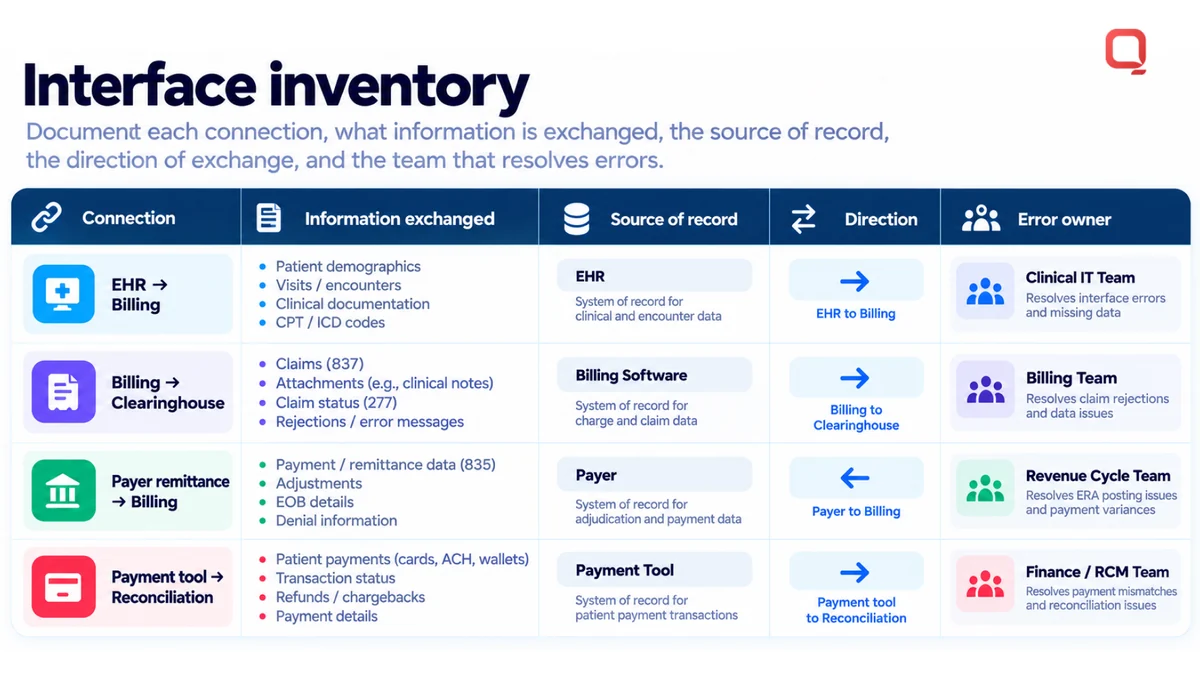
Start with a system inventory, not a preferred interface pattern. For each EHR/EMR, billing, and financial-system touchpoint, document the information exchanged, the source of record, the direction of exchange, and the team responsible for resolving errors.
HL7 and FHIR are standards used in healthcare information exchange. They can guide data exchange, but adopting a standard does not complete the integration design. Teams still need to specify how systems connect, what information the workflow needs, how messages or requests are handled when they fail, and who owns follow-up. Those decisions depend on the participating systems and the intended workflow.
Capture these details in an interface inventory. It gives product, operations, and engineering teams a shared view of dependencies before they choose an architecture or estimate integration work.
How Can Teams Validate the System Before Rollout?
Test the workflow, not just the interface. Include normal cases, incomplete data, corrections, and exceptions. Confirm that access is appropriate for each user role, changes can be reviewed, and the team understands how relevant events are recorded. Include recovery considerations in the technical review, such as what happens to work if a connected system is unavailable.
Use staged validation: review requirements and interface assumptions, test connections and workflow behavior, then assess operational readiness with the people who will use and support the system. Agree on acceptance criteria based on the organization’s requirements rather than applying a universal threshold.
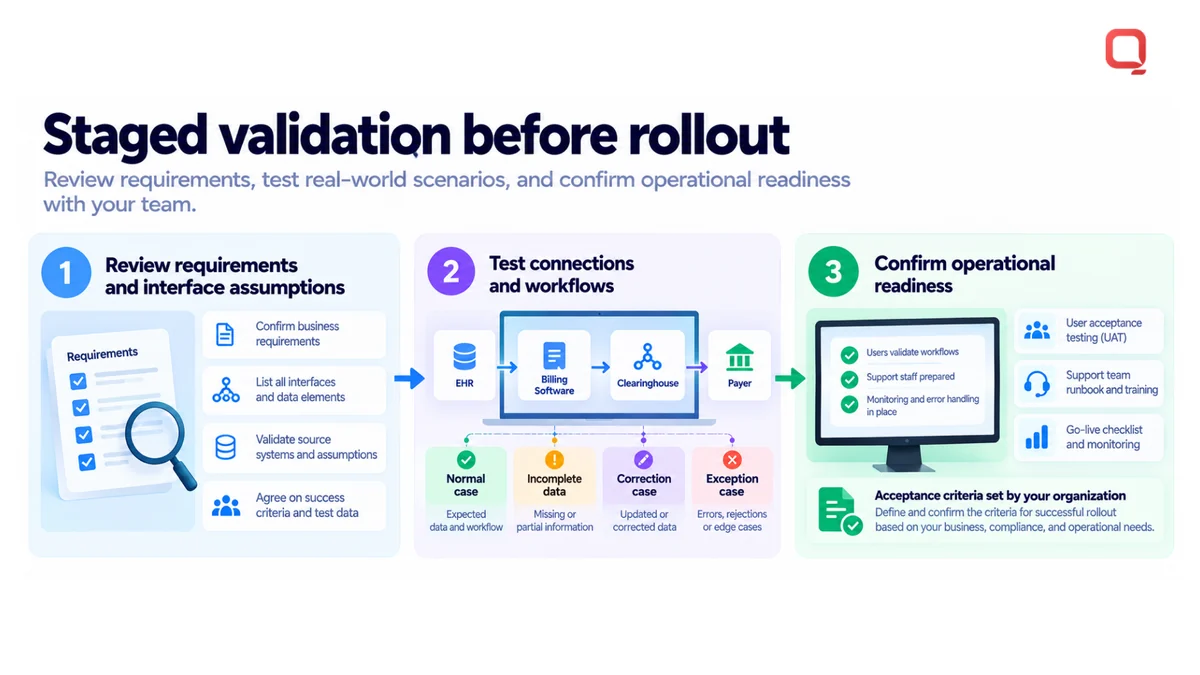
Information about QSS healthcare software requirements is available for teams planning discovery and validation.
How Can QSS Support Medical Billing Software Development?
QSS provides Revenue Cycle Management (RCM) Software and related healthcare engineering capabilities. QSS Technosoft Inc. is a US-based company with an international presence. For US providers and health-tech teams, project scope can address billing workflows and the data connections around them, based on existing systems, operational priorities, and defined requirements.
Which QSS Capabilities Relate to Billing Workflows?
Revenue Cycle Management (RCM) Software supports operational work surrounding billing and claims management. Project requirements may cover how billing activity connects with clinical records, how information moves between systems, and where staff need visibility to carry out their work. The specific workflow and product scope are defined for each project.
QSS’s Healthcare Interoperability and HL7 Interface Development capabilities relate to healthcare information exchange. EHR / EMR Development relates to clinical systems that may supply or receive information used in connected workflows. These capabilities can be relevant when systems need to share data, but not every billing project needs the same interfaces or integration approach.
QSS Technosoft Inc. has 250+ in-house engineers and has delivered 400+ projects. Its company profile lists CMMI Level 3 and ISO 27001:2013. These details provide organizational context, not evidence of a particular billing outcome or a guarantee that a specific solution will fit.
What Should Teams Bring to an Initial Project Discussion?
A focused discussion starts with the current operating picture. Bring materials that show how work happens today and where teams encounter friction. Useful inputs include:
- Workflow maps: Show the main billing steps, handoffs, and points where staff review or redirect work.
- System inventories: List relevant EHR/EMR, billing, and financial systems, along with known dependencies.
- Integration constraints: Document existing interfaces, data ownership, exchange direction, and known limitations.
- Operational priorities: Identify user needs, recurring pain points, exception paths, and the work that matters most.
- Measures of improvement: Define what evidence would show progress, such as clearer work status or a more traceable exception process.
Bring examples of where the current process breaks down, not just a feature wishlist. That distinction helps teams separate a genuine workflow requirement from a preferred technical approach. It also gives engineering and operations a shared basis for discussing scope, integration responsibilities, and maintenance.
Details for QSS healthcare software projects are available for teams evaluating billing workflows and related system connections.
Turn Billing Requirements Into a Practical Next Step
The next step in medical billing software development is to turn unresolved assumptions into decisions your teams can test. Choose a workflow with a clear operational need. Document who uses it, which systems it depends on, what happens when information is incomplete, and what evidence would show the process is working as intended.
That focused scope gives product, operations, and engineering leaders a grounded way to assess whether an existing platform can be extended or a more tailored solution is needed. It also makes integration and maintenance responsibilities visible before they become production problems. Start with the work that creates friction, not a feature list detached from daily operations.
QSS works with healthcare organizations on software and interoperability needs. To discuss a defined billing workflow or a broader healthcare software initiative, contact QSS about your healthcare software project.
Connect Claims, Payments, and EHR Data in One Workflow
Bring your billing workflow map, system inventory, and the exceptions that slow your team down. QSS Technosoft is a software development company in USA, based in Bloomington, Minnesota, offering healthcare software development services, custom healthcare software development, and custom medical software development for revenue cycle teams, with EHR software development company expertise in EHR, HL7, and FHIR integration and software that supports billing and coding services teams.
Discuss your billing workflow →