Allscripts EHR Data Integration for an ICU Dashboard: An Engineering Case Study
 By Ashwani Rana
QSS Technosoft
October 1, 2026
12 min read
By Ashwani Rana
QSS Technosoft
October 1, 2026
12 min read
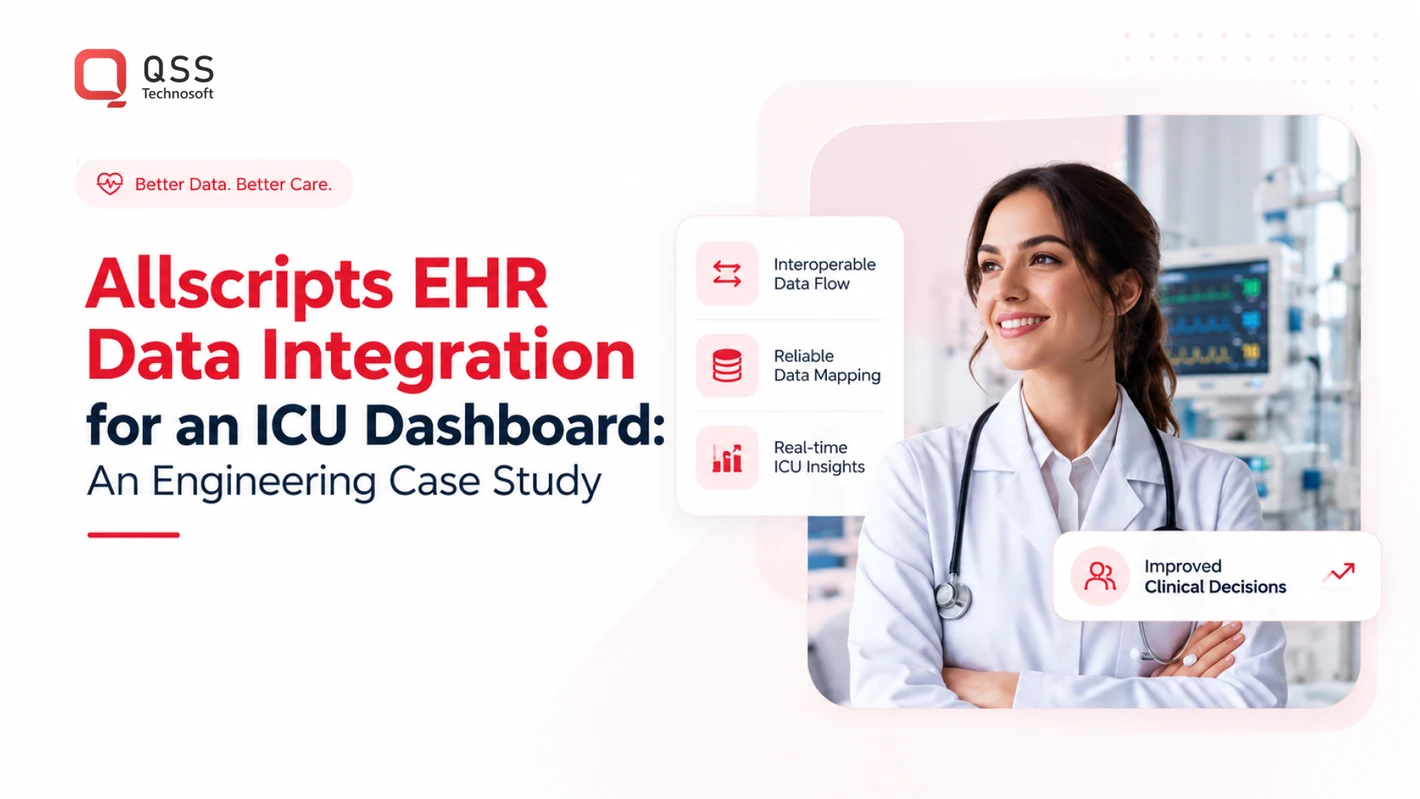
What if an ICU dashboard’s cleanest-looking value is the one clinicians should trust least? In an allscripts ehr data integration icu dashboard, a number without its timestamp, unit, or source can lose the clinical context that makes it useful. Allscripts Healthcare Solutions is now Veradigm, but the product, deployment, version, and interfaces available at a specific organization still need to be confirmed.
The challenge is not simply moving data. EHR information may arrive through different interfaces and workflows, and a polished dashboard can make inconsistencies look authoritative. Teams need a traceable path from source to screen, with provenance and privacy controls considered from the start.
This illustrative engineering case study follows that path: confirm the available feeds, define the data mapping, and validate terminology, units, timestamps, and refresh expectations before deployment. It also covers governance checks for protecting sensitive information and supporting timely review. QSS provides Allscripts Integration using FHIR standards, alongside healthcare interoperability and EHR/EMR integration. The guidance below focuses on what to verify with an integration team before building the dashboard.
Quick Answer
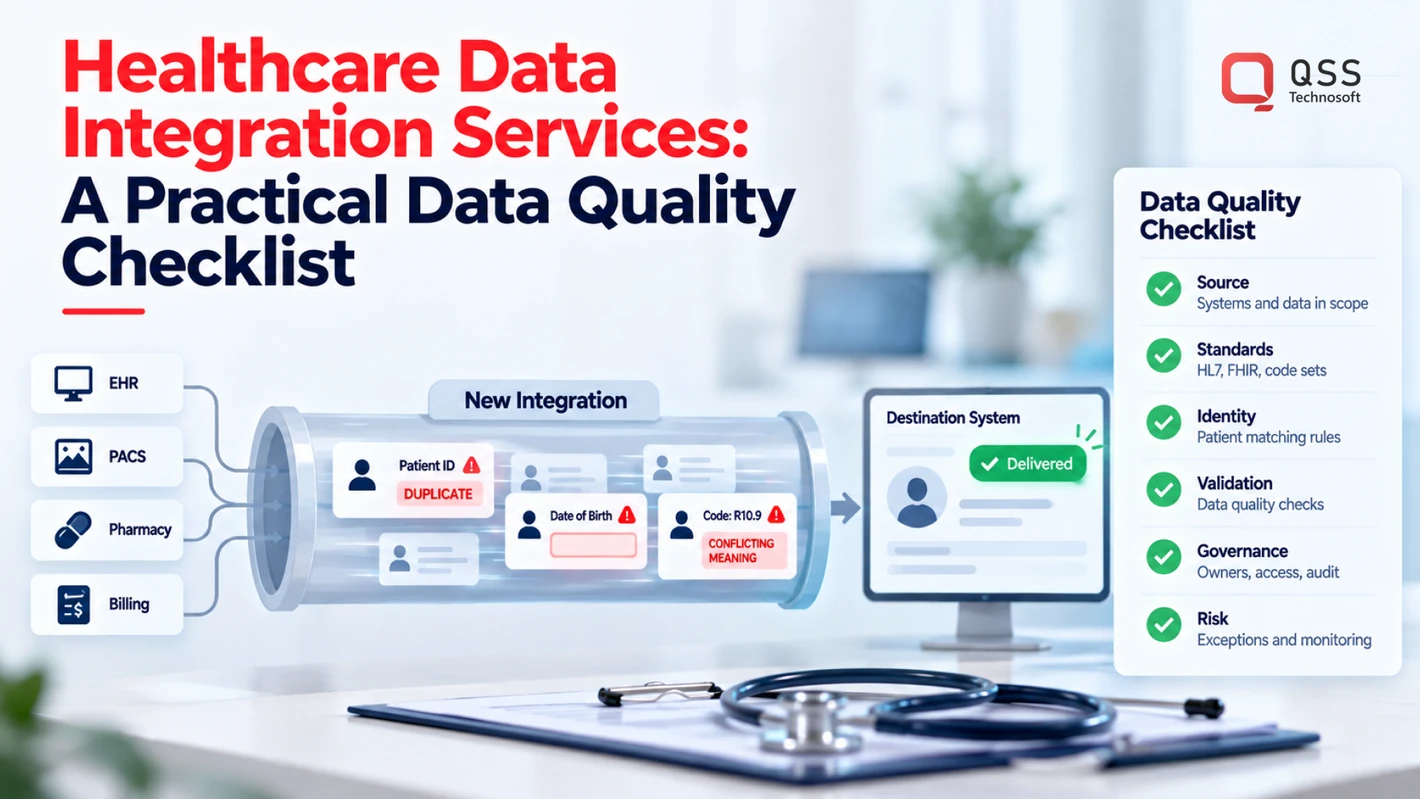
An Allscripts (now Veradigm) EHR integration for an ICU dashboard is only as trustworthy as the path from source to screen. Confirm the specific product, deployment, version and available interfaces (FHIR, HL7 messaging or another supported route) before designing around them. Map every field with a named clinical and technical owner, keep source, timestamp, unit and status attached to each displayed value, and test delayed, missing, duplicated, corrected and out-of-order data before release. Protect access with minimum-necessary roles and audit requirements, roll out in controlled stages, and monitor feed health and freshness after launch. The dashboard supplements the EHR; it never replaces the legal medical record.
Why connect Allscripts EHR data to an ICU dashboard?
An ICU dashboard brings selected clinical information into a view designed for a particular care workflow. The aim is not to reproduce every EHR screen or record. Instead, teams agree which information should be reviewed together and make it easier to see, while retaining the context staff need to interpret it.
Integration connects systems; it does not prove that a value is complete, current, or suitable to display. A result may arrive late, an order may have changed, or a measurement may use a unit that the dashboard handles differently. For allscripts ehr data integration icu dashboard work, define the purpose of the view and how each displayed item will be checked before deciding what to build.
Data provenance is the record of where a value came from, when it was recorded, and how it reached the dashboard; clinicians need that context to judge whether the value is relevant and trustworthy. Without it, a clear-looking number can conceal an unclear source or transformation.
This section describes an illustrative architecture and planning approach, not a documented customer deployment or evidence of a clinical outcome. Each organization’s environment must be assessed before making claims about data availability or behavior.
What information might an ICU dashboard bring together?
Discovery may consider observations, orders, medications, and laboratory results. These are candidate categories, not a promise that every item can be accessed or belongs on the dashboard. Availability depends on the specific EHR deployment, supported interfaces, permissions, and agreed project scope.
Begin with workflow questions: what information do staff need to review together, and which source is authoritative for each item? Do not assume universal clinical thresholds, alerts, or treatment decisions. Those require clinical governance and local validation.
What does Allscripts EHR integration mean in practice?
Allscripts Healthcare Solutions is now called Veradigm. Confirm the target product, deployment, version, and available interfaces rather than relying on the brand name alone. An Electronic health record (EHR) supports the recording and sharing of health information, but a dashboard connection still needs a defined, verified path from source data to display requirements.
That path should specify what is included, how updates are represented, and what users see when data is missing or delayed. The dashboard supplements existing clinical systems; it should not be presented as a replacement for the legal medical record. Keep the source and the limitations visible.
How Allscripts data moves from the EHR into an ICU dashboard
A dependable data flow starts with verification, not code. The sequence below illustrates how a team can move agreed information from an Allscripts or Veradigm environment into a dashboard while retaining its context. The available route depends on the specific product, deployment, permissions, and interfaces confirmed by the provider.
- Confirm scope. Agree which workflow the dashboard supports, which data categories are included, and what users need to see.
- Inspect interfaces. Review the source environment and verify which feeds and access routes are available.
- Map data. Match source fields to dashboard concepts with clinical and technical owners.
- Transform safely. Apply documented conversions while preserving source meaning, identifiers, timestamps, units, and status.
- Validate. Compare dashboard output with the source and test expected, missing, delayed, and conflicting values.
- Monitor. Track feed health and freshness, and define how teams will investigate failures or unexpected changes.
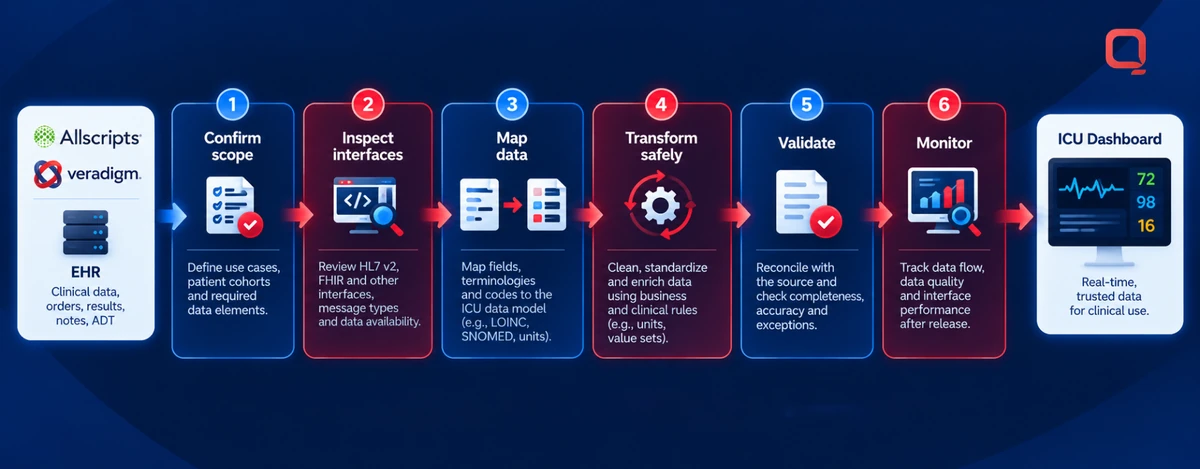
Choosing and confirming the integration interface
First identify the target Allscripts or Veradigm product, deployment, and version. Then verify which interface options are available. FHIR, HL7 messaging, APIs, or another supported route may be candidates, but the product name alone does not confirm that any particular option is usable. Check access, licensing, vendor requirements, and limits on exchanged data before designing around an interface.
FHIR and HL7 are possible interoperability approaches, not interchangeable guarantees. The right fit depends on verified source capabilities and the dashboard’s requirements. For an allscripts ehr data integration icu dashboard, an integration team can assess those constraints before the project commits to an architecture.
Mapping and normalizing clinical data
Prepare a mapping specification before dashboard development. For each field, record its source, intended display, meaning, and accountable clinical or technical owner. Check patient and encounter identifiers, terminology, units, timestamps, duplicate records, missing values, and status semantics. For example, an order marked discontinued should not appear indistinguishable from one that remains active.
Keep provenance attached through each transformation. Preserve enough detail to trace a displayed value to its source, including when it was recorded and how it was converted. A dashboard value is interpretable only when users can see its source and timestamp. Documented rules give reviewers and support teams a shared basis for investigating errors rather than guessing what the interface did.
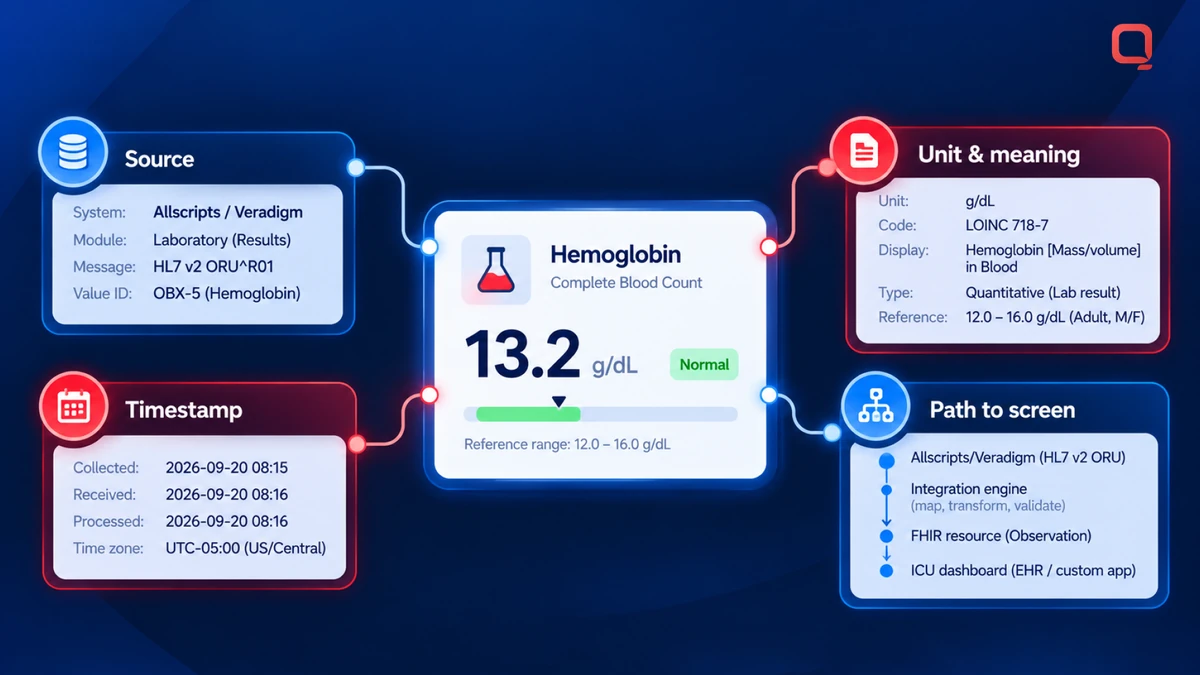
Teams defining interface scope or field mappings can review healthcare integration requirements with an experienced integration team.
What makes an ICU integration trustworthy, not merely connected?
A successful connection proves that data can move. It does not prove that the dashboard presents the information accurately, promptly, or in a way that fits clinical work. In an ICU, a stale or ambiguous value can look authoritative simply because it appears on a polished screen. Validate what users see, not only whether an interface is running.
| Connected data | Validated data | |
|---|---|---|
| Provenance: | A value appears, but its source or transformation may be unclear. | The source and relevant transformation history can be traced. |
| Freshness: | Data arrives, but users may not know when it was last updated. | The display communicates timing against an agreed requirement. |
| Workflow fit: | Information is displayed without confirming how staff will interpret or use it. | Clinical stakeholders have reviewed labels, context, and intended use. |
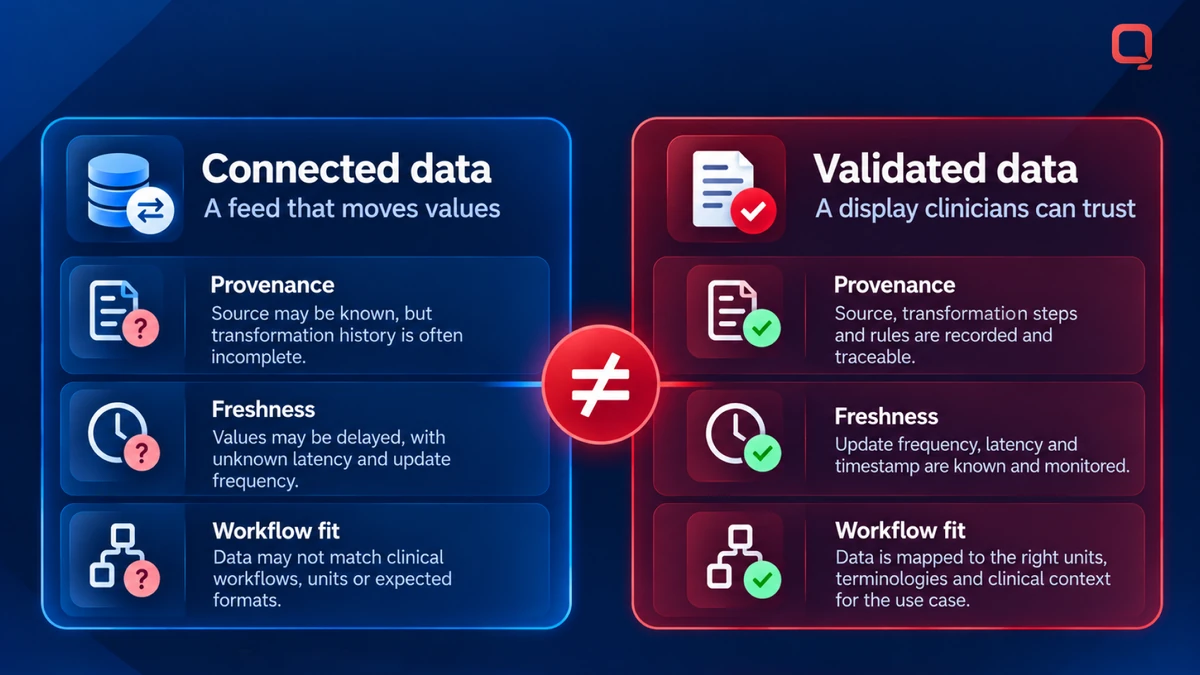
Do not assume that a feed is “real time.” Clinical stakeholders should define acceptable latency for each data category and what users will see when an update is delayed. Requirements may vary by workflow. If a dashboard refreshes on a schedule, make the timing clear rather than implying that every value is current.
How should teams validate dashboard data?
Compare representative dashboard values with their source records using agreed test cases. Include delayed, duplicated, missing, corrected, and out-of-order data. Check how the display handles each case, including whether users can distinguish unavailable information from a confirmed result. Before release, obtain clinical sign-off on labels, units, timestamps, and the workflow the dashboard is designed to support.
How do teams protect privacy and reduce operational risk?
Set minimum necessary access, user roles, audit requirements, and data-retention expectations with the appropriate stakeholders. Review authentication, authorization, encryption, and monitoring in the actual architecture. A checklist alone cannot verify how controls behave in production.
HIPAA-aware design is part of broader system and operational responsibilities; it does not make a dashboard compliant by itself. For allscripts ehr data integration icu dashboard projects, assess how information is accessed, handled, logged, and maintained across the integration. Make the review specific to the actual environment, including its interfaces and operational practices.
If your ICU dashboard depends on Allscripts or Veradigm data, validate the interface scope, field mappings and freshness requirements with an integration team before committing code to production.
A practical implementation and testing plan for an ICU dashboard
For an allscripts ehr data integration icu dashboard, a disciplined rollout is more useful than a fast mock-up. Treat the following as an illustrative engineering plan, not a claim of a completed deployment or clinical outcome. Move through defined gates and assign an owner to each decision.
- Discovery: Clinical informatics and ICU operations define user roles, workflows, decisions supported, required fields, and what stays outside the dashboard.
- Interface validation: EHR administration and engineering confirm the target environment, available feeds, access approvals, data ownership, and downstream dependencies.
- Mapping: Clinical and technical owners approve field definitions, identifiers, terminology, units, timestamps, and status handling.
- Prototype: Engineering builds a limited view against approved requirements, with security reviewing access and data-handling controls.
- Testing: The project team checks data reconciliation, security, usability, and failure behavior against agreed scenarios.
- Controlled rollout: ICU operations introduces the view to defined users, gathers feedback, and agrees when and how access may expand.
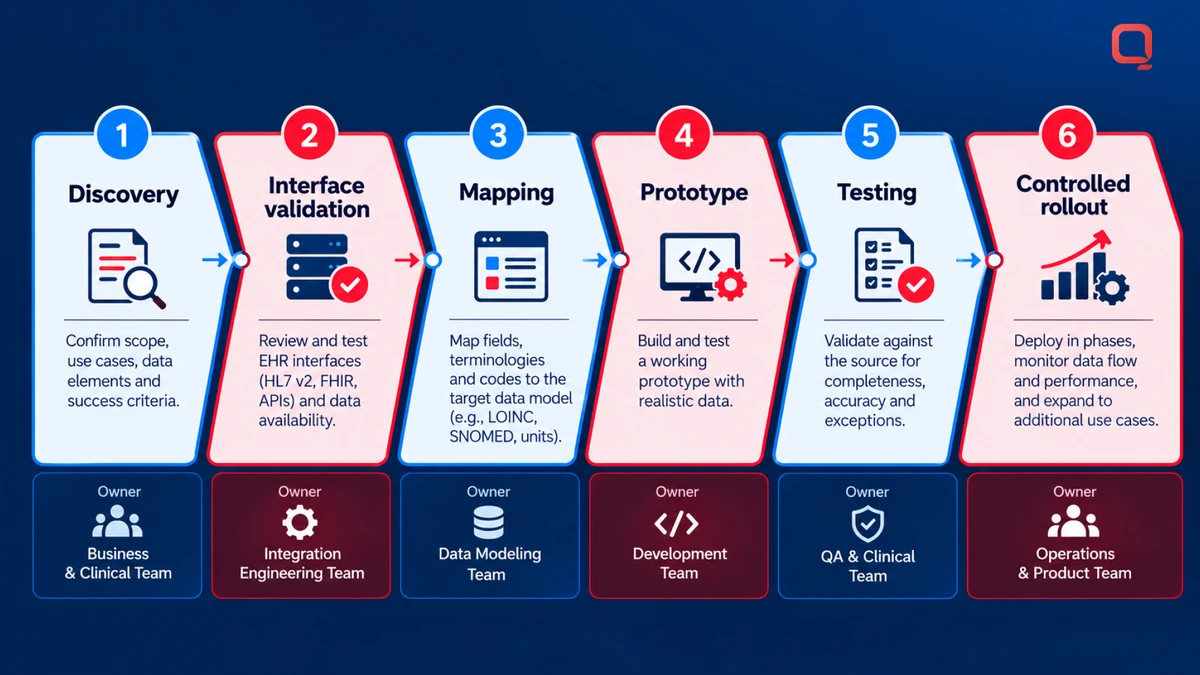
Set acceptance criteria before development. Specify how completeness and correctness will be assessed against source records, what freshness is acceptable for each data type, which users may access each category, and whether labels and layout support the intended workflow. Define expected behavior for feed failure, delayed updates, missing values, and corrections. “Works” needs a testable meaning.
Discovery questions before development starts
Ask who will use the dashboard, what work it supports, which source systems and fields are in scope, and where the dashboard’s responsibility ends. Document interface constraints, data ownership, approvals, and downstream dependencies. Assign responsibility for downtime, delayed feeds, corrections, and support escalation. Involve clinical informatics, ICU operations, security, EHR administration, and engineering early. Otherwise, unresolved assumptions may surface during testing, when they are harder to address.
Testing, rollout, and post-launch monitoring
Test approved scenarios for integration, security, usability, and data reconciliation. Compare displayed values with source records and confirm that access controls behave as designed. Pilot with defined users and a clear feedback route before broadening access. Record issues, assign owners, and resolve release blockers.
After release, monitor feed failures, data freshness, access events, and support issues. Review these signals with the teams responsible for the source system, dashboard, and clinical workflow. Use the findings to refine mappings and operating procedures, without implying a clinical benefit that has not been established.
Teams planning this work can review healthcare integration requirements with QSS.
How QSS can support Allscripts EHR data integration
Reliable integration starts with practical questions: which data is available, what does it mean, how quickly does it need to appear, and who can access it? QSS Technosoft provides Allscripts Integration using FHIR standards, alongside healthcare interoperability and EHR/EMR integration. These capabilities can support requirements discovery, interoperability design, implementation planning, and validation.
For an allscripts ehr data integration icu dashboard, assess the actual environment rather than assuming that a named standard or product guarantees a workable connection. The target Allscripts or Veradigm product, deployment, version, permissions, and available interfaces affect feasibility and scope. FHIR may be part of the approach, but supported resources and access must be confirmed with the provider. The dashboard work described here is illustrative, not a completed QSS Technosoft deployment or a claim of clinical outcomes.
What to bring to an integration discussion
A focused discussion is easier when the team can describe its environment and constraints. Share information only in line with organizational policy, and do not send sensitive data through unapproved channels. Useful preparation includes:
- The Allscripts or Veradigm product and deployment details, plus known interface options or limitations.
- Intended dashboard users, workflows, boundaries, and the data categories under consideration.
- Known data-quality or timing concerns, such as inconsistent terminology, unclear timestamps, or delayed updates.
- The people responsible for security, privacy, governance, EHR administration, and clinical validation.
This gives integration engineers a practical starting point for identifying questions that need answers before design begins. It also helps separate verified requirements from assumptions, a common source of avoidable rework.
When to involve an integration engineering partner
Consider an experienced partner when legacy interfaces, inconsistent data, or multiple systems make the data path difficult to trace. Assess experience in healthcare interoperability and EHR/EMR integration, and ask how the team will verify interface availability, document mappings, test exceptions, and preserve traceability. These are planning questions, not a promise that an interface or data feed will be available in a particular environment.
QSS Technosoft’s Allscripts Integration capability using FHIR standards is relevant to that assessment. Project scope and technical feasibility still depend on the target system and must be established with the organization and its provider. To discuss your requirements, contact QSS Technosoft about Allscripts integration. Start with the environment, the workflow, and the questions that need verification.
Build the Dashboard on Verified Data
A dependable ICU dashboard starts with clear scope, verified interfaces, and clinical agreement on how information should appear. Integration alone is not enough. Teams also need to test data quality, timestamps, access controls, and failure handling before using the view in a care workflow.
The practical lesson behind allscripts ehr data integration icu dashboard is to preserve context, confirm what the target environment supports, and validate the display with the people who will use it. The architecture discussed here is illustrative, not a report of a completed QSS deployment or a claim of clinical outcomes.
QSS provides Allscripts Integration using FHIR standards and works in healthcare interoperability and EHR/EMR integration. Interface feasibility and project scope still depend on the specific environment.
Bring your system details, workflow requirements, and known constraints to the conversation. Discuss your Allscripts EHR integration requirements with QSS to identify what needs verification before development begins.
Stop building ICU dashboards on unverified feeds
A 30-minute conversation with a healthcare integration architect, not a salesperson. Bring your Allscripts or Veradigm environment details and the ICU workflow you want to support; we will review it against the checks in this case study (interface availability, field mapping, provenance, freshness, access controls and failure handling) and tell you what needs verification before development begins. You keep the written notes either way.
Book a Discovery Call →