AI for Medical Imaging: Practical Use Cases, Workflows, and Readiness
 By Nagender Pratap
QSS Technosoft
October 21, 2026
14 min read
By Nagender Pratap
QSS Technosoft
October 21, 2026
14 min read
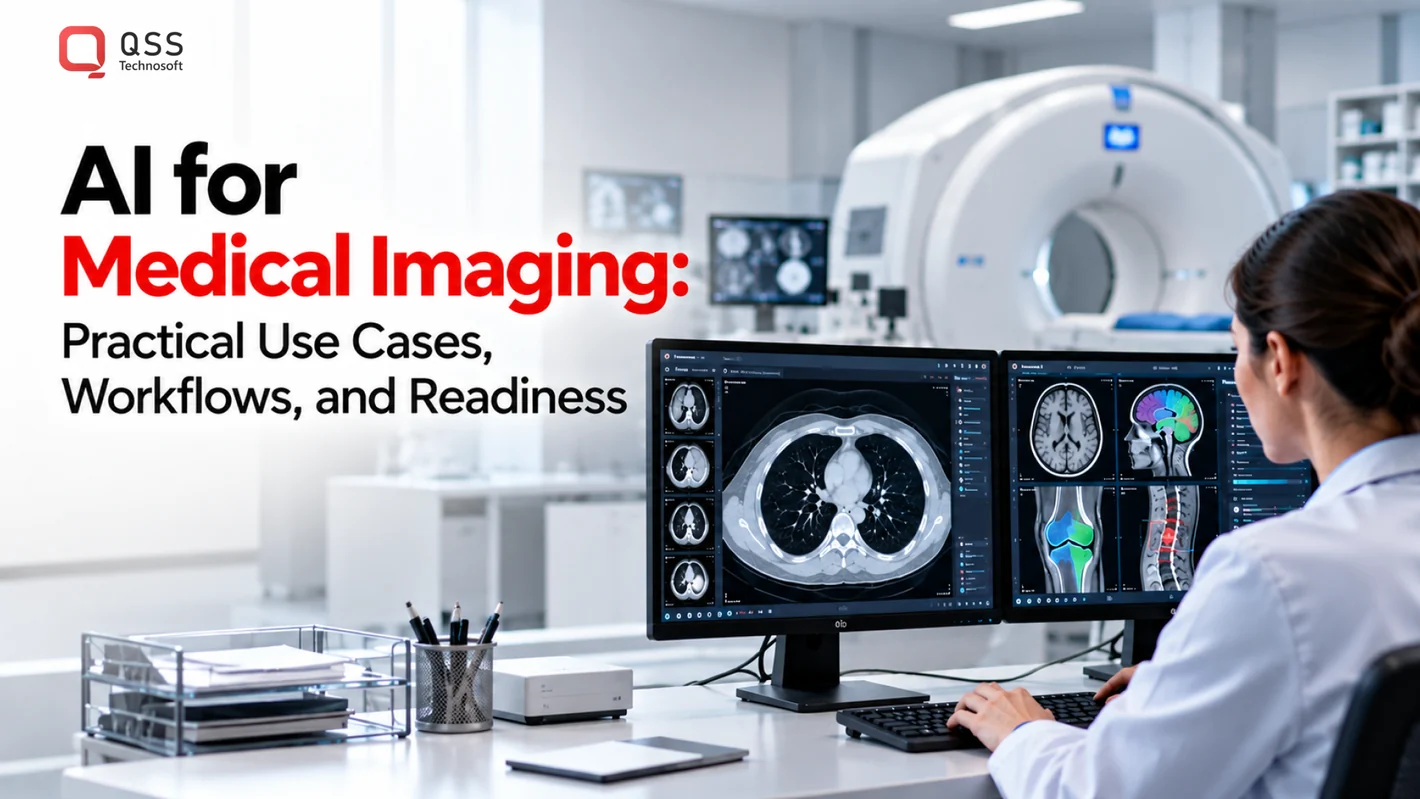
Medical imaging AI creates value when a validated model fits the clinical workflow, not just a research dataset. AI for medical imaging can help clinical teams detect patterns, prioritize studies, and automate measurements, while clinicians remain responsible for reviewing results and making care decisions. The practical challenge is making those capabilities work with local data, imaging systems, and day-to-day reading workflows.
A promising demonstration does not show whether results arrive in time, integrate with PACS and clinical systems, or remain useful across patient populations and imaging equipment. Teams need to evaluate those operational questions alongside model performance.
This article explains practical imaging AI use cases, how AI fits into a clinical workflow, and what teams should validate before production deployment. It covers DICOM and PACS integration, data quality, clinician oversight, and governance to help CIOs, CMIOs, engineering leaders, and health-tech product teams assess readiness without mistaking research results for operational proof.
Quick Answer
AI for medical imaging is software that performs a defined task on images, such as classification, detection, segmentation, prioritization, or faster acquisition and reconstruction, and returns an output for a clinician to review. It is not a diagnosis. To move from research to production, define the task and intended user, check that local images and equipment match the evaluation data, and map PACS integration and DICOM integration end to end: study selection, inference, output routing, and clinician review. Add security, HIPAA review, failure handling, monitoring, and named owners before go-live. Medical imaging software development and clinical workflow automation succeed when the model fits the workflow, not just the dataset.
What Is AI for Medical Imaging, and Where Can It Help?
AI for medical imaging is software that analyzes medical images or supports the processes used to create and review them. It can assist with image acquisition, reconstruction, detection, segmentation, prioritization, and interpretation. Its output supports clinical teams, but it is not a diagnosis or a substitute for a clinician’s judgment.
Definition: Medical imaging AI is software that processes images or related imaging data to perform a defined task, such as locating a feature or outlining anatomy. A clinician reviews and interprets the output in the context of the patient and examination.
This overview is for US healthcare technology leaders, imaging teams, and health-tech product owners assessing where AI may fit in an imaging workflow. The useful questions are what task the model performs, who acts on its output, and whether that output suits the clinical context. The broader field of artificial intelligence in healthcare includes medical imaging alongside other applications, but each imaging use case needs its own evaluation.
What tasks can AI perform on medical images?
Medical imaging AI can perform different tasks, and each produces a different kind of result for review. Define the task before assessing a model or designing its place in the workflow.
- Image classification assigns an image or finding to a category. The result may flag a category for review, but it does not establish a clinical diagnosis.
- Detection locates a suspected feature in an image so a clinician can examine that area. The location prompts review; it does not prove the feature is present.
- Segmentation outlines structures or regions within an image. A clinician may use the outlined region as an aid for assessment or measurement, subject to review.
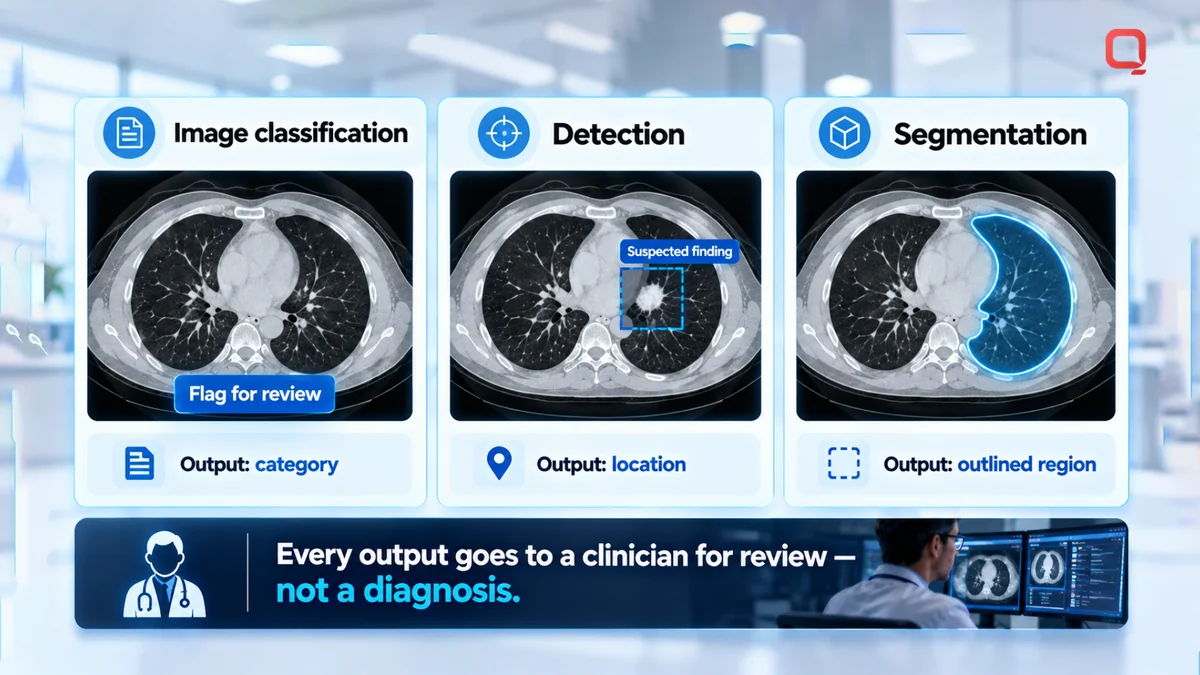
AI may also support image acquisition or reconstruction, the processes of collecting imaging data and forming images from it. Other systems can prioritize studies for attention or help interpret image patterns. These functions address different workflow needs, so a result that is useful for one task may not answer another.
Which imaging examples make the use cases concrete?
Research and institutional projects show the range of tasks under investigation. They can help teams identify a candidate use case, but they do not establish that a particular system is deployed or suitable for every clinical setting.
- Faster MRI: NYU Langone has reported research on using AI to support faster MRI. This is an image acquisition and reconstruction example, not a general promise about scan times.
- Breast imaging: Research in this area explores AI support for analyzing breast images. The specific task and intended clinical role vary by system.
- Neuroimaging and brain-image segmentation: These research areas include analyzing brain images and outlining regions for review. Segmentation marks image regions; it does not determine their clinical meaning.
Keep the boundary clear: a model produces a task-specific output, while a clinician interprets that output alongside relevant clinical information. For product owners, this distinction shapes requirements, user review, and how results appear in imaging software. Research can suggest a promising direction, while local validation and workflow fit determine whether it is ready for operational evaluation.
How Does Medical Imaging AI Move Through a Clinical Workflow?
Deploying medical imaging AI connects imaging data, model output, and a clinical workflow. Images must reach the intended service, results must return in a usable form, and an identified user must know what to do with them. The integration depends on the use case and existing systems, so it is not plug-and-play.
How do DICOM and PACS fit into an imaging AI workflow?
DICOM is a standard used to represent and exchange medical imaging information. PACS is a system used to store and manage medical imaging studies. An AI service may connect with imaging data through or alongside PACS, depending on local architecture and workflow needs.
A typical workflow moves through these stages:
- Create the study. An imaging device produces a study, such as a CT or MRI examination, represented using DICOM.
- Transfer the images. The study moves into PACS or another configured system. The integration defines which studies are eligible for AI processing.
- Run inference. Inference is the process of applying a trained model to data to produce an output. The AI service processes the eligible image or study for its defined task.
- Route the output. The result goes to the appropriate user or workflow, such as a worklist or image review interface. Its destination and format should fit the clinical team’s workflow.
- Review and learn operationally. A designated clinician reviews the output. The organization can monitor workflow issues, such as failed transfers or results that arrive too late to inform review.
What happens after a model produces an output?
A model output should be presented as an aid for review, not an unquestioned result. The interface and workflow should make clear what the model returned, which study it relates to, and what action the assigned user is expected to take.
- Assign review: Define who reviews the output and where it appears.
- Set escalation: Decide what happens when results are unavailable, unclear, or require additional attention.
- Document handling: Determine how review and relevant actions are recorded in existing clinical systems.
These decisions are part of implementation, not details to leave until after integration. A routing delay, mismatched study, or unclear handoff can make a technically successful model difficult to use. Map the workflow with imaging, clinical, and IT teams before selecting interfaces or deployment patterns.
Which Medical Imaging AI Examples Are Ready for Evaluation?
Choose a medical imaging AI example based on the workflow need it addresses, whether relevant data are available, and the maturity of its supporting evidence. Research examples can help teams define a question to test, but they do not establish readiness for a different patient population, imaging system, or clinical workflow.
NYU Langone describes research across imaging stages and areas that include faster MRI, breast imaging, neuroimaging, and brain-image segmentation. Treat these as research examples, not proof that a specific AI system is deployed or ready for use in your organization. The table frames each example as a candidate for evaluation.
| Example | Intended task | User benefit to investigate | Key validation question |
|---|---|---|---|
| Faster MRI, a research example reported by NYU Langone | Support image acquisition or reconstruction | Whether the approach could address a defined imaging workflow need | Does it work with the local MRI data and acquisition workflow? |
| Breast imaging research described by NYU Langone | Analyze breast images for a defined research task | Whether the output could support the intended user’s image review | Does evidence match the target population, image source, and task? |
| Neuroimaging research described by NYU Langone | Analyze brain images for a defined research task | Whether the result is relevant to a specific review or analysis workflow | Can the intended user interpret and act on the output in context? |
| Brain-image segmentation research | Outline structures or regions in brain images | Whether the outline could support a specified review or measurement task | Are the regions relevant, and can a clinician review the output? |
How do research examples differ from production use cases?
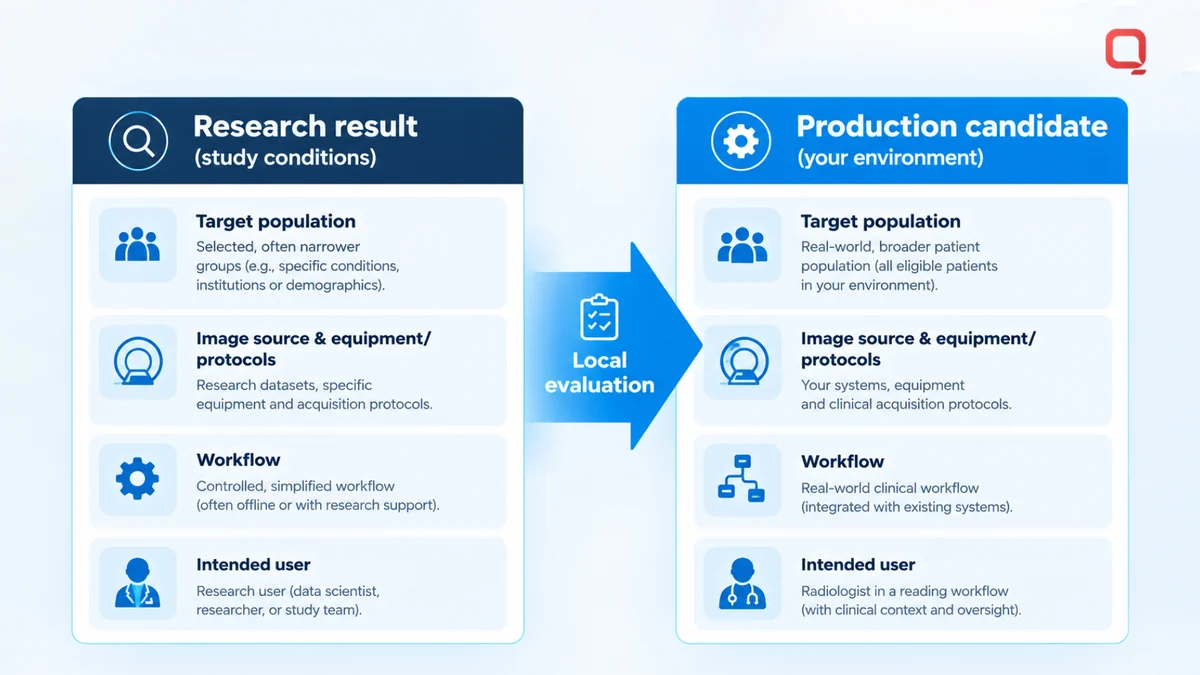
A research result answers a question under the conditions studied. By itself, it does not show that a model is suitable for another care setting. Before treating an example as a production candidate, compare the study’s target population, image source, workflow, and intended user with those in the planned environment.
A model developed or evaluated with one imaging source may encounter different equipment, protocols, or data characteristics elsewhere. A research user may also interact with results differently from a radiologist working inside a clinical reading workflow. These gaps call for local evaluation rather than assumptions.
How should teams compare possible imaging AI applications?
Start with the work the team needs done, then examine the practical conditions for evaluating it:
- Task: State the output and the decision or workflow step it is meant to support.
- Data: Identify whether representative local images and relevant records are available for evaluation.
- Workflow: Define where the result should appear and who will review it.
- Evidence: Separate technical feasibility from evidence of benefit in the intended environment.
AI for medical imaging must be evaluated in context. A promising model output is useful only if it fits the data, user, and workflow it was designed to support.
What Must Healthcare Teams Validate Before Deploying Imaging AI?
Before deploying imaging AI, healthcare teams should validate the intended task, the data it will process, its fit with the clinical workflow, and the oversight around its outputs. Evaluation should use evidence relevant to the planned environment, without assuming a research result or vendor metric predicts local performance.
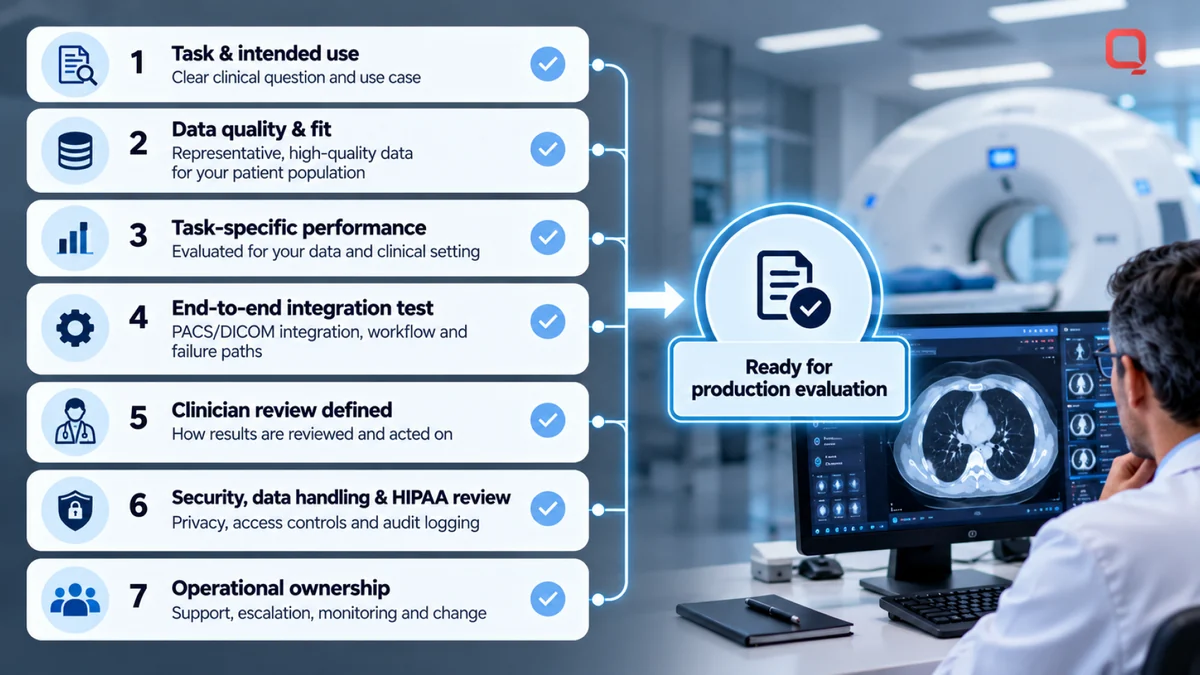
Use this checklist to make readiness concrete:
- Define the task and intended use. State which imaging studies the system will process, what output it produces, and which user or workflow it is meant to support.
- Check data quality and fit. Assess whether available images represent the target population, modalities, equipment, protocols, and operating conditions. Look for missing data, artefacts, inconsistent formats, and relevant differences across sites or patient groups.
- Evaluate performance for the task. Choose measures that match the output and its intended use. Review errors and edge cases with the clinical team, and set acceptance criteria for the specific project rather than relying on a universal threshold.
- Test integration end to end. Confirm that the right study reaches the model, the output is linked to the correct study, and the result appears in the intended interface or workflow. Include failure paths, such as unavailable services or incomplete transfers.
- Specify user review. Document who reviews outputs, how uncertainty or disagreement is handled, and where decisions or follow-up actions are recorded.
- Plan security and data handling. Define access controls, data flows, storage, retention, and protections for sensitive information. For US healthcare organizations, assess applicable HIPAA privacy and security obligations based on the organization’s role and the system’s handling of protected health information. HIPAA relevance does not, by itself, establish that a system is compliant.
- Assign operational ownership. Name the teams responsible for support, incident escalation, monitoring, and change management after go-live.
What data and workflow checks should come first?
Start with the images and the people who will use the result. Compare the evaluation data with the intended operating environment, then map where users receive, interpret, and act on model outputs. Identify who investigates failures, who escalates concerns, and who can pause or change the workflow. Make these responsibilities explicit before go-live rather than improvising after an incident.
How should teams plan privacy, security, and monitoring?
Make security architecture part of the project design. Review how image data and outputs move between imaging systems, the AI service, and clinical interfaces, then define access and handling controls for each connection. Plan to monitor technical failures and performance changes over time, with a documented process for reviewing updates. Regulatory and governance obligations depend on the system and its intended use, so assess them for the specific deployment.
Model validation asks whether the system performs its defined task under evaluation conditions. Successful workflow adoption asks whether people can use its outputs appropriately in routine practice.
Record evaluation findings, unresolved risks, and accountable owners so the deployment decision has a clear basis.
How Can QSS Technosoft Support Medical Imaging Software Development?
QSS Technosoft is a US-based healthcare IT engineering partner for healthcare organizations and health-tech firms. QSS supports medical imaging software development and DICOM/PACS solutions, focusing on software and integration work around imaging systems. Its role is engineering, not providing clinical diagnoses or replacing clinician review.
For teams exploring AI for medical imaging, the surrounding software and integration boundaries are part of the project. QSS can help teams define how imaging applications fit their existing systems, data flows, and user requirements. The design should reflect the organization’s architecture and intended workflow.
Which QSS capabilities are relevant to imaging projects?
QSS’s DICOM / PACS Solutions support imaging software and system integration planning. This work can address how an application relates to existing PACS workflows and how imaging data or outputs need to move between systems. The right approach depends on project scope and the organization’s technical environment.
QSS has a proprietary web-based DICOM/PACS Viewer. This is a viewer capability, not a claim that the viewer includes AI features. QSS also offers DICOM AI Suite as a productized AI platform. Its role in a project should be defined from the requirements rather than assumed from the product name.
QSS’s experience with OHIF and DCM4CHEE can inform architecture discussions when those technologies are relevant to the imaging environment. Their place in a project depends on existing systems, required interfaces, and how clinical users access studies.
What should a first project discussion clarify?
A productive project discussion starts with the use case and current environment. Clarify the work to be done before deciding how to connect components.
- Imaging task: Define the intended task and the output the software needs to handle.
- Users: Identify who will receive the output and how it fits their work.
- Data flow: Map how studies move through existing imaging systems and where the AI component connects.
- Integration boundaries: Specify which systems and interfaces fall within the software scope.
- Validation responsibilities: Establish which clinical and technical teams evaluate the model and workflow.
- Operational requirements: Clarify ownership for monitoring, issue escalation, and post-deployment changes.
These details give the engineering team a practical basis for shaping imaging software around the organization’s actual environment and project needs.
Turn an Imaging AI Idea Into a Defined Project
The next step for AI for medical imaging is to turn a promising use case into a scoped engineering plan. Identify the user need, systems involved, data flow, validation ownership, and operational requirements before committing to a production design. Clear boundaries help clinical, product, and engineering teams move forward with shared expectations.
QSS Technosoft is a US-focused healthcare IT engineering partner with 250+ in-house engineers and 15+ years in business. Its imaging capabilities include a proprietary web-based DICOM/PACS Viewer and DICOM / PACS Solutions, including PACS, OHIF, and DCM4CHEE. These capabilities support software and integration planning, not clinical diagnosis or a promise of model performance.
Start with the workflow you want to improve and the realities of the imaging environment it must fit. From there, teams can define a practical path for development, integration, and evaluation. Plan your medical imaging software project with QSS.
Scope Your Imaging AI Workflow Before You Build
Bring the imaging task, the users who will review the output, and your current PACS and DICOM environment. Our engineers support medical imaging software development and custom medical software development, from PACS integration and DICOM integration to output routing, viewer work with OHIF and DCM4CHEE, and clinical workflow automation, alongside healthcare AI consulting that keeps clinicians in control of every result.
Plan your medical imaging software project with QSS →