Automated Patient Intake Software Development: From Workflow to EHR
 By Ashwani Rana
QSS Technosoft
October 21, 2026
14 min read
By Ashwani Rana
QSS Technosoft
October 21, 2026
14 min read
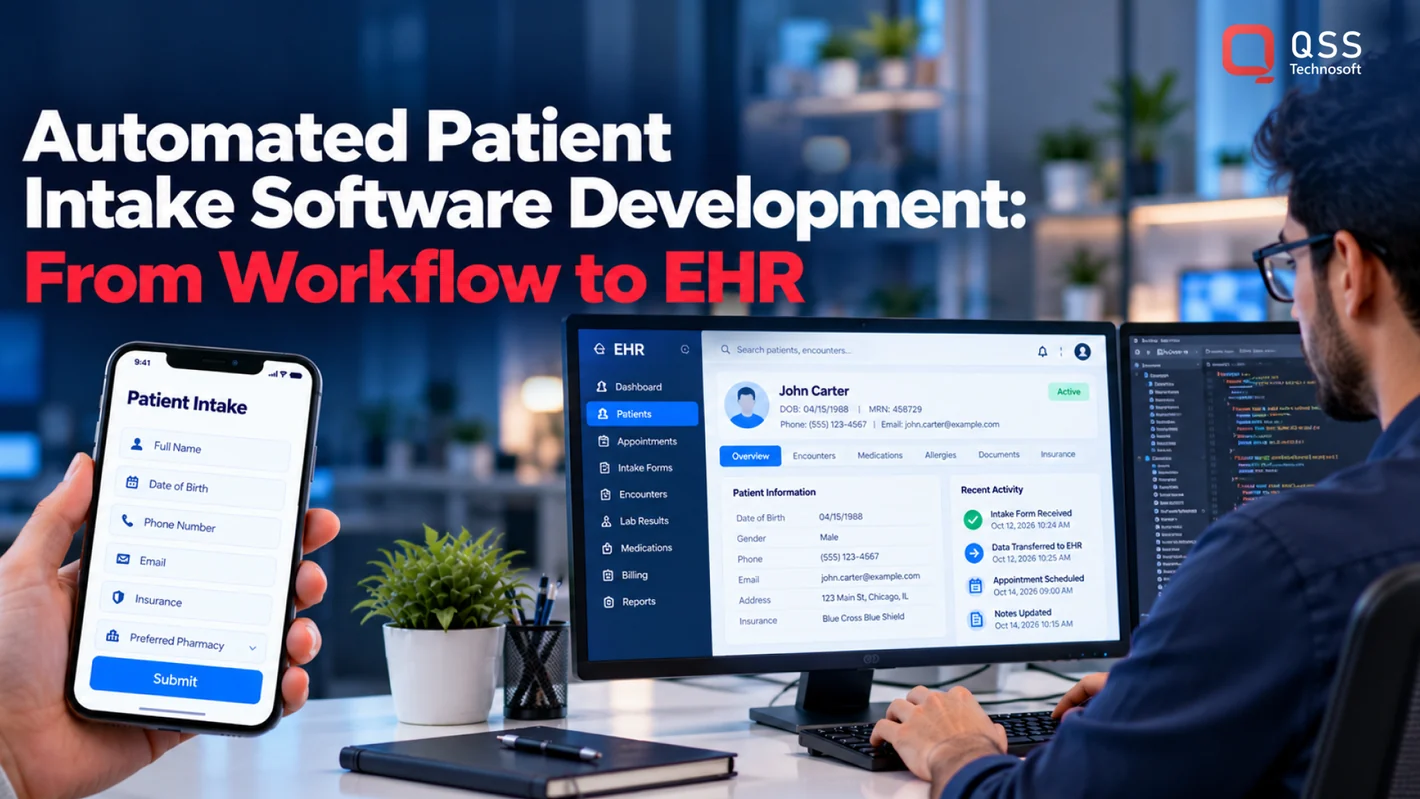
Automated patient intake software development designs systems that collect patient information, support staff review, and transfer approved data into connected healthcare systems. Effective software fits the organization’s actual workflow, including exceptions and handoffs. It does more than digitize forms: it defines what happens after submission and how staff know whether information reached the right system.
Paper and manual intake can make patients repeat information and leave staff copying details across disconnected systems. The practical challenge is to design around real workflows, user needs, integration boundaries, and exceptions.
This guide is for US healthcare providers and health-tech decision-makers planning intake automation. It covers workflow mapping, configurable software versus custom engineering, and validation around existing systems. QSS Technosoft develops healthcare software and interoperability solutions for these kinds of requirements.
Quick Answer
Automated patient intake software development goes beyond digital intake forms or patient portal software: it validates submissions against defined rules, routes exceptions to the right staff, and transfers approved data into the EHR with visible status. Map the full journey first (access, submission, validation, staff review, and system handoff), then map each field to the receiving system and define acknowledgments, errors, and retries, using HL7 FHIR integration tools for healthcare where they fit. Compare configurable, custom, and hybrid options on workflow fit, integration boundaries, ownership, and maintenance. A custom healthcare software development company or EHR software development company should test complete and failed handoffs, not just form submission, before launch.
What Is Automated Patient Intake Software Development?
Automated patient intake software development is the design and engineering of systems that collect patient information, support staff review, and transfer approved data into connected healthcare systems. It helps US healthcare providers and health-tech teams fit intake automation to their users, workflows, and existing technology.
A digital form collects answers. An automated workflow can also route submissions, check information against defined rules, flag exceptions for review, and transfer data to another system. That distinction matters: digitizing a form may still leave staff copying details into the patient record, while automation addresses what happens after submission.
The intake journey can begin with registration and continue through information collection, document submission, staff review, and handoff to downstream systems. A destination may include an Electronic Health Record (EHR), a practice management system, or another application in the organization’s environment. For each handoff, define what information moves, who can review it, and what happens when data is missing or inconsistent.
Scope should follow the clinic’s actual process, not an idealized diagram. Identify who uses each step, which systems are involved, and where staff currently intervene. These details shape requirements and help distinguish useful automation from a new layer of work.
Which patient intake tasks can software support?
Patient intake software can support patient-facing activities, administrative review, and system-to-system exchange. The specific tasks depend on documented requirements and the organization’s existing systems.
- Patient-facing: registration, information collection, and document submission.
- Administrative: reviewing submissions, identifying incomplete or inconsistent information, and determining the next step.
- System-to-system: mapping approved information to receiving systems and managing transfer outcomes.
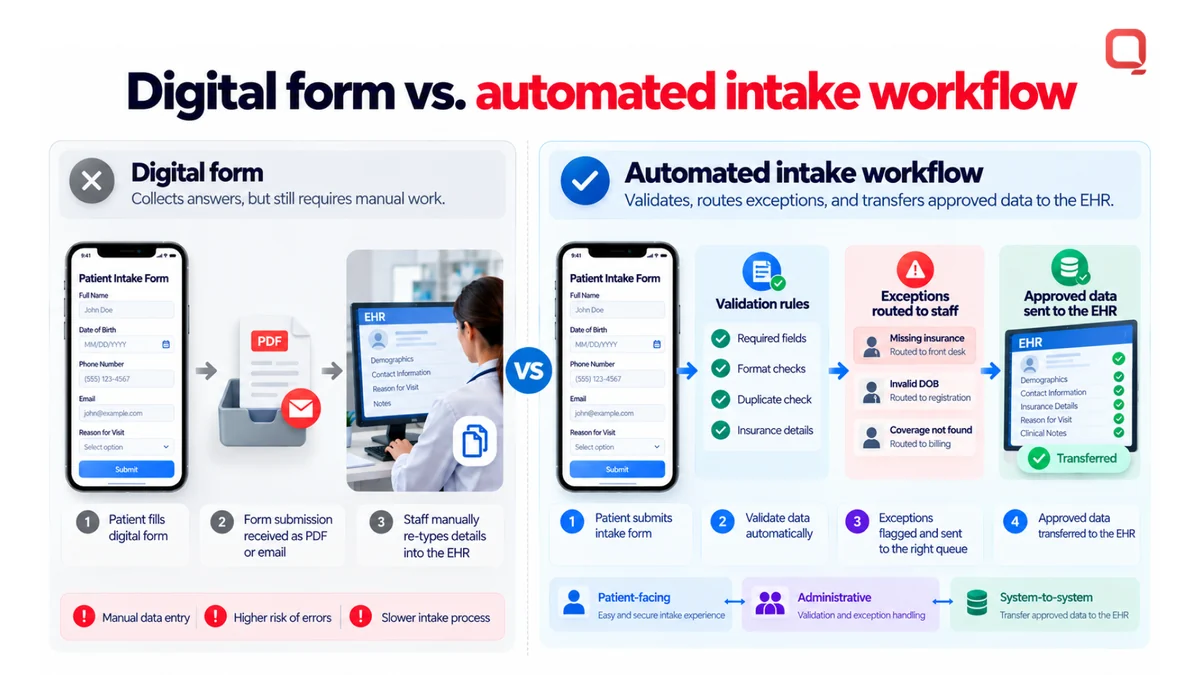
For example, a submitted form may contain a blank field or information that doesn’t match an existing record. Define whether the submission is held for staff review, returned for correction, or handled another way. Don’t assume every intake step can be automated safely. Establish responsibility and exception handling before implementation.
Who needs a custom intake solution?
A custom intake solution may suit provider organizations and health-tech teams whose workflows or integration boundaries do not align with configurable products. It can be relevant when intake spans multiple systems, requires specific staff review steps, or must work within existing technical constraints.
Configurable software may be a practical fit when its supported workflows, data exchange, and administrative controls meet the organization’s needs. Tailored engineering becomes more relevant when gaps would leave staff reconciling information manually or force changes to established clinical operations. The choice should rest on workflow fit, connected systems, and the effort required to maintain the solution, not on the number of form fields it can display.
Custom intake software isn’t automatically necessary because a clinic uses an older EHR, and a configurable product isn’t automatically sufficient because it offers digital forms. Document the current process, users, exceptions, and handoffs first. Then assess whether existing software supports that operating model or whether healthcare software engineering is needed to close specific workflow and integration gaps.
How Does Automated Patient Intake Work Across the Patient Journey?
Automated patient intake moves information from patient access through submission, validation, staff review, and transfer to connected systems. A reliable workflow identifies who acts at each step, what data moves, and how the team handles exceptions. EHR exchange involves more than sending a form: it also requires defined responses, corrections, and status tracking.
- Invitation or access: The patient starts from an organization-defined access point. The workflow may provide registration instructions or identify the visit. An expired invitation or a patient who cannot access the intake process needs a defined exception path.
- Information submission: The patient supplies the requested registration details and documents. The system records the submission for processing. An incomplete form, unsupported document, or interrupted session may need patient or staff follow-up.
- Validation: The software checks submitted data against project-defined rules, such as required fields or expected formats. These checks can flag missing or inconsistent entries, but they don’t establish whether clinical information is correct.
- Staff review: Administrative or clinical staff review items assigned to them under the workflow. They may correct an administrative error, request clarification, or route a question to the appropriate role. Conflicting information needs a defined owner, not an automatic overwrite.
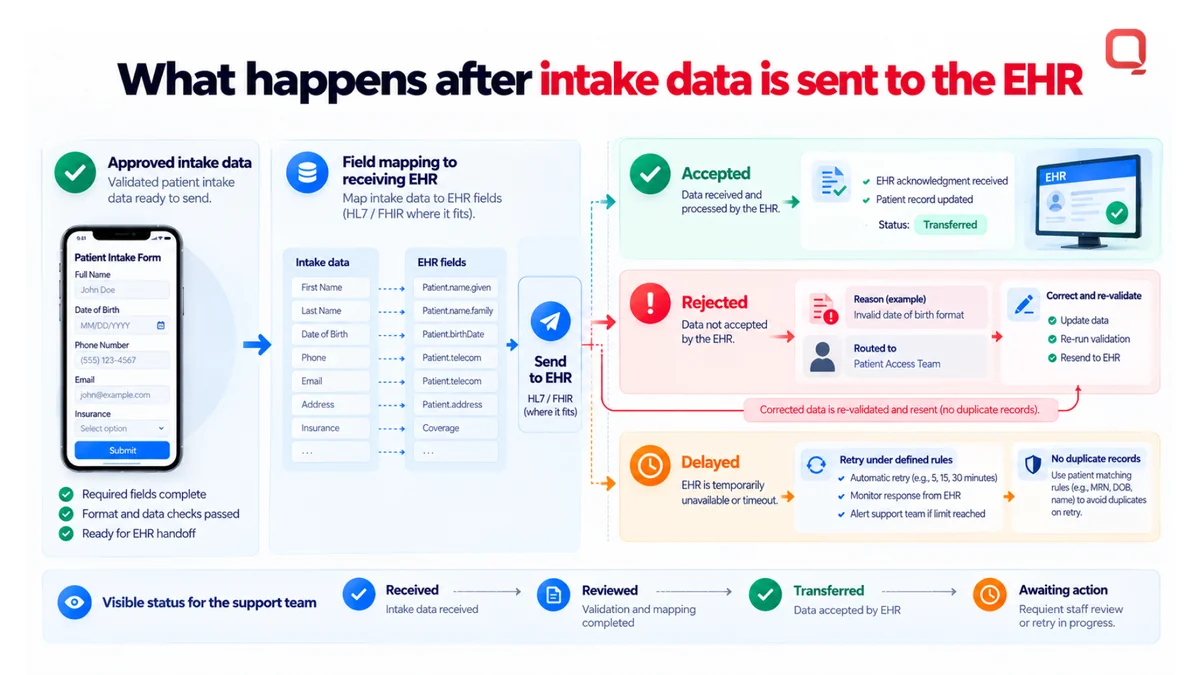
- System handoff: Approved data is mapped and sent to the receiving EHR or other connected system. A rejected or delayed transfer should produce a visible status and a next step, such as retrying under defined conditions or assigning the issue for staff correction.
Document extraction needs its own boundary. If document capture is in scope, optical character recognition (OCR) can extract text from an image or scanned document. Extraction is not validation. Staff review or other project-defined checks may still be needed before extracted data is accepted or transferred.
How should intake data move into an EHR?
Map every submitted field to the receiving system’s data model and workflow requirements before building the interface. HL7 and FHIR are interoperability approaches, but choosing a standard alone doesn’t guarantee that two systems exchange information as intended. The implementation must account for supported data, required fields, and receiving-system behavior.
Define how the integration handles acknowledgments, validation errors, and retries. A rejected message should remain identifiable, with a reason and a correction path. Retrying should follow explicit rules to avoid creating duplicate or conflicting records. Keep operational status visible to the team responsible for resolving failures.
What happens when intake is incomplete or inaccurate?
Incomplete, conflicting, or unreadable information should be flagged for the appropriate patient or staff review instead of silently treated as complete. Automated checks can identify a missing required value or a format mismatch. Administrative and clinical judgment remains with the people assigned to make those decisions.
Set clear ownership for corrections. Specify who can update each type of information, how the change is recorded, and whether corrected data must pass through validation again. Status visibility helps staff distinguish a received submission from one that is reviewed, transferred, or awaiting action.
For teams turning these workflow rules into an integration plan, discuss healthcare software engineering requirements with QSS Technosoft.
Should You Buy Patient Intake Software or Develop a Custom Solution?
Buy configurable patient intake software when it meets documented workflow and integration requirements. Consider custom development when existing tools leave important operational or system gaps. A hybrid approach can combine a configurable product with tailored integration or workflow components. The right choice follows actual constraints, not the assumption that custom software is always better.
| Decision factor | Configurable software | Custom development | Hybrid approach |
|---|---|---|---|
| Workflow fit | Works when existing options support the documented process. | Can be shaped around distinct organizational workflows. | Uses product workflows where they fit and custom components for specific gaps. |
| Integration boundaries | Depends on supported connections and their limits. | Integration behavior is designed for the project’s systems and requirements. | Connects a configurable product with tailored interfaces or services. |
| Customization | Bounded by available settings and configuration. | Can address requirements that configuration cannot support. | Targets customization where it adds operational value. |
| Ownership | Product operation and change depend on the software provider’s model. | The organization must define responsibility for the resulting software and its ongoing changes. | Responsibilities are shared across product configuration and custom components. |
| Maintenance | Less custom code can mean a smaller engineering maintenance scope. | The organization must plan for support, updates, and future changes. | Requires coordination between product changes and custom component maintenance. |
| Implementation complexity | Primarily shaped by configuration, workflow fit, and available integrations. | Includes engineering, integration, validation, and long-term support decisions. | Requires clear boundaries and ownership between product and custom work. |
Use this comparison against real scenarios, not a feature checklist alone. Trace an ordinary intake submission, a missing field, a conflicting patient detail, and a system handoff failure. The approach that handles these cases with clear ownership and manageable change is more relevant than one that looks comprehensive in a demonstration.
When can configurable patient intake software be enough?
Configurable software may be enough when its supported workflows and integrations meet requirements agreed by patient-facing, administrative, clinical, and technical teams. Test its limits against actual operating scenarios, including staff review and exceptions. If the product handles those cases without forcing disruptive process changes, fewer custom components can reduce engineering and ongoing maintenance scope.
Configuration still has boundaries. Document which settings can change, which workflows remain fixed, and how product updates affect local processes. That turns “it can be configured” into a concrete fit assessment.
When does custom patient intake software development make sense?
Custom patient intake software development may make sense when distinct workflows, integration requirements, or product needs are not addressed by existing tools. Custom healthcare software development can provide a path for those gaps, but it also creates responsibility for support, technical decisions, and future change management.
Define who owns each component, how changes are tested, and how integration behavior will be maintained as connected systems evolve. If a product meets core requirements with limited workarounds, custom development may add complexity without resolving a meaningful constraint. Choose the smallest approach that fits the workflow and can be sustained.
How Do You Plan and Validate an Automated Intake Software Project?
Plan an automated intake software project by bringing patient-facing, administrative, clinical, and technical stakeholders together before development begins. Map the workflow, define data and access rules, then test the complete patient-to-system handoff, including exceptions. Clear requirements make validation meaningful and expose operational gaps before they reach staff and patients.
Teams need to know what the system should do, what data it should exchange, and how exceptions should be handled. Without those details, a successful form submission can conceal a failed handoff or an unclear staff responsibility.
What should the project requirements cover?
Start with stakeholder discovery across the people who use, support, and connect the intake process. Document each intake stage, user role, required information, consent steps, and exception path. Record where the EHR/EMR and other connected systems begin and end, without assuming a particular vendor or interface.
- Workflow: Define who performs each action and what moves the submission forward.
- Data: Specify required fields, source information, receiving destinations, and mapping rules.
- Access: Describe which roles can view, review, change, or escalate information.
- Accountability: Set expectations for auditability, data handling, and support ownership.
- Exceptions: Document what happens when information is missing, inconsistent, or cannot be transferred.
Keep each requirement testable. “Staff can resolve a rejected submission” is a starting point. The project team should also define who sees the rejection, what information they need, and how a corrected submission proceeds.
How should the team test the workflow before launch?
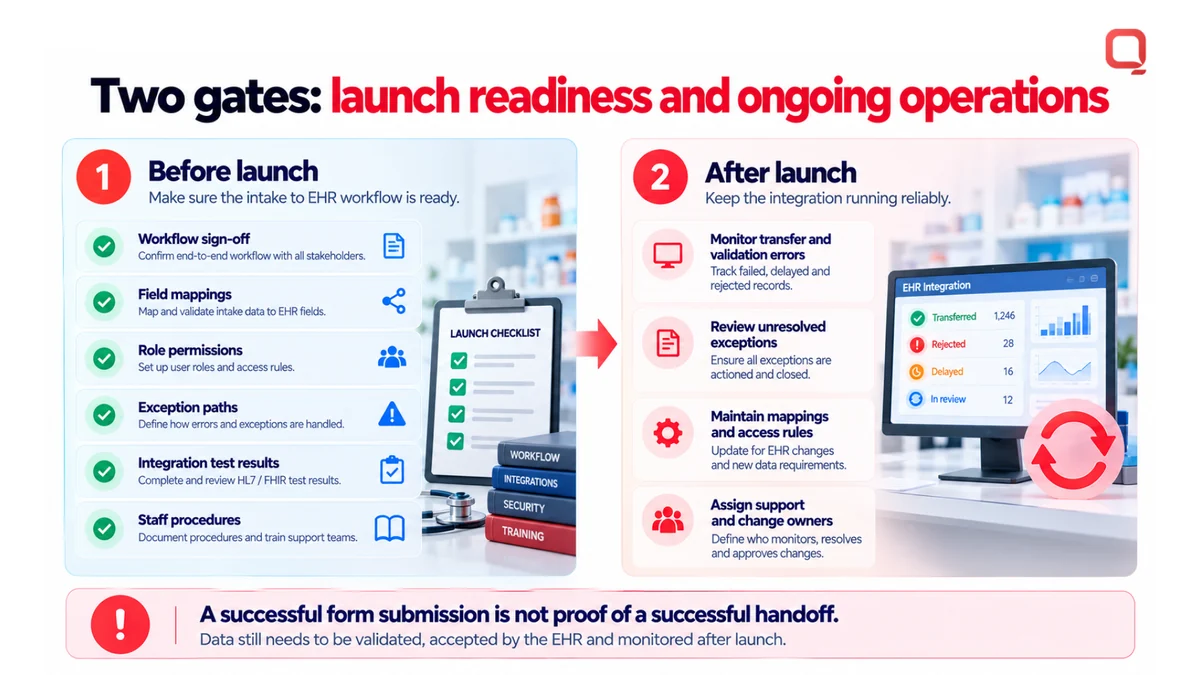
Test the workflow from the patient’s first action through staff review and system handoff. Use representative patient and staff scenarios, and protect sensitive test data according to the project’s data-handling plan. Include expected paths and failures. A successful form submission alone doesn’t prove the receiving system accepted or correctly handled the information.
- Submit complete and incomplete information, then confirm the expected status and next step.
- Test duplicate or conflicting information and verify that the workflow doesn’t silently overwrite data.
- Simulate integration failures and confirm that errors, retries, and staff follow-up are visible.
- Verify staff can find submission status, correct only permitted information, and escalate unresolved exceptions.
- Check that access permissions and audit records behave as defined in the requirements.
Treat launch readiness and ongoing operations as separate gates. A system can pass initial testing and still need active monitoring as workflows, connected systems, and organizational needs change.
- Before launch: Confirm workflow sign-off, field mappings, role permissions, exception paths, integration test results, and staff procedures.
- After launch: Monitor transfer and validation errors, review unresolved exceptions, maintain mappings and access rules, and assign owners for support and changes.
QSS Technosoft supports healthcare software engineering and interoperability planning for patient intake workflows. Discuss your intake project requirements with the team.
How Can QSS Technosoft Engineer Healthcare Patient Intake Software?
QSS Technosoft develops automated patient intake software as part of its healthcare software engineering work for US healthcare organizations and health-tech teams. Projects can bring patient engagement, EHR/EMR development and integration, and healthcare interoperability into one plan, with scope shaped by documented workflows, existing systems, and integration boundaries.
Intake software has to work within real operating conditions, including established clinical processes and systems that may not share the same data model. QSS Technosoft Inc. has a US presence and focuses on the US market. Its engineering team includes 250+ in-house engineers, and the company has delivered 400+ projects. These company-wide figures describe organizational scale, not a promised timeline or outcome for an intake project.
How does QSS approach intake workflow engineering?
QSS connects workflow discovery to architecture, development, integration, testing, and ongoing engineering responsibilities. A senior-led, architect-driven approach starts with project requirements and existing healthcare systems, then defines how each component should fit before implementation begins. This keeps interface decisions tied to operational needs rather than assuming every organization can change its workflow to suit a new application.
- Discover: Align patient-facing, administrative, clinical, and technical needs with the current intake process.
- Design: Define system boundaries, data movement, user responsibilities, and exception paths.
- Build and integrate: Develop the agreed components and connect them to the EHR/EMR environment through project-defined interfaces.
- Validate and maintain: Test the workflow and handoffs, then plan ownership for support and future changes.
The integration approach depends on the systems involved. QSS’s healthcare interoperability and HL7 Interface Development capabilities can inform how the project handles exchange requirements. HL7 and FHIR do not guarantee compatibility on their own. The selected approach must fit the receiving systems and defined data requirements.
Security also belongs in the engineering plan. QSS offers HIPAA-compliant app development, but compliance should not be treated as an automatic result of selecting a development service. Project teams need to define applicable data handling, access, and security controls, then validate them within the solution’s intended environment.
What is the next step for a healthcare intake project?
For CIOs, CTOs, CMIOs, product leaders, and interoperability teams, begin with three practical inputs: the intake workflow, the systems it must connect with, and the points where data or responsibility crosses a system boundary. These details help establish whether the project calls for configuration, custom engineering, or a combination. They also give the team a grounded basis for architecture and validation planning.
Discuss your workflow needs, current systems, and integration boundaries with QSS Technosoft to frame the engineering scope.
Discuss your patient intake software project
Move Your Intake Project Toward a Clear Engineering Plan
The next step in automated patient intake software development is to agree on what the project should solve first. Choose a defined workflow boundary, identify the decision-makers responsible for scope, and record assumptions that could affect delivery. A focused starting point gives clinical, operations, and technical teams a shared basis for prioritizing work.
For US healthcare organizations, QSS Technosoft brings a US-focused healthcare software engineering perspective to these planning discussions. The aim is not to automate every intake task at once. It is to establish a practical direction that fits the organization’s priorities and can evolve as those priorities change.
Bring your project goals and key decisions to a conversation with QSS Technosoft. Discuss your patient intake software project.
Start with a clear scope, align the people accountable for it, and move forward with confidence.
Map Your Intake Workflow From Form to EHR
Bring your current intake steps, the exceptions staff handle today, and the EHR/EMR and patient portal software it must connect with. As a custom healthcare software development company and EHR software development company, our engineers provide healthcare software development services for automated patient intake software development, from digital intake forms and validation rules to HL7 FHIR integration tools for healthcare and visible handoff status.
Discuss your patient intake software project →