Custom Pharmacy Management System Development: A Buyer’s Guide
 By Rashmi Kanti
QSS Technosoft
October 21, 2026
13 min read
By Rashmi Kanti
QSS Technosoft
October 21, 2026
13 min read
Custom pharmacy management system development creates software around a pharmacy’s workflows, data, and integration needs. It can connect prescription processing, dispensing, inventory, billing, and reporting when existing software does not fit the operation. The right approach starts with documented requirements, then compares custom, configurable, and hybrid options against workflow fit and long-term ownership.
Custom software can address workflow gaps, but it also introduces decisions about integrations, testing, and ongoing maintenance. Define the pharmacy’s needs before choosing an architecture or committing to a build.
This guide explains how to assess pharmacy workflows, integration needs, and security considerations before deciding on a delivery approach. Last updated: October 19, 2026.
Quick Answer
Custom pharmacy management system development builds pharmacy management software around your own prescription, dispensing, inventory, billing, and reporting workflows. Start by mapping those workflows and the gaps existing software cannot cover, then compare custom, configurable, and hybrid options on workflow fit, integration needs, change control, ownership, and maintenance. If you build, define data and interfaces first, using HL7 FHIR integration tools for healthcare only where the connected EHR and billing systems call for them, then build, test exception paths, and plan operations. Treat HIPAA-compliant software development as engineering support for technical safeguards: compliance still depends on the pharmacy’s own policies and practices.
What is custom pharmacy management system development?
Custom pharmacy management software is a system designed around a pharmacy’s specific workflows, integrations, and operational requirements. Custom pharmacy management system development shapes how the system handles work instead of requiring every pharmacy to follow the same configuration. It is relevant to US pharmacies, pharmacy chains, healthcare providers, and health-tech teams assessing whether existing software fits their operations.
A pharmacy management system coordinates operational work across the pharmacy. A single-purpose pharmacy tool handles one defined task, while a pharmacy management system can connect multiple tasks and the information they depend on. For an overview of the category’s history and core functions, see pharmacy management system Wikipedia.
Disconnected prescription, inventory, billing, and reporting processes can make it harder to see where work stands and how one task affects another. The goal of a custom system is not to add features for their own sake. It is to define how information and work move through the pharmacy, including where staff review, update, or hand off a task.
Which pharmacy operations can a management system support?
A pharmacy management system can support different parts of the medication workflow. The right scope depends on the pharmacy’s operating model and existing systems. Common areas to assess include:
- Prescription intake and processing: Capture incoming prescriptions and move them through the pharmacy’s review steps.
- Dispensing: Track prescription status as staff prepare and complete dispensing tasks.
- Inventory: Record stock activity and provide the inventory information staff need for daily work.
- Billing: Connect relevant prescription details with the pharmacy’s billing workflow.
- Reporting: Present operational information for monitoring activity and reviewing performance.
These are potential requirements, not a mandatory feature checklist. One pharmacy may need closer coordination between prescription processing and inventory. Another may prioritize billing connections with existing healthcare systems. Define the operational need first, then decide which functions belong in the system.
When does a pharmacy need a custom system?
Custom development is worth evaluating when important workflows do not fit an existing configuration, or when required integrations need system behavior that standard settings cannot support. It may also suit a pharmacy that needs coordinated processes across several operational areas. The deciding factor is a documented gap, not a preference for bespoke software.
Map the current workflow before proposing a build. Identify where staff re-enter information, where handoffs stall, and which existing systems must exchange data. Then separate essential requirements from convenient additions. This helps determine whether a configuration change, a hybrid approach, or custom software is proportionate to the problem.
There is a trade-off. Custom software gives the organization control over system behavior, but it also creates ongoing responsibility for maintenance and updates. If an existing product supports the pharmacy’s workflows and integration needs with manageable configuration, a full custom build may not be necessary. Evaluate fit, ownership, and long-term support together.
Which features should a custom pharmacy management system include?
A custom pharmacy management system should support the workflows staff need to complete and connect, with clear status visibility and useful exception handling. Start with prescription processing, dispensing, inventory, billing, and reporting, then prioritize capabilities based on the pharmacy’s operating model. Not every pharmacy needs every feature.
For custom pharmacy management system development, separate core operational requirements from additions that depend on specific workflows. A feature belongs in the initial scope when staff need it to complete or hand off essential work. Assess other capabilities against their purpose, dependencies, and ongoing support needs.
| Workflow | User need | System capability | Validation question |
|---|---|---|---|
| Prescription processing | Know what needs review or action | Prescription records and visible workflow status | Can staff identify the next step and any hold? |
| Dispensing | Coordinate preparation and completion | Status transitions tied to defined staff tasks | Does the record show whether dispensing is pending or complete? |
| Inventory | Understand stock relevant to pharmacy work | Inventory records connected to the agreed workflow | Which events should update inventory, and who handles exceptions? |
| Billing | Process and review pharmacy-related billing work | Billing workflow linked to relevant prescription information | How are rejected or incomplete items routed? |
| Reporting | Review operational activity and make decisions | Reports based on agreed data and user roles | Which decisions should each report support? |
How should prescription, dispensing, and inventory workflows connect?
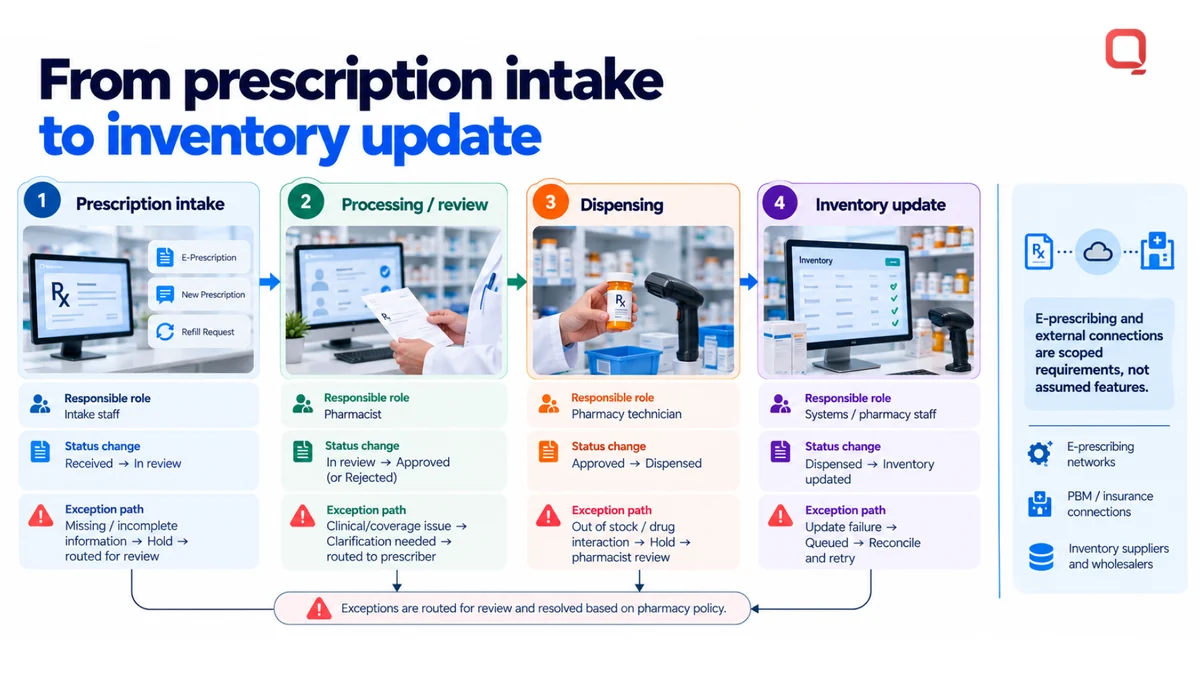
Define the intended path from prescription intake to processing, dispensing, and any related inventory update. For each step, specify the responsible role, the status change, and what happens when information is missing or a task cannot proceed. Staff need to distinguish work that is in progress from work that requires review. E-prescribing and other external connections should be scoped as project requirements, not assumed features.
Which billing and reporting capabilities belong in scope?
Billing requirements should reflect the pharmacy’s actual handoffs, including how staff identify incomplete items and review claim outcomes. Keep the system boundary clear between pharmacy billing and broader healthcare financial workflows. Reports should answer defined questions for operational leads and executives, such as what work is pending, where exceptions occur, and which activity needs review. Avoid adding metrics no one uses.
Before locking scope, walk through representative tasks with pharmacy staff and decision-makers. Confirm what data each step needs, who can change its status, and how exceptions reach the right person. That turns a feature list into testable requirements. If your team is defining these workflows, discuss the requirements with QSS.
Custom development or existing pharmacy software: how should you compare?
Compare custom development, configurable pharmacy software, and a hybrid approach against documented workflows, integration needs, change control, ownership, and maintenance responsibility. Existing software may fit established operations when it supports the necessary integrations. Custom development can address distinct requirements, but it adds complexity unless scope, decision-making, and long-term ownership are explicit.
Start with the operational gap, not a feature wishlist. For each requirement, record who needs it, what task it supports, which systems or data it depends on, and how the team will verify that it works. Then compare approaches using the same criteria.
| Decision factor | Custom development | Configurable software | Hybrid approach |
|---|---|---|---|
| Workflow fit | System behavior can be designed around documented workflows. | Workflows use available settings and supported processes. | Configure standard tasks and customize specific gaps. |
| Integration needs | Interfaces can be scoped for defined system connections. | Fit depends on available integrations and configuration options. | Use existing connections where they fit, and build around exceptions. |
| Change control | Changes follow the project’s agreed governance and release process. | Changes depend on product settings and vendor release options. | Changes are divided between configuration and custom components. |
| Ownership | Ownership terms for code, data, and technical documentation must be clear. | Use is governed by the product and its service terms. | Ownership may differ between the configured product and custom work. |
| Maintenance responsibility | The organization needs a plan for ongoing support and updates. | Maintenance responsibilities are shaped by the product arrangement. | Responsibility is shared across product and custom components. |
The comparison is useful only when each option is assessed against the same real tasks. A long feature list can obscure a basic mismatch, such as a workflow that requires a handoff the system cannot represent. Validate the steps staff perform, including exceptions and downstream dependencies.
When can configurable software be the more practical fit?
Configurable software may be practical when pharmacy workflows are established and the product supports the required integrations and operational steps. Evaluate whether staff can complete real tasks with the available settings, not how many features appear in a brochure. Limited flexibility may matter if processes change, but it can be an acceptable trade-off when the configured workflow meets current needs.
When can custom Pharmacy Management Software Development make sense?
Custom Pharmacy Management Software Development may fit distinct workflows, required integrations, or product goals that existing configuration cannot adequately support. It is not automatically lower risk or lower effort. Custom pharmacy management system development should follow documented requirements, with named owners for decisions, maintenance, and future changes. Otherwise, added scope can create a system that is harder to test and sustain.
Before choosing, identify which requirements are essential, which approach supports them, and who will own the system after implementation. If configuration meets the need, avoid rebuilding the same capability. If a custom component is justified, keep its purpose and boundaries explicit.
How should you plan integrations, security, and implementation?
Plan pharmacy system implementation in a deliberate sequence: map workflows, define data, design interfaces, build, test, and prepare for ongoing operations. This gives technical teams and pharmacy stakeholders a shared basis for decisions before development begins. HL7 and FHIR are relevant when the project’s healthcare data exchange requirements call for them, not simply because they are common terms.
Define interface and data-flow requirements before implementation. Otherwise, the team risks building connections that move the wrong information at the wrong time.
What should pharmacy teams map before development?
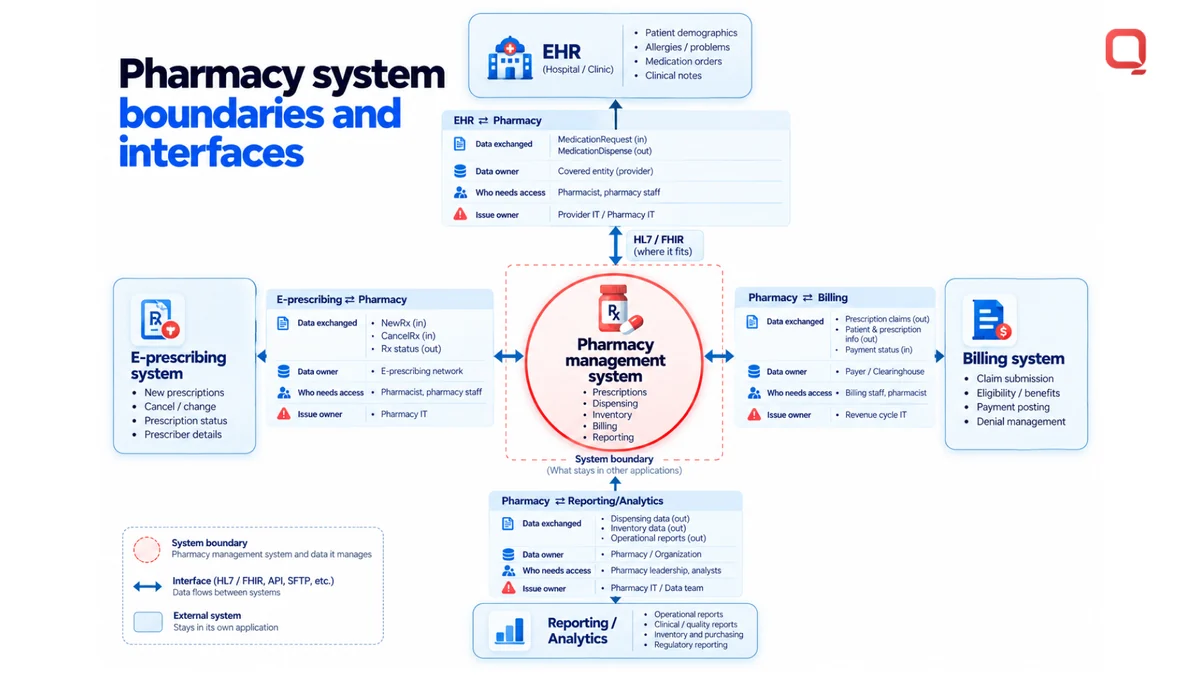
Start with the people and systems involved in each workflow. Record user roles, handoffs, exceptions, and the boundaries between the pharmacy management system and other applications. Identify relevant EHR, billing, and healthcare interfaces without assuming a particular vendor or connection method.
Then document the information exchanged at each boundary: what data is sent or received, who owns it, who needs access, and which team is responsible for resolving problems. This groundwork helps distinguish an interface requirement from a workflow change and keeps assumptions visible.
How can teams validate security and interoperability?
Validation should establish whether information reaches the intended system, staff can complete their assigned workflows, and access matches defined user roles. QSS brings HL7 and FHIR interoperability experience to healthcare software engineering. The project’s specific interfaces and expected behaviors still need to be defined and tested against its requirements.
HL7 is a set of standards used to exchange healthcare information. FHIR, or Fast Healthcare Interoperability Resources, is an HL7 standard for exchanging healthcare data. Use either where it fits the systems and data flows in scope. A standard alone does not establish that an interface will work as intended. Teams need to agree on the data, workflow, and expected result.
For custom pharmacy management system development, use a staged implementation plan that makes requirements testable:
- Map workflows: Document roles, steps, handoffs, exceptions, and system boundaries.
- Define data: Specify the information exchanged, its source, its destination, and access needs.
- Design interfaces: Agree on exchange standards and expected behavior for each connection.
- Build and test: Verify interfaces, access controls, and complete workflows, including exception paths.
- Plan operations: Assign responsibility for monitoring, issue handling, maintenance, and future changes.
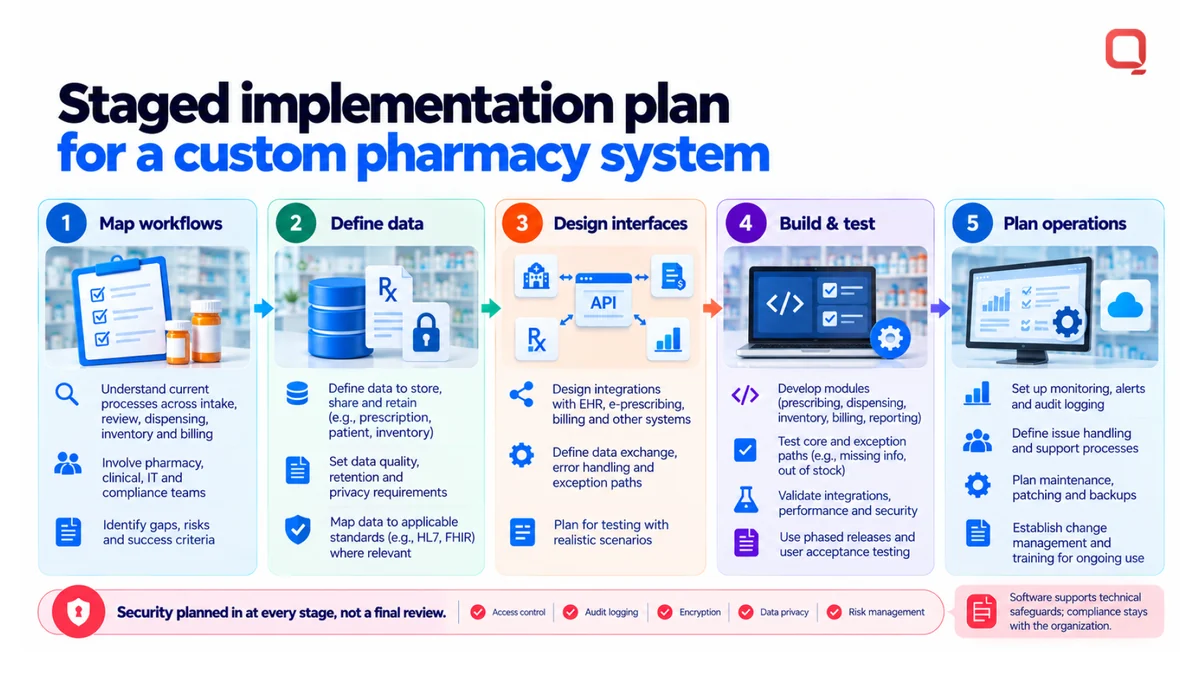
Security planning should be part of those decisions, not a final review after features are built. HIPAA compliance is not something software alone can guarantee. Engineering can support technical safeguards, but the healthcare organization must address its broader administrative and physical safeguards with its compliance and legal teams. This section is implementation guidance, not legal advice.
QSS’s healthcare interoperability and HIPAA-focused engineering capabilities support teams planning pharmacy software alongside existing healthcare systems. Discuss your pharmacy integration and implementation requirements.
How can QSS support Pharmacy Management Software Development?
QSS Technosoft provides Pharmacy Management Software Development for healthcare organizations, supported by healthcare interoperability and HL7 and FHIR experience. For US pharmacies and health-tech teams, a project discussion can translate operating needs into a defined scope for workflows, integrations, security considerations, and delivery. Start with a clear project brief, not a pile of feature requests.
What should a pharmacy project brief contain?
A useful brief gives the engineering team context to assess the pharmacy’s operating model and identify decisions that need clarification. Keep it practical and specific. Include:
- Target users: Identify the staff and decision-makers who will use the system or oversee its workflows.
- Current workflows: Describe today’s work, including pain points, handoffs, and exceptions.
- System boundaries: Specify what the pharmacy system should handle and which processes remain in other applications.
- Existing systems and interfaces: Name relevant EHR, billing, and other healthcare systems, along with known data exchange needs.
- Data and security needs: Describe the information involved, access roles, and project security considerations.
- Release priorities: Separate initial-release requirements from capabilities that can be considered for later phases.
This brief keeps custom pharmacy management system development tied to operational requirements. It also gives stakeholders a shared reference when making trade-offs about scope, integration, and delivery.
What happens in an initial development discussion?
An initial discussion can bring pharmacy operations and technical decision-makers together to review the brief, clarify constraints, and identify open questions. Participants may include pharmacy operations leaders, interoperability teams, and product or engineering stakeholders. The aim is to connect day-to-day workflows with the systems and data they depend on.
QSS Technosoft is a US-focused healthcare software engineering partner. Its pharmacy work is supported by healthcare interoperability capabilities, including HL7 and FHIR experience. These capabilities support project planning, but they do not mean a specific pharmacy system is automatically compliant or that an integration outcome is guaranteed.
Before the discussion, identify the workflows and systems in scope, the project constraints, and who will own key decisions. This preparation helps clarify what needs to be built, what should remain outside the system, and which questions need further definition. It gives the team a grounded starting point without committing prematurely to a feature list.
Turn the next decision into a clear project brief
Before committing to a build, align the people who will approve, use, and maintain the system. Decide who owns scope decisions, how trade-offs will be resolved, and what evidence will show that the first release is ready for operational use.
Turn open questions into decisions: which workflow needs attention first, which systems are in scope, and what should wait for a later phase? Clear answers keep the project grounded in pharmacy priorities rather than an expanding list of feature requests.
A focused discussion with QSS can help your team assess project needs and constraints, then shape a practical next step. Bring the right stakeholders and an honest picture of the work ahead.
Discuss your pharmacy software project.
Bring Your Pharmacy Workflow Gap. Leave With a Defined Scope.
Share your prescription, dispensing, inventory, billing, and reporting workflows and the systems they depend on. Our engineers provide pharmacy management software development and healthcare software development services, from custom healthcare software development and HL7 FHIR integration tools for healthcare to HIPAA-compliant software development practices that support your pharmacy’s own compliance program.
Discuss your pharmacy software project →