Cloud Migration Consulting Services: Myths, Trade-Offs, and What Works
 By Vineet Bhardwaj
QSS Technosoft
October 1, 2026
14 min read
By Vineet Bhardwaj
QSS Technosoft
October 1, 2026
14 min read
What if the biggest risk in a healthcare cloud migration isn’t the move itself, but assuming every workload should move the same way? Cloud migration consulting services can help clarify the path, but a roadmap is only useful if it accounts for clinical dependencies, legacy integrations, and day-to-day operations.
That concern is justified. A migration can affect systems staff rely on to deliver care and run the business. Moving data to a cloud platform does not, by itself, resolve questions about security, HIPAA, or who manages each part of the environment.
This article separates common cloud migration myths from engineering realities, then offers a practical framework for assessing workloads, dependencies, risks, and operational needs. You’ll learn how to compare lift-and-shift with modernization, plan for continuity, and evaluate a partner beyond its promises.
QSS Technosoft is a software engineering company with healthcare experience and capabilities in cloud engineering, DevOps, and legacy system modernization. The goal here is practical: build a migration plan that fits the systems you have and the care and business operations that depend on them.
Quick Answer
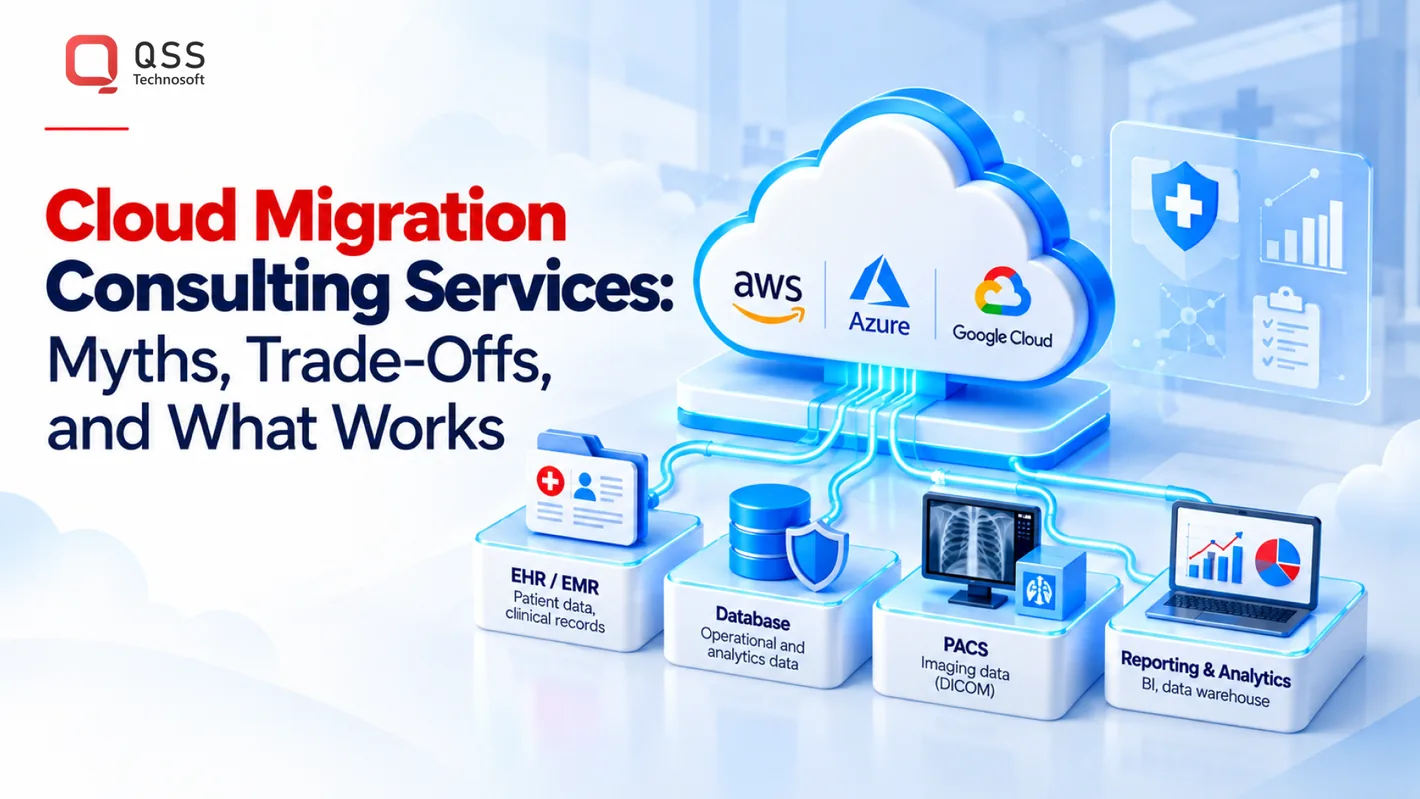
Cloud computing in healthcare doesn’t automatically cut cost or complexity, and lift-and-shift isn’t automatically the safest route. Good cloud migration consulting services start with discovery: map each workload’s owner, databases, interfaces, data flows (including EHR/EMR, HL7/FHIR, and DICOM/PACS connections), risks, and operational needs. Then choose rehosting, replatforming, or refactoring per workload, evaluate AWS, Azure, or Google Cloud against those needs, and plan testing, cutover, rollback, and post-migration ownership. Moving data to the cloud doesn’t make it HIPAA compliant on its own, so your security and compliance teams validate controls and responsibilities. When choosing a partner, ask who leads architecture decisions and how scope, risks, and handoffs will be documented.
Cloud Migration Consulting Services: Which Common Myths Create Risk?
Worrying about disruption, unclear scope, or how healthcare information will be handled during a migration isn’t resistance to change. It’s sound operational judgment. A workload rarely moves alone: applications connect to databases, interfaces, users, and routines that staff depend on. Cloud migration consulting services should identify those connections before anyone commits to a schedule or approach.
Cloud platforms provide a different way to run and manage technology. They don’t remove the need to understand the systems underneath. A neutral overview of cloud computing can help ground the discussion, but migration decisions depend on your actual workloads and operating context.
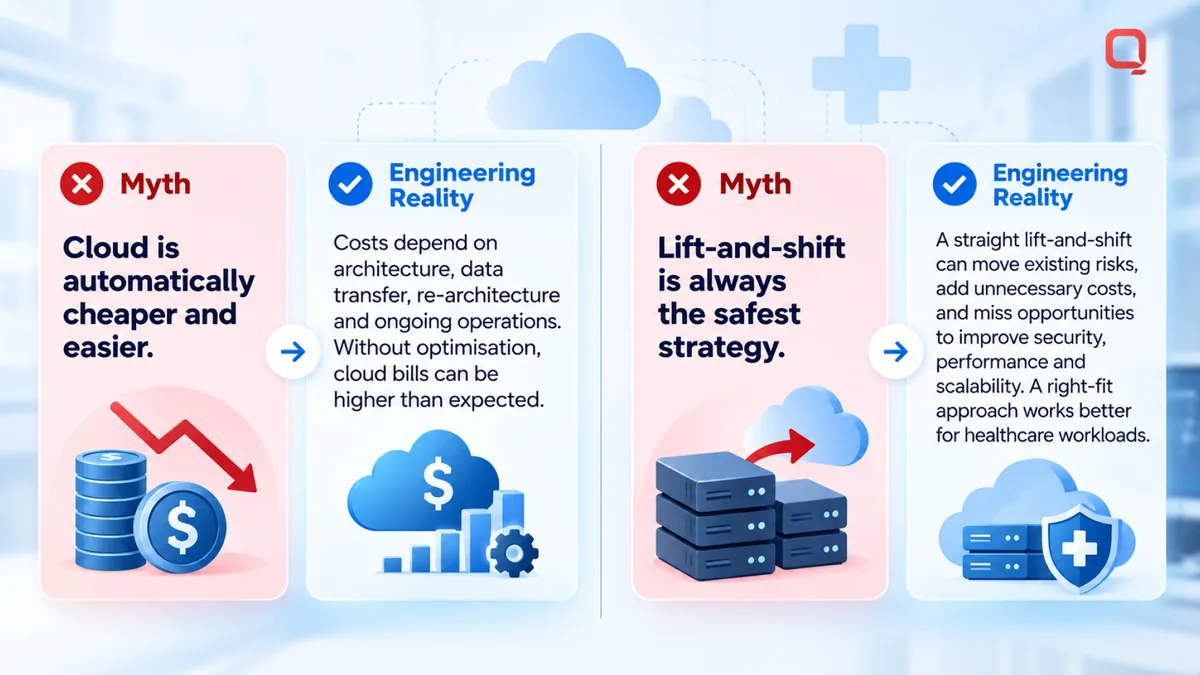
Myth: Cloud migration automatically makes systems cheaper and easier to manage
The claim: Move infrastructure to the cloud and both costs and complexity fall.
The caveat: Changing where a workload runs doesn’t automatically reduce the work required to support it. Teams still need to maintain applications, manage the environment, and handle ongoing engineering tasks. The effort and expense depend on the workload, its architecture and usage, and the selected cloud environment.
For example, moving an application without reviewing its database connections or links to other systems may preserve the same operational friction in a new location. Separate infrastructure changes from the total effort of running the system. Ask what will change after migration, which responsibilities will remain with your team, and what assumptions shaped the proposed design. Don’t accept “cloud is cheaper” as a plan. Ask what is changing and why.
Myth: Lift-and-shift is always the safest migration strategy
The claim: Moving an application with limited redesign is the least risky option for every workload.
The caveat: Lift-and-shift can limit application changes during the move, but it doesn’t make every application a good fit for direct transfer. Legacy dependencies, connections to other systems, and performance needs all affect whether the approach will work as intended. Minimal redesign may also leave existing limitations untouched.
Consider a healthcare application that exchanges information with an EHR and supports staff workflows. Moving it with limited changes may sound straightforward, but its interfaces, database connections, and day-to-day use still need review. If a dependency behaves differently in the new environment, the application could move successfully while the workflow around it breaks. That’s why “safest” must be judged against the specific system, not assumed from the migration label.
Lift-and-shift is one option, not a default. Map dependencies, data flows, and operational impact first. Then decide whether to move the application largely as-is or investigate another approach. This gives technical and clinical teams a specific decision to evaluate instead of a broad cloud promise.
What Cloud Migration Consulting Services Should Assess Before Moving Workloads
A migration assessment establishes what an organization runs, how systems connect, what information moves between them, and what they need to keep operating. Cloud migration consulting services should use that picture to inform the approach, rather than start with a preferred platform or blanket timeline.
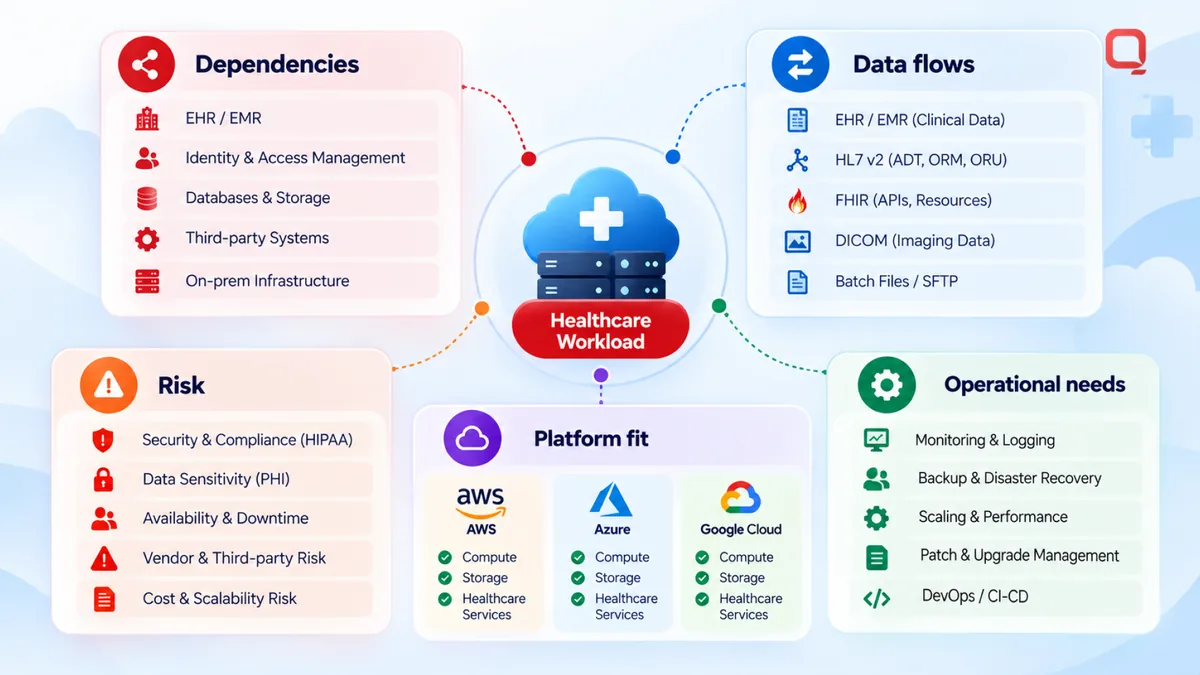
Assessment in practice: Document workloads, dependencies, data flows, risks, and operational needs before deciding what to move, when to move it, and how to support it afterward.
How do teams map applications, data, and dependencies?
Start with an inventory that connects technology to ownership and use. For each application, identify its owner, databases, interfaces, connected systems, and the teams or workflows that rely on it. The NIST Definition of Cloud Computing offers context on cloud service and deployment models, but it doesn’t determine how a particular healthcare workload should move.
In a healthcare environment, trace relevant connections to EHR/EMR platforms and interoperability workflows, including HL7 or FHIR interfaces where present. Follow the data, not just the application diagram. Note where sensitive information is stored, accessed, transferred, and used, then consider how that handling fits the organization’s HIPAA context. This discovery work does not replace the organization’s compliance review.
Some dependencies won’t be clear at first. Record them as open discovery items and investigate before deciding they can be removed. A connection that looks unused may still support a report, interface, or staff workflow.
Which cloud and platform choices need evaluation?
AWS, Azure, and Google Cloud Platform are options to evaluate against the organization’s needs. Compare them in the context of existing workloads, architecture, operational capacity, and the environment the organization intends to run. There’s no universal winner. Choosing a platform before workload discovery risks solving the wrong problem.
Technology choices need the same discipline. Docker, Kubernetes, and Terraform may fit some architectures, but they aren’t automatic requirements for a migration. Examine the application and the team’s ability to operate the resulting environment first. A tool can add value, or add another layer to maintain.
A useful assessment connects each workload to its dependencies, data flows, risk, platform fit, and ongoing operational needs.
That record helps teams sequence work around real connections and user impact, rather than treating every system as an isolated move.
If you’re mapping a healthcare migration and want to discuss the workload and platform questions involved, discuss your migration needs with QSS.
How to Compare Cloud Migration Approaches for Healthcare Workloads
Rehosting, replatforming, and refactoring describe different levels of change, but teams may use these terms differently. Confirm what each means in the project scope before comparing proposals. The labels matter less than the work involved, the dependencies affected, and who will operate the result.
“The migration approach should follow workload needs, not a one-size-fits-all preference.”
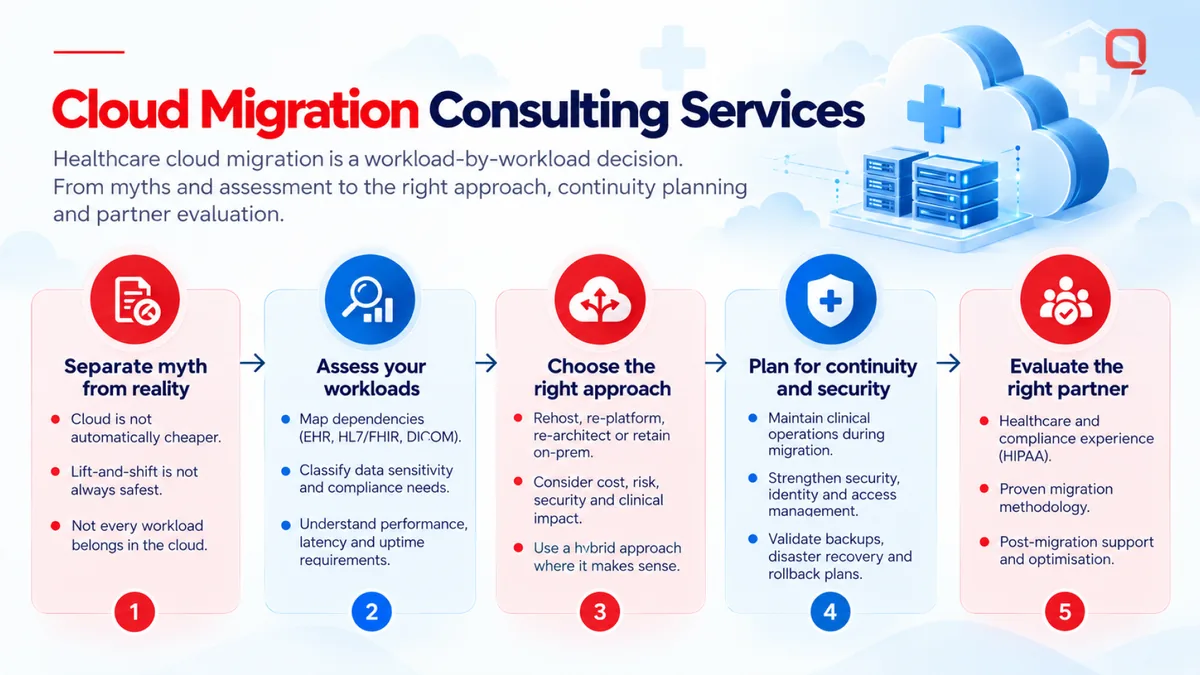
One healthcare organization may rehost a relatively isolated application, make targeted platform changes to another, and plan deeper modernization for a third. Choose an approach for each workload.
When might rehosting, replatforming, or refactoring be considered?
Use the comparison as a starting point, not a verdict. Actual effort depends on the application’s architecture and the project’s defined scope.
| Approach | Application change | Dependency complexity | Operational impact | Reasons to investigate |
|---|---|---|---|---|
| Rehosting | Move with limited redesign. | Existing connections generally remain relevant and need review. | May preserve current operating patterns and limitations. | Consider when limiting application changes is a priority, while checking whether the workload fits the destination environment. |
| Replatforming | Make targeted changes to how the application runs. | Databases, interfaces, and linked services can complicate the change. | May alter deployment or support tasks, so teams should assess the new responsibilities. | Investigate when specific platform adjustments are part of the goal and dependencies can be tested. |
| Refactoring | Change application design or code more deeply. | Requires a clear view of connected components and affected workflows. | Can change how the application is maintained and operated. | Consider when modernization goals justify the added engineering scope and review. |
Rehosting is not automatically faster or cheaper, and refactoring is not automatically the better long-term choice. Each approach has trade-offs. Define the intended application changes, tests, operational handoffs, and scope limits before treating a label as a commitment.
How do healthcare data and interoperability shape the decision?
Review data flows, availability needs, and integration dependencies as part of the assessment. For example, an application exchanging information through HL7 or FHIR interfaces may need coordination with connected systems. A DICOM/PACS workload may have different data movement and operational considerations. These examples don’t dictate a migration method. They show why workload context matters.
Map the workflows that rely on each connection and decide how teams will test them. Ask security and compliance teams to validate applicable controls and data-handling expectations for the selected approach. Healthcare cloud migration is engineering work, but its boundaries must be reviewed with the people accountable for security, compliance, and operations.
How to Prepare for Cloud Migration: A Practical Readiness Checklist
A readiness checklist turns migration intent into work people can review, assign, and test. Keep it specific to each workload. A clinical application, reporting tool, and administrative system can have different dependencies, risks, and cutover needs, even when they’re part of the same program.
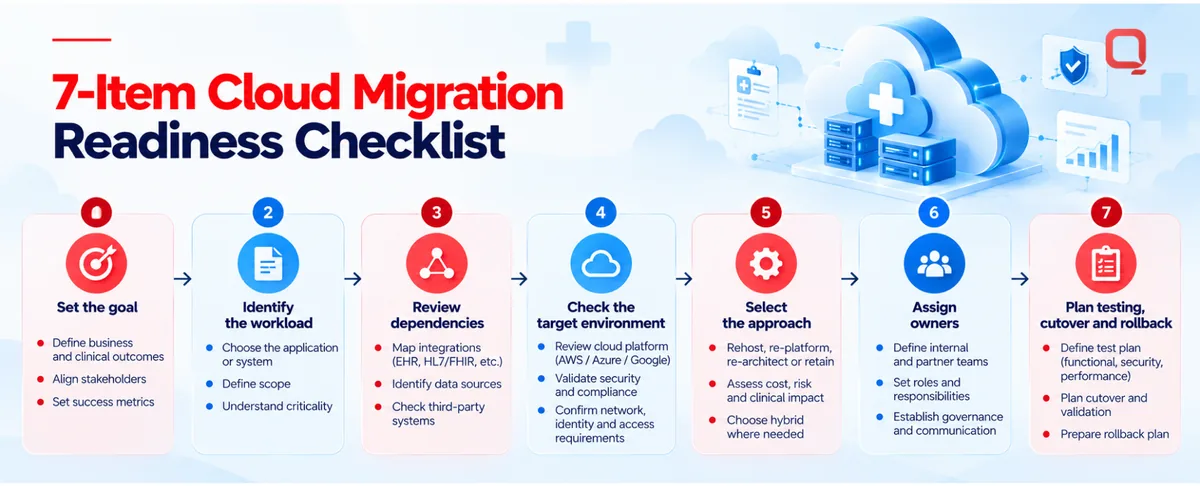
What should the migration readiness checklist cover?
- Set the goal. Record why the workload is being moved and what a successful outcome means. Avoid broad aims that can’t guide technical decisions.
- Identify the workload. Name the application owner, users, databases, interfaces, data flows, and known technical constraints. Mark unknowns for discovery rather than treating them as resolved.
- Review dependencies. Trace connections to other applications and workflows. Confirm which teams need to participate in testing and cutover decisions.
- Check the target environment. Confirm the intended cloud environment and assess whether the workload’s architecture and operational needs fit. Finalize scope after this review.
- Select the approach. Document the planned level of application change and why it fits the workload. Note assumptions that could affect scope or sequencing.
- Assign review and decision owners. Identify who is responsible for security and HIPAA-related review, who approves test results, who makes the cutover decision, and who owns operations afterward. Involve the organization’s responsible security and compliance teams to validate applicable expectations.
- Plan testing, cutover, and rollback. Define what needs to be tested, how the team will judge readiness, who authorizes the transition, and what conditions would trigger rollback. Tailor the plan to the system’s risk and business context rather than relying on a generic template.
What should happen after migration and cutover?
Moving a workload is not the finish line. Validate that the application behaves as expected, connected systems exchange information correctly, and authorized users can access the functions they need. Review operational monitoring as well, so the team can observe the live environment and identify issues that need attention.
Make ownership explicit before cutover. Clarify who maintains the cloud infrastructure, application, integrations, and operational processes once the workload is live. If responsibilities are split between internal teams and a partner, document handoffs and escalation paths. Unclear ownership can leave problems unresolved even when the migration itself appears complete.
Use cloud migration consulting services to help turn these decisions into a workload-specific plan, while keeping internal owners involved in approvals and operational handoffs. A checklist is useful only when someone owns each action and the team knows what evidence supports moving forward.
Want to review your organization’s migration readiness and open questions? Start a conversation with QSS about migration readiness.
How to Choose Cloud Migration Consulting Services for a Healthcare Organization
The right partner should do more than recommend a cloud platform. Look for engineering depth across architecture, legacy modernization, healthcare integrations, and the work required to operate systems after migration. A credible discussion gets specific about your workloads and constraints instead of forcing every application into the same plan.
What should you ask a cloud migration consulting partner?
Use direct questions to check whether a proposed plan is grounded in your environment:
- How will you discover dependencies? Ask how the team will identify application owners, databases, interfaces, data flows, and less visible connections before recommending a workload-specific approach.
- How will healthcare context shape planning? Ask how sensitive data handling, HIPAA-related considerations, and interoperability connections will be considered. Clarify how your security and compliance teams will validate applicable controls and responsibilities.
- Who leads architecture decisions? Identify who evaluates the target environment and migration approach, and how decisions, assumptions, risks, and scope changes will be documented.
- Who owns delivery and operations? Confirm responsibilities for testing, cutover coordination, issue handling, and ongoing infrastructure and application operations. Get the handoffs in writing.
Listen for clear answers, not just confidence. If the partner can’t explain what it needs to learn, who makes decisions, or how responsibilities are recorded, the plan may have gaps before migration work begins.
What makes QSS relevant to healthcare cloud migration?
QSS Technosoft provides software engineering services that include cloud migration, Cloud & Platform Engineering, and Cloud Engineering & DevOps. Its cloud experience includes AWS, Azure, and Google Cloud Platform. These capabilities are a starting point for discussion, not a substitute for checking how a proposed team will handle your specific architecture, integrations, and operating needs.
Healthcare migrations also intersect with legacy systems and interoperability. Ask how a partner will account for existing connections and workflows, and how its migration planning relates to legacy modernization. Keep HIPAA-related review grounded in your organization’s security and compliance processes. A platform name or general compliance statement is no substitute for documented scope and ownership.
Cloud migration consulting services are a fit when the engagement makes the hard decisions visible: what moves, what changes, what must be tested, and who supports the result. Compare partners on the clarity of their engineering approach and the practicality of their handoffs, not on broad promises.
To discuss your project requirements with QSS, start with QSS contact details and bring the workloads, dependencies, and open questions your team needs to resolve.
Build a Migration Plan Around the Workloads You Have
A sound healthcare cloud migration starts with discovery, not a platform promise. Map applications, data flows, integrations, and operational dependencies before choosing whether to rehost, replatform, or refactor. Then define testing, cutover, security review, and ongoing ownership for each workload. These details matter, especially when clinical and business systems depend on one another.
Cloud migration consulting services are most useful when they turn those details into clear decisions and documented responsibilities. The right partner should explain its reasoning, surface risks, and work with your teams to shape an approach that fits your environment.
QSS Technosoft has 15+ years in business and 250+ in-house engineers. Its cloud experience includes AWS, Azure, and Google Cloud Platform. To discuss your organization’s workloads, dependencies, and migration requirements, discuss your cloud migration needs with QSS.
Start with the systems you have, ask the hard questions, and build a plan your teams can operate with confidence.
Plan Your Healthcare Cloud Migration, One Workload at a Time
Bring your application inventory, integrations, and open questions to a working session with our engineers. QSS Technosoft is a software development company in USA, based in Bloomington, Minnesota, offering cloud migration consulting services alongside healthcare software development services. As a custom healthcare software development company, we help teams map dependencies, choose rehost, replatform, or refactor per workload, and plan HIPAA-compliant software development and cutover with your security and compliance teams in the loop.
Discuss your cloud migration needs →