Hospital Information Management System Development for Hospitals
 By Vineet Bhardwaj
QSS Technosoft
October 21, 2026
15 min read
By Vineet Bhardwaj
QSS Technosoft
October 21, 2026
15 min read
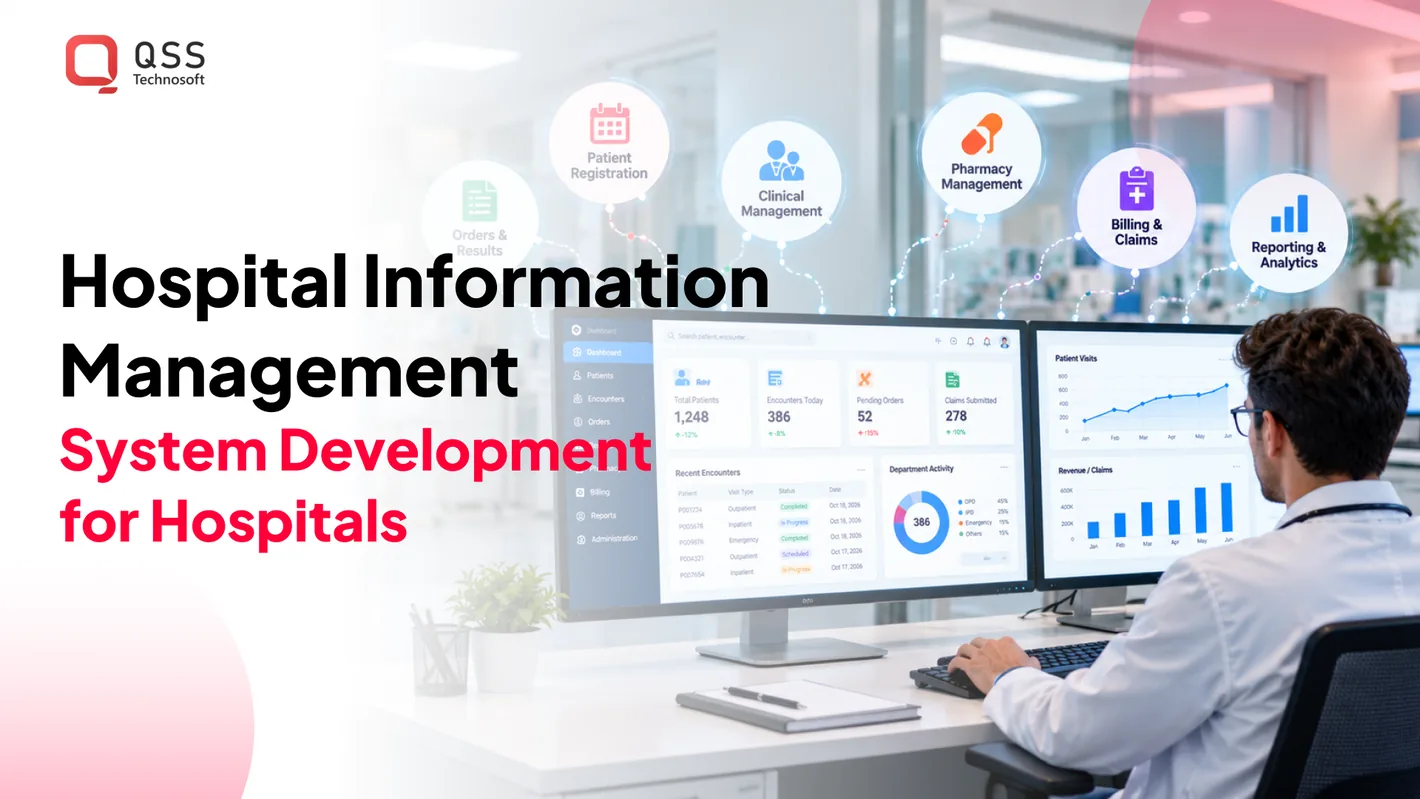
A hospital’s information system is only as dependable as the architecture connecting its people, workflows, and data. A hospital information management system (HMIS) brings clinical and administrative processes into a coordinated software environment. Hospital information management system development services shape that environment around hospital workflows, client-server architecture, and the systems that need to exchange data.
This involves more than putting forms on a screen. Information must move between departments and connected systems without adding avoidable friction, even as legacy technology and day-to-day interruptions remain in the picture. A design that overlooks handoffs can shift work onto staff instead of easing it. The system also needs to support operational priorities, not just technical preferences.
This article explains what an HMIS does and how its architecture supports hospital operations. You’ll learn how development teams map workflows, design data management, plan HL7 interoperability, and test the system before deployment. The focus is practical: how to build a system that fits the hospital’s actual processes, not just a diagram of how they’re supposed to work. You’ll also see how to connect technical decisions to the people and tasks that depend on reliable information.
Quick Answer
Hospital information management system development services design and build an HMIS around a hospital’s real clinical and administrative workflows: registration, encounters, scheduling, pharmacy, billing, and reporting. The work starts with workflow mapping, then covers HL7 interfaces (and HL7 FHIR integration tools for healthcare where they fit) to labs, health information exchanges, and the EHR; relational data models with clear data ownership; role-based access, audit logs, and HIPAA-compliant software development practices; and a client-server architecture with documented failure paths. Delivery runs through requirements, design, development, testing, and phased deployment. Choosing a custom healthcare software development company makes most sense when distinct workflows or existing systems limit how well a packaged product fits.
Hospital software development benefits
Hospital software can improve coordination when it supports clinical and administrative work instead of forcing staff to use disconnected tools. An HMIS can organize information around care delivery, operational handoffs, and reporting needs. The benefits depend on selecting meaningful workflows and designing the software around them.
Custom-built and off-the-shelf hospital information systems differ in how closely they fit a hospital’s needs. Off-the-shelf software provides predefined functions that may suit common workflows, while custom software can be tailored to specific processes and integration requirements. Compare workflow fit, configuration limits, maintenance ownership, and support for future changes before choosing.
Documentation remains a substantial operational task: doctors spend around 35% of their time on documentation. Software can help by presenting relevant information within the task at hand. For example, a clinician reviewing an encounter could see prior notes and current orders in one workflow, reducing the need to switch between separate screens.
Hospital management software can make cross-team handoffs easier to track. A transfer workflow, for example, can show whether the receiving unit has accepted a patient and which administrative steps remain. Clear status and ownership help teams spot stalled work without relying on repeated calls or informal updates.
Custom healthcare software can support hospital-specific priorities through capabilities such as:
- Role-based views: Show clinicians, administrators, and managers the information relevant to their tasks.
- Workflow-specific forms: Capture required details in context, such as discharge instructions or a referral reason.
- Operational reporting: Let managers examine process status and identify where work is waiting.
- Changeable components: Let teams revise one workflow without redesigning unrelated functions.
Scalability means the system can accommodate changing workflows and connected applications without requiring a rebuild for every change. For example, a hospital adding a service line can extend its referral workflow while keeping existing encounter processes intact. The architecture and data ownership determine how smoothly that change fits.
Custom HMS development is most useful when a hospital’s distinct workflows or existing applications limit the fit of a standard product. It also creates responsibility for maintaining custom code, testing updates, and managing dependencies. If a packaged system already supports the required process, customization may add work without enough operational benefit.
For U.S. hospitals, assess data handling and access controls alongside workflow fit. Define which roles can view or change information, then test the rules with realistic tasks. A useful design review checks whether staff can complete their work without exposing unrelated records or creating unnecessary handoffs.
HL7 interoperability with health information exchanges and third-party labs
HL7 interoperability allows hospital systems to exchange structured health information with health information exchanges and external laboratories. A dependable interface must preserve meaning, patient context, and message status across each organization’s systems.
Consider a lab order sent from a hospital system to an outside laboratory. The interface needs to carry the identifiers and order details required by the receiving workflow. When a result returns, the hospital must associate it with the correct patient and order. A message can be delivered technically yet fail operationally if its content cannot be matched or interpreted.
Plan the connection through a sequence of concrete decisions:
- Inventory participants: Record each source and destination system, its owner, and the workflow it supports.
- Map exchanged data: Define identifiers, required fields, code references, and how each organization represents orders and results.
- Specify message handling: Set expected acknowledgments, retry behavior, error queues, and ownership for resolving exceptions.
- Validate workflow outcomes: Test unmatched patients, corrected results, duplicate messages, and messages received out of sequence.
An HIE introduces another participant and data source. Define how users can distinguish information received through an HIE from information entered within the hospital. If a received record conflicts with a local record, staff need a review workflow that preserves both context and source. The interface should never silently overwrite a local value.
A well-connected health information system architecture gives each connection a clear route. An interface engine can direct data between hospital applications, an HIE, and laboratory systems. Operational monitoring should show whether a message was received, processed, rejected, or delayed. Support teams also need traceable identifiers to investigate a failed result without exposing unnecessary patient details.
Health management information can come from electronic health records, laboratory applications, pharmacy systems, registration, and billing. Document which system owns each data element and how often it changes. For example, a laboratory system may own the finalized result, while the hospital record displays it for clinical use. This distinction helps prevent duplicate edits and conflicting reports.
Digital Health Indicator assessments can help organizations evaluate digital capability and identify areas for improvement. HIMSS describes its digital health maturity models as eight-stage models. Use assessment findings to prioritize practical work, such as assigning an interface owner or improving message-failure monitoring, rather than treating a score as an implementation plan.
Healthcare technology professional development should connect technical staff with clinical and operational teams. Train interface developers on mapping decisions, support staff on error queues, and workflow owners on escalation. A tabletop review of a corrected lab result can reveal unclear responsibilities before similar confusion occurs during live operations.
For hospitals planning an HIE or laboratory connection, discussing interoperability requirements can help translate data flows and workflow needs into an integration plan.
Relational databases for medical and administrative data
Relational databases organize hospital information into connected tables, such as patients, encounters, orders, and claims. Sound data design defines how those records relate, who can access them, and how teams maintain quality.
Medical and Administrative Data Storage
A relational database stores structured information in tables linked through identifiers. For example, a patient record can connect to encounters, test orders, and billing entries without copying every detail into one large record. Developers should define which system owns each field and how updates affect connected records.
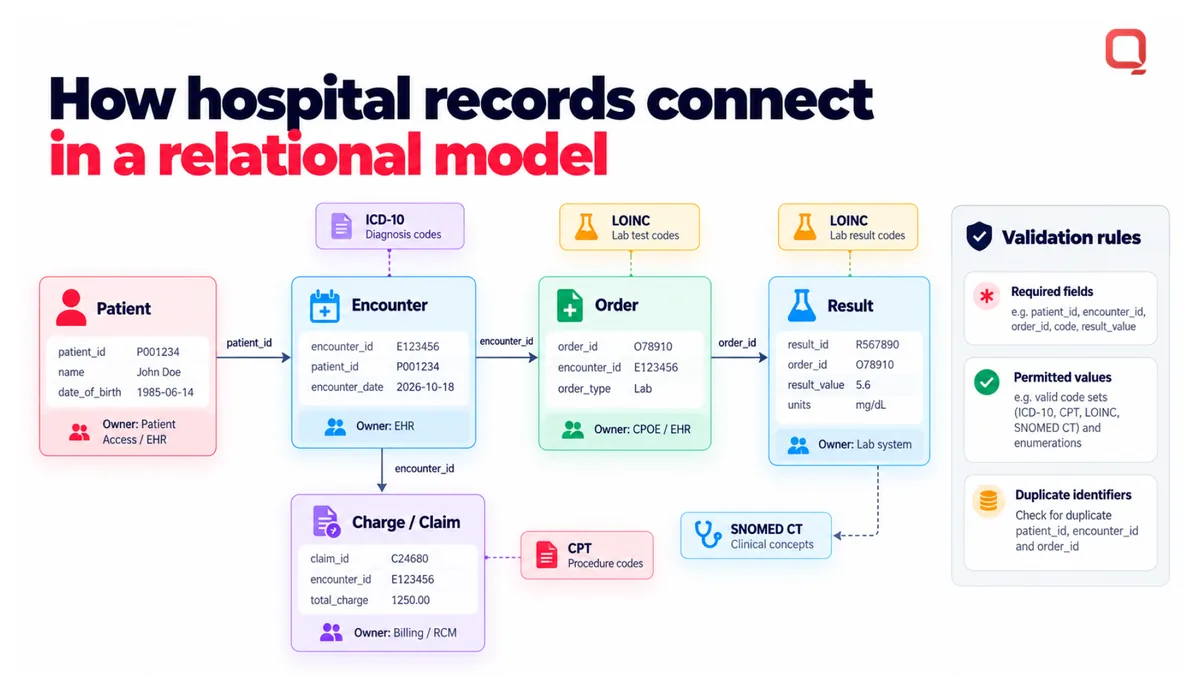
Clinical terminology also needs consistent representation. ICD-10, CPT, LOINC, and SNOMED-CT can inform the fields and code references used in hospital data models. Separate clinical concepts from administrative transactions, then define relationships clearly. This makes it easier to trace a coded diagnosis to an encounter or a charge to its source.
Data quality depends on more than database structure. Set validation rules for required fields, permitted values, and duplicate identifiers. A rejected or incomplete record should trigger a clear correction path rather than silently entering reports or downstream processes.
Capacity building should address individual, organizational, and system levels, with a focus on data management and quality assurance. Train staff who enter information, assign owners to data definitions, and establish a process for reviewing recurring errors. For example, a monthly review of rejected records can show whether the cause is training, field design, or interface mapping.
For DHIS2 data capture where connectivity is limited, design the workflow around offline entry and later synchronization. Define which fields users can complete offline, how duplicate submissions are identified, and how conflicting updates are resolved after reconnection. Test the process with realistic forms before relying on reports, since delayed synchronization can affect what teams see.
Data Security and HIPAA Safeguards
Hospital data security combines access design, monitoring, and controlled data handling. The U.S. Department of Health and Human Services identifies HIPAA as one of the regulatory standards relevant to hospital software. Teams should translate their responsibilities into system requirements and operational procedures, rather than treating a database choice as proof of compliance.
For HMS data security, define role-based permissions for clinical, billing, and administrative users. Log access and changes so authorized teams can review activity. Protect data in transit and at rest through the system’s selected security controls, and test access restrictions with representative user roles.
Build a practical review checklist:
- Access: Match each role to the records and actions needed for its work.
- Auditability: Capture who changed a record and when.
- Recovery: Test restoration procedures and confirm data remains usable.
- Quality: Review validation failures and recurring corrections.
These controls need ongoing ownership. Document database field changes, review user access as responsibilities shift, and include data quality checks in routine system maintenance. Assigning a clear owner to each process helps keep medical records and administrative data manageable as hospital workflows evolve.
Client-server hospital information system architecture
Client-server architecture separates hospital user interfaces from application services and data storage. In a hospital information system, this separation lets a nurse enter treatment notes through a client while server-side services validate, store, and make records available to authorized workflows.
The client is the interface used by a clinician, registrar, or analyst. It may be a browser-based workstation or a mobile application. The server applies workflow rules, processes requests, and connects the client to data stores or external systems. Each layer has a distinct role, helping teams isolate faults rather than treating the entire system as one block.
A typical request might begin when a clinician opens an encounter. The client sends a request to an application service, which checks the user’s permissions and retrieves relevant records. The service returns permitted information for the client to display. Keeping validation and access decisions on the server prevents different screens from applying inconsistent rules.
Map the architecture around a real workflow before selecting components:
- Identify clients: List the interfaces used for registration, clinical documentation, pharmacy, and reporting.
- Define services: Separate capabilities such as scheduling, encounter management, and claims processing.
- Assign data ownership: Specify which service creates and updates each record, such as an encounter or medication order.
- Document interfaces: Define how internal services and external systems exchange requests, responses, and errors.
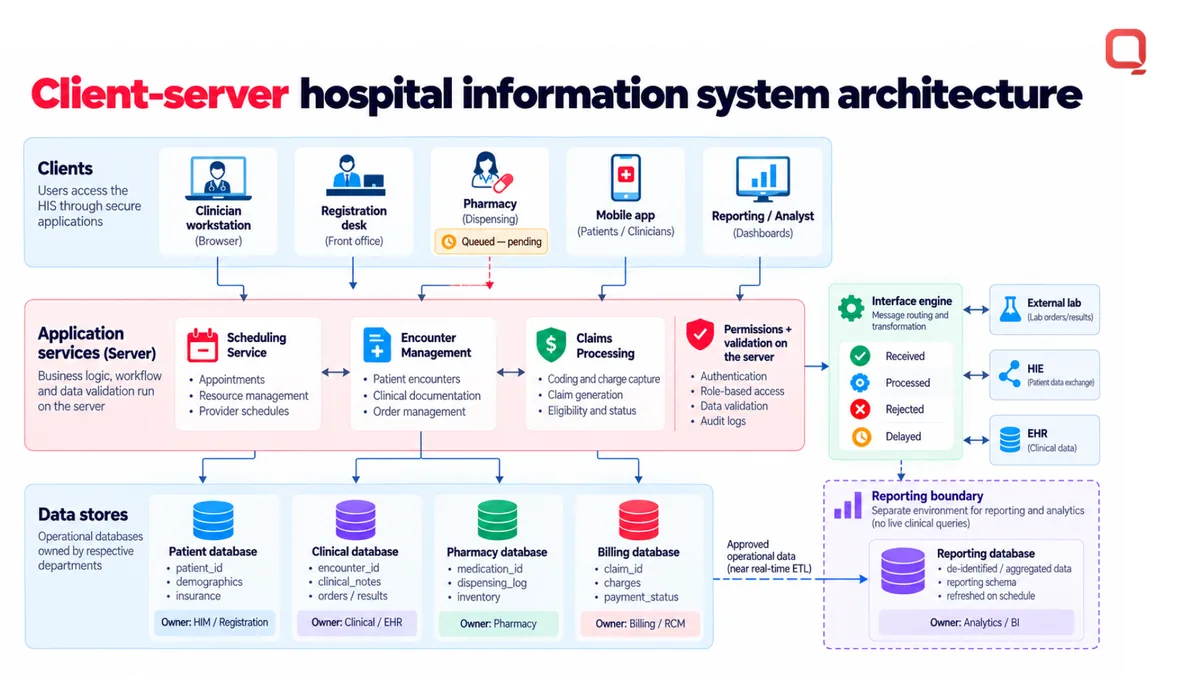
For example, an operational dashboard should request summarized appointment status from scheduling services rather than query clinical records directly. This boundary reduces coupling between reporting and treatment workflows. It also clarifies which service owns a correction when staff identify an inaccurate appointment status.
Architecture decisions also shape failure handling. If a pharmacy service is temporarily unavailable, the core registration workflow may not need to stop. Define which functions require synchronous responses, which can queue work, and how users see pending status. A queued medication message needs a visible state and a clear reconciliation process once the service resumes.
Client-server design also affects deployment and maintenance. A centralized application service can simplify updates across hospital workstations, although network interruptions may still affect access. Plan for connection loss by defining user-facing error states, recovery behavior, and which actions staff can safely repeat without creating duplicate requests.
Reporting needs a separate boundary. A reporting service can use approved operational data without burdening live encounter workflows with complex queries. Define refresh behavior and data provenance so analysts can distinguish a current operational record from a delayed reporting view.
When modernizing legacy systems, migrate one workflow boundary at a time. A registration service can coexist with an older billing application while teams validate data exchange and operational handoffs. The key design test is simple: every client, service, and data store should have a clear responsibility and documented failure path.
What services are included in hospital information management system development?
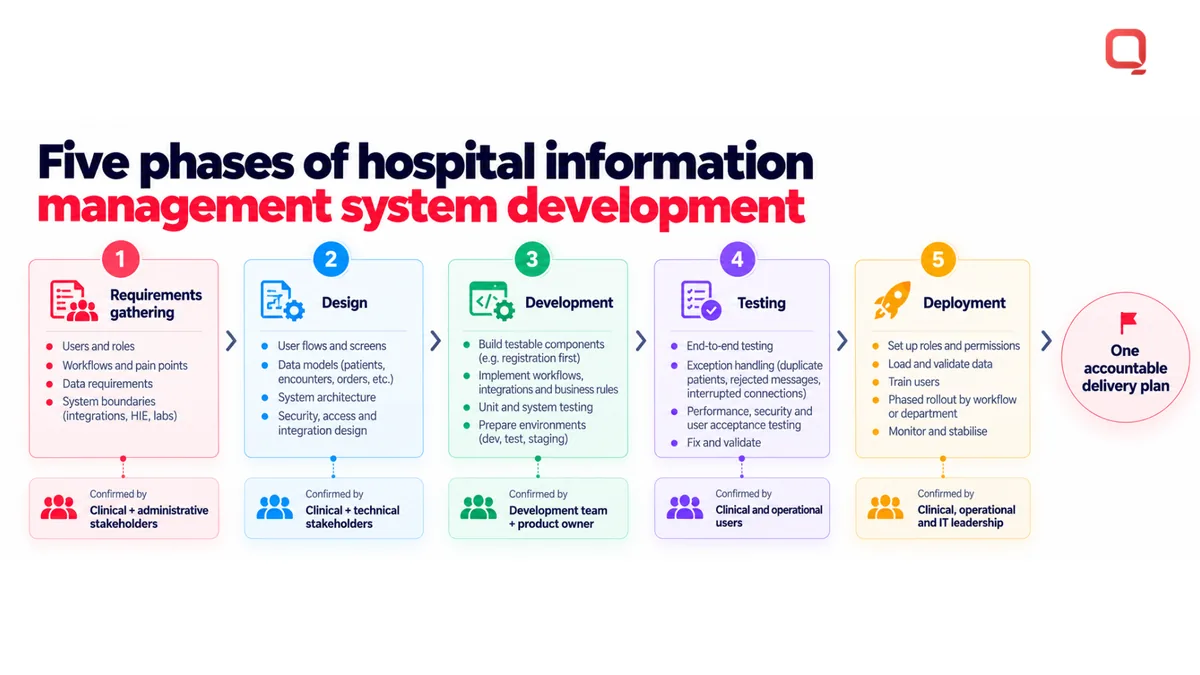
Hospital information management system development typically includes requirements gathering, design, development, testing, and deployment. Each phase turns hospital workflows into software requirements, then verifies the system against clinical and operational use cases.
For a hospital, scope may include patient registration, encounter documentation, scheduling, billing, pharmacy workflows, and integrations. The right modules depend on the problem to solve, the systems already in use, and the teams responsible for operating the software.
Requirements gathering identifies users, workflows, data, and system boundaries. Teams map tasks such as admission or discharge, document exceptions, and prioritize needs with clinical and administrative stakeholders. A useful requirement describes a user action and its expected result, such as recording an admission and making its status visible to the appropriate team.
Design translates requirements into user flows, data models, and architecture decisions. Teams define how a clinician moves between patient search, encounter review, and documentation. They also specify how records connect to related workflows, which services own particular data, and where external interfaces enter the system.
Development builds the agreed capabilities in testable components. A team might implement registration first, then connect it to scheduling and billing. This staged approach makes dependencies visible and lets stakeholders review working software before later modules depend on it.
Testing checks individual functions and end-to-end workflows. Test cases should cover routine use and realistic exceptions, such as duplicate patient details, incomplete forms, rejected interface messages, or interrupted connections. Clinical and operational users can confirm that the software supports the intended process, not merely that buttons respond.
Deployment brings the tested system into hospital operations. Preparation includes configuring user roles, migrating or loading agreed data, training affected teams, and defining how issues are reported. A phased rollout can limit disruption by introducing a workflow or department before expanding access.
Before work begins, decision-makers can clarify scope by documenting:
- Users and workflows: Identify who performs each task and where handoffs occur.
- Systems and interfaces: List connected applications and the data exchanged.
- Acceptance criteria: Define observable outcomes, such as a completed admission appearing in the correct queue.
- Rollout needs: Set training, data transition, and operational support responsibilities.
Hospital information management system development services are most useful when these phases connect to one accountable delivery plan. A development team can help translate workflows into requirements, build the system, test integrations, and prepare deployment. For a project with unclear scope, start by defining the workflow and the systems it touches. Discuss your hospital system development needs to plan the next step.
QSS Technosoft: Generative AI Solutions
QSS Technosoft helps hospitals and health technology teams build and modernize software through Healthcare IT Engineering, Legacy System Modernization, Mobile App Development, and Generative AI Solutions. Turn to the team when existing systems create workflow friction, integrations need engineering, or a new hospital information management system needs a clear technical foundation.
Start with the operational problem. Define the users, data flows, and systems involved before deciding where custom development or generative AI fits. AI should support a defined workflow, not obscure how clinical information is handled. Legacy modernization can help teams address existing systems while planning a maintainable architecture.
For a practical discussion about your hospital software needs, contact QSS Technosoft or visit qsstechnosoft.com.
Turn Your System Priorities Into a Build Plan
The next step is to decide what the hospital needs to change first and what must keep working throughout that change. Identify the workflow causing the most operational friction, the systems it depends on, and the people responsible for approving its data and user experience. This gives technical and clinical leaders a practical basis for setting scope.
For hospital information management system development services, QSS Technosoft offers Healthcare IT Engineering and Legacy System Modernization to address hospital software and existing-system needs. Its Generative AI Solutions may also suit a defined healthcare workflow that calls for an AI capability. Start with the problem, not a predetermined technology choice.
Bring the workflow, integration constraints, and desired system behavior into a focused project discussion. Those details help shape a feasible next step without pretending every hospital needs the same architecture or roadmap. Discuss your hospital system project with QSS Technosoft, and move forward with a plan grounded in how your teams work.
Start With the Workflow That Hurts Most
Bring the hospital workflow causing the most friction, the systems it touches, and the people who own its data. Our engineers provide hospital information management system development services and healthcare software development services, from custom medical software development and EHR integration to HL7 FHIR integration tools for healthcare and HIPAA-compliant software development practices, as a custom healthcare software development company and EHR software development company focused on US hospitals.
Discuss your hospital system project →