Medical Device Companion App Development Costs and Compliance
 By Nagender Pratap
QSS Technosoft
October 30, 2026
14 min read
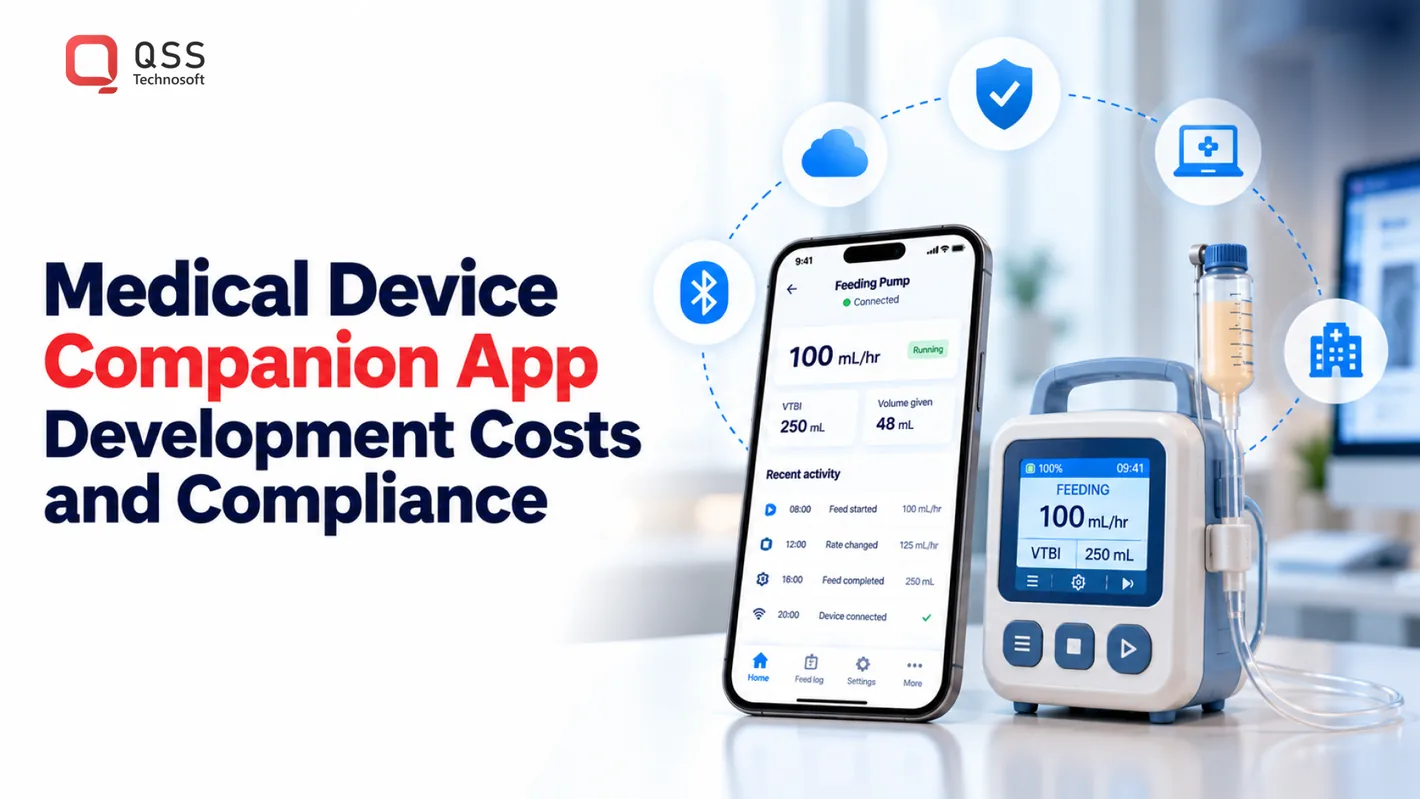
A connected medical device is only as useful as the software that helps people work with its data. Medical device companion app development creates mobile software that pairs with a device to present information, support monitoring, and guide interactions for patients or caregivers. The app’s intended use and potential impact on patient safety shape its risk controls, testing, and documentation.
That makes the app more than a screen layered over hardware. Bluetooth behavior, data handling, usability, and software changes all need careful attention, particularly when a connection drops or a patient misunderstands what the app displays.
This article explains what companion apps do and how IEC 62304 and risk management influence their development. It also covers the main cost drivers, regulatory considerations, and ongoing maintenance needs, so healthcare and health-tech teams can scope the work with fewer blind spots. The practical takeaway: define the app’s role clearly, then build its connectivity, controls, and evidence around that role.
Quick Answer
Medical device companion app development costs depend on the app’s intended use and safety class, the device protocol (often Bluetooth Low Energy), platforms, clinical integrations such as HL7 FHIR, and the validation evidence required. IEC 62304 compliance sets the lifecycle activities, ISO 14971 drives risk management, and FDA rules decide the pathway: most moderate-risk connected medical devices use FDA 510(k), with a FY2026 standard fee of $26,067. This guide’s planning estimates are 8–14 months of development, 4–8 months of 510(k) preparation, 3–6 months of FDA review, and annual maintenance of about 25% of build cost. Budget engineering, regulatory preparation, testing, and maintenance as separate workstreams, and build traceability from day one: retrofitting medical device software documentation is far more expensive than building it in. Treat these as planning inputs for healthcare software development, not quotes.
Why is IEC 62304 important in medical device mobile app development?
IEC 62304 is an international standard for medical-device software lifecycle processes. It matters because it connects requirements, architecture, verification, and change control to the risks a mobile application could create for patients.
What cybersecurity requirements apply to medical device apps under FDA guidance? FDA cybersecurity guidance addresses safeguards for connected medical devices, including the software bill of materials requirement for cyber devices. Under FD&C Act section 524B(b)(3), a software bill of materials is a legal requirement in U.S. premarket submissions for cyber devices.
FDA’s February 2026 cybersecurity guidance explicitly addresses that SBOM requirement. An SBOM records software components and dependencies, giving teams and reviewers a structured view of what is inside an application. Keep it aligned with released versions; an outdated inventory cannot describe the software currently submitted or deployed.
IEC 62304 also makes safety class consequential. Its three software safety classes reflect the harm a software failure could cause, from no possible injury to potential serious injury or death. Higher-risk software calls for more rigorous activities, including documented architecture, detailed unit verification, and tighter traceability between requirements and tests.
Clinical usability is part of the evidence. A patient may misread a measurement, miss a warning, or act on stale data after a connection drops. Define the intended user and use environment, then test realistic tasks: pairing the device, interpreting a displayed value, recovering from a failed sync, and responding to an alert. Record findings and link design changes to updated requirements and verification.
Cybersecurity controls should reflect the device’s data flows and hazards. Connected applications should encrypt sensitive information at rest and in transit, store and rotate keys securely, and validate device and app identities before accepting or uploading sensitive data. Two-factor authentication can strengthen account access, but it does not replace secure device pairing or authorization checks.
Bluetooth creates a practical attack surface. Assess man-in-the-middle risks and use secure pairing, such as a PIN, an out-of-band display, or a cryptographic handshake. Test what happens when pairing fails or the device reconnects unexpectedly. These technical behaviors can have clinical consequences if users mistake missing or delayed readings for current information.
HIPAA, GDPR, and FDA cybersecurity guidance should inform privacy and security safeguards where they apply to the product and its users. Treat them as related design inputs, not interchangeable rulebooks. Map each data flow, access role, retention decision, and security control to documented requirements, then verify the controls against the application’s actual behavior.
Regulatory submissions depend on records that survive design changes. Maintain an audit trail of requirements, risk decisions, test results, defects, and approved releases. IEC 62304 calls for lifecycle planning, defined requirements, architecture design, verification, change control, and problem resolution. Connect each software change to its impact assessment and regression testing; otherwise, a minor interface update can leave safety evidence behind.
Patient-facing companion apps for implantable and external devices
A patient-facing companion app is a mobile application designed to work with a connected medical device and extend how people use it. For an external device, integration may support measurements, settings, and monitoring. An implantable device may use an app to display selected information or support communication with a care team, depending on its intended role.
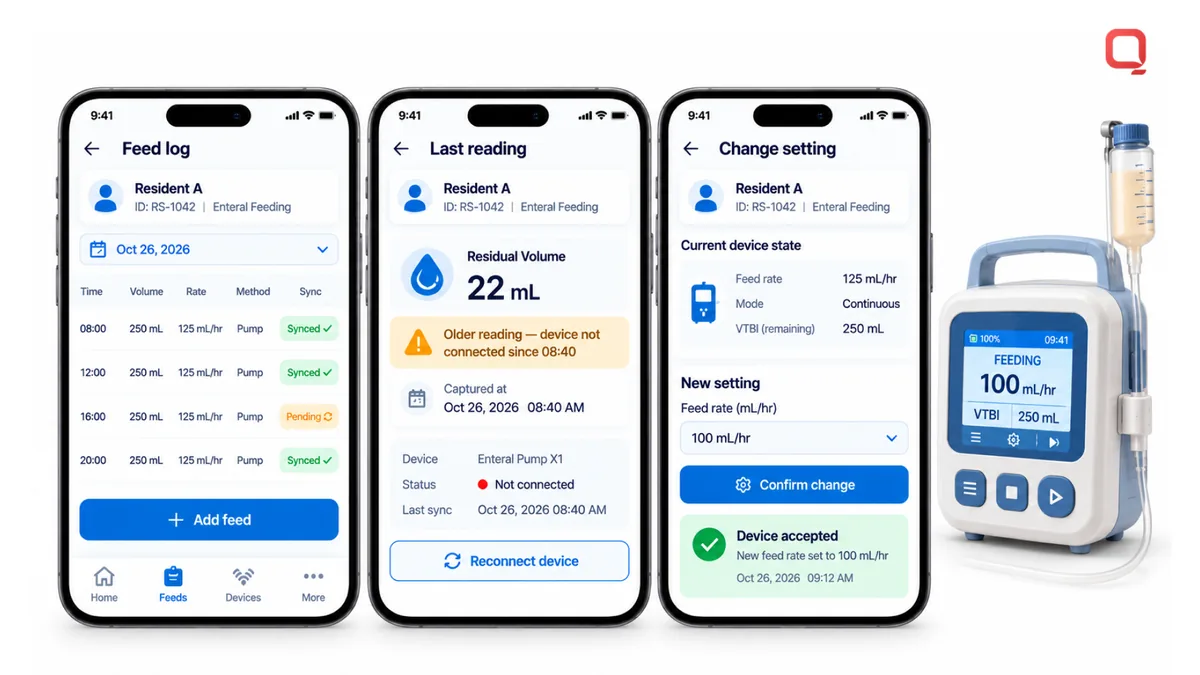
Start with the patient’s task, not a feature list. Someone using an enteral feeding pump may need a clear record of each feed, while a caregiver needs to review it without guessing. An app can log the feed date, time, volume, rate, and method. Bluetooth Low Energy connects the pump to the phone, but pairing failures and connectivity gaps still need a clear response for users.
Make records easy to understand. Show when a value was captured and whether it has synchronized. Connected-device data can be stored locally and synchronized when the device reconnects. This can preserve a workflow during a network outage, but the interface should distinguish current readings from older data. Patients and caregivers need that context before acting on what they see.
Patient-provider communication can extend the device workflow beyond data capture. A companion app may provide secure direct messaging between patients and the care team, along with troubleshooting guides and FAQs. For telehealth, connected data can inform a conversation, while the clinician’s workflow determines how information enters the clinical record. Do not present app messaging as an emergency channel unless that function is explicitly designed and supported.
Smartphone-based therapy controllers need especially careful interaction design. A control screen should clearly distinguish the device state, selected setting, and confirmation step. For example, separate a command to change therapy from a status display, and show whether the connected device accepted the command. Test the sequence under realistic interruptions, such as an incoming call or a lost Bluetooth connection.
Medication management is another companion-app use case. Globally, 25% to 50% of patients do not follow prescribed treatment plans. These figures reinforce why reminders, medication records, and care-team communication must fit real routines rather than add friction.
Implantable-device functions need a clear boundary between information and clinical action. A cardiac implant app that displays pacing data and alerts clinicians to lead integrity issues is an example of Class C software. This illustrates why intended users, displayed information, and escalation paths must be defined before interface design. The app should not imply that a patient can interpret clinical signals without appropriate context.
For teams planning a device workflow, map the patient, caregiver, device, and clinical system interactions before choosing screens or integrations. If that work involves patient-facing workflows and connected-device software, discuss the app requirements with the team building it.
Risk management, design controls, and software validation
Risk management connects software hazards to design decisions, verification, and release evidence. Key risks include unmitigated hazards, weak traceability, and changes without adequate testing. Regulatory review can become difficult when submitted evidence does not show how requirements were verified.
Software Lifecycle and Design Controls
IEC 62304 software lifecycle practices define how teams plan, specify, design, verify, and maintain medical-device software. Design controls turn intended use and identified hazards into testable requirements, then preserve links between requirements, architecture, and results. For a mobile app that displays a device measurement, teams should define what the value means, how the app handles missing data, and which tests prove those behaviors.
ISO 14971 addresses medical-device risk management through hazard analysis and mitigation. Apply it to the complete system, including the app, hardware, connection, and user interaction. For example, assess whether a delayed reading could be mistaken for a current one, then document a mitigation and verify it under interrupted connectivity. Higher-risk software requires more rigorous activities, including detailed unit verification and tighter requirements-to-test traceability.
Build the risk file and lifecycle plan alongside the digital product, not after implementation. IEC 62304 includes change control and problem resolution, so each defect or proposed feature should trigger an impact review. That review identifies affected requirements, hazards, architecture, and tests. Teams that skip lifecycle compliance may spend 2 to 3 times more retroactively documenting and testing software.
Managing Software and Firmware Updates
Over-the-air updates deliver software or firmware to a connected device without a manual update process. They can keep device and app behavior aligned, but every release changes a controlled system. Record the version, affected components, test evidence, and release decision. Before deployment, check compatibility between the new app and existing device firmware.
Plan for interrupted downloads, failed installations, and devices that reconnect with older software. Define how the application identifies versions and communicates update status to users. A release should preserve expected device behavior and include regression testing for existing functions. These controls help prevent a software change from creating a new hazard or obscuring an earlier defect.
Software as a Medical Device, or SaMD, is software intended for one or more medical purposes that performs those purposes without being part of a hardware medical device. That distinction matters when an app analyzes or interprets information rather than simply providing a companion interface. Define the intended medical purpose and the software’s role before selecting its architecture and validation evidence.
Validation should cover complete user and system workflows, not just isolated screens. Test requirements against the built application, then retain results, unresolved defects, and approval records. For a connected therapy feature, verify the command path from the mobile interface through the connection to the device, including the returned status. Link each result to the relevant requirement and risk control so reviewers can follow the evidence without reconstructing development decisions.
Development costs, regulatory fees, and maintenance
In the United States, FDA requirements depend on intended use, risk classification, and whether software supports clinical decisions. Scope development, regulatory preparation, review, and maintenance as separate workstreams, because each involves different tasks and evidence.
What FDA regulations apply to medical device companion apps in the United States? The applicable pathway depends on the app’s intended function and device classification. FDA pathways include 510(k), De Novo, and premarket approval (PMA), while cybersecurity and quality-system requirements also shape development and submission materials.
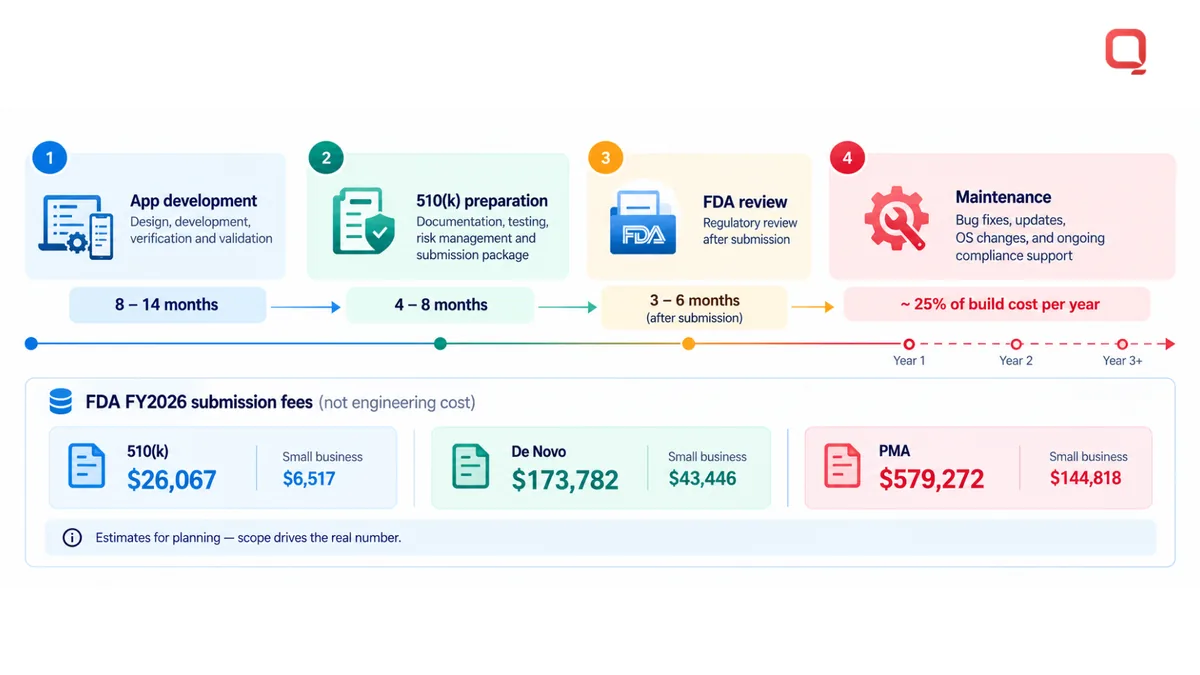
How long does medical device companion app development and FDA review take? A regulated app program is estimated to take 8 to 14 months before regulatory work. For a Class II 510(k), preparation is estimated at 4 to 8 months, followed by estimated FDA review of 3 to 6 months after submission.
Regulatory Compliance Across Regions
Regulatory compliance across regions means preparing product evidence for each market’s applicable rules. In the United States, most moderate-risk medical devices reach the market through the FDA 510(k) pathway by demonstrating substantial equivalence to a predicate, according to the U.S. Food and Drug Administration.
Novel low-to-moderate-risk devices may use the FDA De Novo pathway, according to the U.S. Food and Drug Administration. The EU Medical Device Regulation (MDR) informs CE Mark compliance, while Australia’s framework includes the Therapeutic Goods (Medical Devices) Regulations. FDA’s Quality Management System Regulation incorporates ISO 13485:2016 by reference, effective February 2, 2026.
| Pathway | Typical fit described | FY2026 standard FDA fee |
|---|---|---|
| 510(k) | Moderate-risk device demonstrating substantial equivalence to a predicate | $26,067 |
| De Novo | Novel low-to-moderate-risk device | $173,782 |
| PMA | Highest-risk device | $579,272 |
These are FDA submission fees, not app engineering costs. Small-business fees differ: the 510(k) fee is $6,517 for FY2026, and the De Novo fee is $43,446 for FY2026. The standard PMA fee is $579,272 for FY2026; its small-business fee is $144,818 for FY2026.
Regulatory Readiness and Review Timing
Regulatory readiness means aligning product claims, classification, risk evidence, and submission documents before filing. It matters because missing materials can add preparation work. FDA’s 2019 guidance distinguishes software that only displays data processed by a cleared device from software that transforms, analyzes, or interprets data for clinical decisions.
Before submission, define intended use, document software classification, assemble risk and verification evidence, and check cybersecurity materials and version records. Annual app maintenance is estimated at about 25% of build cost. Plan for operating-system changes, compatibility testing, defect correction, security updates, regression testing, and refreshed documentation.
Custom medical device companion app solutions
Custom solutions align a device’s capabilities with patient, caregiver, and clinical workflows. Their value comes from matching the interface and technical architecture to a specific device, not from adding features without a clear use. The scope of medical device companion app development should reflect the device’s intended role and the people who rely on its data.
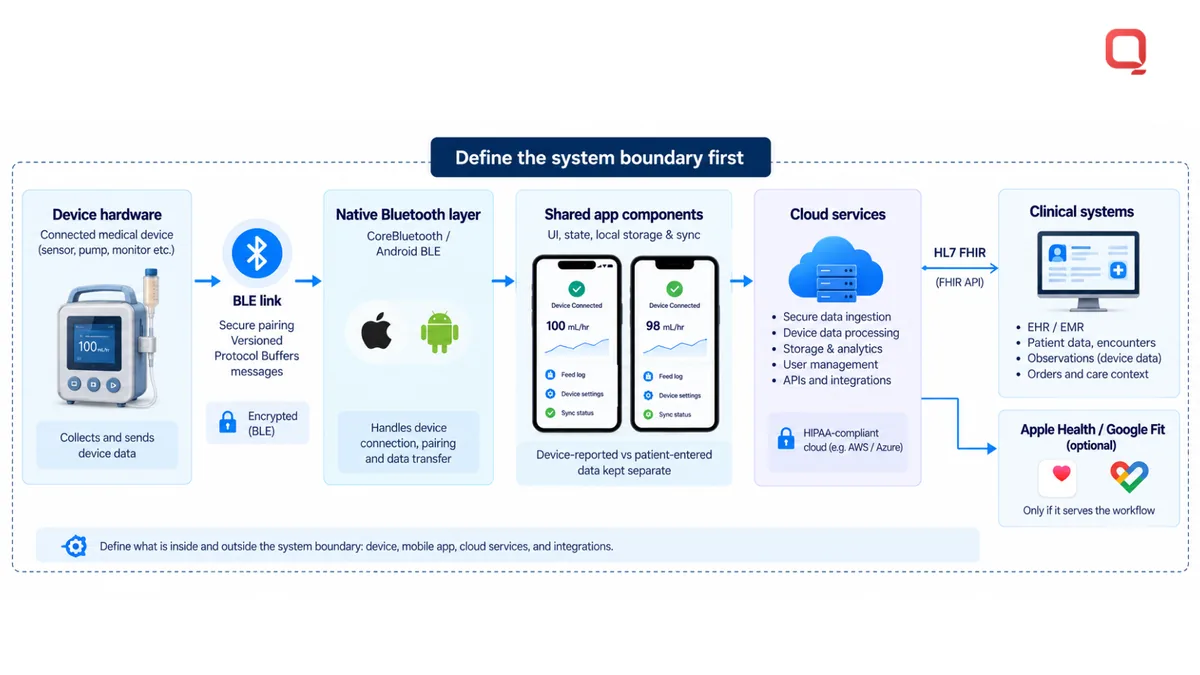
Start by defining the system boundary: device hardware, mobile application, cloud services, and clinical systems. For a Bluetooth Low Energy device, document its message format and connection behavior before building screens. Apple’s CoreBluetooth supports BLE communication, while iOS requires user consent for BLE access and explicit background configuration for continued connections.
Device protocols often determine the framework choice. Native Swift can provide direct access to CoreBluetooth, while a cross-platform abstraction can make low-level device debugging harder. A hybrid design can keep the Bluetooth layer native while sharing other application components. This can help when iOS Bluetooth behavior needs close control and teams also need Android support. Choose based on device behavior, not framework popularity.
Design the interface around what a patient must understand or do. For example, distinguish a device-reported measurement from a manually entered value. Use clear units, timestamps, and device status labels. Test under realistic conditions, including a phone in low-power mode and a device that sends measurements in bursts. Define which screen states appear when the device is unavailable.
Make the device-to-app contract durable. Protocol Buffers can provide compact, schema-driven BLE messages, while versioned message formats preserve compatibility as features evolve. Bundle related measurements into one BLE message where that fits the device protocol. For clinical-system exchange, HL7 FHIR provides a common standard for exchanging clinical data through modern web APIs. Keep device messages distinct from clinical resources, then map only the data required by the workflow.
- Map each device command and response to a specific app state.
- Define how the interface handles unsupported or malformed message versions.
- Separate patient-entered information from measurements sent by hardware.
- Test Bluetooth performance against worst-case connection behavior, including iOS parameter changes.
- Run compatibility testing across device models; the described approach tests more than 20 models.
Wearables bring energy and ecosystem constraints. Integration with Apple Health or Google Fit can give users a consolidated view, but only when that data supports the intended workflow. Keep background processing purposeful and avoid repeated transfers that drain the battery without improving the patient experience. Medical device companion app development should make each integration serve a defined user task.
Custom architecture is useful when a standard interface cannot support a device’s protocol, clinical workflow, or data exchange needs. The key design decision is where to preserve device-specific behavior and where to use shared application components. That boundary keeps the interface coherent without obscuring how the connected hardware behaves.
QSS Technosoft: Generative AI Solutions
QSS Technosoft can help medical device teams turn app requirements into a buildable, maintainable product. Its Healthcare IT Engineering and Mobile App Development services support connected healthcare workflows, while Legacy System Modernization can help when existing software or integrations constrain a new app.
Bring the team in when device connectivity, clinical workflows, software architecture, and maintenance need to be planned together. Generative AI Solutions may also suit projects with a defined, appropriate AI use case, but they are not a substitute for device-specific risk controls or validation.
Share your device workflow and development goals with QSS Technosoft, or visit qsstechnosoft.com to start a conversation.
Turn the app plan into a buildable roadmap
The next step is to turn the device concept into decisions your team can act on: intended use, patient and clinician workflows, integration boundaries, risk ownership, and release responsibilities. A practical medical device companion app development roadmap should make these decisions visible before implementation begins. This gives product, engineering, and clinical stakeholders a shared basis for prioritizing work and managing change.
QSS Technosoft offers Healthcare IT Engineering for healthcare software challenges, Legacy System Modernization when existing platforms constrain delivery, and Generative AI Solutions for projects with a defined AI use case. The right starting point depends on your product’s technical foundation and the work your team needs to move forward.
Bring your device workflow, current architecture, and open development questions into the conversation. Contact QSS Technosoft about your app to discuss a practical path from requirements to implementation. Your next build can start with a clearer plan.
Scope Your Companion App Around Its Safety Role
Bring the device protocol, intended use, target platforms, and the clinical systems the app must reach. Our engineers support medical device companion app development and healthcare software development, from BLE connectivity and medical device software architecture to IEC 62304 compliance documentation, validation evidence for an FDA 510(k) submission, and lifecycle maintenance, so medical app development costs are planned workstream by workstream for your connected medical devices.
Contact QSS Technosoft about your app →