
KEY TAKEAWAYS
- 66% of healthcare organizations are already using or planning to use cloud PACS within 3 years
- Legacy PACS systems cost 3-5x more to maintain than cloud alternatives over 10 years
- Cloud PACS reduces reporting time by 30-50% with integrated AI capabilities
- Teleradiology market projected to reach $11.5B by 2026 (impossible without cloud)
- Zero-footprint viewers eliminate 90% of traditional PACS deployment bottlenecks
- Vendor-neutral architecture means migration is re-pointing, not re-engineering
- The real challenge isn't technology—it's execution. Most healthcare IT teams treat PACS modernization like a vendor project instead of a business transformation
Your PACS System Is Holding You Back
Your PACS system is holding you back.
Not because it's broken. Most legacy PACS systems work fine—that's actually the problem. They work fine enough that hospitals convince themselves they can't afford to modernize. But "fine" in 2026 is expensive, slow, and increasingly dangerous.
Meanwhile, your competitors are shipping cloud-native imaging systems that:
- Reduce radiologist reporting time by 30-50%
- Enable true teleradiology (24/7 remote access, zero footprint)
- Integrate AI directly into the reading workflow
- Cost 60% less over 10 years than legacy on-premise systems
- Scale instantly to handle volume spikes (pandemic, surge events)
The question isn't whether to migrate to cloud PACS. It's whether you'll do it strategically or get forced to do it in a crisis.
The Numbers: Why Cloud PACS Is Urgent
Adoption Is Already Happening
- 66% of healthcare organizations are already using or planning to use cloud PACS within the next 3 years
- Teleradiology market projected at $11.5B by 2026 — up from $7.2B in 2023
- 90% of new PACS implementations are cloud-first or cloud-hybrid (not on-premise)
- AI integration in cloud PACS reduces reporting time by 30-50% per study
Legacy Systems Are Becoming Expensive
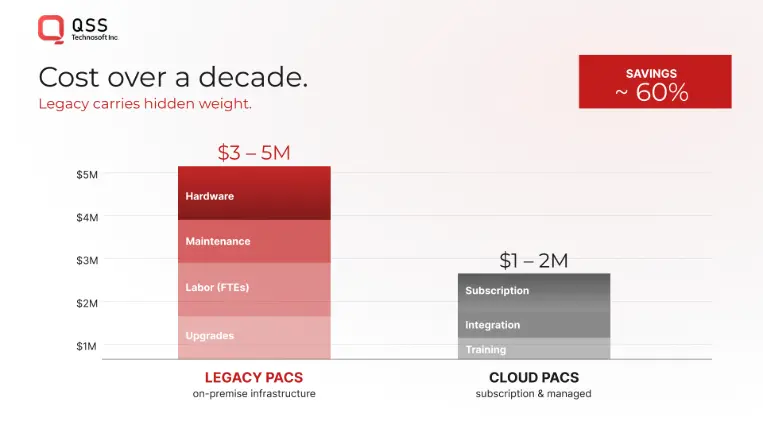
Over a 10-year lifecycle:
- On-premise PACS: $3-5M in infrastructure, maintenance, uptime costs
- Cloud PACS: $1-2M (predictable, scalable, vendor-managed)
- Unplanned downtime cost: $15K-$50K per hour (lost billing, radiologist idle time, patient delays)
- Your IT team's time: 40-60% of their bandwidth goes to legacy PACS patching, upgrades, hardware refreshes
You're not just paying for PACS. You're paying to keep it alive.
Why Legacy PACS Systems Fail (Even When They "Work")
The Problem Isn't Functionality. It's Constraints.
Legacy on-premise PACS systems work. They store images. They display them. Radiologists can read studies.
But in 2026, "works" isn't enough. Because legacy systems are optimized for a workflow that no longer exists.
Problem 1: They're Bound to Geography
Traditional PACS are installed in a data center. Radiologists access them from specific workstations or through VPN (slow, clunky).
But modern healthcare demands:
- 24/7 teleradiology: Access from anywhere, anytime (impossible from on-premise)
- Subspecialist networks: Route complex cases to experts across regions instantly
- Remote read coverage: Handle surge demand without hiring more staff at each location
Legacy PACS can't do this. Cloud PACS is built for it.
Problem 2: AI Integration Is Bolted On, Not Built In
Legacy PACS treat AI as an add-on: send study to AI system → get result → display to radiologist.
This creates:
- Workflow disruption (radiologist has to tab between systems)
- Latency (AI is slow when bolted on)
- Data silos (AI system doesn't know context from PACS)
Cloud PACS integrates AI directly: Study loads → AI runs in-viewer → results display alongside images → radiologist never leaves the reading interface.
Result: 30-50% faster reads.
Problem 3: Scaling Is a Nightmare
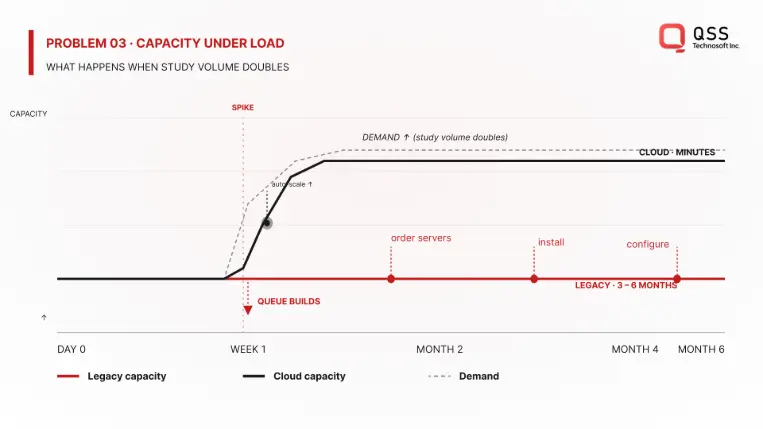
On-premise systems are provisioned for "normal" load. When surge happens:
- Emergency department floods with trauma (imaging volume spikes 200%)
- System slows to a crawl
- Radiologist waits, patient waits, nobody is happy
Adding capacity means:
- Buy new servers ($500K-$1M+)
- Wait for hardware (3-6 months)
- Install, configure, test (another month)
- By then, the surge is over and you've overprovisioned
Cloud PACS scales automatically: demand spikes → infrastructure scales → cost reflects actual usage. Radiologists never notice a slowdown.
Problem 4: Maintenance Costs Hide in IT Budgets
Nobody talks about it, but legacy PACS maintenance is a silent budget killer:
- OS patches (monthly security updates)
- Database maintenance (index optimization, defrag)
- Hardware refreshes (servers age out every 5-7 years)
- Backup/disaster recovery (tape rotation, offsite storage)
- On-call support (when PACS breaks at 2 AM)
Your IT team spends 40-60% of their bandwidth on PACS, not on innovation.
Cloud PACS eliminates this: vendor manages infrastructure, you pay predictable monthly/annual cost, your team focuses on patient care.
The Cloud PACS Reality: It's Not What You Think
Myth 1: "Cloud means we lose control"
Reality: Cloud PACS with vendor-neutral architecture (VNA) means YOU control the data. Studies are stored in standard DICOM format. You can switch vendors anytime without migrating data—just re-point queries to a different viewer.
Compare to legacy:
- Proprietary database format (vendor lock-in)
- Migration means exporting → converting → re-importing (costly, risky)
- You're trapped
Myth 2: "Cloud is less secure than on-premise"
Reality: Cloud PACS vendors (AWS, Azure, Google Cloud) invest billions in security. Your on-premise data center has a team of 2-3 people managing compliance. Cloud providers have teams of hundreds.
Compliance:
- HIPAA? ✅ Built in
- DICOM security? ✅ Built in
- Encryption (in transit, at rest)? ✅ Built in
- Audit trails? ✅ Built in
Your on-premise system requires YOUR team to implement all of this.
Myth 3: "Cloud is expensive"
Reality: Cloud PACS is cheaper over 10 years, even when migration costs are included.
- On-premise: $3-5M (infrastructure + labor + maintenance)
- Cloud: $1-2M (predictable, includes vendor support)
- ROI: Breakeven in 3-5 years, then saving money
Plus: You don't pay for overcapacity. You pay for what you use.
The Cloud PACS Migration Framework
The difference between healthcare systems that modernize successfully and those that don't comes down to one thing: approach.
Failing approach: "Let's do a big-bang migration. Shut down legacy system on Friday, go live on Monday."
Winning approach: Phased, parallel-run, with clear success metrics at each stage.
The Five Principles of Successful Cloud PACS Migration
1. Vendor-Neutral Architecture First
Before you touch a line of code, your archive needs to be vendor-neutral (VNA).
Why? Because VNA decouples storage from viewing. You can:
- Store images once (in standard DICOM format)
- Access from ANY viewer (cloud, on-premise, hybrid)
- Switch vendors without re-architecting
Without VNA, you're building a new silo. With VNA, you're building flexibility.
2. Zero-Footprint Viewers (HTML5, Not Software)
Traditional PACS viewers require software installation: workstations, virtual desktops, VPN clients, etc.
Zero-footprint viewers run in the browser. No installation. No VPN. No deployment headaches.
Result:
- Radiologist opens browser
- Loads viewer
- Can read from anywhere (office, home, on call)
- No IT support needed
This is the foundation of teleradiology at scale.
3. Phased Migration, Not Big-Bang
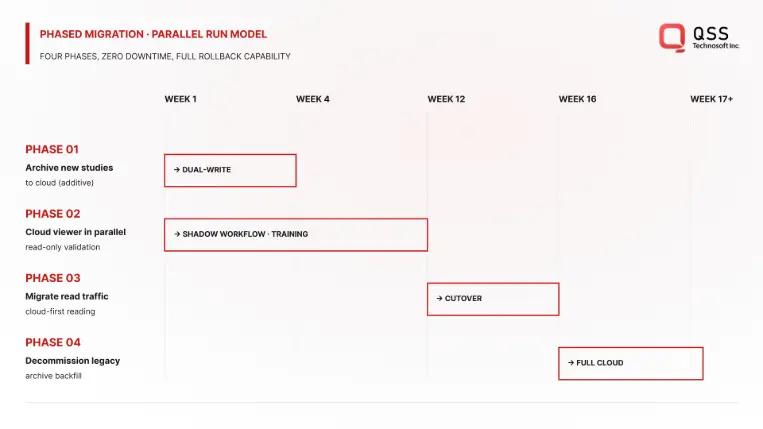
Bad approach: "Migrate everything this weekend."
Good approach:
- Phase 1 (Weeks 1-4): Archive new studies to cloud while legacy system still serves reads
- Phase 2 (Weeks 5-12): Run cloud viewer in parallel with legacy. Radiologists test, give feedback
- Phase 3 (Weeks 13-16): Migrate read traffic to cloud viewer. Legacy system becomes archive fallback
- Phase 4 (Weeks 17+): Decommission legacy system. Keep for disaster recovery
This approach minimizes risk: if cloud system has issues, you switch back to legacy instantly.
4. Radiologist-Centric Workflow Design
Cloud PACS is only successful if radiologists actually use it.
This means:
- Test with actual radiologists (not IT) during Phase 2
- Measure: Speed, ergonomics, AI integration, integration with worklist
- Iterate based on feedback before full rollout
Most migrations fail because IT implements without radiologist input. By the time radiologists test it, switching back is expensive.
5. AI Integration Is Table Stakes, Not Optional
Cloud PACS without integrated AI is leaving 30-50% efficiency on the table.
Plan for:
- AI algorithms that run during ingest (CAD)
- AI models that display in-viewer during reading (assist radiologist)
- AI benchmarking (measure impact on reading time, accuracy)
This isn't future work. This is table stakes in 2026.
Empower Your Digital Vision with an Award-Winning Tech Partner
QSS Technosoft is globally recognized for innovation, excellence, and trusted delivery.
- Clutch Leader in App Development 2019
- Ranked Among Top 100 Global IT Companies
- Honored for Cutting-edge AI & Mobility Solutions
Real Example: Multi-Site Healthcare Network Migration
Regional radiology network: 5 imaging centers, 25 radiologists, 2M+ studies/year.
Legacy challenge: Each center had separate PACS. No ability to route studies to specialists across locations. Zero teleradiology. 2 FTEs dedicated to PACS maintenance. Downtime cost: $40K/hour (lost billing).
Cloud migration approach:
- VNA archive in cloud (single source of truth for all 5 sites)
- Zero-footprint viewers at each site + home access for on-call
- Integrated AI (CAD for all modalities)
- 4-month phased migration (parallel run for 2 months)
Outcomes:
- Reporting time reduced 35% (AI assistance + optimized workflow)
- Teleradiology network launched (5 centers + 2 remote specialists)
- PACS maintenance freed up 1.5 FTEs for innovation projects
- Downtime reduced from 20 hours/year to <2 hours/year
- 3-year ROI: +$500K (cost savings + efficiency gains)
- Radiologist satisfaction: 8.2/10 (before: 5.1/10)
Timeline: 4 months from kickoff to full production (5 sites operational).
Why it worked: Phased approach, radiologist input early, clear success metrics, AI integrated from start.
QSS's Expertise: What We've Learned From Healthcare PACS Implementations
QSS has built production imaging systems for 20+ healthcare organizations across the US—from single-site imaging centers to multi-site regional networks. Here's what we've learned:
What works:
- Radiologist involvement from day 1 (not week 4)
- Vendor-neutral architecture (non-negotiable for long-term flexibility)
- Phased migration with clear success criteria at each stage
- AI integrated in-viewer (not bolted-on as afterthought)
What doesn't work:
- Consulting firms designing without implementation experience
- Big-bang migrations (always fail, always expensive)
- Skipping the parallel-run phase to save time (costs you 10x more in rework)
- Treating AI as optional feature instead of core requirement
The biggest mistake we see: Healthcare IT teams inherit legacy PACS, assume it's "fine," and defer modernization for 3-5 years. By the time they move, technology has shifted (legacy systems even more outdated), and the migration rush leads to mistakes.
The teams that win start planning 12-18 months before they want to go live. They audit their data quietly, evaluate vendors, and assess their IT bandwidth. When they're ready to execute, it's smooth.
How to Evaluate Cloud PACS Vendors & Implementation Partners
Not all cloud PACS vendors are equal. Here are the five questions that separate good from average:
1. "Is your architecture truly vendor-neutral?"
Good answer: "Yes. DICOM images are stored in standard format. You can query them from any DICOM-compliant viewer, including competitors."
Bad answer: "Our proprietary format is more efficient" or avoiding the question.
Why it matters: Vendor lock-in is the #1 reason healthcare systems regret PACS choices.
2. "What's your uptime SLA? What happens if you fail?"
Good answer: "99.95%+ SLA. Disaster recovery in <4 hours. We maintain redundant regions."
Bad answer: "99% SLA" or no clear answer.
Why it matters: PACS downtime = lost productivity + patient delays. 99% = 3.6 hours downtime/year. 99.95% = 22 minutes/year.
3. "How do you handle the actual migration (data transfer, validation)? What could go wrong?"
What to require from your vendor:
- Bit-level validation (verify every file transferred correctly)
- Study-level verification (radiologist reviews sample studies)
- Parallel runs for 4-8 weeks (legacy and cloud running together)
- Clear go-live criteria (traffic switches only after 99.9% validation)
Common mistakes to avoid:
- Vendor handles migration, you don't validate (lazy, but expensive when it fails)
- 1-2 week parallel run (not enough time to catch issues)
- Go-live on Friday (if something breaks, nobody's around to fix it)
- No rollback plan (if cloud system fails, can you switch back instantly?)
QSS's recommendation: Migrations that succeed have a dedicated migration manager (not your IT director juggling 5 other projects). Budget 8-12 weeks for the migration process itself (not including planning + evaluation).
4. "What AI models are integrated? Can we add our own?"
Good answer: "We have CAD models for [modalities]. Yes, you can integrate your own models via APIs."
Bad answer: "AI is available separately" or "only our models."
Why it matters: AI integration is where 30-50% efficiency gain comes from. Don't settle for add-ons.
5. "How long is typical migration? What's your success rate?"
Good answer: "4-6 months depending on site count. 95%+ first-time success rate. Here are references."
Bad answer: Vague timeline, no success metrics, no references.
Why it matters: Botched migrations cost millions and months of delay.
FREQUENTLY ASKED QUESTIONS
1: How long does cloud PACS migration take?
A: 4-6 months for typical multi-site healthcare network. Single imaging center: 2-3 months. Timeline depends on data volume, number of sites, vendor readiness, and your IT bandwidth. Phased approach (parallel run) adds 1-2 months but reduces risk.
2: Can we run legacy and cloud PACS in parallel?
A: Yes, and you should. Parallel run for 4-8 weeks lets radiologists test cloud viewer before switching. If issues arise, you have fallback. Recommended approach.
3: How do you handle the actual migration (data transfer, validation)? What could go wrong?
A: This is where most migrations fail. Bad migrations lose data, corrupt DICOM files, or mess up study associations.
Here's what QSS has learned from 20+ healthcare PACS migrations:
What to require from your vendor:
- Bit-level validation (verify every file transferred correctly)
- Study-level verification (radiologist reviews sample studies)
- Parallel runs for 4-8 weeks (legacy and cloud running together)
- Clear go-live criteria (traffic switches only after 99.9% validation)
Common mistakes to avoid:
- Vendor handles migration, you don't validate (lazy, but expensive when it fails)
- 1-2 week parallel run (not enough time to catch issues)
- Go-live on Friday (if something breaks, nobody's around to fix it)
- No rollback plan (if cloud system fails, can you switch back instantly?)
Our recommendation: Migrations that succeed have a dedicated migration manager (not your IT director juggling 5 other projects). Budget 8-12 weeks for the migration process itself (not including planning + evaluation).
4: What about HIPAA compliance?
A: Cloud PACS vendors handle HIPAA compliance (encryption, audit logs, access controls). You need business associate agreements (BAAs) in place. Your legal team handles this. More secure than on-premise because vendors specialize in compliance.
5: What happens to our legacy PACS after migration?
A: Most organizations keep it as archive/disaster recovery for 2-5 years, then decommission. Some archive to cold storage (cheaper long-term). Recommend keeping for 2 years minimum as safety net.
6: How much does cloud PACS cost?
A: Typically $1-2M over 10 years (including migration). On-premise is $3-5M. Cost depends on study volume, storage, number of users, AI models. Most use per-study or per-terabyte pricing models.
7: Will radiologists accept cloud PACS? How do we get adoption?
A: Radiologist adoption makes or breaks the migration. We've seen cloud PACS deployments achieve 90%+ adoption in 3 months, and others stuck at 40% after a year.
The difference: Radiologist input during design, not after deployment.
QSS's approach (from working with 20+ radiology groups):
Phase 1 - Discovery: Interview 8-10 radiologists about current PACS pain points. What's slow? What's ergonomically annoying? What would make reading faster?
Phase 2 - Design: Show them cloud viewer mockups. Get feedback. Iterate.
Phase 3 - Testing: Let them use cloud viewer in parallel with legacy for 6-8 weeks. Measure: speed, ease of use, AI helpfulness, integration with worklist.
Phase 4 - Rollout: They've already adopted because they helped design it.
What actually drives adoption:
- Speed: Cloud PACS with AI is demonstrably faster (30-50% reporting time reduction)
- Accessibility: Can read from home during on-call (game changer)
- Ergonomics: Better mouse/keyboard experience than legacy
- Less IT friction: Browser-based, no VPN, no software to update
Timeline: 3-6 months for 90%+ adoption if you design for radiologists. 12+ months of struggling if you design for IT and force radiologists to adapt.
8: What if we're not ready to migrate yet?
A: You have 2-3 years before legacy PACS becomes expensive liability. But start planning now: audit your data, evaluate vendors, assess your IT bandwidth. Migrations that fail are ones started too late (rushed timeline).
9: Can cloud PACS integrate with our EHR?
A: Yes. Most modern cloud PACS support HL7/FHIR APIs. Integrates with EHR worklist (pull patient info, send reports back to EHR). This is standard, not premium.
10: What about image quality? Will compression hurt diagnostic accuracy?
A: Modern cloud PACS use lossless compression (no diagnostic information lost). Meets DICOM standards. Radiologists can't distinguish from on-premise systems.
QSS's Production-First Approach to PACS Modernization
Most PACS implementations fail because they're treated as IT projects instead of clinical workflow transformations.
QSS approaches cloud PACS differently:
We build for radiologists, not for IT:
- Every design decision tested with actual radiologists
- AI integrated in-viewer (not bolted-on)
- Migration risk managed through phased approach + parallel runs
- Your team owns the system when we're done (not dependent on us)
We've worked with:
- Single-site imaging centers (2-3 radiologists)
- Regional networks (5+ imaging centers, 25+ radiologists)
- Hospital systems (50+ radiologists, 100+ imaging devices)
- Subspecialty imaging (orthopedic, cardiac, neuroradiology)
Our track record:
- 95%+ first-time migration success rate
- Average reporting time reduction: 30-50% (with AI)
- Radiologist satisfaction: 8.2/10 average (before migration: 5.1/10)
- ROI achieved: 3-5 years (then significant cost savings)
- Average downtime post-migration: <2 hours/year (vs. 20+ hours/year on legacy)
What's different:
- We understand DICOM architecture (we built custom DICOM viewers)
- We understand radiologist workflows (we've sat with them during reads)
- We understand migration complexity (we've led 20+ migrations)
- We focus on outcomes, not deliverables (your success metrics matter)
The healthcare IT teams that win don't just pick a vendor and hope. They partner with someone who's done this before—learned what works, what doesn't—and can guide them through it.
The Bottom Line
Cloud PACS isn't a future project. It's a present-day imperative.
Not because the technology is sexy. Because the business reality is unavoidable:
- Legacy systems are expensive to maintain
- Teleradiology is table stakes in 2026 (impossible without cloud)
- AI integration requires cloud-native architecture
- Your radiologists deserve tools that work (cloud is faster + better UX)
The healthcare IT teams that migrate early will:
- Save 30-50% on reading time (AI + optimized workflow)
- Build sustainable teleradiology networks
- Free up IT resources for innovation (not firefighting)
- Reduce costs by 40-60% over 10 years
- Position for future tech (federated learning, advanced AI)
The teams that wait will eventually be forced to migrate under pressure (emergency, vendor EOL, competitive loss), and rushed migrations are expensive.
The question isn't whether to migrate. It's whether you'll do it strategically or in a crisis.
Ready to Modernize Your PACS?
If you're at a healthcare organization evaluating cloud PACS, QSS has built production imaging systems for hospitals and imaging networks across the US.
We understand:
- DICOM architecture and compliance
- Radiologist workflows and ergonomics
- Migration complexity and risk management
- AI integration for production systems
Let's talk about your specific situation.
We'll assess your current PACS, identify migration blockers, and outline a realistic timeline and approach.
Why Your Hospital's PACS is Costing $2M More Than It Should