ADA Web Compliance for Healthcare: WCAG and Accessibility Basics
 By Vineet Bhardwaj
QSS Technosoft
November 10, 2026
15 min read
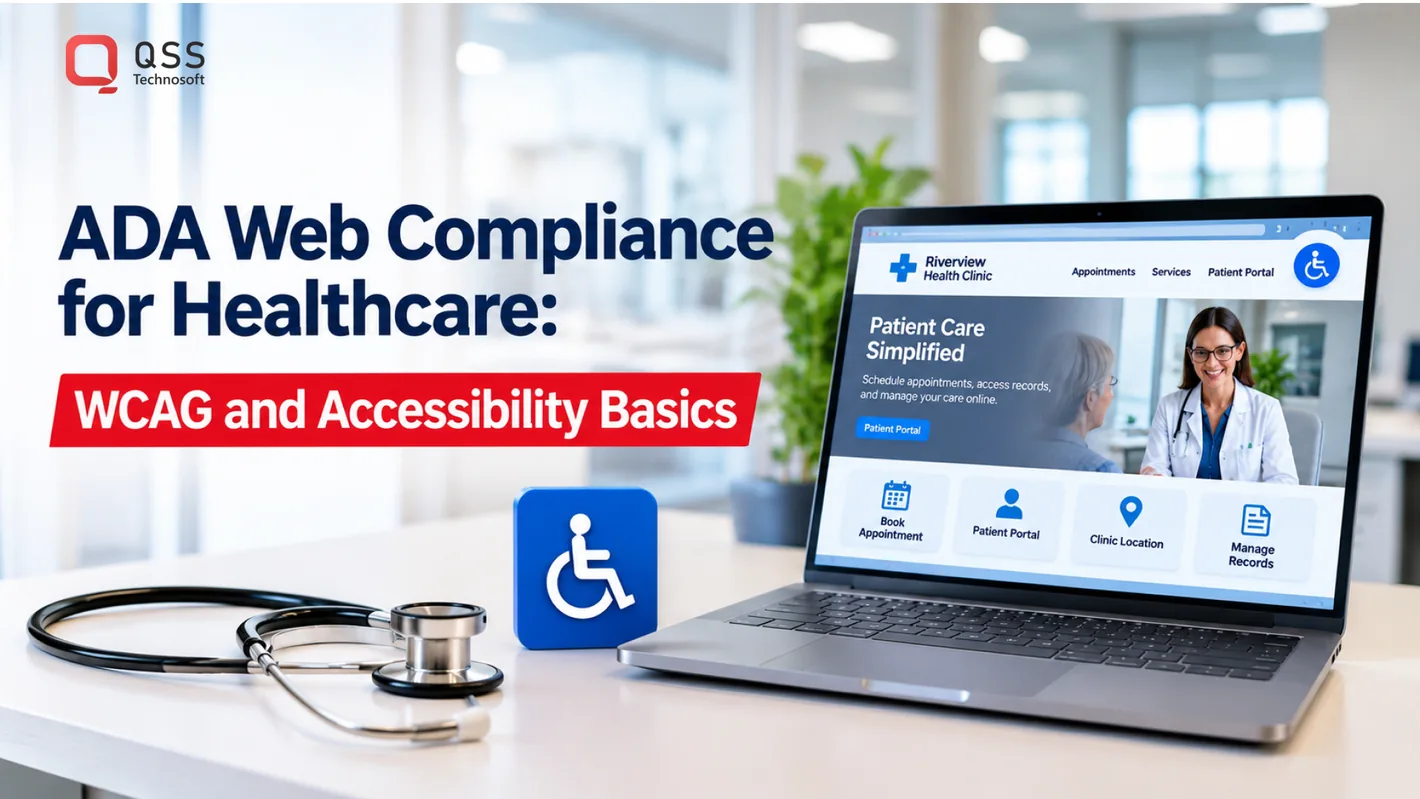
Patient access can break down before care begins. WCAG website compliance means making digital content usable for people with disabilities by following the Web Content Accessibility Guidelines, a technical standard for accessible websites and apps. For healthcare organizations, ada web compliance solutions for healthcare begin with applying those criteria to real tasks, such as finding care, booking appointments, and using patient portals.
Healthcare leaders are right to look beyond visual accessibility overlays. Patients may rely on keyboard navigation, screen readers, captions, clear forms, and accessible appointment systems. Automated tools alone can miss barriers in these workflows.
This article explains how WCAG relates to U.S. accessibility requirements, what accessible websites and media need to support, and where automated tools help or fall short. It also explains how requirements can differ for public entities and healthcare organizations receiving federal funding, so you can understand what may apply and why accessibility is an ongoing part of inclusive care.
Quick Answer
ADA web compliance solutions for healthcare start by applying WCAG accessibility criteria to real patient tasks: finding care, booking appointments, and using patient portals. Automated scans are a useful first pass, but digital accessibility testing also needs manual keyboard and screen-reader reviews of each critical workflow, followed by remediation and retesting after every release. Which requirements apply depends on the organization: ADA Title III for private providers open to the public, Title II for state and local government entities, and the HHS Section 504 rule, which specifies WCAG 2.1 Level AA, for covered organizations receiving HHS funding. Healthcare website accessibility and accessible patient portals also depend on meaningful alt text, captions, transcripts, sufficient contrast, and clear form errors. Treat ADA compliance as ongoing release work with a named owner for each patient-facing channel, not a one-time scan.
Automated accessibility tools
Automated accessibility tools scan healthcare websites for detectable barriers, but they cannot establish full compliance on their own. Choosing ada web compliance solutions for healthcare means combining scans with practical reviews of patient tasks across websites, apps, portals, and forms.
Automated Accessibility Scanning
Automated accessibility scanning uses software to detect code and content patterns that may conflict with accessibility guidelines. A healthcare practice can scan appointment forms, patient portals, and telehealth pages for missing labels, low contrast, and navigation barriers.
Free compliance reports can offer an initial view of website issues. But a clean scan does not prove that a patient using assistive technology can complete a task. Tools may miss complex form behavior, inaccessible PDFs, and structural navigation problems. Treat scan results as a starting point for review, not a pass certificate. Effective ada web compliance solutions for healthcare combine detection with manual assessment and remediation.
For businesses open to the public, ADA Title III applies to public accommodations. Healthcare providers offering appointments or patient services online should address barriers that prevent people with disabilities from accessing those services. State and local governments have separate obligations under ADA Title II, including accessibility for their websites and mobile applications.
The DOJ’s 2024 web accessibility rule applies to state and local government entities, not private medical practices. Under that rule, larger jurisdictions with populations of 50,000 or more had an April 24, 2026, deadline; smaller jurisdictions have an April 26, 2027, deadline. Separately, the HHS rule issued in May 2024 applies to covered healthcare organizations receiving HHS funding, including Medicare or Medicaid payments. Organizations with 15 or more employees had a May 11, 2026, deadline; organizations with fewer than 15 employees have a May 11, 2027, deadline. HHS updated Section 504 to extend web and mobile accessibility requirements to covered clinicians and healthcare entities.
State or local requirements may add obligations. In California, inaccessible website claims can lead to statutory damages under the Unruh Civil Rights Act, so a provider’s location can affect its legal exposure.
Accessibility Testing and Remediation
Accessibility testing combines automated scans with manual reviews of how people use a digital service. For a patient portal, testers can use keyboard navigation and screen readers to find barriers in sign-in, form completion, and appointment booking.
Remediation means correcting barriers and then retesting the affected workflow. Include disabled users in usability testing where possible; their experience can reveal problems that scanners and scripted reviews miss. Repeat testing after content, form, or software changes, because new releases can reintroduce barriers.
Common barriers include unlabeled form fields, broken keyboard tabbing, outdated PDFs, and videos without captions. Without captions, a deaf patient may miss spoken instructions; a screen-reader user may not identify an unlabeled appointment button. Test each critical path from entry to completion, including mobile apps and telehealth access.
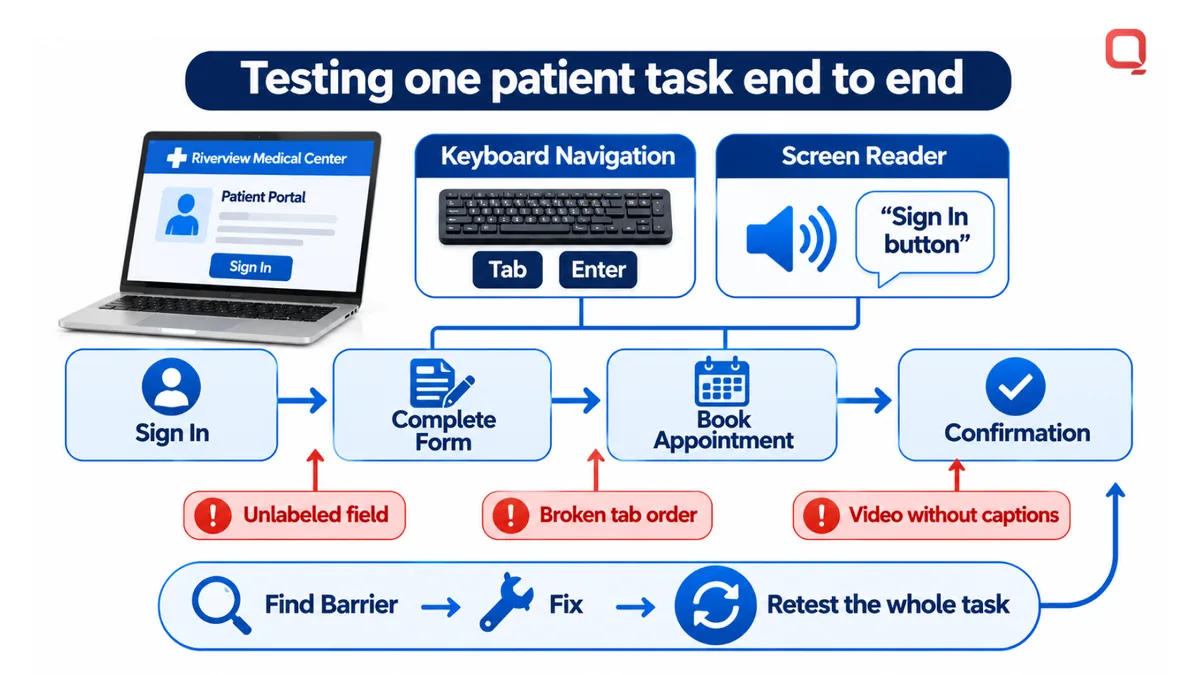
Auditing and remediation costs depend on site and app scope, workflow complexity, legacy code, and the volume of content requiring correction. Pricing is provided after a quote request. A useful audit identifies specific barriers, affected patient tasks, and remediation priorities rather than offering a score alone.
Are there any exemptions to who must comply with the web and mobile content accessibility requirements?
There is no single exemption that applies to every healthcare organization. Coverage depends on whether an entity is public or private, whether it receives HHS funding, and whether its digital services fall under applicable accessibility requirements.
For healthcare providers, receiving Medicare or Medicaid payments can bring an organization within the HHS rule when it receives HHS funding. The rule applies to covered websites and mobile apps and requires WCAG 2.1 Level AA conformance. The employee threshold affects its deadlines: organizations with 15 or more employees had a May 11, 2026 deadline, while organizations with fewer than 15 employees have a May 11, 2027 deadline.
That threshold should not be treated as a blanket ADA exemption. ADA obligations differ by entity and context. A private practice open to the public may have obligations under Title III, while state and local government healthcare entities are covered under Title II. A standalone website with no connection to a physical place of business may not be subject to ADA requirements, but that possibility does not automatically remove duties under other laws or funding conditions.
Public funding matters. A pediatric practice participating in Medicaid, CHIP, Medicare, or another government funding program may be subject to web and mobile accessibility requirements. Assess the provider’s funding relationship, organizational role, employee count, and digital services together. Looking at only one factor can lead to a mistaken assumption about coverage.
WCAG, or the Web Content Accessibility Guidelines, is a technical standard for making digital content more accessible to people with disabilities. It has three conformance levels: A, AA, and AAA. Level AA is generally the accepted benchmark, and the HHS rule specifies WCAG 2.1 Level AA for covered entities. WCAG provides measurable criteria; the ADA and Section 504 establish legal obligations in their respective contexts.
This distinction matters because meeting a technical standard and determining legal coverage are related but separate tasks. A practice can use WCAG criteria to guide accessible images, videos, forms, and screen-reader support. Its specific obligations still depend on the laws and funding rules that apply to the organization. A website vendor’s role does not transfer a covered healthcare provider’s responsibility for its digital content.
For an organization with uncertain coverage, map the entity type, public funding, employee threshold, and each website or app used to serve patients. That creates a practical basis for assessing requirements without assuming that small size, a vendor-managed site, or a standalone domain automatically creates an exemption. Discuss healthcare accessibility requirements when translating that assessment into a digital remediation plan.
What is WCAG Website Compliance?
WCAG website compliance means designing and maintaining digital content according to accessibility criteria for people with disabilities. In healthcare, these criteria should reflect the patient tasks supported by websites, apps, and portals. Effective ada web compliance solutions for healthcare turn requirements into design and engineering work that can be tested.
How the ADA Applies to Websites
The Americans with Disabilities Act establishes nondiscrimination duties, while WCAG supplies technical criteria for digital accessibility. The U.S. Department of Justice has taken the position that the ADA applies to web content since 1996, although Title III does not specify technical website standards.
For a healthcare organization, the practical distinction is between a legal obligation and a technical method for addressing barriers. WCAG criteria help teams assess whether patients can use page structures, interactive controls, and digital content. Applying ada web compliance solutions for healthcare connects that technical work to the services patients need to access.
Risks of Inaccessible Websites
An inaccessible workflow can prevent patients from independently using medical information or services. For example, a portal that signals a form error only through color may leave a screen-reader user without the information needed to correct it. The barrier affects both task completion and the patient’s experience of the organization.
Organizations also face implementation risks when accessibility ownership is unclear. A design team may fix a visible contrast issue while an engineering release introduces a new focus-order problem. Assigning responsibility for requirements, code changes, content, and retesting helps prevent isolated fixes from leaving the wider workflow unusable.
WCAG provides a shared reference for evaluating digital content, but automated and manual testing detect different types of problems. Automated tools scan code and content patterns; manual testing examines how people move through real tasks. Use both methods to build a clearer picture of accessibility barriers.
| Testing method | What it can reveal | Key limitation |
|---|---|---|
| Automated scanning | Detectable code or content patterns, such as missing labels | May miss complex interactions and task failures |
| Manual review | Problems in navigation, form behavior, and page structure | Requires reviewers to examine workflows and assistive technology use |
For governance, map each patient-facing channel to an accountable owner and release process. A portal, mobile app, and public website may have separate teams, but patients experience them as connected services. Tracking defects by workflow helps product and engineering teams fix underlying patterns instead of repeatedly patching individual screens.
Alt text, captions, and transcripts
WCAG accessibility depends on more than readable text. For healthcare websites, images, video, and audio need alternatives that let people with disabilities access the same information. WCAG criteria make these requirements testable, including alt text under WCAG 1.1.1 and captions under WCAG 1.2.2.
Alt text gives a screen reader a text equivalent for an image. Describe the image’s purpose, not just its appearance. For example, a clinic-location image showing where to enter needs a useful description; a purely decorative image can use empty alt text so assistive technology can skip it. Avoid repeating nearby text in alt text, since that adds noise without adding information.
Headings also shape navigation. Use a logical heading structure so a screen-reader user can move through sections, such as “Preparing for your visit” followed by “What to bring.” WCAG 3.2.3 addresses consistent navigation across pages. A patient portal that changes menu order between screens can make familiar tasks harder to locate.
Text and images of text need a contrast ratio of at least 4.5:1 under WCAG 1.4.3. Check labels, appointment buttons, and instructions against their backgrounds. Color alone should not communicate a warning; pair a red error state with a text message such as “Enter a valid date.” That gives users another visual and textual cue.
WCAG 1.4.4 supports resizing text without breaking content or functionality. Website text should remain usable when resized to 200%, without requiring extra technology or losing content. Test a patient registration form at that size. Labels, instructions, and buttons should remain visible and usable rather than overlapping or disappearing off-screen.
Captions and transcripts provide alternatives for people who are deaf or hard of hearing. WCAG 1.2.2 covers captions for video, while WCAG 1.2.3 covers transcripts for audio content. A clinic video explaining appointment preparation should include synchronized captions; an audio-only explanation should have a transcript users can read.
- Images: Add concise alt text when the image conveys information under WCAG 1.1.1.
- Videos: Provide captions so spoken instructions are available as text under WCAG 1.2.2.
- Audio: Offer transcripts that preserve the information in recorded content under WCAG 1.2.3.
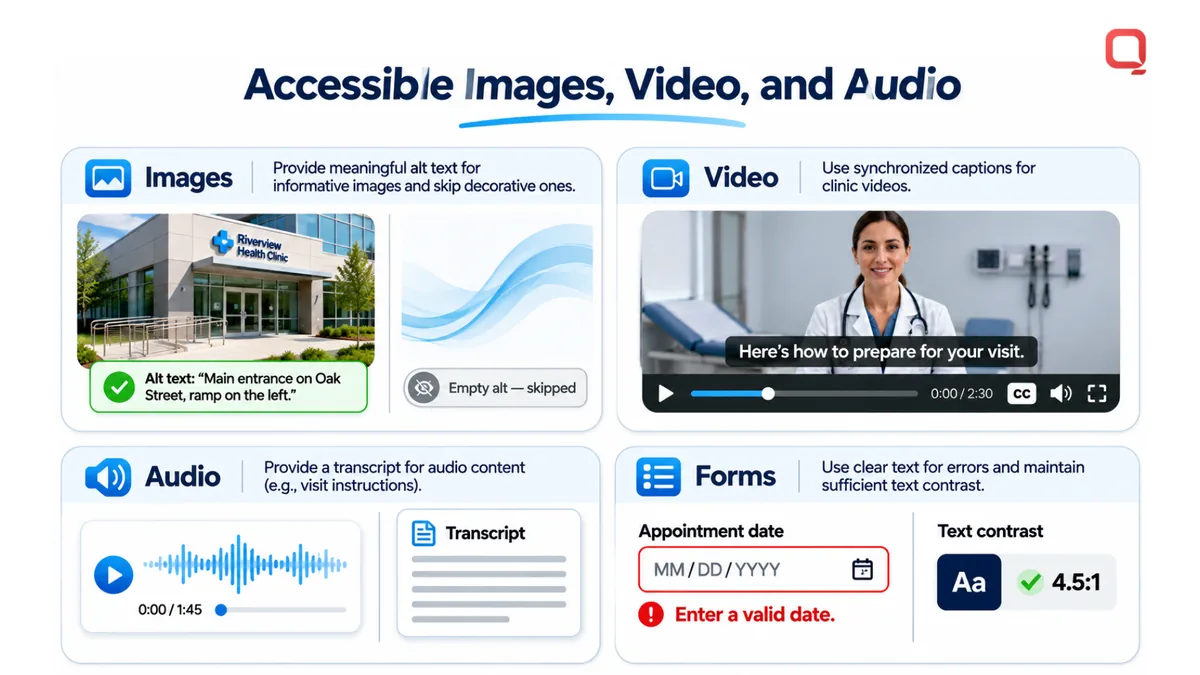
For healthcare content, accuracy matters as much as inclusion. A caption that changes a medication instruction can mislead; an image description that omits a key location can frustrate patients. Review captions, transcripts, and alt text alongside the source content, then test how they appear and function in the patient-facing experience.
Patient trust and inclusive care
Accessible web content affects whether patients can use digital services independently, not just whether a page passes a scan. In the United States, more than 70 million adults live with disabilities. A keyboard user, screen-reader user, or patient with hearing loss may encounter different barriers in the same appointment workflow.
Trust grows through usable interactions. A patient who can find clinic hours, understand preparation instructions, and submit a form without assistance has a more direct route to care. A patient blocked by a keyboard trap or unclear error message has to stop, seek help, or abandon the task. Small interface failures create real friction.
Apply the four WCAG principles to complete patient tasks: make information perceivable, controls operable, instructions understandable, and code robust for assistive technologies. For example, a telehealth appointment flow should make every control available through keyboard navigation, explain required fields, and present status messages to screen readers. A visually attractive page can still fail if the full workflow breaks.
Inclusive care also means respecting different ways of reading and interacting. A patient with a cognitive disability may need plain instructions and a predictable sequence. A person with low vision may enlarge text or use a screen reader. Someone who is deaf needs captions for spoken information. These differing access needs cannot all be met with a single visual overlay.
- Before the visit: make clinic location, appointment steps, and preparation details easy to find.
- During a task: keep keyboard focus visible and explain form errors beside the relevant field.
- After submission: provide a clear confirmation that assistive technology can announce.
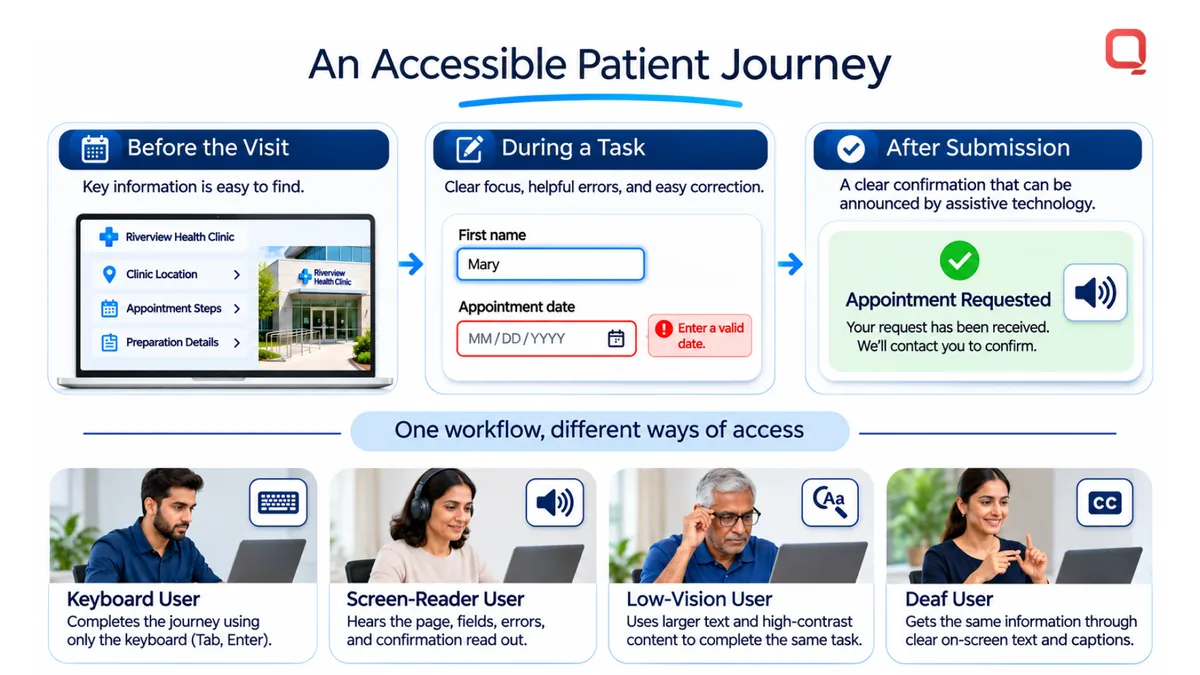
The Department of Justice’s ADA position on web content reinforces why healthcare organizations should treat accessibility as part of public service delivery. Its 2024 Title II rule sets specific web and mobile requirements for state and local governments. For patients, the practical measure remains whether they can complete essential tasks, not whether the organization has added an accessibility statement.
Measure the experience across real workflows. Have testers navigate appointment booking, patient portal sign-in, and telehealth entry using keyboard-only interaction and screen readers. Include disabled users in usability sessions where possible, then record the task, barrier, and correction. Retest after interface changes; a redesigned button can disrupt focus order even when its appearance improves.
For healthcare leaders, the takeaway is concrete: build accessibility into product decisions, content review, and release testing. That keeps patient access from depending on a particular device, input method, or staff member’s help. Plan an accessibility review for patient workflows to identify barriers that affect trust and independent access.
QSS Technosoft: Generative AI Solutions
QSS Technosoft helps healthcare organizations address accessibility needs through Healthcare IT Engineering, Legacy System Modernization, and Mobile App Development. Turn to these services when patient-facing systems need accessibility improvements across older web workflows, portals, or mobile experiences.
Accessibility needs to be built into the interface and tested in context. Modernization can address structural barriers in legacy software, while mobile development can account for keyboard operation, readable content, and assistive technology. Generative AI Solutions may support broader healthcare technology initiatives, but they do not replace accessibility design, testing, or remediation.
Share your healthcare system’s accessibility goals with QSS Technosoft to discuss a practical next step. Contact QSS Technosoft.
Make accessibility part of the next release
Accessibility work is strongest when it becomes part of product planning, development, and ongoing release decisions. Treat each change to a patient-facing service as an opportunity to preserve access, not as a separate cleanup task that waits for complaints. This approach makes ada web compliance solutions for healthcare part of how digital care is built and maintained.
QSS Technosoft offers Healthcare IT Engineering and Legacy System Modernization for healthcare platforms, alongside Generative AI Solutions. These capabilities can support organizations addressing accessibility within evolving systems, while accessibility itself still requires deliberate design and testing.
Start with the patient workflows that matter most, then assign ownership for fixing and retesting barriers. A clear scope gives engineering, product, and operations teams a shared path forward.
Contact QSS Technosoft to discuss accessibility and plan a practical next step. Better access is built through steady, measurable work, and your next release can move that work forward.
Find the Barriers Your Patients Actually Hit
Bring your website, patient portal, and appointment flows. Our healthcare engineers pair automated scans with keyboard and screen-reader digital accessibility testing against WCAG 2.1 Level AA, then fix and retest each barrier, so healthcare website accessibility and accessible patient portals hold up release after release. We handle the engineering side of ADA compliance; your legal team confirms which requirements apply to your organization.
Plan an accessibility review →