Patient Portal Software Development Costs and Features
 By Ashwani Rana
QSS Technosoft
November 10, 2026
14 min read
A patient portal is more than a login screen. Patient portal software development connects patients with health information and services through a secure digital experience, often integrated with an EHR. The work involves selecting patient-facing features, planning data exchange, and designing around privacy and security requirements such as HIPAA.
The scope matters. A portal that seems straightforward can become complex when it must connect to existing clinical systems, provide reliable access to records, and make sensitive tasks clear for patients. Plan these requirements early, before integration and security decisions become costly to change.
This article explains how patient portal software works, which features and build options to consider, and what affects project costs. It also covers HIPAA, interoperability, and how to decide between a focused portal and a broader platform. Use it to scope a portal around your systems and the way patients need to use it.
Quick Answer
Patient portal software development builds a secure, patient-facing application connected to your EHR, practice management, and other systems. Core patient portal features include appointment scheduling, secure messaging, reminders, payments, and video visits, each tied to a clear next step for staff. EHR integration usually shapes scope and schedule the most: confirm the vendor’s approval process and interface capabilities (such as FHIR R4, US Core 6.1.0, and SMART App Launch 2.0.0) early, decide which system owns each data element, and test complete workflows. Patient portal costs depend on features, integrations, platforms, security work, and ongoing hosting and maintenance; a focused MVP typically takes 4 to 6 months, and pricing is quoted per project. Choose between an EHR portal, a commercial portal, or custom healthcare software development based on workflow fit and ownership, and design for HIPAA compliance and WCAG 2.1 AA accessibility from the start.
What is patient portal software development?
Patient portal software development creates an application that connects patients with health information and services across clinical and administrative systems. The integration design determines which records and workflows patients can access, and how information moves between systems.
Custom and Integrated Portal Development
A custom portal is designed around an organization’s workflows, while an integrated portal connects a patient-facing experience to existing software. The distinction matters because even a custom interface depends on reliable connections to clinical and operational data.
An electronic health record (EHR) stores a patient’s clinical record across care settings; an electronic medical record (EMR) generally supports a clinical record within a practice. A customer relationship management system (CRM) manages interactions, while practice management software (PMS) handles administrative workflows such as registration and billing. A portal may need to connect to all four without creating conflicting patient profiles or duplicate tasks.
Integration can extend beyond an EHR or EMR. A hospital information system (HIS) supports hospital operations, while a health information exchange (HIE) enables information sharing across organizations. A radiology information system (RIS) manages imaging workflows, and a laboratory information system (LIS) manages lab workflows. Third-party connections may also support identity verification, payment processing, or video visits.
Each connection needs a defined data flow. For example, the portal might read appointment details from a practice management system, then send a patient’s scheduling request back through an approved interface. FHIR R4, US Core 6.1.0, and SMART App Launch 2.0.0 are identified integration methods for patient portals. The right option depends on the EHR’s interfaces and the data or actions the portal must support.
Vendor access can affect the schedule: EHR vendor program reviews commonly take 8 to 20 weeks. A proprietary EHR vendor API integration typically takes 6 to 14 weeks, including vendor program approval. These are separate planning considerations, so teams should identify the vendor’s approval process and interface requirements before locking the integration scope.
Development Risks and Challenges
Common risks include limited vendor access, mismatched data, duplicate records, and workflows that break across connected systems. These issues can leave the portal showing incomplete information or route an action to the wrong operational process.
Vendor approvals and API constraints can delay or limit integration work. A read-only interface, for example, may show an appointment but not allow rescheduling. Portal features must match the actual capabilities of each EHR, EMR, CRM, or PMS connection.
Data mapping is another pressure point. A lab result from an LIS and a medication record from an EHR may use different codes or formats. Without consistent mapping, the portal can show duplicate or confusing entries. Specify which system owns each data element and how updates are reconciled.
Test complete workflows, not just whether an API responds. Trace a patient action from portal input through the connected system and back to the displayed result. This can expose permission errors, stale data, and broken handoffs before release.
Patient engagement depends on features working reliably across the systems behind them. Define what each integration reads or writes, document vendor dependencies, and test failure paths such as unavailable interfaces. This makes technical limitations visible before they cause confusion for patients or staff.
Patient portal development costs
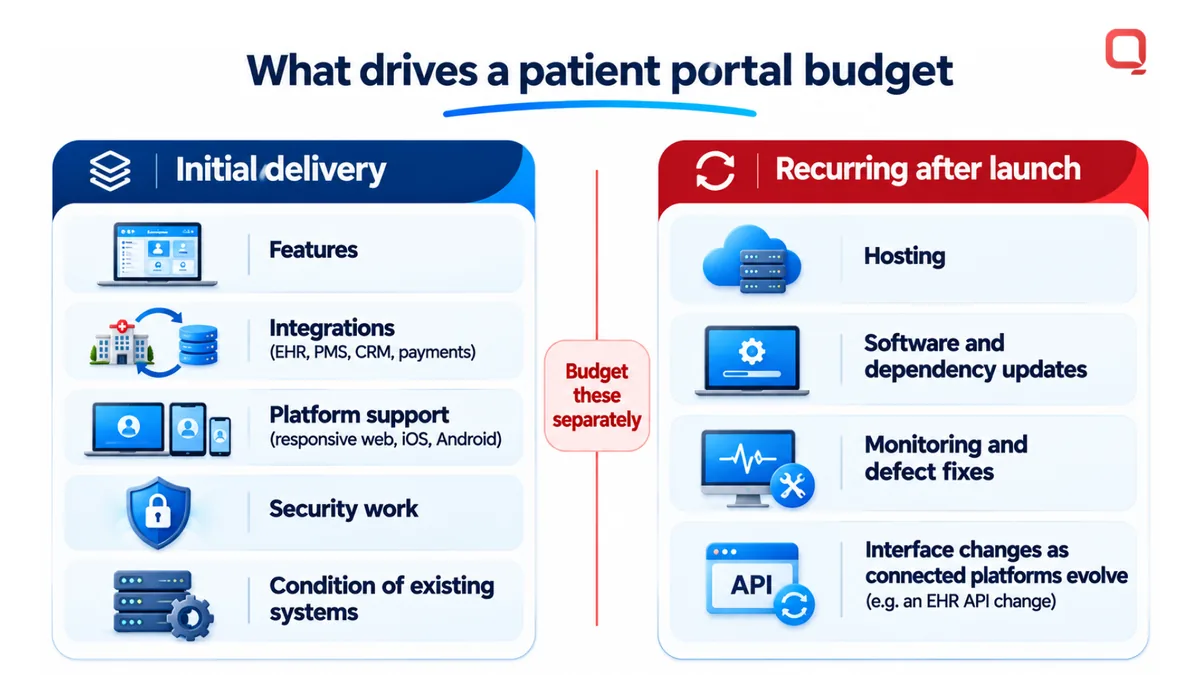
Patient portal budgets depend on features, integrations, platform support, and post-launch work. Common options include responsive web applications and native iOS or Android apps, built with frameworks such as React Native or platform-specific tools.
Custom Portal Development Costs
A custom portal is built around a provider’s workflows rather than a fixed product configuration. Its cost depends on the features, integration scope, user experience, and operational requirements.
For example, a portal limited to viewing records has a different scope from one that supports appointment requests, signed forms, payments, and mobile access. Each workflow requires design, development, testing, and connections to the systems that own its data.
Project pricing depends on the specific case and is provided after a quote request. The main cost drivers are feature complexity, third-party connections, platform support, security work, and the condition of existing systems.
A focused MVP patient portal typically takes 4 to 6 months. That timeline can shift when the provider needs multiple integrations, custom workflows, or both web and mobile experiences.
Hosting and Maintenance Costs
Hosting and maintenance cover the infrastructure and ongoing engineering required to keep a portal available, secure, and compatible with connected systems. Launch is only one stage of the work.
Hosting needs depend on deployment architecture, expected use, data storage, and operational controls. A portal handling electronic records and signed forms, for example, needs a hosting design that supports its security and availability requirements.
Maintenance includes software updates, defect fixes, dependency updates, monitoring, and interface changes as connected platforms evolve. An EHR API change may require adjustments to data mapping or workflow logic, even when the portal’s patient-facing features stay the same.
Separate initial delivery costs from recurring hosting and engineering in the budget. This makes ongoing costs visible and helps teams prioritize platform updates, integration support, and feature changes after release.
Platforms and Frameworks
A development platform determines where the portal runs, while a framework provides reusable tools for building its interface and application logic. Platform support affects design, testing, deployment, and future maintenance.
A responsive web application serves desktop and mobile browsers through one interface. Native iOS and Android apps provide platform-specific experiences, while React Native supports cross-platform mobile development from a shared codebase.
Healthcare data exchange options also include FHIR-compatible interfaces and SMART App Launch. These standards help structure access and application launch, but the provider’s connected systems and vendor requirements still shape the integration.
Choose a framework based on required devices, accessibility needs, integration architecture, and internal engineering capabilities. This helps avoid a platform choice that creates unnecessary maintenance later.
If you’re defining a portal scope, a patient portal project discussion can help connect feature priorities with platform and integration decisions.
Appointments, messaging, payments, and video visits
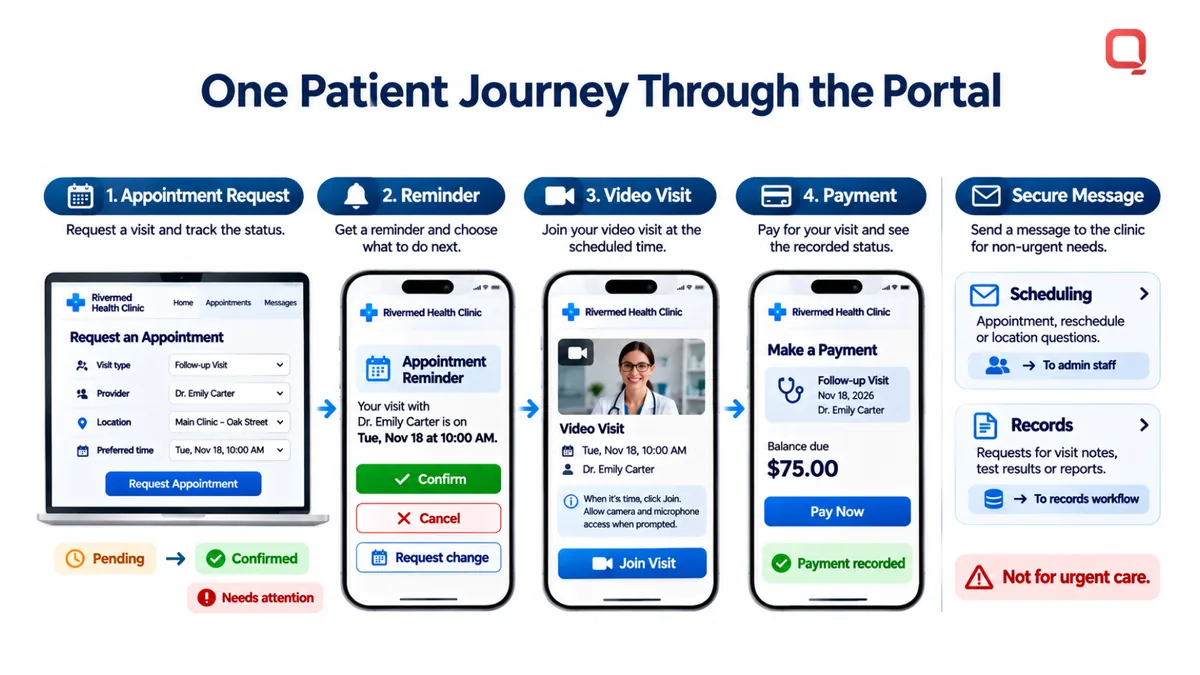
A patient portal can bring appointment scheduling, secure messaging, payments, and video visits into one patient-facing workflow. Each feature should connect a clear patient action to the healthcare organization’s next step.
Appointment Scheduling and Management
Appointment scheduling lets patients view available visits and submit or manage requests through the portal. A useful flow shows visit type, provider, location, and available time slots before the patient selects an appointment.
After submission, the portal should show the request’s status, such as pending, confirmed, or needing attention. This helps patients understand what happens next instead of mistaking a request for a completed booking.
Scheduling rules should reflect operational differences. A follow-up with a primary care provider may have different availability from a diagnostic appointment. Organizations can define which visit types support self-scheduling and which require staff review.
Appointment Scheduling and Messaging
Secure messaging gives patients and care teams a channel for non-urgent questions related to portal use. For example, a patient can ask about preparation instructions for an upcoming appointment without using a general comment field.
Message categories help route requests to the right team. A scheduling question can go to administrative staff, while a question about a medical record follows a separate workflow. Clear categories reduce misdirected messages and make responsibility visible.
The portal should distinguish messaging from urgent care instructions. Explain the channel’s intended use and direct patients to appointment details, records, or other relevant information.
Appointment Reminders
Appointment reminders help patients keep track of scheduled visits. A reminder workflow can use appointment status as its trigger and present the date, time, provider, and location for review.
Design reminders around the action patients need to take. If they must confirm, cancel, or request a change, the message should lead directly to that portal task. A reminder that only repeats the date offers less practical value.
Payments and Video Visits
Payment features can show a balance, explain the related service, and guide patients through payment processing. After submission, display a clear status so patients know whether the payment was recorded or needs follow-up.
Video visits add a virtual appointment option to the same patient experience. The portal can show visit details, provide an entry point at the scheduled time, and keep related instructions near the appointment. Together, these features connect scheduling, communication, and follow-through without scattering tasks across workflows.
Custom build versus commercial and EHR portal options
Healthcare providers can use an EHR portal, license a commercial portal, or build a custom application. The right fit depends on workflow flexibility, integration needs, product control, and support.
| Option | Useful when | Trade-off |
|---|---|---|
| EHR portal | Existing EHR features match patient and staff workflows. | Customization may be limited to vendor capabilities. |
| Commercial portal | Standard patient-facing workflows can meet organizational needs. | Configuration and integrations depend on the product. |
| Custom portal | Distinct workflows or connected applications need a tailored experience. | The organization takes on product ownership and ongoing changes. |
EHR and Commercial Portals
An EHR portal is a patient-facing application supplied with or connected to an electronic health record. It can be a practical choice when its features cover core workflows, such as viewing records and managing appointments.
A commercial portal is a separately licensed product that can connect to healthcare systems. Its fit depends on configuration options, supported integrations, and how well its workflows suit the organization’s operations. Practices with standard needs may avoid building features already available in their EHR or commercial platform.
Custom Patient Portal Development
Custom patient portal development creates an application around specific organizational workflows and integration requirements. It may suit organizations whose EHR portal cannot support a needed patient journey, such as combining services across separate clinical applications.
Custom work also brings product responsibilities. Plan for interface updates, testing, accessibility, security, and ongoing feature changes. A tailored interface does not eliminate dependencies on vendor APIs or the systems supplying clinical data.
Support and Ownership
Support options vary by ownership model. An EHR vendor typically supports its own portal, while a commercial software vendor supports its licensed product. A custom application needs a defined team to handle defects, platform changes, and integration maintenance.
That team may include internal engineers, a software development agency, or both. Assign responsibility for each application layer: portal interface, identity and access, data exchange, and vendor-facing connections. For example, if an EHR changes an API, the support process should identify who assesses the change, updates the integration, and tests affected workflows.
Compare options against concrete needs: required patient workflows, systems to connect, customization limits, and long-term ownership. If the EHR portal supports the required engagement, a custom build can add unnecessary work. If workflows span applications or require a distinct experience, a custom portal may provide control that a fixed product cannot.
HIPAA compliance and protected health information
Patient portals that handle protected health information need architecture and workflows designed around privacy, security, and accessibility. WCAG 2.1 AA is the accessibility standard identified for US patient portals; usability also depends on clear labels, readable content, and understandable task flows.
Regulatory Compliance and Healthcare Standards
Regulatory compliance means aligning portal design and operations with applicable healthcare rules and standards. It matters because patient-facing features can expose clinical data or create gaps in information handling.
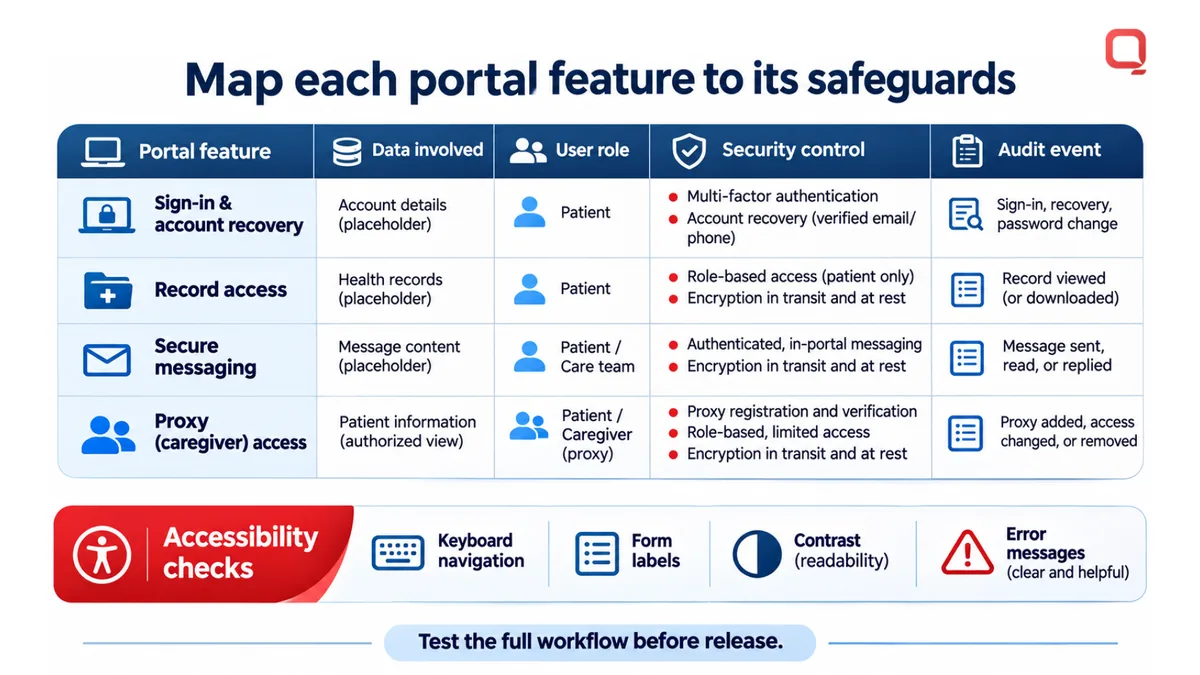
The 21st Century Cures Act prohibits information blocking, according to the U.S. Congress. Portal teams should consider how the system supports appropriate access to health information. Accessibility testing should cover keyboard navigation, form labels, contrast, and error messages across important workflows.
HIPAA Safeguards
HIPAA safeguards are controls for protecting health information. They matter because secure messaging, record access, and account management each create opportunities for unauthorized access.
Architecture decisions should define how the portal authenticates users, limits access by role, protects data in transit and at rest, and records security events. Test a complete workflow, such as a patient signing in, opening a medical record, and sending a message. This can reveal access-control gaps and sensitive information in application logs.
According to the U.S. Department of Health and Human Services Office for Civil Rights, HIPAA fines range from $100 to $50,000 per violation. The office states that breach notification is required within 60 days of discovery. Incident procedures should identify who investigates, documents, and communicates a breach.
HIPAA and Meaningful Use Compliance
HIPAA safeguards and Meaningful Use objectives address different aspects of health IT. A portal’s electronic record-access features do not, by themselves, establish HIPAA compliance or satisfy a program objective.
For example, a provider may offer electronic access to clinical records while separately managing identity verification, permissions, and audit events. Map each feature to its data, user role, and security control, then test the workflow before release. Include accessibility and security checks in the product’s ongoing quality process.
QSS Technosoft: Revenue Cycle Management (RCM) Software
QSS Technosoft develops Revenue Cycle Management (RCM) Software for healthcare organizations connecting patient access with financial operations. This service can fit when portal work needs to align with revenue-cycle workflows or when existing systems create friction between patient activity and billing operations.
QSS Technosoft also provides Healthcare IT Engineering, Generative AI Solutions, and Legacy System Modernization. These services support teams addressing broader healthcare software needs, including modernizing systems connected to patient-facing services. Scope the work around the workflows, integrations, and operational requirements your organization needs to address.
Contact QSS Technosoft to discuss your revenue cycle software needs.
Set the Next Portal Decision in Motion
Turn broad goals into a decision-ready scope. Identify the patient tasks the portal should support, the systems those tasks depend on, and the operational owner for each workflow. Then define how the team will evaluate the first release, including usability, integration behavior, and support responsibilities.
This groundwork gives product, clinical, security, and engineering teams a shared basis for trade-offs. It also keeps patient portal software development focused on the experience and operational outcomes your organization needs, rather than adding features without a clear owner or purpose.
QSS Technosoft can help healthcare teams shape software projects around their technical and operational requirements. If you’re ready to discuss the work ahead, contact QSS Technosoft to discuss your project. A clear starting scope can make the next decision easier and put your team on a practical path forward.
Scope a Patient Portal Around Your Real Workflows
Bring the patient tasks you want to support, the systems behind them, and your first-release priorities. QSS Technosoft delivers patient portal software development and custom healthcare software development, from EHR integration over FHIR and SMART App Launch to appointment scheduling, secure messaging, payments, and video visits, with HIPAA compliance and accessibility built into the architecture. We’ll help you weigh patient portal features against patient portal costs and ongoing maintenance before you commit.
Discuss your patient portal project →