HL7 Interface Development Services and How Integration Works
 By Vineet Bhardwaj
QSS Technosoft
October 28, 2026
14 min read
By Vineet Bhardwaj
QSS Technosoft
October 28, 2026
14 min read
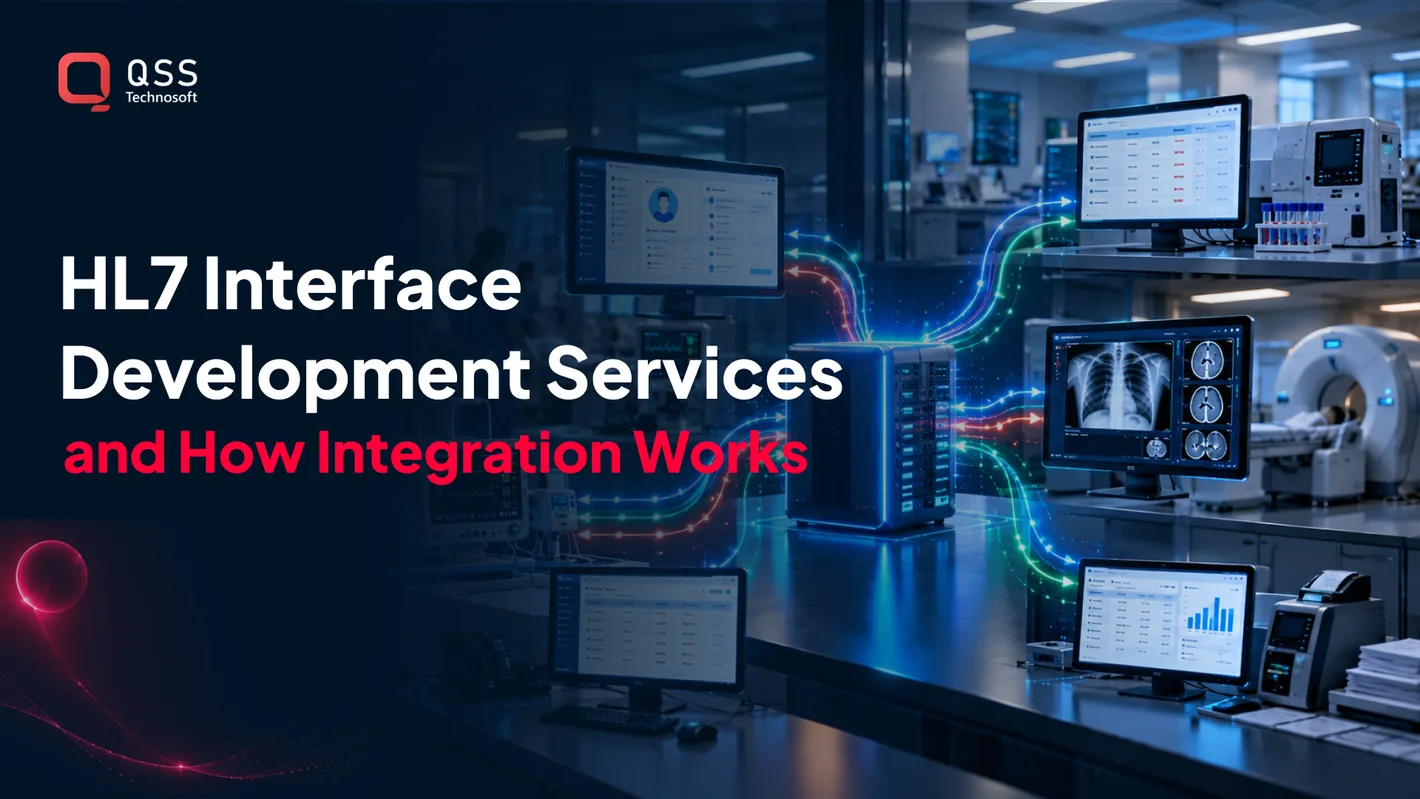
HL7 is a family of standards for exchanging health information between healthcare systems. HL7 interface development services connect applications such as EHRs, laboratory systems, and imaging systems, mapping and routing messages so each system can use the data it receives. Common HL7 v2 messages include ADT for patient movement, ORM for orders, and ORU for results.
For US healthcare SaaS teams, a shared standard is only the starting point. Different applications can interpret fields differently or reject messages, so interfaces need deliberate mapping, testing, and ongoing support.
This guide explains how HL7 supports healthcare data exchange, where v2 messages fit, and what interface development, testing, and engine deployment involve. QSS Technosoft is a US-based company focused on healthcare technology and SaaS solutions.
Quick Answer
HL7 interface development services connect EHRs, laboratory information systems (including laboratory information management system platforms), radiology, PACS, billing, and other applications by parsing, mapping, validating, and routing HL7 messages such as ADT (patient movement), ORM (orders), ORU (results), and MDM (documents). A dependable interface defines source and destination fields, acknowledgments, error queues, and ownership before go-live, then tests valid and invalid messages and monitors message status after launch. An interface engine centralizes routing and transformation across many connections, while custom code handles unusual endpoint logic. HL7 FHIR integration tools for healthcare can translate v2 messages into FHIR resources for API-based apps in a hybrid setup.
What Are the Advantages of Health Level 7 Interface & Integration?
HL7 integration connects healthcare systems by mapping and exchanging clinical data between applications, rather than requiring staff to re-enter it. Project cost and timeline depend on the number of systems, message types, data mappings, testing needs, and the complexity of existing technology; pricing depends on the case and is provided after a quote request.
Interfaces can transfer information between an EHR, laboratory, hospital, or other connected system through agreed message structures and field mappings. Legacy protocols, access to test environments, and approval workflows also affect the delivery schedule.
Healthcare System Connections
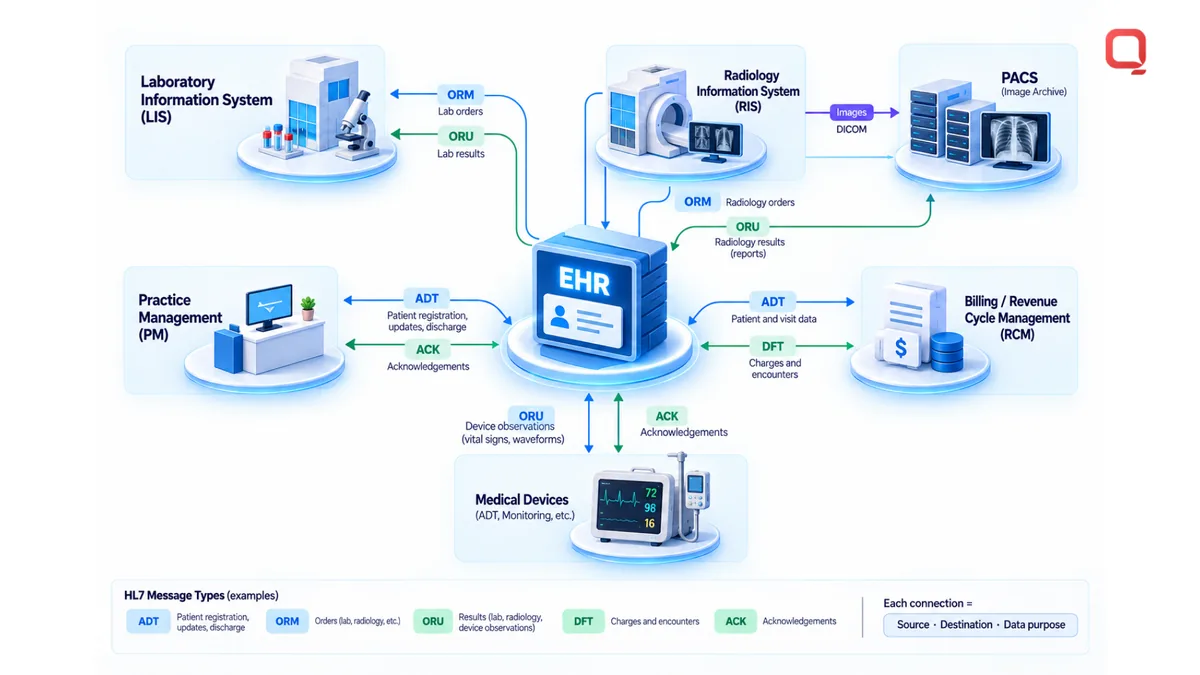
Healthcare system integration links hospital, practice management, laboratory, and medical equipment applications so relevant information can move between them. For example, a hospital admission may need to reach a practice workflow, or a laboratory result may need to return to the ordering system.
Each connection needs a defined source, destination, and data purpose. A practice management system might send registration details to an EHR, while a connected device supplies observations for clinical review. Mapping fields and handling exceptions prevents the interface from treating different local formats as interchangeable.
EHR and Diagnostic System Integration
EHR and diagnostic system integration connects electronic health records (EHRs), electronic medical records (EMRs), laboratory information systems (LIS), radiology information systems (RIS), and picture archiving and communication systems (PACS). These connections support workflows that span systems, from ordering a test to reviewing its result or image.
An HL7 interface can route a laboratory order from an EHR to an LIS, then return the result to the patient record. A radiology workflow can connect an order in the EHR with an RIS and associated images in PACS. Integration design must account for the fields each endpoint accepts, including patient identifiers, order details, and result status.
Data Integrity and Security Controls
Data integrity controls check whether exchanged information is complete, correctly mapped, and associated with the intended patient. Validation can reject a message with a missing identifier or unsupported value, while error logs help technical teams trace and correct the cause.
Security controls govern who can access protected information and how activity is recorded. According to the U.S. Department of Health and Human Services, HIPAA is relevant to monitoring and maintaining HL7 integrations in the United States. Audit records can capture message status and system events, supporting investigation when data is delayed or rejected.
These connections support workflows for hospitals, practices, laboratories, imaging centers, pharmacies, and payers. Clinicians can review information from another system, while laboratory and imaging staff can receive orders without duplicating the originating workflow. Operations teams can use message status and error records to find where an exchange stopped.
The benefit depends on fit, not simply on adding connections. An interface should exchange only the data needed for its workflow, preserve the meaning of source fields, and make failures visible. Before it carries live clinical data, define ownership for mappings, validation rules, access controls, and audit review.
Why integrate HL7 standards in healthcare operations?
HL7 standards give healthcare systems shared rules for parsing, mapping, validating, and routing health information. Common risks include mismatched fields, invalid patient identifiers, and failed messages; mitigate them with explicit mapping rules, validation checks, message monitoring, and defined error handling.
Data Validation and Error Handling
Data validation checks whether an HL7 message has the required structure and usable values before delivery. It matters because a malformed patient identifier or missing order field can interrupt a clinical workflow.
For example, an interface can validate required fields, record rejected messages, and route errors to an operational queue. Monitoring should distinguish a delivery failure from a message that arrived but failed validation. Teams can then correct the mapping or source data and reprocess the affected message without silently losing health information.
Formats and Clinical Coding Standards
Healthcare data formats and clinical coding standards define how systems represent and interpret information. Consistent representations matter because a code or value understood by one application may mean something different to another.
SNOMED CT is a clinical terminology used in interoperability. Mapping should preserve the source meaning when translating a coded diagnosis or observation into the receiving system’s format. A field-level mapping specification can identify the source and target fields, permitted values, and handling for missing or unsupported codes.
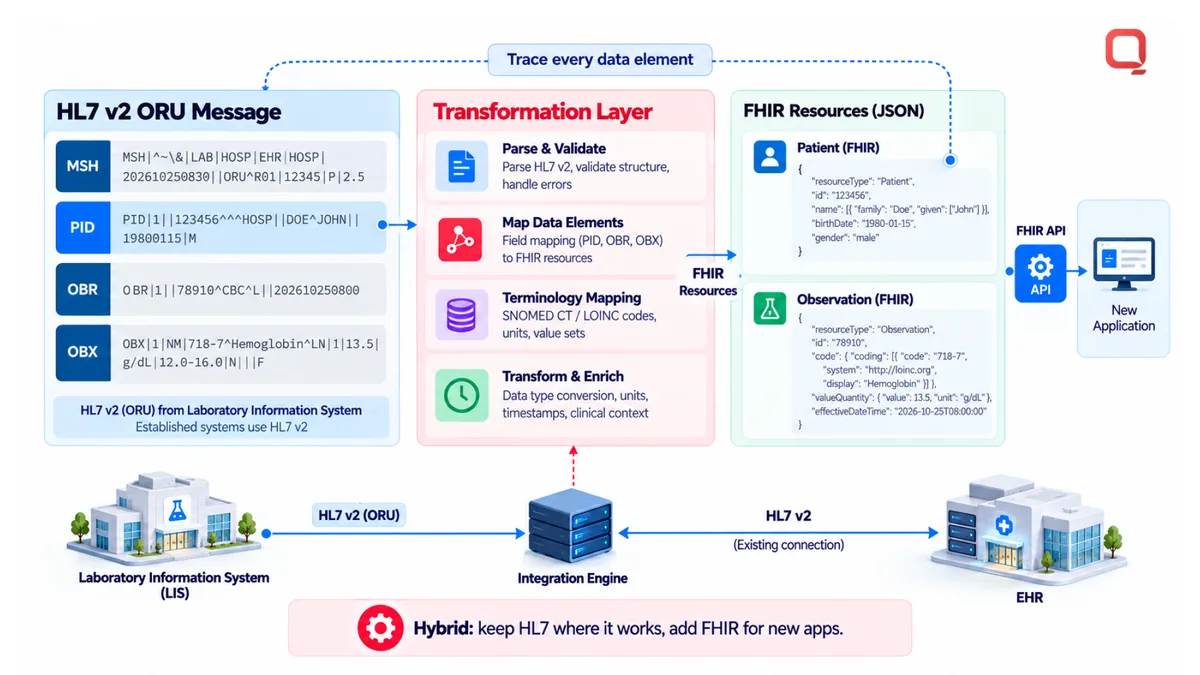
Parsing turns an incoming message into fields an interface can inspect. Mapping assigns those fields to the receiving system’s expected structure, while routing sends the transformed message to its destination. An interface engine can receive, transform, validate, and route messages, making each step visible for troubleshooting.
Clinical documents and nursing data also need deliberate handling. An MDM message can carry medical documents and reports, while an ORU message can carry clinical results and observations. A nursing workflow may include observations that need to reach the correct patient record, so mappings must preserve identifiers, timestamps, and the meaning of each value.
HL7-to-FHIR transformation translates legacy HL7 messages into FHIR resources, allowing healthcare organizations to expose data through APIs without replacing existing clinical systems. For example, a message containing a patient and observation can be mapped to corresponding FHIR resources. The mapping must account for differences in structure and vocabulary, not just rename fields.
A hybrid approach retains HL7 connections for established applications and uses FHIR APIs for newer applications. This can support gradual modernization, but it adds translation rules and monitoring points. Teams need to trace each data element from its source message through transformation to its destination resource.
Validation, monitoring, and mapping work best as a single operational process. Define acceptable values, capture failures, and assign ownership for correcting source data or transformation rules. Review those rules regularly as workflows and connected applications change, and document adjustments to keep them aligned with the intended exchange.
HL7 v2 messaging and common message types
HL7 v2 messages carry structured healthcare data between systems, with each message type tied to a workflow. Interface developers support HL7 Version 2, Version 3, CDA, and FHIR, choosing formats and mappings that fit connected systems.
HL7 Standards and Message Structure
HL7 standards define how healthcare systems format and exchange information, while an HL7 v2 message organizes data into segments and fields. That structure matters because receiving software needs to interpret each field consistently.
A message includes a type that identifies its purpose and segments that carry details such as patient or order information. HL7-formatted messages can travel between systems using MLLP, a transport protocol used for message exchange. The receiving application parses the segments according to its interface rules.
ADT, ORM, and ORU Messages
ADT, ORM, and ORU are HL7 v2 message types for patient movement, service orders, and clinical results. Their distinct purposes help systems route information to the correct workflow.
An ADT message communicates patient admission, discharge, or transfer events. An ORM message carries an order, such as a laboratory test or imaging service. An ORU message carries observations or results. In a typical workflow, an EHR sends an ORM to a laboratory system, then receives an ORU with the result.
Custom Interface Message Types
Custom interface messages adapt an exchange to local requirements when standard message handling does not cover a system’s workflow. They can address organization-specific fields, event triggers, or routing rules.
Custom work should preserve the meaning of standard segments and document each extension. An organization might define how a local status value maps to one accepted by the receiving system. Test the message against both endpoints, since locally valid data can still fail in destination software.
Supported HL7 Versions and Standards
HL7 v2, HL7 Version 3, CDA, and FHIR address different exchange patterns. Developers select a standard based on the systems, data, and workflow involved.
HL7 v2 supports operational messaging, while CDA structures clinical documents and reports. FHIR supports data exchange through web APIs and resources. A healthcare organization can retain HL7 connections for established systems while using FHIR for newer applications. Translation requires explicit mappings, since a v2 field and a FHIR resource may organize the same information differently.
Message testing checks whether software can parse, validate, and deliver expected content. Test cases should cover accepted messages, missing required fields, invalid values, and acknowledgments from the receiving system. A successful transmission alone does not prove that the message was interpreted accurately.
For example, an ADT test should verify that the receiving system recognizes the event and associates it with the intended patient. An ORM test should check order details, while an ORU test should confirm that result fields arrive in the intended structure. Record expected outputs and compare them with actual messages before deployment.
Consultation, development, testing, and ongoing support
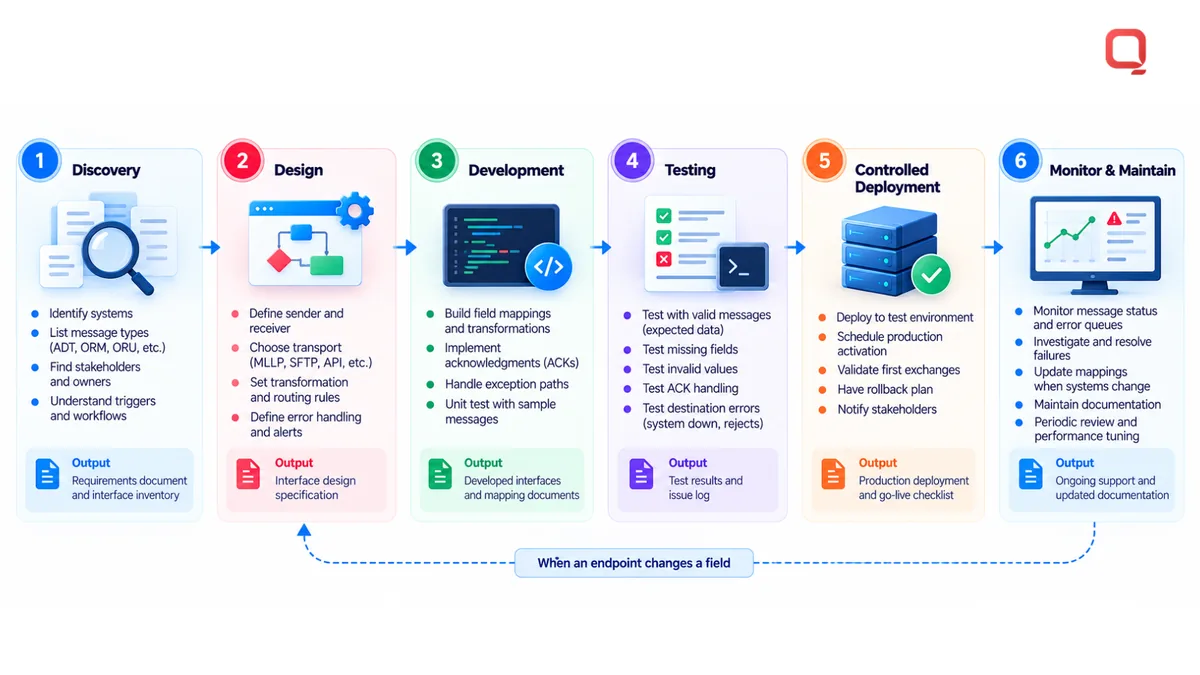
HL7 interface projects move from workflow discovery to design, development, testing, deployment, and maintenance. Each phase connects technical requirements to real electronic health workflows used by providers and healthcare organizations.
Consultation and Interface Development
Consultation defines the systems, data, and operational goals an interface must support. This matters because an interface built on assumptions can miss how providers actually document or exchange information.
Teams identify source and destination applications, message types, ownership, and workflow triggers. A hospital may need an admission event sent to an EHR, while a practice may need clinical results returned to its record system. Before writing interface code, developers document field mappings, required values, acknowledgments, and exception paths.
Interface Design and Deployment
Interface design specifies how messages move between applications and how each endpoint handles them. Clear design matters because a technically valid message can still fail in the destination system’s workflow.
A design may define the sender, receiver, transport method, transformation rules, and routing conditions. For example, a laboratory result can route to the ordering EHR using the patient and order identifiers that application expects. Deployment planning identifies environments, access requirements, release steps, and rollback procedures before production traffic moves.
Use a controlled transition. Configure the interface in a test environment with representative data, then compare expected and received message content with system owners. Schedule production activation around clinical operations and assign someone to review the first exchanges. This avoids treating deployment as a simple switch.
Testing, Monitoring, and Maintenance
Interface testing verifies that messages arrive, parse correctly, and preserve intended data between connected systems. Monitoring and maintenance matter because application changes or altered workflows can disrupt an interface after launch.
Test cases should cover accepted messages, missing fields, invalid values, acknowledgments, and destination errors. For example, a test can confirm that an updated patient identifier still matches the receiving EHR’s expected format. Record the test input, expected outcome, actual response, and any correction made.
After deployment, monitor message status, processing failures, and queues containing unprocessed data. Assign ownership for reviewing errors and escalating recurring failures. If an EHR or laboratory system changes a field, update the mapping and rerun affected tests before releasing the revision.
Ongoing support also includes maintaining interface documentation, access controls, and operational contacts. Keep current records of message purpose, endpoint owners, transformations, and recovery steps. This helps providers distinguish a source-system problem from a transport or mapping issue, while giving technical teams a clear trail of changes for restoring the affected workflow.
HL7 interface engine development and deployment
An HL7 interface engine is middleware that receives, transforms, validates, and routes messages between healthcare systems. It centralizes data exchange across electronic health records, laboratories, and billing applications, while custom interface code can address requirements that standard engine workflows don’t cover.
Integration engines and custom development solve related but different problems. An engine provides a shared hub for multiple connections; custom code builds or extends behavior for a specific system or workflow. The choice depends on endpoint compatibility, transformation needs, routing complexity, and ongoing ownership.
| Approach | Best fit | Trade-off |
|---|---|---|
| Interface engine | Multiple routes, shared transformations, and centralized message operations | Requires engine configuration and maintenance of its routes and mappings |
| Custom interface code | A focused workflow or endpoint requirement that engine configuration cannot address | Requires clear code ownership, documentation, and retesting when systems change |
A hospital, for example, may route ADT messages from one EHR to several applications through an engine. A single connection with unusual logic may instead need custom code tailored to both endpoints.
Middleware can also translate existing HL7 messages for newer interfaces. A transformation layer can map legacy fields into FHIR resources and expose data through APIs. This lets organizations retain established clinical systems, but adds mappings that need testing and maintenance.
Implementation starts with an inventory of systems, message types, and destinations. Define data ownership, transformation rules, and error handling. Then configure routes, test representative messages, and confirm that receiving systems interpret their content as intended.
Custom software must also work with connected systems and their supported methods. Developers may need to preserve patient, order, or result fields while adapting a message to the destination’s format.
During deployment, keep testing separate from production traffic. Verify routing, acknowledgments, transformations, and error visibility with system owners. After launch, monitor message flow and investigate failures at their source, such as a rejected billing message or delayed clinical update.
QSS Technosoft: Generative AI Solutions
QSS Technosoft helps healthcare organizations address integration work through Healthcare IT Engineering, Healthcare Interoperability, and HL7 Interface Development. Turn to this work when clinical or operational applications need to exchange data, or when legacy systems complicate a modernization effort.
For teams building connected healthcare products, QSS Technosoft provides SaaS product development and Generative AI Solutions. The right scope depends on the systems involved, data workflows, and operating requirements. Start by identifying the applications, message flows, and failures that need attention, then determine whether the priority is a new connection, a legacy integration, or a broader product initiative.
Contact QSS Technosoft to discuss your healthcare integration needs.
Set the Next Integration Priority
Choose the next interface based on the workflow causing the most operational friction. Define the systems involved, the information that must move, and who is responsible for reviewing failures. This gives engineering and clinical stakeholders a shared starting point before implementation expands.
For healthcare organizations planning integration work, QSS Technosoft provides Healthcare IT Engineering and Legacy System Modernization. Its Generative AI Solutions also support teams exploring AI in healthcare technology. The right starting scope depends on your systems, data flows, and product goals.
Bring a specific workflow, integration challenge, or modernization priority to the discussion. QSS Technosoft’s hl7 interface development services can be considered as part of a practical plan for healthcare data exchange and ongoing system needs.
Discuss your healthcare integration priorities with QSS Technosoft and take the next step with a clear technical direction.
Map Your Next HL7 Interface Before You Build It
Bring the source and destination systems, the message types involved (ADT, ORM, ORU, MDM), and the failures you see today. Our engineers provide HL7 interface development services and healthcare software development services, from field mapping and interface engine routes to HL7 FHIR integration tools for healthcare, as a custom healthcare software development company and EHR software development company connecting EHRs, labs, and laboratory information management system platforms.
Discuss your healthcare integration priorities →