Hospital Asset Tracking Software Development: Costs and Integration
 By Nagender Pratap
QSS Technosoft
November 10, 2026
15 min read
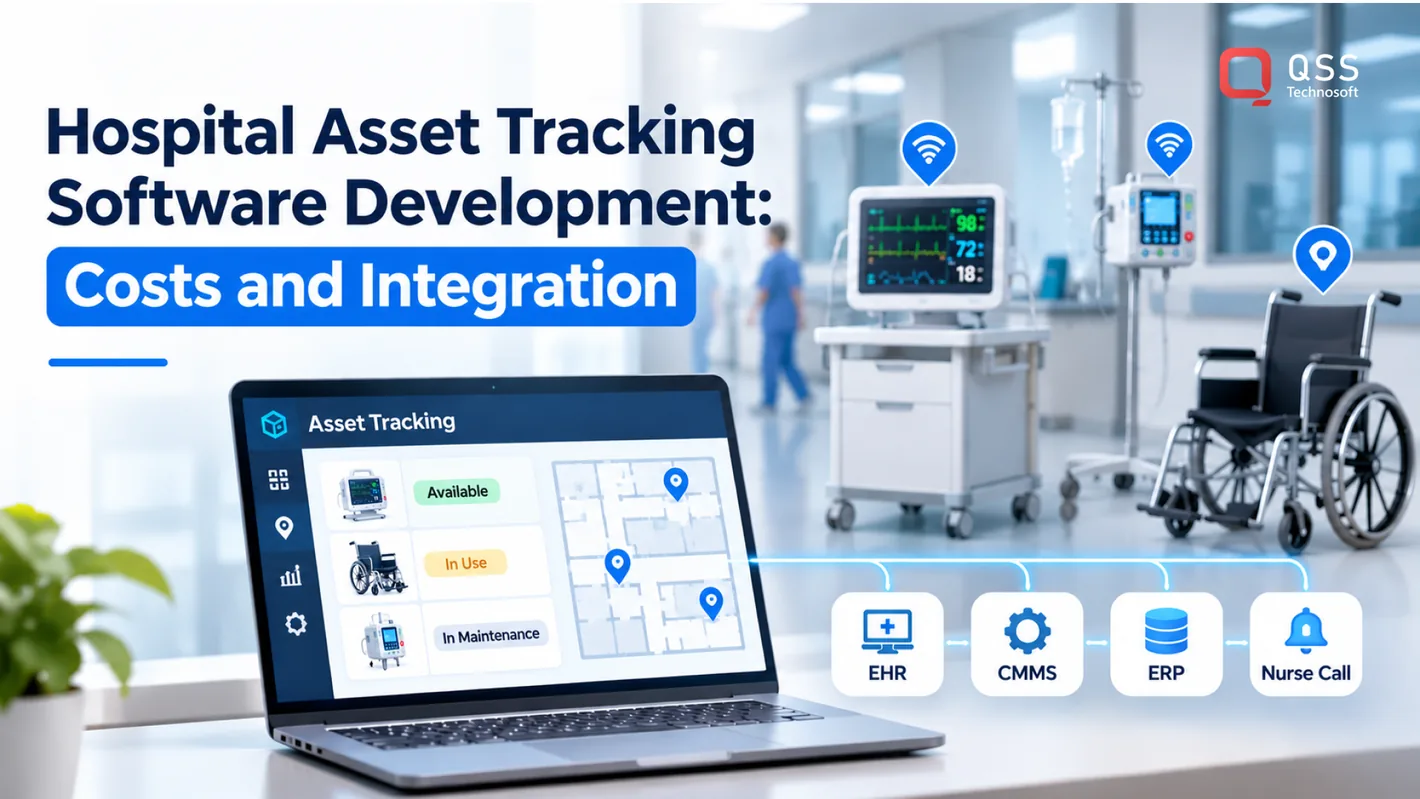
Hospital asset tracking software development is most effective when location data reflects how a hospital actually works. It connects RFID- or barcode-based identification with software that records each asset’s location, status, and usage, and can integrate that information with hospital systems. The challenge is not simply locating equipment. It is keeping data dependable across busy wards, existing infrastructure, and everyday workflows.
For hospital CIOs, CTOs, and operations leaders, the need is practical: staff must find equipment, confirm its availability, and manage maintenance without adding another disconnected system. The right approach depends on which assets are tracked, the required location accuracy, the identification method, and the integrations the hospital needs.
This article explains how hospital asset tracking works, where RFID and other methods fit, and how integration connects asset data to hospital operations. It also outlines the main implementation cost factors so you can assess the scope before committing to development.
Quick Answer
Hospital asset tracking software development pairs an identification method with software that records each asset’s identity, location, status, and movement history. Choose RFID asset tracking, barcode tracking, BLE, Wi-Fi, or ultra-wideband based on the location detail, coverage, and workflows you need, then plan hospital software integration with EHR, CMMS, ERP, and nurse call systems so staff can use the data in their existing work. Healthcare software costs for these projects are quoted case by case and depend mainly on integration depth, tracking coverage, and workflow complexity, with tagging, infrastructure, data migration, and training adding to the scope. Start with one defined use case, such as finding shared infusion pumps, so healthcare asset management improves where staff feel it first.
What is a Hospital Asset Tracking System and Its Importance?
A hospital asset tracking system records each asset’s identity, location, status, and movement history. Staff can use it to find medical equipment, review inventory, and see whether resources are available for patient care.
Tracked Hospital Assets
Tracked hospital assets may include equipment, supplies, or personnel represented by a system record. Hospitals may track beds, wheelchairs, infusion equipment, surgical instruments, medication inventory, and staff. The recorded details depend on the item: a wheelchair may need an availability status, while an instrument may need a processing status.
This distinction helps staff act on records instead of assuming every item is ready to use. For example, someone searching for a portable monitor can tell whether it is assigned to a patient or available in storage. Clear categories also help administrators review different asset groups without treating equipment and medication inventory as interchangeable.
Centralized Inventory and Equipment Records
A centralized inventory is a shared set of records that links each tracked item to its identifier and operational details. It matters because separate departmental lists may describe the same equipment differently, making ownership and availability harder to establish.
For example, a portable monitor’s record can link its identifier to its assigned department, current status, and maintenance history. A shared record structure can also distinguish a borrowed wheelchair from one assigned to a unit. Administrators can review the same core information across departments and identify incomplete or conflicting records.
Real-Time Equipment Location
Real-time equipment location tracking updates an asset’s recorded position when readers or staff scans provide new data. RFID readers can send tag events to a central system, where authorized users can see the reported location and status.
If a portable ultrasound moves between departments, its latest recorded event can give staff a starting point for finding it. Location history can also show recorded transfers and whether an item is onsite, offsite, or borrowed. Timestamps help users distinguish recent updates from older location records.
Compliance and Implementation Concerns
Implementation considerations include privacy, cybersecurity, intended software use, tag durability, and workflow fit. In the United States, HIPAA is relevant when a system handles protected health information for a covered entity or business associate. FDA requirements can depend on the software’s intended use and functionality.
Useful features include searchable asset records, location and status views, movement history, role-based access, and reporting. Maintenance information can support operational workflows. Common implementation risks include incomplete records, unreliable reads, insufficient reader coverage, and steps that staff bypass.
RFID tags on instruments need testing under the hospital’s sterilization conditions. Greenville Hospital System is an example of an implementation involving RFID-tagged surgical instruments, but the available project detail does not identify a named source for a sterilization-cycle figure. Hospitals should also test readers around medical equipment before deployment to assess tracking performance and potential interference.
Hospital asset tracking architecture and RFID technology
Hospital asset tracking architecture connects tags or scans, receiving infrastructure, and software records. Technologies differ in how they identify medical assets and estimate location, so the design should reflect clinical workflows and the required precision.
Tracking Technology Options
BLE, RFID, barcodes, and ultra-wideband can identify or locate hospital assets. BLE beacons transmit signals to receivers, while RFID readers detect tagged items. Barcode-based tracking depends on items being scanned to record their information. Ultra-wideband uses radio signals to calculate location with high precision, which can suit workflows that need room-level visibility.
Each method involves different operational trade-offs. Barcode scanning is straightforward but depends on staff scanning at the right point. RFID can capture tags without a direct scan, though reader placement affects coverage. BLE receivers report beacon signals, while ultra-wideband may require additional infrastructure and configuration. Match the technology to asset movement, location needs, and the hospital’s physical environment.
Asset Identification Methods
Asset identification gives each item a unique identity through an RFID tag or barcode. That identity links the physical asset to its software record, helping asset management teams distinguish similar equipment across departments.
A barcode workflow usually requires a staff member to scan the label when equipment moves or its status changes. RFID readers can detect tags as equipment passes through a configured area. Active RFID tags transmit data using an embedded power source; passive tags reflect a reader’s electromagnetic waves. The choice affects how the system captures movement and what infrastructure it needs.
Use a consistent identifier across the tag, inventory record, and maintenance workflow. For example, a tagged infusion pump should link to one record, not separate entries in storage and maintenance lists. Consistent data helps streamline inventory updates and prevents duplicate identities from undermining location reports.
IoT and RFID Monitoring
Internet of Things (IoT) monitoring connects tagged medical assets to software through readers, receivers, or connected equipment. In an RFID setup, readers capture tag data and send events to the tracking application. The application can then update location, status, or movement history for authorized users.
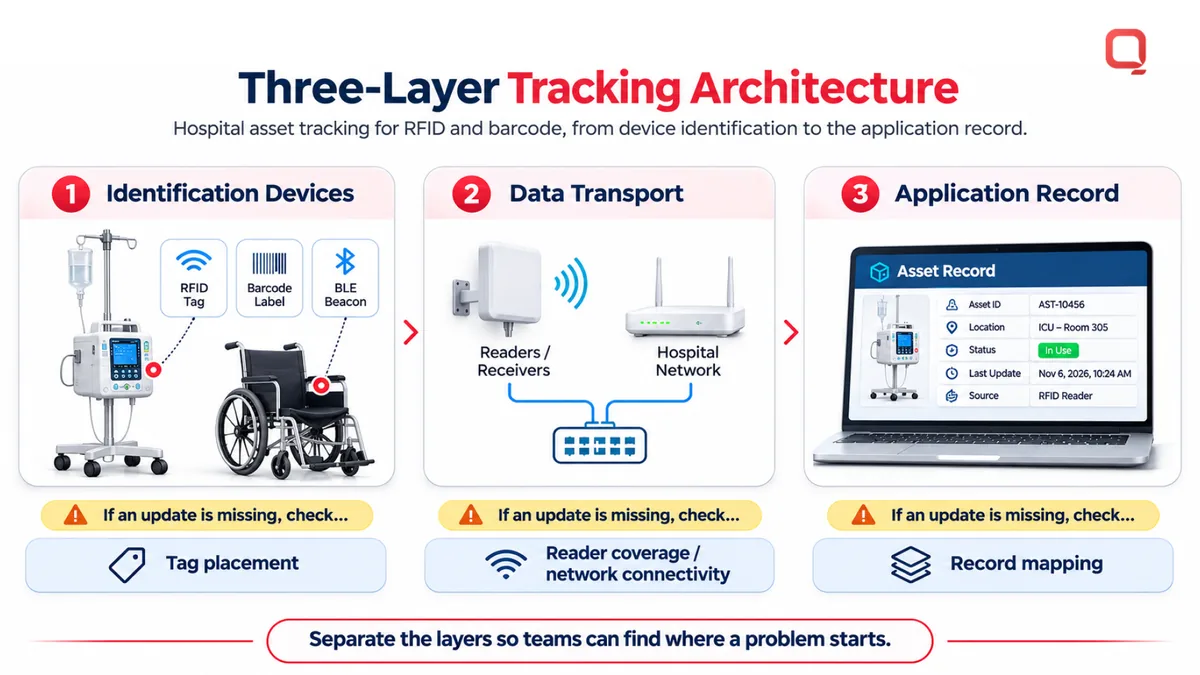
A practical architecture separates the system into three layers: identification devices, data transport, and the application record. A reader detects a tag, the network carries its event, and software associates that event with an asset. This separation helps teams locate problems. A missing update may stem from tag placement, reader coverage, network connectivity, or record mapping.
BLE-powered tracking systems can have tag battery life of 5-8 years. Battery status and reader coverage still need operational attention. Where hospitals combine RFID with Wi-Fi or BLE, the software should preserve the source and timestamp of each update. That makes asset history easier to interpret when signals arrive late or equipment moves between monitored areas.
For teams shaping a tracking design, discussing asset tracking requirements can help connect technology choices with the intended workflow.
Selecting and integrating tracking technology with hospital systems
Hospitals should choose a tracking approach based on workflow fit, system connectivity, and operational needs. Commercial platforms and custom systems differ in flexibility and configuration. Either way, successful deployment depends on clear data mapping, integration testing, and staff adoption.
Vendor and Platform Selection
Platform selection means matching a tracking system to hospital requirements. A system that cannot support local workflows or exchange data cleanly can create another disconnected inventory. Custom systems can be tailored to an organization’s workflows, while commercial platforms use established product configurations. Neither approach is automatically the better fit.
| Approach | Potential fit | Key consideration |
|---|---|---|
| Commercial platform | Common workflows and established configurations | Assess fit with existing processes and required interfaces |
| Custom system | Distinct workflows or organization-specific integrations | Define ongoing maintenance and ownership of the software |
Assess Zebra, ASAP Systems, CenTrak, Wasp Barcode, and GuardRFID against the same requirements. When evaluating a development partner, examine healthcare integration experience, security design, testing methods, and support for EHR, CMMS, ERP, and nurse call connections.
Available Tracking Solutions
Zebra, ASAP Systems, CenTrak, Wasp Barcode, and GuardRFID are names hospitals may encounter when evaluating tracking options. A name alone does not show whether a system fits a particular hospital. Compare each candidate’s proposed workflow against a concrete scenario, such as recording an equipment transfer and making its updated status visible to the responsible department.
For system-wide data sharing, define which application owns each field and which teams can view or change it. A centralized dashboard is useful only if departments interpret asset statuses consistently.
Development and Deployment Steps
Development and deployment turn operational needs into a tested system. Start by documenting the departments, asset categories, user roles, and information required for each workflow. Then map the data fields and interfaces for EHR, CMMS, ERP, and nurse call systems.
Next, build and test the interfaces using representative records. Check how the system handles missing identifiers, duplicate events, and delayed messages. Train staff on the actions they need to complete, then deploy in phases so teams can address workflow issues before expanding across the hospital.
Integration planning should assign responsibility for data mapping, interface monitoring, and error resolution. These decisions help maintain inventory management and efficiency after launch. A development partner can help when requirements exceed a commercial platform’s configuration options or involve complex connections across existing systems.
Hospitals can discuss hospital tracking requirements in the context of their systems and workflows.
How Much Does It Cost to Implement Healthcare Asset Tracking?
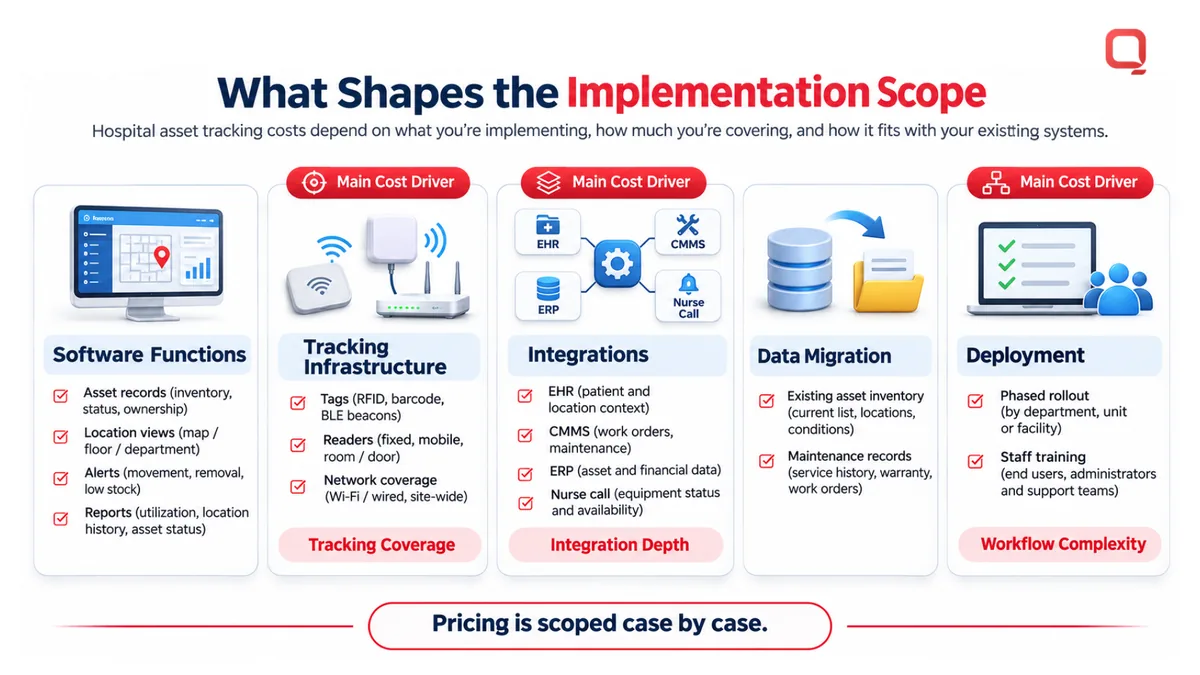
Hospital asset tracking implementation costs depend on software scope, tracking infrastructure, integrations, and rollout requirements. Project pricing is determined case by case and provided after a quote request. For hospital leaders, key cost drivers include the asset categories supported, how location data is collected, and how the system fits existing maintenance workflows.
IoT-enabled tracking connects medical equipment to software that receives location, status, or performance information. Real-time monitoring depends on the selected tags, readers, network coverage, and data processing. For example, a hospital tracking infusion pumps across facilities may need different coverage and reporting from one tracking equipment within a single department.
Maintenance features also shape project scope. A basic schedule may record a device’s next service date, while a more connected workflow can combine equipment performance signals with maintenance history. Preventive maintenance, calibration, and cleaning alerts can help teams organize tasks, but each alert needs a defined trigger, responsible role, and completion record.
- Preventive maintenance: Schedule service based on an asset’s maintenance record and operational needs.
- Calibration: Flag equipment that requires calibration, then record its completion status.
- Cleaning: Assign a cleaning task after a use or transfer event, according to the hospital workflow.
- Maintenance alerts: Notify the appropriate team when a scheduled task or recorded condition needs attention.
Predictive maintenance uses asset history and equipment data to estimate when service may be needed. IoT-enabled systems can communicate performance information and maintenance needs in advance. AI models can analyze historical usage patterns, but their usefulness depends on consistent asset records and relevant operating data. Incomplete maintenance logs cannot provide a reliable basis for a model.
Utilization reports provide another operational view. A facilities team, for example, can review how often equipment is used, where it spends time, and which assets need maintenance. These reports can support inventory planning and resource allocation. Their scope affects development because every metric needs a defined data source, calculation, and dashboard presentation.
To estimate scope, implementation teams break the work into software functions, connected infrastructure, integrations, data migration, and deployment. They also define how alerts reach staff and how completed work is recorded. A hospital integrating maintenance scheduling with an existing system may need different interface work from one using a standalone tracking dashboard. The main cost drivers are typically integration depth, tracking coverage, and operational workflow complexity.
Hospital asset tracking software definition and purpose
Hospital asset tracking software records healthcare assets’ identities, locations, status, and movement history. Its purpose is operational visibility: hospital teams can see whether equipment is available, in use, or awaiting maintenance. For example, staff searching for a portable monitor can start with its latest recorded status instead of checking departments one by one.
The system combines asset records with updates from RFID, barcode, Wi-Fi, Bluetooth, or staff-entered events. Each update should link to a consistent asset identifier. If a wheelchair moves from the emergency department to a patient room, the record can show its latest reported location and when that information was received.
This is more informative than a static inventory list. An inventory list may identify a device and its assigned department; a tracking record can also show movement, availability, or usage history. Administrators can use these fields to see where equipment accumulates, which items are frequently borrowed, and whether records need correction.
Accurate visibility depends on the quality of incoming data. A tag may be missed, a barcode scan may happen late, or a device may move beyond reader coverage. The software should retain timestamps and update sources so staff can distinguish a recent reader event from an older manual entry. That context is more useful than a location pin without a timestamp.
Analytics turn tracking events into operational insights. A hospital can review usage patterns to see whether equipment is concentrated in one facility or department. The system can also display location histories and onsite, offsite, or borrowed status. These views support asset allocation, but they reflect recorded events, not every unobserved movement.
The purpose is not to track every object by default. Start with a defined use case, such as finding shared infusion pumps, managing wheelchair availability, or reviewing instrument movement. Then select tracking solutions and features that serve that workflow. Nurses spend an average of 208 hours each year searching for items, making search reduction a practical measure to evaluate.
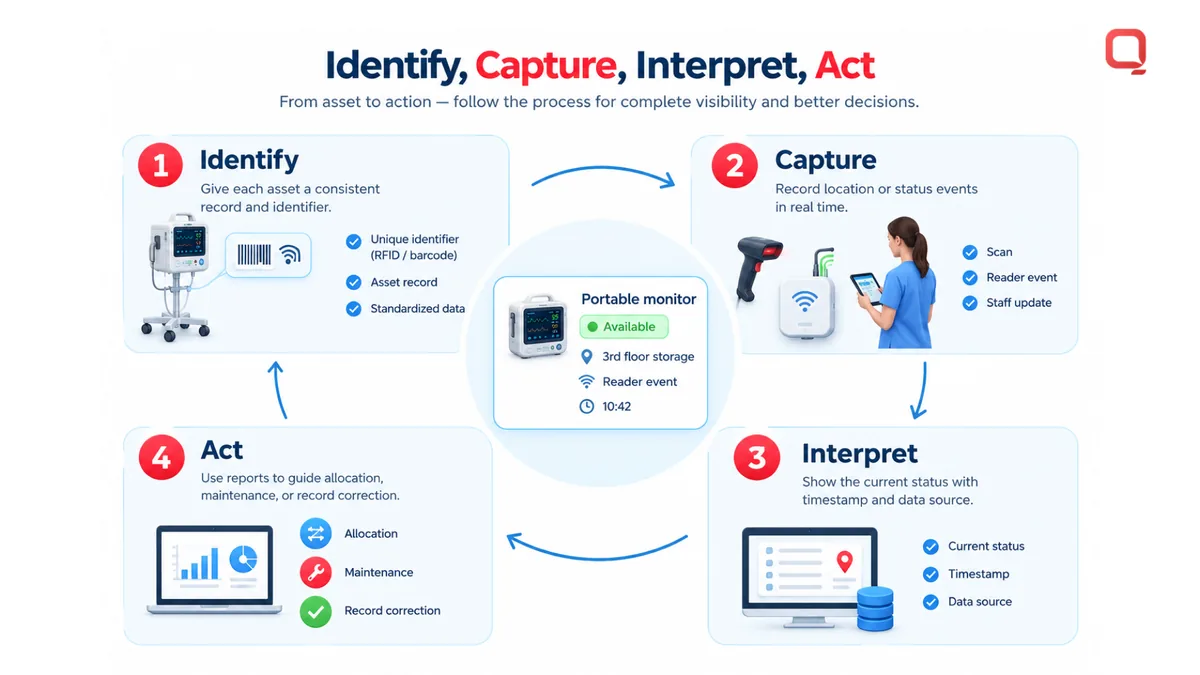
- Identify: Assign each tracked asset a consistent record and identifier.
- Capture: Receive location or status events through a scan, reader, or staff update.
- Interpret: Show timestamps, data source, and current status together.
- Act: Use reports to guide allocation, maintenance, or record correction.
For hospital leaders planning hospital asset tracking software development, the central design question is which operational action each data point should support. A dashboard that reports location but does not clarify availability may still leave staff calling departments. Define the workflow, data owner, and success measure together.
Discuss your hospital asset tracking requirements and the workflows the system needs to support.
QSS Technosoft: Hospital Information Management System (HIMS)
QSS Technosoft supports healthcare organizations with its Hospital Information Management System (HIMS) and Internal Location Tracking. These offerings are relevant when teams need hospital software aligned with operational workflows or want to develop location visibility for assets.
For a hospital asset tracking initiative, start by defining which assets need tracking, what location data staff need, and how that information should support daily operations. QSS Technosoft can help shape the software and integration scope around those requirements. Where hospital operations also involve revenue workflows, Revenue Cycle Management (RCM) Software may be relevant; Generative AI Solutions can support separate, appropriate use cases.
Contact QSS Technosoft to discuss your hospital asset tracking requirements and next steps.
Turn Asset Visibility Into an Operational Plan
Define what improved asset visibility should change in your hospital: quicker equipment access, clearer maintenance workflows, or more informed allocation. Use those outcomes to shape the tracking system’s requirements, integration priorities, and rollout plan. This keeps hospital asset tracking software development anchored to an operational need rather than a feature list.
QSS Technosoft offers Healthcare IT Engineering for healthcare software initiatives, Legacy System Modernization for existing platforms, and Generative AI Solutions for relevant data-driven use cases. These capabilities can support different parts of a hospital technology roadmap, depending on project needs.
Bring your workflow goals and integration priorities into a project discussion. Contact QSS Technosoft to discuss your project and identify a practical path from requirements to implementation.
Plan Asset Tracking Around Real Hospital Workflows
Bring the assets your teams need to find, the location detail they rely on, and the systems the data must reach. QSS Technosoft scopes hospital asset tracking software development end to end: RFID asset tracking and barcode tracking options, healthcare asset management records, hospital software integration with EHR, CMMS, ERP, and nurse call systems, and phased rollout, with healthcare software costs tied to the workflows you actually need.
Discuss your asset tracking project →