Legacy Software Modernization Services for Business Continuity
 By Rashmi Kanti
QSS Technosoft
November 3, 2026
15 min read
Legacy software modernization services help businesses maintain continuity while updating aging applications. The work may combine cloud migration, incremental changes, and targeted upgrades rather than a full rebuild. The right approach depends on system dependencies, critical workflows, and how much operational change the business can absorb.
Modernizing software that supports essential work can feel risky. That concern calls for a practical plan, not a promise that every system can change without friction.
This article explains how cloud migration, incremental modernization, application upgrades, and engagement models can support continuity. It also covers how to assess technical dependencies and choose an approach that fits how the system is used.
Quick Answer
Legacy software modernization services update aging applications without stopping the work they support. Choose an approach per component (retain, rehost, replatform, refactor, or replace) based on dependencies and critical workflows, and treat cloud migration as one option rather than the default. Run legacy application modernization in controlled increments: map the workflow, preserve its interfaces, test against current production behavior, and plan data synchronization, cutover, and rollback before each release. Prioritize application upgrades where maintenance blocks a needed integration, feature, or security improvement. A sound software modernization strategy also settles the engagement model, technology stack, ownership, and release evidence up front, so business continuity becomes an engineering requirement rather than an afterthought.
Cloud migration and cloud-native architecture
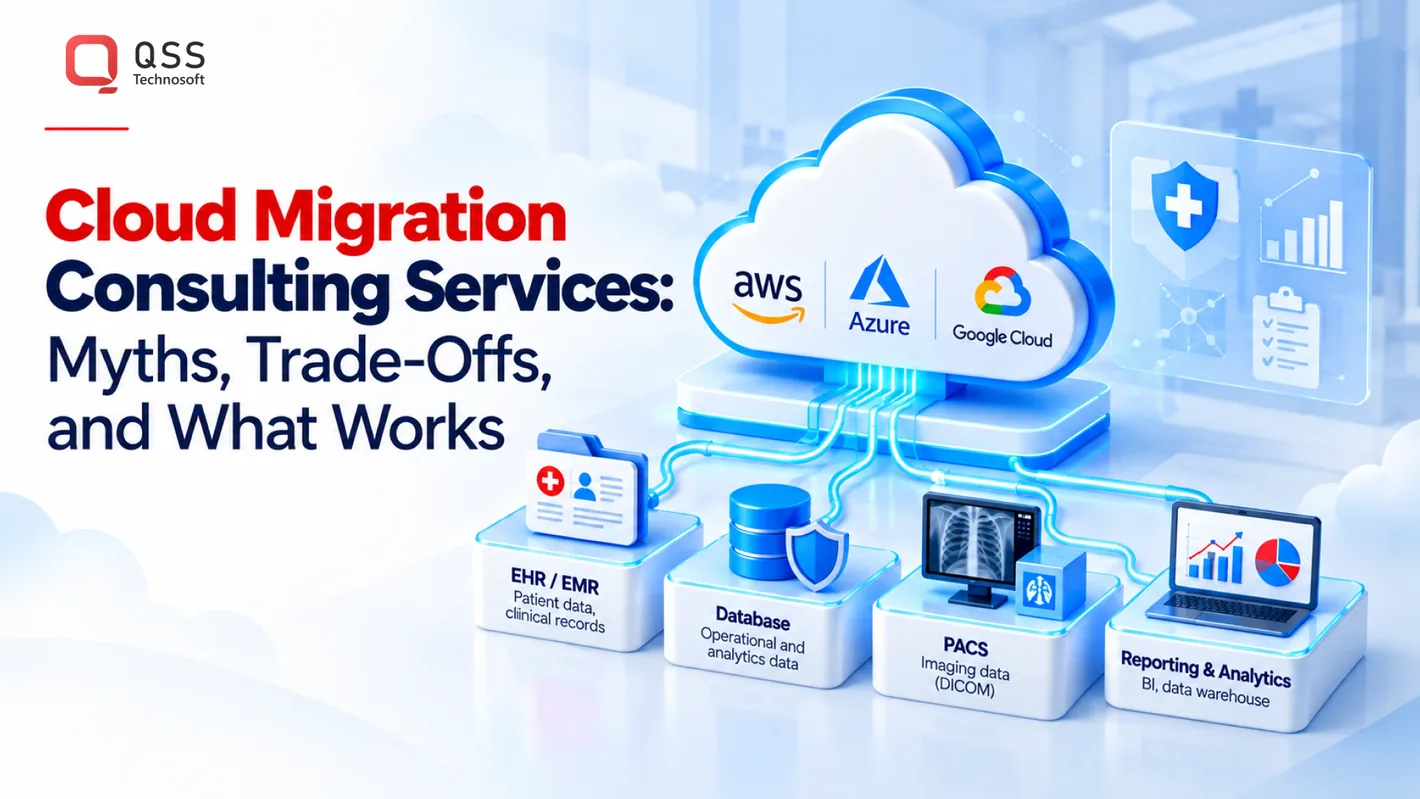
Cloud migration moves a legacy application, its data, or its supporting infrastructure to cloud platforms. Options include cloud-native redesign, replatforming, refactoring, and serverless modernization. The right choice depends on system dependencies, operating needs, and the amount of change the business can absorb.
Start by mapping application components, data stores, interfaces, and batch jobs. Then identify which parts can move together and which need an adapter or replacement. For example, an application tied to a local database may need data replication and reconciliation before cutover. Moving code without mapping dependencies can simply shift existing bottlenecks to a new environment.
Cloud-native architecture uses cloud capabilities such as independently deployable services and managed infrastructure. This can support scalability, but splitting a tightly coupled application too early adds operational complexity. Establish deployment automation, observability, and recovery procedures before separating components. Keep the first migration boundary small enough to test against a real workflow.
Serverless modernization runs selected code through cloud-managed execution services instead of maintaining application servers. It can suit event-driven tasks, such as processing an uploaded document or responding to a queue message. It may be a poor fit for workloads that need persistent processes, predictable low-latency connections, or extensive runtime control. Account for these constraints before choosing an architecture.
A cloud enablement plan prepares teams and systems to operate safely on platforms such as Amazon Web Services, Microsoft Azure, or Google Cloud. A useful sequence is:
- Inventory application dependencies, data flows, and operational owners.
- Select a migration pattern for each component, including retain, replatform, refactor, or replace.
- Build a test environment and compare key workflows with current production behavior.
- Plan data synchronization, cutover, monitoring, and rollback before release.
Platform expertise matters because identity, networking, storage, deployment, and monitoring differ across AWS, Azure, and Google Cloud. Map each requirement to a platform capability, then test access controls and recovery paths. For a US healthcare workload, include EHR interfaces and data exchange workflows in migration testing. Cloud enablement also covers team practices, so engineers can deploy, monitor, and troubleshoot the new environment.
One website modernization and AWS migration case study reported a 30% increase in web traffic, zero downtime events, and a 40% improvement in page load speed. These are reported case results, not guaranteed outcomes for other applications.
For a US healthcare platform, a migration rehearsal can compare patient-record counts and key fields between the original database and its cloud copy. Test whether connected applications receive the expected updates before production cutover. This validation can expose data or interface mismatches while the original environment remains available.
Legacy software modernization services can combine cloud migration and targeted refactoring while preserving workflows that still meet business needs.
Why do businesses need legacy software modernization?
Businesses modernize outdated software to address maintenance constraints, support changing workflows, and create room for innovation. AI-assisted code analysis, database migration, and upgrades to modern technology stacks can help identify practical changes without turning every project into a full rebuild.
Rehosting moves an application with minimal code changes; replatforming adapts it to a new environment; refactoring changes its internal structure; rebuilding creates a replacement. A typical refactoring timeline is 3–9 months in 2026, while other approaches depend on scope, dependencies, and testing needs.
Modern Technology Stack Migration
Migration to a modern technology stack updates languages, libraries, protocols, or supporting platforms. The CDC describes application modernization as converting, refactoring, or porting legacy applications to modern languages, libraries, protocols, or hardware platforms. Start by mapping dependencies, then identify outdated components that block maintenance or integration.
Evaluate compatibility, deployment practices, and the skills needed to support the target stack. For example, when moving a tightly coupled application, test a limited component and its interfaces first. This can reveal integration issues before the change affects wider operations.
Legacy System and .NET Migration
Legacy system migration moves application functions and data into a supported environment while preserving required business behavior. For a legacy .NET migration, inventory framework dependencies, database connections, scheduled tasks, and external interfaces. Then test representative workflows on the migrated version, including error handling and data exchange.
Compiling an older .NET application does not prove the migration is complete. A payment workflow, for example, may rely on configuration or a third-party library that behaves differently in the target environment. Track these dependencies and resolve them before cutover.
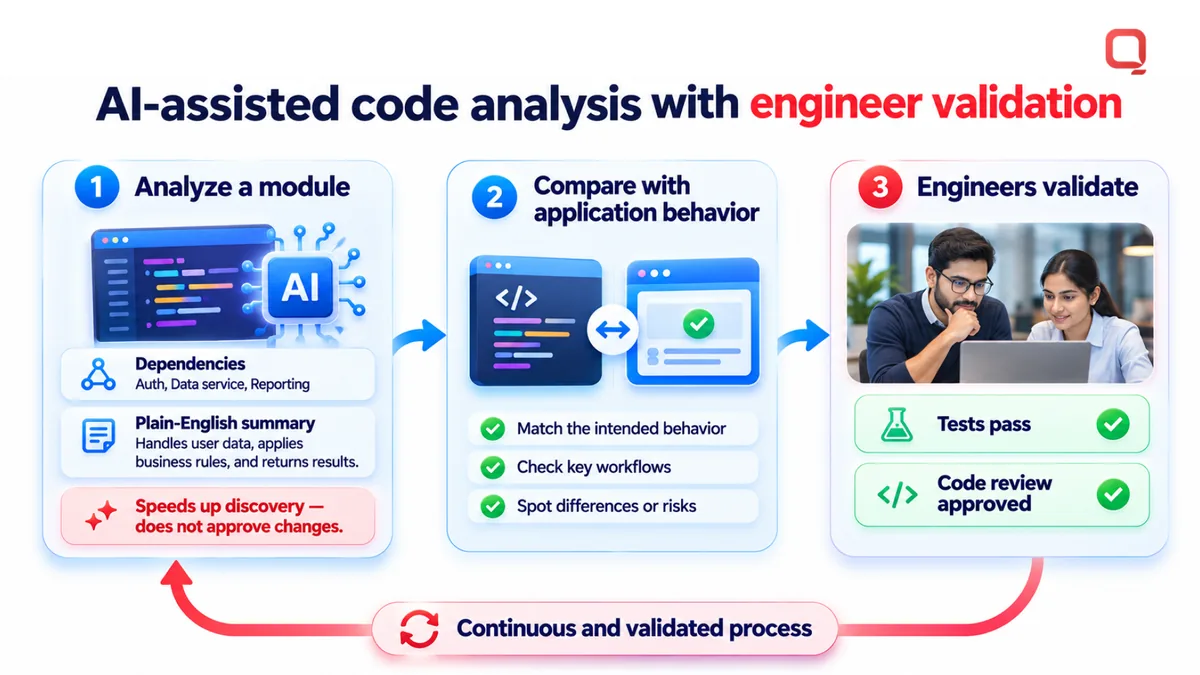
AI-assisted code analysis can help engineers examine source code, identify dependencies, and summarize unfamiliar modules. Use it to speed up discovery, not to approve changes automatically. Analyze a module, compare the findings with application behavior, then have engineers validate proposed edits through tests and code review.
Database modernization can involve changes to database platforms, schemas, data structures, or migration processes. Begin by mapping tables, stored procedures, reports, and applications that read or write the data. For example, when moving a customer-record database, check that downstream billing and reporting workflows still interpret fields correctly.
Modernization can also reduce reliance on outdated components that make routine updates difficult. Prioritize systems where maintenance blocks a needed integration, feature, or security improvement. Keep the business case specific: name the affected workflow, the dependency causing friction, and the change that could address it.
Before migration, document current behavior and define acceptance tests for essential workflows. The CDC’s description includes converting and porting as well as refactoring, so transformation can be scoped to the actual technical need. A focused assessment can help teams organize migration priorities and discuss modernization requirements.
Incremental modernization and business continuity
Incremental modernization changes a system in controlled pieces instead of replacing every component at once. For a business-critical application, isolate one workflow, preserve its existing interfaces, and validate the change before expanding its scope.
Incremental Modernization
Start with a workflow map that identifies users, data stores, interfaces, and recovery steps. A team might modernize appointment scheduling while keeping billing on its current platform. An adapter can connect the updated scheduling module to existing systems, allowing staff to continue established operations while engineers test the new component.
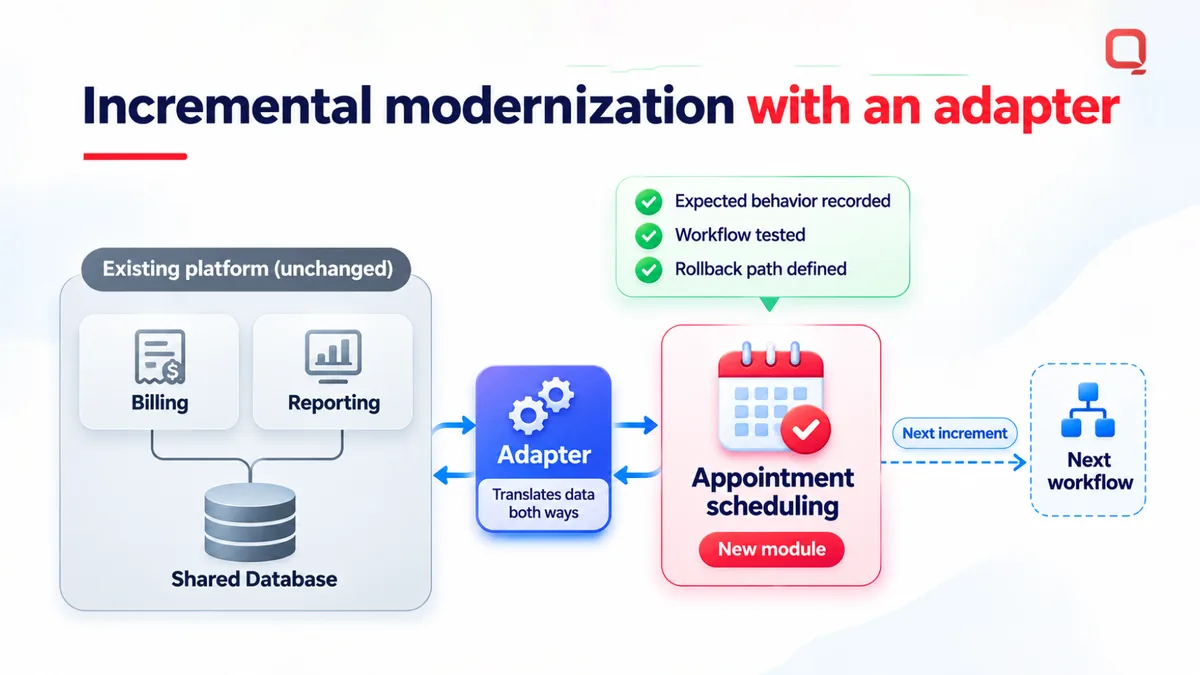
Choose each increment based on business impact and dependency risk. Record expected behavior, test the workflow, and define a rollback path before release. If a change affects patient intake, for example, validate data transfer and staff access before moving on to another workflow.
Security and Compliance
Address security and compliance at each modernization boundary, not only after deployment. Map where sensitive data enters, moves, and is stored, then review access permissions and logs for every changed component. In a healthcare application, test that each interface exposes only the data needed for its workflow.
Keep release evidence: document changed components, test results, approvals, and operational ownership. This gives security and compliance teams a traceable record of what changed. Requirements vary by system and organization, so map applicable controls to actual data flows and the operating environment.
Connect technical failure modes to business consequences during risk analysis. A dependency inventory may reveal that a claims workflow relies on a shared database or scheduled export. If that component changes, test downstream processing and reconciliation before release. Prioritize components by operational impact, recovery options, and the workflows they support.
Use a release sequence that reveals failures early. First, establish a baseline for the current workflow. Next, run the updated component against representative data in a test environment. Compare outputs, review logs, and obtain operational sign-off before production cutover. For a pharmacy system, compare medication records and transaction status across both versions.
Business continuity also depends on people and procedures. Assign an owner to each changed workflow, document how staff handle exceptions, and train users before retiring familiar screens. Give help desk teams clear escalation steps for interface failures. These controls matter because even a technically sound release can disrupt work if users lack a workable fallback.
A modernization partner should make assumptions, dependencies, and release decisions visible. Use a shared change log to record affected services, test evidence, rollback conditions, and support ownership. This helps engineering, security, and operations teams coordinate without relying on undocumented knowledge held by one developer.
Incremental application modernization works best when each release has a bounded scope and measurable acceptance criteria. Keep changes small, validate real workflows, and maintain a tested recovery path. This makes continuity an engineering requirement rather than an afterthought.
Legacy application upgrades and feature enhancements
Upgrades and feature enhancements improve existing software without assuming every enterprise application needs replacement. Start with the workflow causing the most operational friction, then define the change and its acceptance tests.
Application Reengineering
Application reengineering changes software structure or behavior to improve maintainability, integration, or usability. For example, an enterprise order application might separate pricing rules from its user interface, allowing teams to update pricing without changing order entry. Preserve expected outputs, document changed interfaces, and test the new behavior against representative transactions.
Scope an upgrade around a specific operational need. A healthcare platform might add an export workflow while retaining its established scheduling process. Define affected user roles, data fields, and downstream systems before development. This can prevent a feature enhancement from breaking a report or interface another department relies on.
Legacy Application Audits
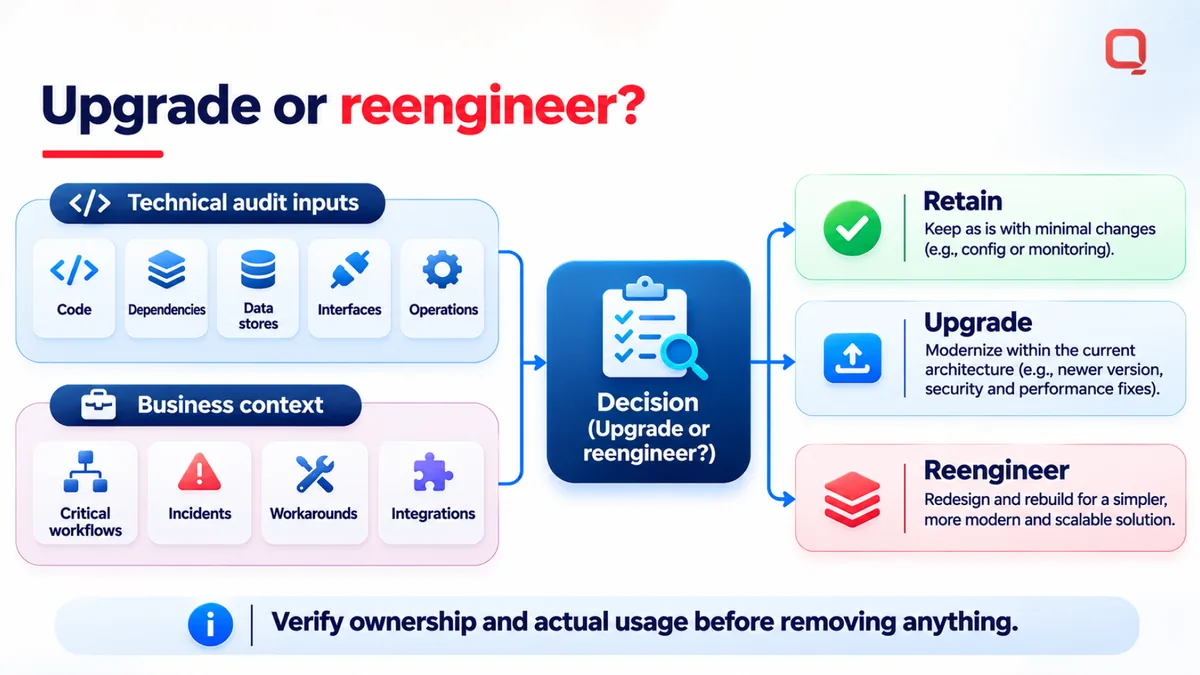
A legacy application audit examines code, dependencies, data stores, interfaces, and operational practices. Its findings should identify components to retain, upgrade, or reengineer. For example, an audit of a claims application can trace a claim from intake through validation and reporting.
Pair technical findings with business context. Ask application owners to identify critical workflows, recurring incidents, manual workarounds, and required integrations. Compare those needs with the code and dependency findings. A database procedure that appears unused may still support a finance report, so verify ownership and actual usage before removing it.
Enterprise systems rarely operate in isolation. An inventory application upgrade can affect purchasing, warehouse records, and financial reporting. Map those connections before changing schemas or interfaces. For each affected application, record the data exchanged, its format and timing, and the team responsible for resolving errors.
Plan database changes separately. Review tables, stored procedures, constraints, reports, and data-retention workflows before modifying a schema. For example, adding a field to a patient record may require updates to an application form, an export, and a downstream analytics process. Test each path with representative records.
Use a clear delivery sequence:
- Identify the business workflow and its current pain point.
- Inventory affected applications, database objects, and interfaces.
- Define expected behavior and acceptance tests before coding.
- Release the change, monitor errors, and document support ownership.
Test more than the new feature. Run regression tests on existing workflows, integration tests on connected applications, and data checks on changed database behavior. A billing upgrade, for instance, should verify both a new adjustment option and existing invoice totals.
Choose an upgrade when the current system still serves its core purpose and targeted changes can address the constraint. Consider broader reengineering when dependencies make routine updates difficult or required workflows cannot be supported cleanly. Base the decision on audit findings, user needs, and the cost of maintaining current behavior.
Engagement models and technology stack
The engagement model defines how modernization work is scoped, staffed, and reviewed. Choose it alongside the technology stack: both should fit project uncertainty, internal decision-making, and the system’s operational constraints.
A fixed-scope model suits a clearly bounded deliverable, such as replacing a specific reporting component. Agreed outputs and acceptance criteria can make progress easier to track. The trade-off is less flexibility if discovery reveals undocumented dependencies that change the work.
Time and materials supports changing priorities during discovery and development. It can suit systems where technical debt becomes clear only as engineers trace code and dependencies. A shared backlog, named decision-makers, and regular progress reviews help keep work focused on business outcomes.
A dedicated team model provides ongoing engineering capacity for a sustained program. A hybrid model can pair a defined assessment with adaptable implementation. Compare the options against the work’s certainty, the organization’s available staff, and who will own decisions after delivery.
| Engagement model | Useful when | Key consideration |
|---|---|---|
| Fixed scope | The deliverable and acceptance criteria are clear. | Newly discovered dependencies may change the agreed scope. |
| Time and materials | Priorities may shift as discovery progresses. | Backlog ownership and review cadence need to be clear. |
| Dedicated team | The work needs sustained engineering capacity. | Define how the team coordinates with internal owners. |
| Hybrid | Discovery is defined, but implementation needs flexibility. | Set a clear transition from assessment to delivery. |
Choose technologies based on compatibility, supportability, and the skills available to maintain them. Review how the target stack handles existing data formats, authentication, deployment, and integrations. A modern platform can still create operational friction if the organization cannot support its tooling or essential interfaces need extensive adaptation.
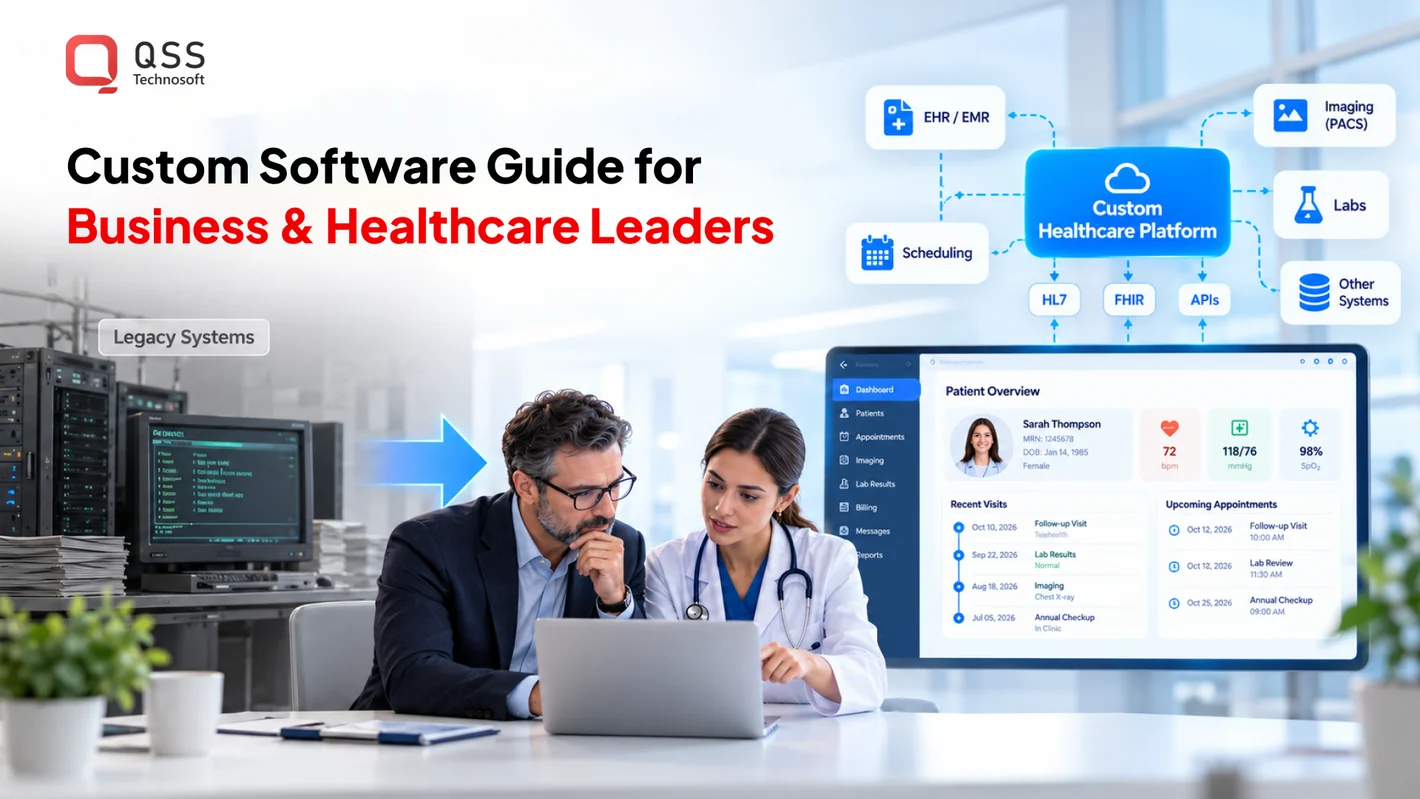
For healthcare applications, include interface contracts and data handling in the technology review. An HL7-connected workflow, for example, needs a clear plan for message validation, error handling, and ownership when a downstream system rejects data. Record those requirements before selecting libraries or redesigning interfaces.
Use a practical selection sequence:
- Document current technologies, licensing dependencies, and support responsibilities.
- Identify which technical debt prevents a required business or product change.
- Compare candidate technologies against integration and operating requirements.
- Test a representative workflow and assess how teams will maintain it.
Match the engagement model to that assessment. A well-defined component can support a bounded scope, while uncertain dependencies call for room to adjust priorities. Discuss your modernization engagement and the constraints shaping your project.
QSS Technosoft: Generative AI Solutions
QSS Technosoft is a US-based software engineering company offering Legacy System Modernization, Healthcare IT Engineering, and Generative AI Solutions. These capabilities support organizations addressing aging applications, healthcare technology workflows, or AI use cases within existing systems.
For healthcare teams, modernization can involve preserving essential data flows while updating the applications that support daily operations. Generative AI Solutions can assist with code analysis and migration planning, while engineering teams validate changes, test integrations, and approve releases.
Organizations with a defined modernization challenge can contact QSS Technosoft to discuss the next steps.
Set the next modernization decision in motion
Start with a short decision brief, not a platform-shopping exercise. Name the business workflow that needs attention, the people who depend on it, and the constraint blocking change. Identify who will approve technical trade-offs and how the team will assess the first release.
That brief gives legacy software modernization services a practical starting point. It also gives engineering and operations leaders a shared reference when priorities shift or an integration behaves unexpectedly. Keep the scope tied to a business outcome, and clarify ownership before implementation begins.
QSS Technosoft offers Legacy System Modernization, Healthcare IT Engineering, and Generative AI Solutions for organizations working through these challenges. If you’re ready to define a focused next step, contact QSS Technosoft to discuss your modernization needs. A clear starting point can help your team move forward with purpose.
Modernize the System Without Stopping the Work
Bring the workflow that can’t go down, the systems it depends on, and the constraint blocking change. Our engineers deliver legacy software modernization services end to end: code and dependency audits, legacy application modernization in tested increments with adapters and rollback paths, cloud migration to AWS, Azure, or Google Cloud, and application upgrades validated against your real workflows, all within a software modernization strategy built around business continuity.
Discuss your modernization project →