Office Ally Practice Mate EHR: Beginner's Guide
 By Vineet Bhardwaj
QSS Technosoft
October 30, 2026
9 min read
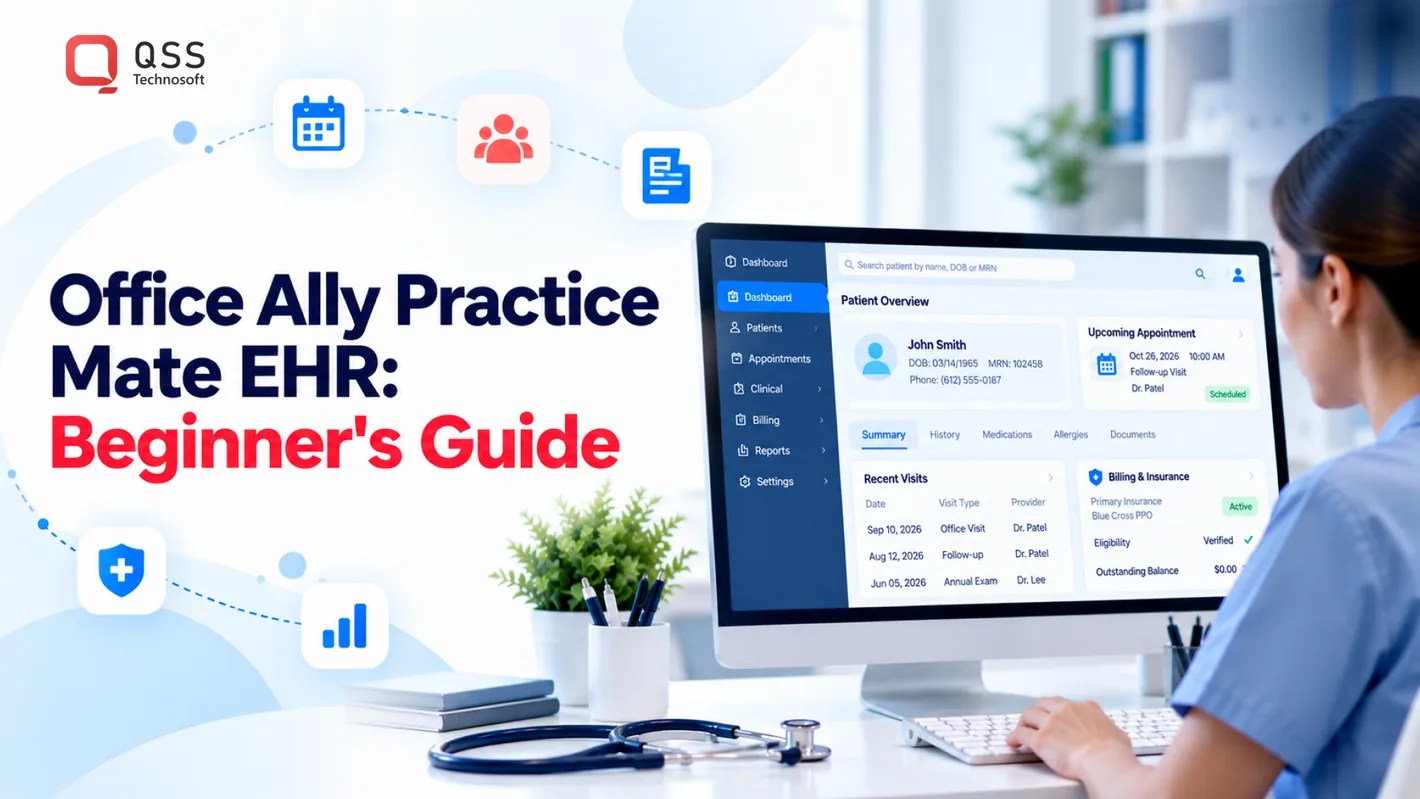
Getting started with Practice Mate means identifying your practice’s operational needs, preparing the right workflows, and testing them before routine use. This Office Ally Practice Mate EHR Guide for Beginners offers healthcare teams a practical path from planning to daily use, while recognizing that software setup alone cannot resolve unclear processes or responsibilities.
- Start with the practice’s goals and existing processes.
- Prepare staff for changes before relying on new workflows.
- Review how technology supports patient care and practice operations.
An EHR affects more than clinical documentation. It also shapes administrative work, access to information, and coordination across the team. A deliberate rollout helps staff understand what the system supports and where established practice procedures still apply.
This guide covers practical decisions for US healthcare practices, from implementation planning to ongoing workflow management. Use it to identify next steps, align your team, and make informed choices about the technology your practice relies on.
Quick Answer
To get started with Practice Mate EHR, treat EHR implementation as a practice project, not just software setup. Set clear goals for clinical, administrative, and billing work; inventory the information staff use; agree on consistent record and documentation conventions; map each role’s daily tasks; and trace how a completed visit reaches billing. Test complete scenarios with the staff who will do the work before routine use. For ongoing medical practice management, assign owners to decisions and measures, plan staff capacity and escalation paths, make insurance eligibility checks a defined task, and pair EHR staff training with clear change control so healthcare workflows stay consistent as the practice evolves.
Office Ally Practice Mate EHR Guide for Beginners
Begin by defining what your practice needs from Practice Mate, then prepare records and workflows before routine use. This Office Ally Practice Mate EHR Guide for Beginners outlines practical preparation steps for US healthcare teams without assuming specific product features or interface details.
- Set clear operating goals. List the work your practice expects the EHR system to support. Separate clinical, administrative, and revenue cycle needs. For example, identify whether the immediate priority is organized patient records or smoother billing handoffs. Clear goals help the team judge setup choices against actual practice needs. They also prevent unrelated tasks from crowding the implementation.
- Inventory the information your team uses. Identify the patient, provider, and practice details staff need during daily work. Note where each item currently comes from and who maintains it. This source inventory helps reveal duplicated or inconsistent information. Decide which details must be accurate before records enter routine use. Keep the list focused on information required for care and operations.
- Prepare a consistent record structure. Agree on how staff will enter names, contact details, coverage information, and medical documentation. Use the same conventions across the practice. For example, define how staff distinguish a preferred name from the name used for billing. Consistency makes records easier to search and reduces confusion when another team member takes over.
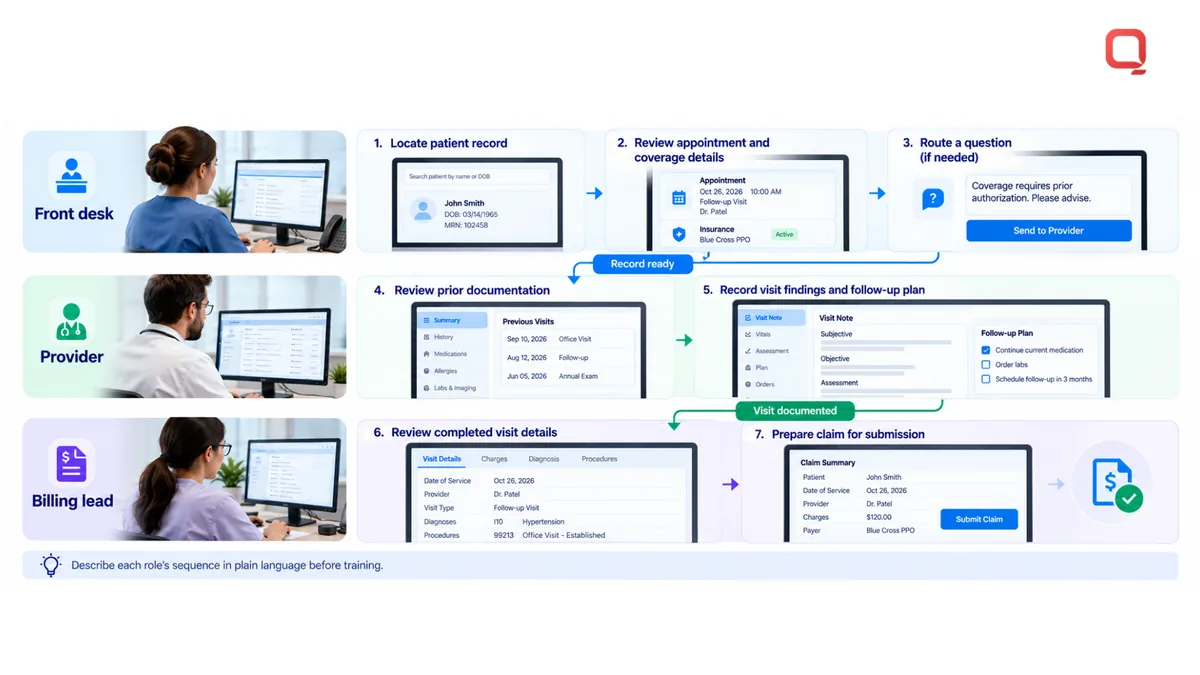
- Map navigation to real tasks. Identify the sequence each role follows for common work. A front-desk employee may locate a patient record, review appointment details, and route a question. A provider may consult documentation before recording visit information. Describe the task sequence in plain language, then use it to orient staff to relevant areas of the software.
- Set documentation expectations. Decide what information belongs in a clinical record and how staff should handle corrections. For example, establish where a provider records visit findings and the follow-up plan. Keep documentation relevant to the encounter. Consistent expectations help the next authorized user understand the record without relying on informal messages or memory.
- Trace the billing handoff. Document how completed visit information reaches the billing workflow. Identify the staff member who reviews details and the point where a claim is prepared for submission. Use a sample encounter to find missing information before routine processing. A defined handoff makes it easier to locate delays and correct source data.
- Test complete scenarios before routine use. Walk through representative tasks using the practice’s agreed procedures. Include a record lookup, a documentation task, and a billing handoff. Ask staff to explain each transition in their own words. Note where instructions are unclear, then revise the process. Avoid assuming that a completed setup means every role can use it correctly.
- Connect setup to information-sharing goals. The 21st Century Cures Act is cited by United States Congress as part of federal efforts to help practices improve information sharing with patients and care quality through technology. More than 75% of office-based clinicians in the United States use an EHR certified by the Office of the National Coordinator for Health IT. Consider how your practice’s information workflows serve patients.
Keep a concise record of setup decisions, data sources, and workflow owners. This reference helps staff follow consistent processes as the practice updates its procedures.
Practice management
Effective practice management turns operational responsibilities into clear decisions, measures, and follow-through. Use the steps below to manage workload, financial operations, and accountability without relying on informal assumptions.
- Assign ownership for operational decisions. Identify who approves changes affecting staffing, billing priorities, and patient communications. Give each decision area a primary owner and a backup. For example, the practice manager can coordinate policy decisions, while the billing lead handles claim-related procedures. Write down escalation paths so staff know where unresolved issues go.
- Set financial priorities using business needs. Decide how the practice will monitor outstanding balances, payment activity, and unresolved billing questions. Define which work needs attention first, such as an aging account requiring follow-up or a payment needing allocation. Keep the process consistent across staff. Clear priorities help prevent urgent items from disappearing inside a general work queue.
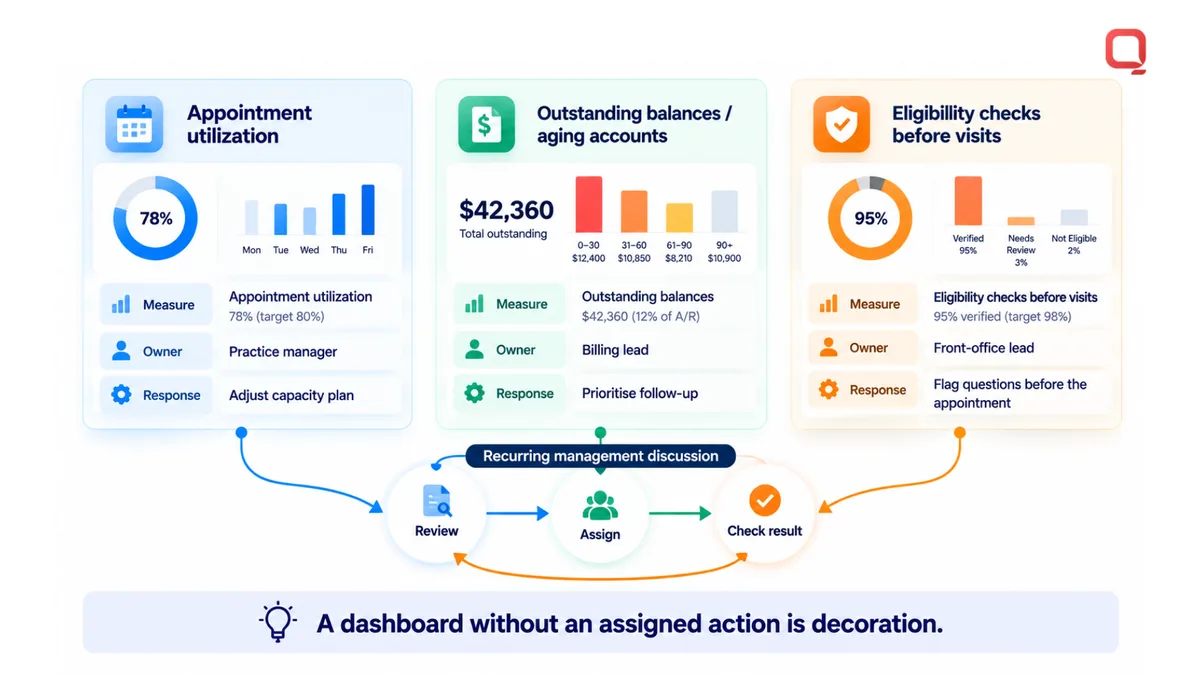
- Separate operational measures by purpose. Use measures that help managers make decisions, not just produce reports. For example, review appointment utilization for capacity planning and outstanding balances for financial follow-up. Pair each measure with an owner and a response. A dashboard without an assigned action is decoration. Keep definitions stable so comparisons remain meaningful over time.
- Make responsibilities visible across roles. Document who owns each management decision and who contributes information. Use this role comparison as a starting point, then adapt it to the practice’s structure.
| Role | Primary management responsibility | Escalates when |
|---|---|---|
| Practice manager | Coordinates operating priorities | Decisions affect multiple teams |
| Billing lead | Manages revenue work priorities | Account issues need policy direction |
| Clinical lead | Clarifies care-process responsibilities | Operational changes affect clinical work |
| Front-office lead | Surfaces patient access concerns | Repeated barriers need management action |
- Plan staff capacity around actual demand. Compare assigned responsibilities with the work arriving each day. Identify tasks that depend on one person or become delayed during absences. Document backup coverage for essential administrative duties. When demand shifts, managers can reassign work based on role and urgency instead of relying on last-minute messages.
- Create a clear escalation path for patient concerns. Define which questions staff can resolve directly and which need a manager, clinician, or billing lead. For example, route a financial-policy question to its designated owner rather than passing it between departments. Record the decision and communicate the next action to the patient. Consistent escalation reduces conflicting answers.
- Control operational changes deliberately. When a policy or responsibility changes, record what changed, who approved it, and when staff should follow it. Share the update with affected roles using the practice’s established communication channel. Retire outdated instructions so employees don’t follow competing versions. This control matters when a small administrative change affects several teams.
- Turn performance findings into management actions. Choose a recurring management discussion for reviewing the measures that affect the practice’s priorities. Assign each action to an owner and record the intended result. At the next discussion, determine whether the action was completed and what remains unresolved. Keep decisions focused on operational impact, rather than collecting metrics without follow-through.
For practices whose operational needs require broader healthcare technology changes, discuss healthcare workflow requirements with a team that understands healthcare operations.
Establish a clear route for patient concerns that staff cannot resolve within their roles. Specify how to document each concern, who reviews it, and how the response reaches the patient. Align this process with the people responsible for operations, billing, clinical processes, and access. Review recurring concerns with the relevant lead to decide whether a workflow or communication step needs adjustment. Make insurance eligibility verification an assigned task before every visit, rather than an informal assumption. Set out how staff should flag eligibility questions that need follow-up before the appointment.
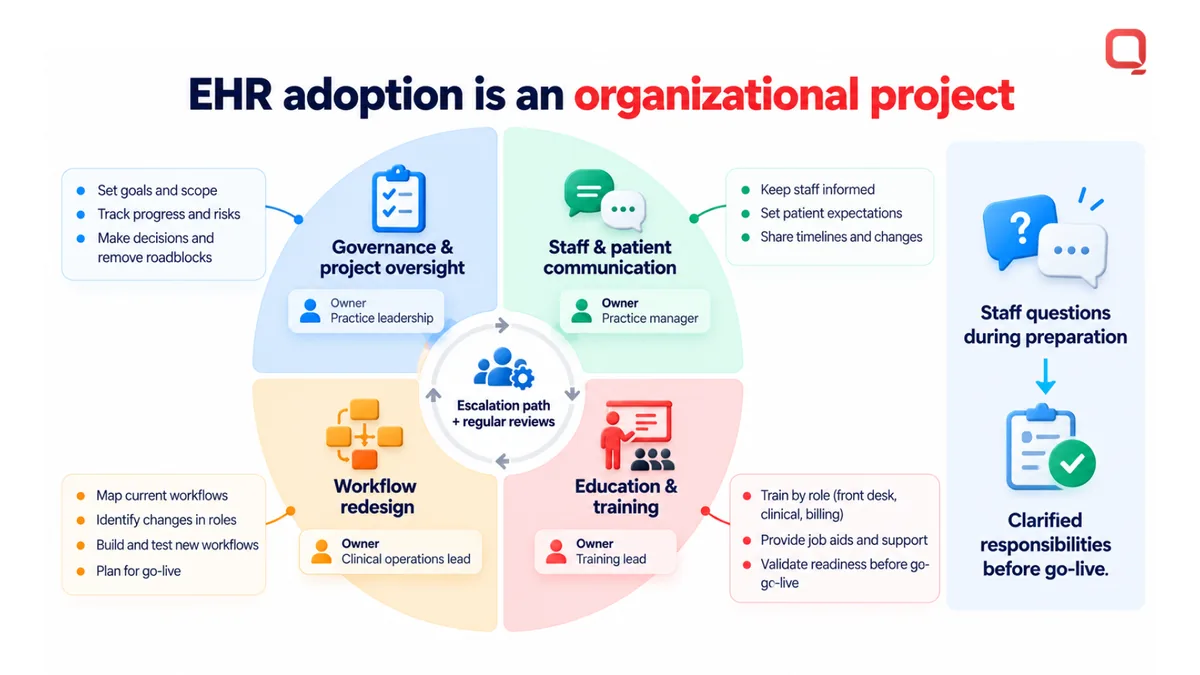
Manage major technology changes as an organizational project, not simply a software task. Before EHR adoption, plan governance and project oversight, staff and patient communication, workflow redesign, and education and training. Assign owners to each area, establish how to escalate decisions and unresolved issues, and explain responsibilities to staff. Assess how proposed workflows affect existing duties, patient communications, and coverage for essential administrative work. Give staff a way to raise questions during preparation, then use those questions to clarify responsibilities before new processes begin. Regular reviews can reveal where further guidance, training, or adjustments are needed while maintaining accountability for decisions and follow-through.
QSS Technosoft: Generative AI Solutions
QSS Technosoft helps healthcare organizations address technology needs beyond configuring an existing EHR. Its Generative AI Solutions support teams exploring AI for defined healthcare workflows, while Healthcare IT Engineering helps design and build healthcare software systems.
Consider Healthcare IT Engineering or Legacy System Modernization when older systems, fragmented processes, or changing operational needs make workflows difficult to maintain. Mobile App Development may suit a practice that needs a dedicated mobile experience for its users. Start by defining the problem, who it affects, and which workflow needs to change. Then determine how the proposed software should fit existing clinical and administrative operations.
Contact QSS Technosoft to discuss a specific healthcare technology requirement.
Build the Next Stage of Your Practice Workflow
Use this Office Ally Practice Mate EHR guide for beginners as a starting point, then identify what your practice needs beyond its current workflows. You may need to improve how existing tools support staff, connect systems, or plan a focused technology change. Begin with the operational gap, the people affected, and the outcome your practice needs.
For needs beyond routine configuration, QSS Technosoft offers Healthcare IT Engineering, Legacy System Modernization, and Generative AI Solutions. These services can support healthcare teams planning new software, replacing outdated systems, or assessing how generative AI might serve a defined workflow. Keep the scope grounded in your practice’s actual processes and technical environment.
If you’re ready to discuss a healthcare technology need, contact QSS Technosoft. A clear problem statement is a useful first step toward building a practical plan.
Need More Than Your EHR Can Configure?
Bring the workflow gap your team works around today, such as a billing handoff, an integration, or a reporting need. Our engineers help practices plan EHR implementation support, custom EHR and medical practice management tools, and integrations that keep healthcare workflows consistent, with EHR staff training and change planning built into the rollout.
Contact QSS Technosoft →