PACS DICOM Integration Services for Healthcare Systems
 By Shreyak Chakraborty
QSS Technosoft
October 28, 2026
14 min read
By Shreyak Chakraborty
QSS Technosoft
October 28, 2026
14 min read
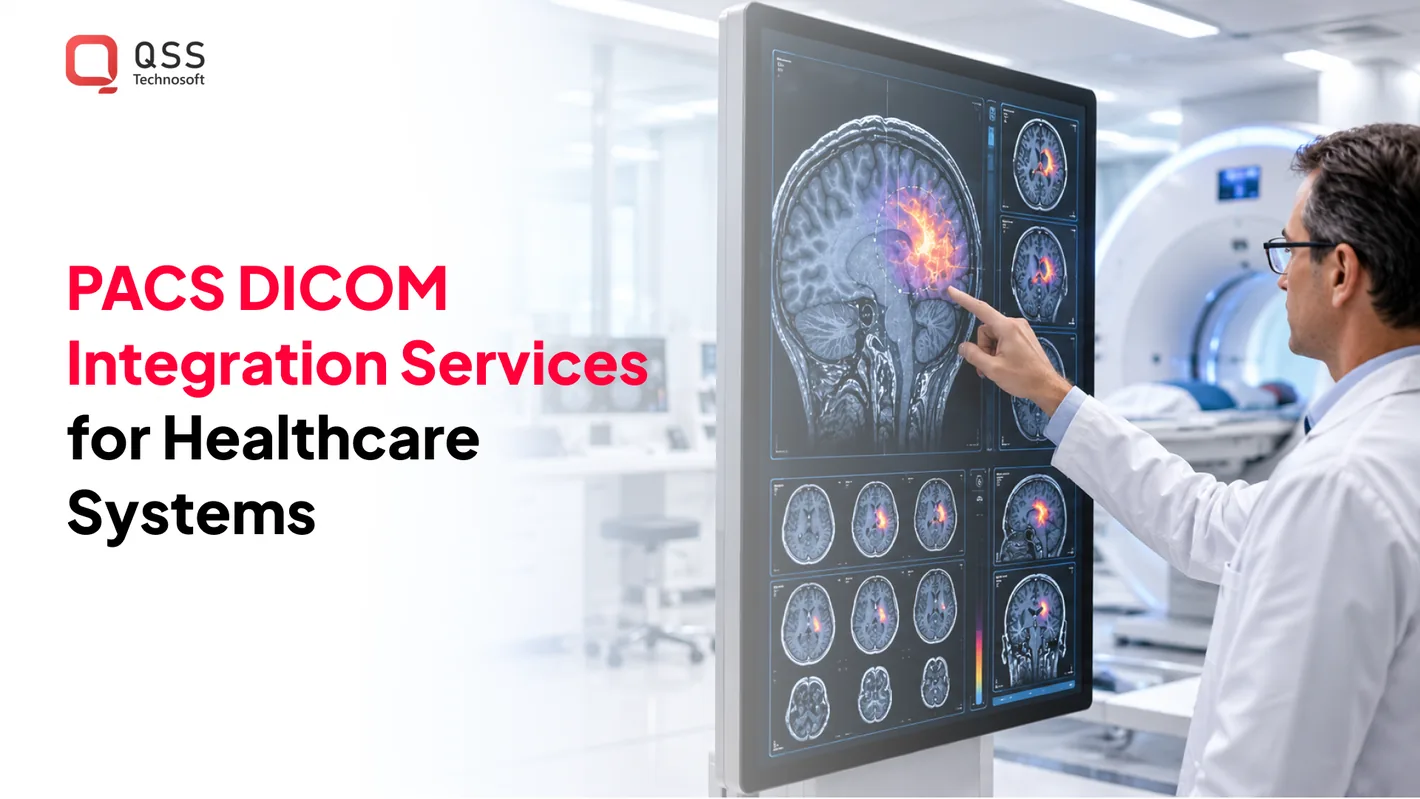
PACS DICOM integration services connect imaging devices and archives with systems such as radiology information systems (RIS), electronic health records (EHR), and hospital information systems (HIS). DICOM carries medical images and related data, while PACS stores, retrieves, presents, and communicates those images. The challenge is making connections work across systems with different workflows and configurations.
That’s why DICOM is more than a file format. It also defines how imaging data moves between devices and applications, while healthcare information systems exchange patient and exam details that provide clinical context. When connections don’t align, staff may encounter mismatched identifiers, missing studies, or extra manual steps.
This article explains how PACS connects with imaging modalities, archives, and healthcare information systems. It covers protocols, identifiers, integration testing, and practical decisions for production environments.
Quick Answer
PACS DICOM integration services connect imaging modalities, PACS, and vendor-neutral archives with RIS, EHR, and HIS so the right study reaches the right clinician with its clinical context. The work covers PACS integration and DICOM integration through DIMSE operations (C-STORE, C-FIND, C-MOVE, C-GET), Modality Worklist, DICOMweb (QIDO-RS, WADO-RS, STOW-RS), and HL7 or FHIR for orders and reports. Reliable medical imaging interoperability depends on comparing conformance statements, aligning patient, accession, study, series, and instance identifiers, testing rendering and interrupted transfers, and documenting access controls and recovery steps. RIS integration, EHR integration, and HIS integration work best when each system’s data ownership is defined before interface work begins.
Archive access and integration prerequisites
Archive access depends on documented credentials, network boundaries, deployment configuration, and recovery procedures. In the United States, available specialists include PACS vendors, healthcare IT consultants, and imaging interoperability teams. PACS DICOM integration services can help connect archive access with existing imaging workflows. Match the project scope to the archive’s interfaces, deployment model, and recovery needs.
Vendor-Neutral Archive Connectivity
A vendor-neutral archive (VNA) stores medical images and related information independently of a particular PACS platform. To establish connectivity, map how each imaging source sends studies and how each authorized viewer retrieves them. Record supported DICOM operations, transfer syntaxes, authentication methods, and network routes. For example, test both image delivery and retrieval when connecting a CT modality and an EHR viewer.
Compare the archive’s conformance statement with those of connected PACS and modalities before configuring exchange. Confirm that patient, accession, study, series, and instance identifiers remain usable across platforms. A VNA can centralize archiving and communication, but it won’t automatically reconcile inconsistent metadata or unsupported formats.
Archive Middleware Integration
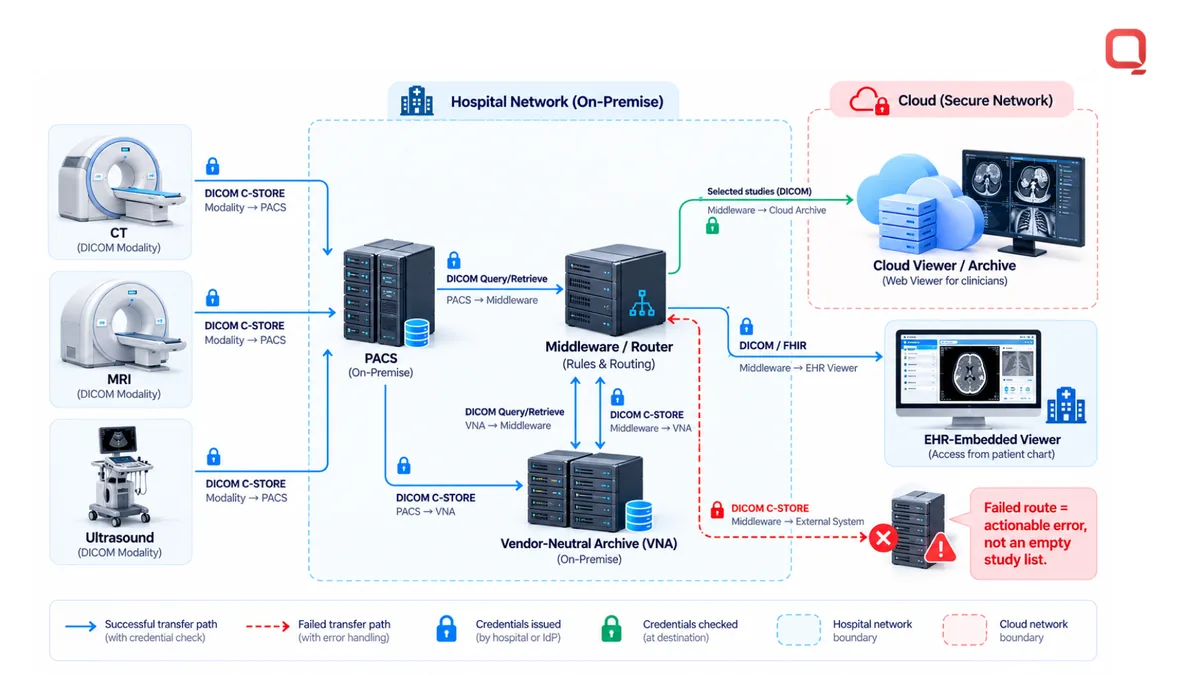
Middleware routes or transforms messages and imaging requests between systems that don’t communicate directly. It can connect legacy PACS, cloud platforms, and clinical applications while keeping each interface configuration explicit. Document source and destination systems, credentials, network boundaries, and error handling. A failed route should produce an actionable error, not an empty study list that looks successful.
Assess middleware based on its supported interfaces, message handling, logging, and recovery behavior. Define how staff can identify a rejected transfer and reconcile a partially received study. Keep deployment configuration and operational recovery steps current in the runbook. HIPAA and GDPR are relevant to protecting patient data in PACS integration, according to the U.S. Department of Health and Human Services and the European Union.
Cloud PACS and hybrid imaging architectures change where data moves, not the need to control access. A hybrid design may retain an on-premise archive while sending selected studies to a cloud viewer or archive. Map every transfer path, including the source modality, intermediary, destination, and user access point. Then test representative study sizes over the network paths staff will use.
Before enabling access, document credential issuance and revocation, as well as the network boundaries protecting each system. Define how the workflow responds to expired credentials, denied access, interrupted transfers, and archive downtime. Recovery procedures should identify the system of record and explain how queued or incomplete exchanges are reconciled. These details make PACS DICOM integration services more operationally reliable.
For vendor-neutral archive integration, inventory PACS and VNA conformance statements, modality connections, viewer requirements, and security configuration. Keep deployment settings and recovery instructions current as platforms change. Include a storage operation only when the imaging workflow requires it. Otherwise, avoid an unnecessary transfer step.
DICOM DIMSE operations for storing, querying, and retrieving images
PACS integration uses DICOM DIMSE operations to store, query, and retrieve medical images. Core operations include C-STORE, C-FIND, C-MOVE, and C-GET. DICOM Modality Worklist supplies scheduled patient and exam details before scanning.
Image Storage and Retrieval
A PACS server serves as the central repository for storing and managing DICOM images. Imaging modalities send acquired instances with C-STORE, while workstations locate studies with C-FIND and retrieve them through C-MOVE or C-GET.
Define how the communication system records the outcome for each instance. If a transfer stops midway, reconcile the incomplete study before treating it as available. To validate distribution, test that an authorized workstation can find the expected patient, study, and series, then retrieve and display the images.
Standardized Image Exchange
DICOM standardizes medical image encoding and communication across imaging devices and systems. Images from different manufacturers are intended to be compatible, but supported operations and transfer syntaxes can still vary by implementation.
That distinction matters in production. Compare each system’s conformance statement, then test representative images and metadata across the actual exchange path. A successful connection alone doesn’t prove interoperability: a study may transfer even if the receiving platform can’t interpret its metadata or display it as expected.
DICOM Transmission and Worklists
DICOM Modality Worklist (MWL) lets imaging equipment retrieve scheduled patient and exam information before scanning. The modality can use that information during acquisition, reducing the need to re-enter exam details at the device.
Test the full sequence: retrieve the scheduled worklist entry, acquire the image, send instances through C-STORE, and confirm the study appears in PACS. Check patient and exam identifiers at every step. A mismatch can separate images from the intended clinical record, even when transmission succeeds.
For a CT examination, the modality receives the scheduled exam through MWL, captures images, and sends them to PACS. A radiology workstation can then query for the study and retrieve it for review. The workflow depends on matching identifiers and supported network operations at each system boundary.
Validate transfer behavior during interrupted connections as well as normal operation. Record per-instance outcomes, identify incomplete studies, and define how staff should reconcile them. Also test large studies and the expected image dimensions or frame counts for each agreed image type. Report unsupported data clearly rather than presenting a partial result as complete.
For healthcare teams mapping these operations across clinical systems, discuss DICOM integration requirements as part of a healthcare interoperability plan.
PACS integration with RIS, EHR, HIS, and imaging modalities
PACS connects imaging modalities and archives with RIS, EHR, and HIS workflows using DICOM and clinical data exchange. Integration cost depends on interfaces, systems, data mapping, deployment architecture, and testing scope. Pricing is provided after a quote request.
Connections to RIS, EHR, and HIS
A radiology information system (RIS) manages radiology exam scheduling, reporting, and billing. An EHR connects imaging studies with a patient’s broader clinical record, while a hospital information system (HIS) supports hospital operations. Integration maps patient and exam details between these platforms, then links the resulting images and reports to the appropriate record.
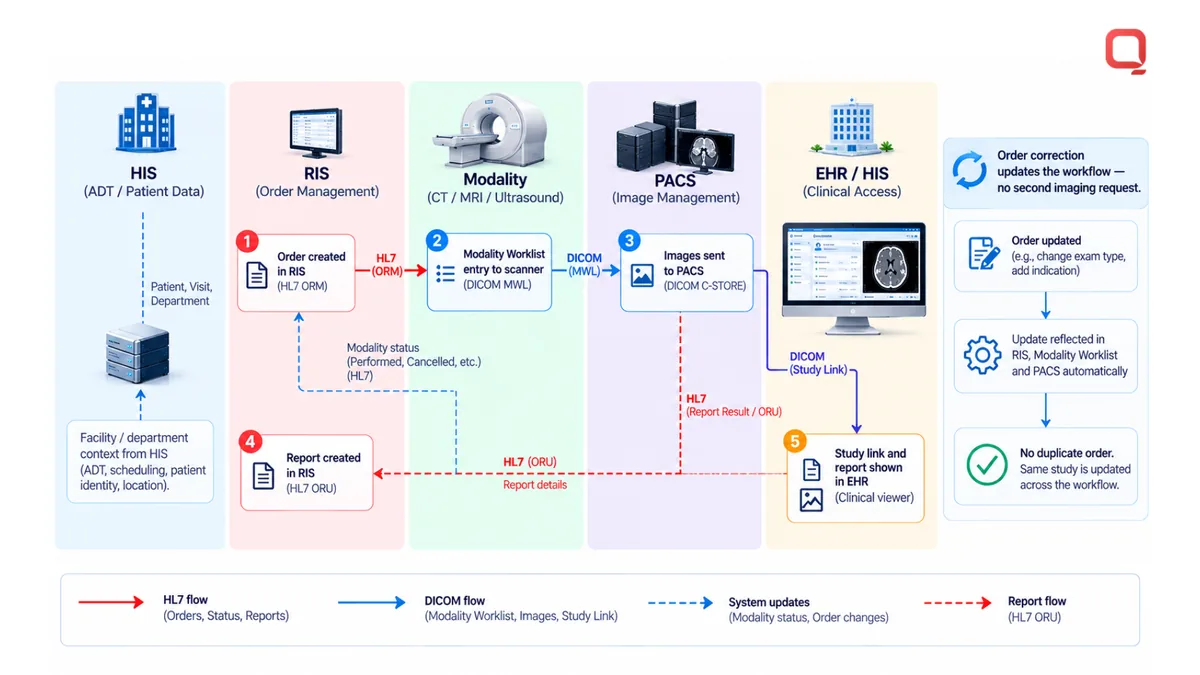
For example, a RIS can provide exam context while PACS handles image storage and access. Define which system owns each identifier and how updates move between systems. DICOM primarily carries imaging data; HL7 commonly supports clinical information exchange. Keep those roles clear when designing interfaces.
Modalities and Transfer Syntaxes
CT, MRI, and ultrasound systems produce DICOM studies for PACS. A transfer syntax specifies how DICOM data is encoded for exchange, so compatibility must be tested between each modality, archive, and viewing application. Review the systems’ conformance statements and test representative studies, including image dimensions and frame counts.
A connection can succeed even when an image remains unreadable or displays incorrectly. Test metadata and rendering, not just whether transmission succeeds. Record unsupported data explicitly, and include each modality’s expected image types in the integration test plan.
Integration Services and Troubleshooting
PACS integration work can include interface design, patient and exam identifier mapping, configuration, testing, and production troubleshooting. Common failure points include mismatched identifiers, unsupported transfer syntaxes, interrupted exchanges, and access errors. Troubleshooting should trace a study from modality to archive to viewer, checking each system’s logs and transfer results.
For imaging AI, define how studies reach the software, which image types it accepts, and how results return to clinical workflows. For mobile and remote access, test the intended viewer and network path. Avoid adding a separate storage transfer when the workflow requires authorized viewing only.
During testing, use studies from each connected modality and verify patient, accession, study, series, and instance identifiers. Check that reports and images remain associated with the correct exam in RIS and EHR views. Test interrupted transfers and session expiry, then document recovery steps for operations staff.
Integration scope grows with each additional vendor, interface, and workflow. A focused plan names the systems, defines the data exchanged, and assigns a validation case to each connection. This gives technical and clinical teams a shared way to review failures before production use.
DICOM and PACS interoperability
DICOM and PACS interoperability depends on compatible interfaces, consistent identifiers, and reliable image presentation. Teleradiology and FHIR connections introduce different paths, so test each workflow across the systems and viewers clinicians actually use.
What interoperability requires
DICOM is the standard for encoding and communicating medical images and related data. PACS stores, retrieves, presents, and communicates those images. A PACS client uses DICOM to request studies from a server, but shared standards alone don’t guarantee identical behavior across implementations.
Start with the conformance statements for each PACS, modality, and viewer. Compare supported operations and transfer syntaxes, then verify representative studies end to end. Check patient, accession, study, series, and instance identifiers across system boundaries. Confirm image dimensions and frame counts for each agreed image type, and report unsupported data explicitly.
Teleradiology across facilities
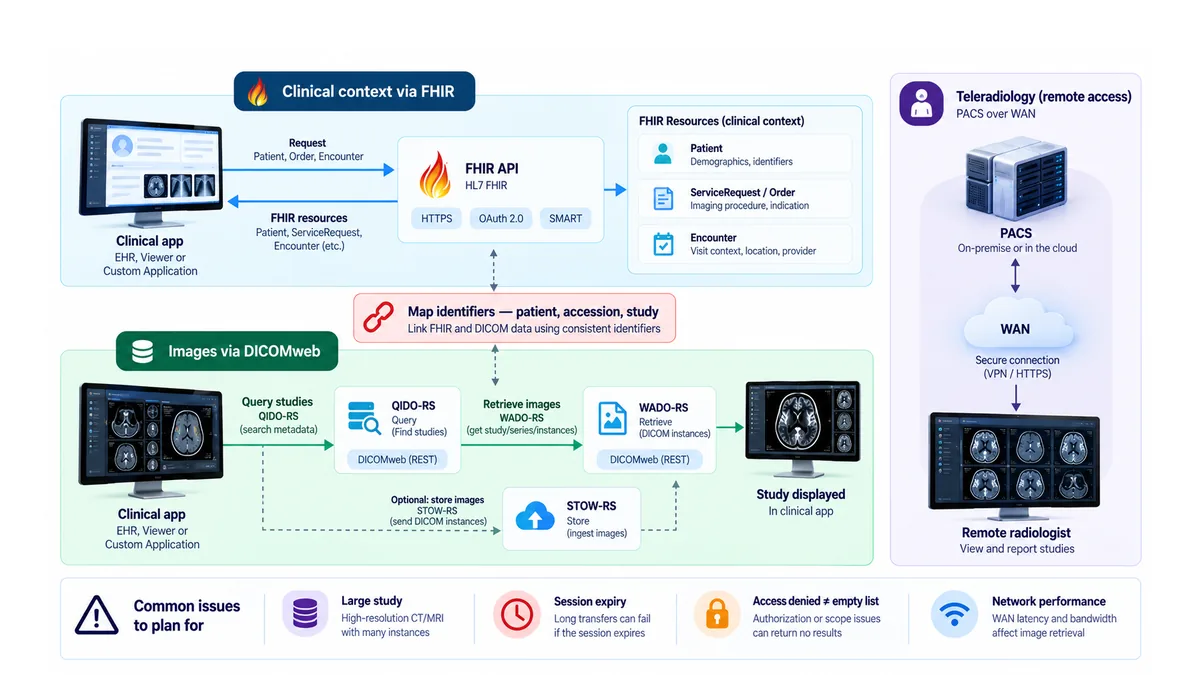
Teleradiology moves imaging studies from one location to radiology readers at another. A PACS network may use a local area network within a facility or a wide area network connecting facilities. For a remote radiologist, test study queries, retrieval, display, and report association across the actual network path.
Large studies and limited bandwidth can expose transfer problems that small test images miss. Exercise interrupted transfers and session expiry. Record per-instance outcomes and define how teams reconcile partial studies. A remote viewer should distinguish denied access or expired credentials from an empty study list.
FHIR and clinical context
DICOM primarily carries imaging data, while HL7 supports clinical information exchange. FHIR can connect clinical applications through structured resources and APIs, while DICOMweb provides REST-based image access through QIDO-RS, WADO-RS, and STOW-RS. Use each interface for its intended data and workflow.
For example, a clinical application can use FHIR to access patient or order context, then use DICOMweb to query and retrieve the related imaging study. Map identifiers between the clinical and imaging systems. Validate that the returned study belongs to the intended patient and exam, rather than relying on matching names alone.
HIPAA and security considerations
HIPAA is relevant to protecting patient data in PACS integration, according to the U.S. Department of Health and Human Services. Document access controls, credential handling, network boundaries, deployment configuration, and operational recovery in the technical design. These controls need to work across on-premise, cloud, and remote-reading environments.
Interoperability testing should cover access-denied responses, expired sessions, and recovery after interrupted exchanges. Keep audit and transfer records useful to operations teams. The goal is a traceable path from modality to archive to authorized viewer, with clear handling when a connection fails.
Integration with healthcare information systems
Integration works when each healthcare platform has a defined role, data owner, and handoff. For CIOs and interoperability leads, the practical task is to make system boundaries explicit before interface work begins.
Assign ownership across systems
RIS, EHR, HIS, and PACS can contain overlapping patient and exam information. Decide which system creates each value and which systems consume it. The table distinguishes their usual responsibilities and the integration question to resolve.
| System | Typical responsibility | Integration decision |
|---|---|---|
| RIS | Radiology scheduling, reporting, and billing | Which exam and order updates flow to imaging workflows? |
| EHR | Patient-facing clinical record and care context | How are studies and reports associated with the correct record? |
| HIS | Hospital-wide operational information | Which facility and department context must be shared? |
| PACS | Imaging study management and access | Which applications can request or display imaging data? |
Use the table as a starting model, then document local ownership rules. A hospital may assign exam scheduling to RIS while the EHR displays the study link. If both systems can modify patient details, define which update takes precedence and how downstream systems receive it.
Design interfaces around events
Specify what event triggers each exchange, what data it carries, and what response counts as success. For example, an order correction should update the relevant workflow without creating a second imaging request. HL7 supports structured clinical information exchange, while DICOM handles imaging data. Keep the mapping between those flows explicit.
Healthcare Interoperability planning should also account for the network path and system ownership at each handoff. Record the source, destination, responsible operations team, and expected recovery action. This helps technical teams distinguish a delayed message from a rejected one without relying on a user report alone.
Validate operational behavior
Build acceptance cases around workflows staff perform, not interface availability alone. Include corrected demographics, delayed results, and a temporarily unavailable downstream application. For each case, define the expected user-visible status and the record operations staff will use to investigate.
Before production, review the interface map with radiology, clinical operations, and IT. Confirm who owns each exception and how teams resume processing after recovery. This matters in mixed environments where older applications and newer cloud platforms share responsibilities.
To plan system boundaries and exchange workflows, discuss healthcare integration requirements with QSS Technosoft.
A clinical information system (CIS) manages and processes a healthcare organization’s clinical data. A radiology information system (RIS) manages and processes a radiology department’s administrative, financial, and clinical data. PACS often integrates with other systems, including electronic health records, to support comprehensive patient care.
QSS Technosoft: Generative AI Solutions
QSS Technosoft supports this integration work through Healthcare IT Engineering and Legacy System Modernization. Turn to its team when PACS workflows need to connect with existing clinical software or older systems make reliable data exchange difficult.
For projects involving AI, QSS Technosoft offers Generative AI Solutions. These can support healthcare products that need generative AI capabilities, with clinical data access and system boundaries designed deliberately. Engineering should still start with the workflow, interfaces, and operational requirements, not an AI feature added for its own sake.
QSS Technosoft also provides Mobile App Development for healthcare products that need mobile access to relevant workflows. Share your PACS integration goals with QSS Technosoft through its website.
Turn Integration Decisions Into a Delivery Plan
PACS DICOM integration services are easier to govern when architecture decisions translate into a clear implementation sequence. Define the clinical workflow, map connected systems, assign ownership of identifiers, and document how teams handle failures. This keeps delivery focused on real imaging workflows, not just a successful connection test.
For a U.S. healthcare organization, the next step is aligning IT, radiology, and product stakeholders around a shared scope. Bring the current system map, target workflows, and known legacy constraints. Use them to prioritize interfaces and testing. QSS Technosoft offers Healthcare IT Engineering and Legacy System Modernization for healthcare software needs, alongside Generative AI Solutions for defined use cases where AI fits the workflow.
Ready to shape the next step? Contact QSS Technosoft to discuss your integration requirements. A clear scope gives your team a stronger starting point for practical, maintainable delivery.
Trace One Study From Modality to Viewer
Bring your current system map (modalities, PACS or VNA, RIS, EHR, and HIS) and the imaging workflow that breaks most often. Our engineers deliver PACS DICOM integration services covering PACS integration, DICOM integration, DICOMweb and FHIR connections, and RIS integration, EHR integration, and HIS integration, with identifier mapping and failure-path testing that make medical imaging interoperability dependable in production.
Discuss your integration requirements →