Senior Housing Care Management Software Development Costs
 By Rashmi Kanti
QSS Technosoft
October 28, 2026
13 min read
By Rashmi Kanti
QSS Technosoft
October 28, 2026
13 min read
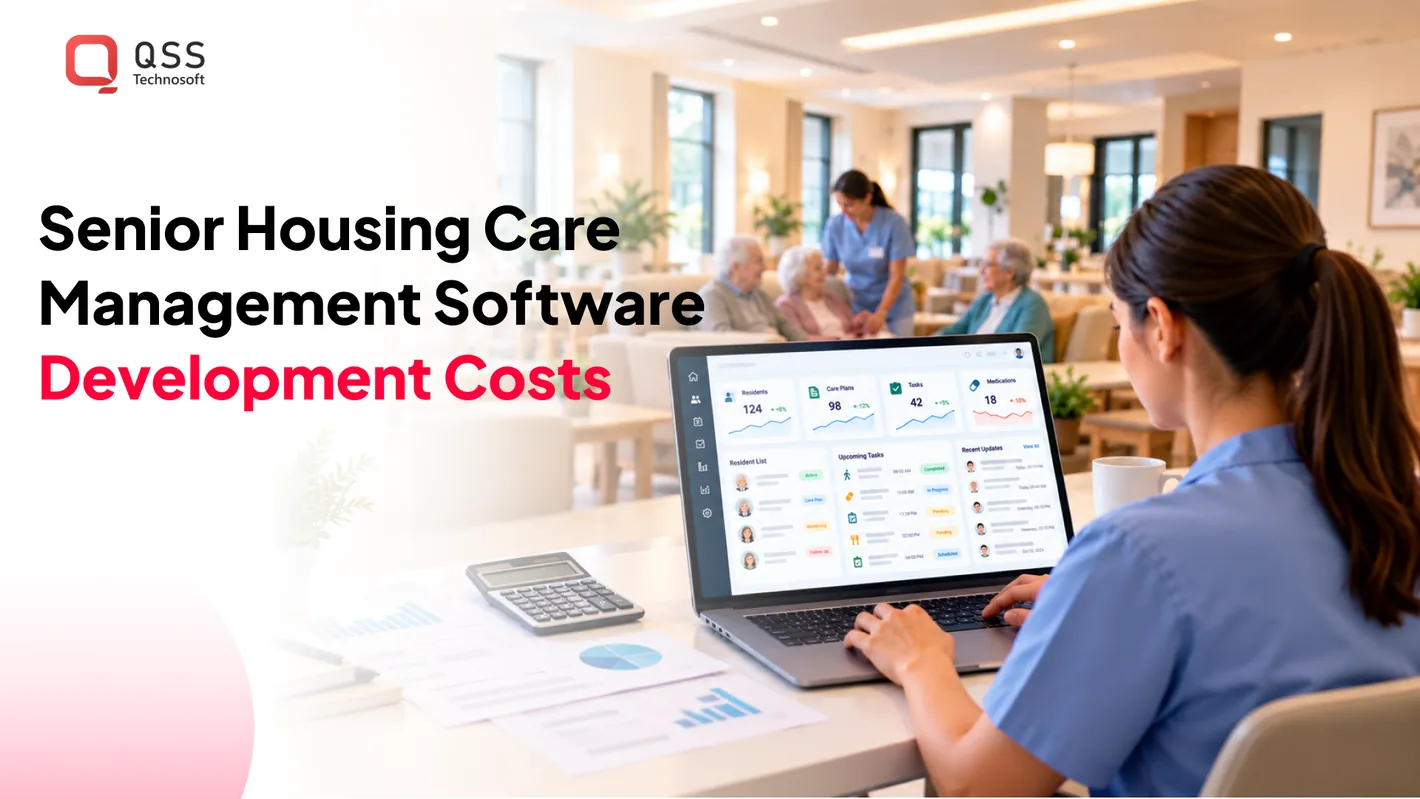
The cost of senior housing care management software development depends on what the platform needs to do, which systems it must connect to, and whether it supports one community or multiple locations. A focused care tool has a different scope from a platform that combines resident records, medication workflows, staff operations, and reporting. The feature set shapes the development work.
That distinction matters because care management software is more than a digital filing cabinet. It must fit caregivers’ and administrators’ daily work while handling sensitive resident information and the practical demands of busy shifts. Integrations and multi-site workflows add further engineering considerations.
This article explains what senior housing care management software does, which features support daily care, and how project complexity shapes development costs. You’ll see how integrations, security, user roles, and deployment scope affect the build, helping you define a realistic project before development begins. Start with a clear scope, then prioritize the workflows residents and staff rely on.
Quick Answer
Senior housing care management software development costs depend on scope: the care workflows you need (resident records software, care plans, medication tasks, communication, reporting), the number of communities and user roles, data migration, security and HIPAA controls, and healthcare software integrations with EHR, billing, and pharmacy systems. A focused module costs far less than a multi-site care management platform with offline mobile use and external interfaces. This guide’s planning figures are 4–6 months for a basic project and about USD 10,000–40,000+ for full compliance setup, but senior care software costs should be estimated from a defined release scope. Compare proposals against the same facilities, workflows, integrations, and rollout assumptions, and plan hosting, support, and enhancements separately from the initial build.
What is care management software?
Care management software organizes resident records, care plans, communications, and facility operations in one system. For senior living teams, it brings daily information together so staff can coordinate care and track changes.
Resident Profiles and Centralized Records
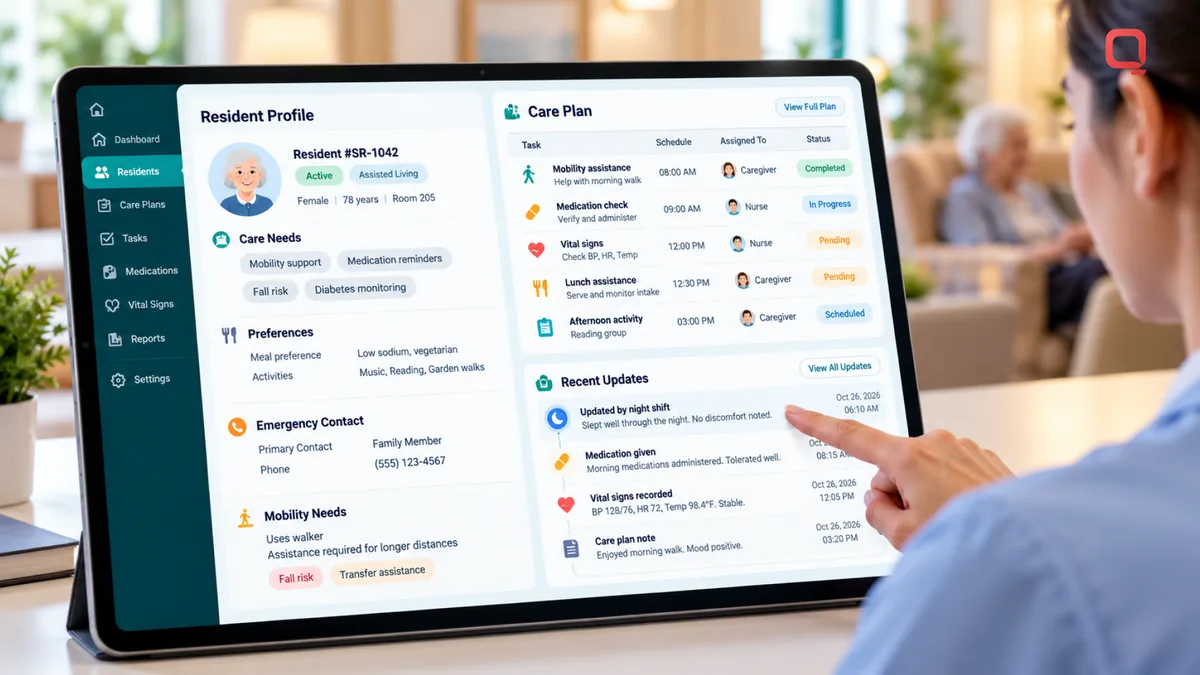
A resident profile is a structured record of a person’s care needs, preferences, contacts, and relevant health information. Centralized records let authorized staff find and update information in a shared system instead of piecing together separate files.
For example, a profile can connect an emergency contact, mobility needs, and current care instructions. Facility leaders can use consistent records to coordinate operations across teams. The World Health Organization warns that the share of the world’s population over age 60 is expected to rise from 12% to 22% by 2050, increasing the importance of usable information systems in senior living.
Care Plan Management
Care plan management means recording resident needs, planned support, and updates alongside each resident’s profile. It gives caregivers a shared reference for assigned tasks and changes that affect daily care.
A plan might document mobility assistance, meal preferences, or monitoring needs. Staff can record updates against the relevant resident so the next caregiver knows what changed. Clear ownership and dated entries matter: a plan that is difficult to find won’t help during a busy shift.
Communication and Resident Engagement
Communication features help staff, residents, and families share relevant updates through approved channels. A family portal can provide access to selected information, while staff messaging can keep operational updates linked to resident records.
Access should reflect each person’s role. Families may need appointment or activity updates, while care staff need current instructions. Resident engagement tools can support feedback, event information, and requests. Keep messages clear, assign follow-up, and don’t put sensitive details in channels without appropriate access controls.
Custom-built or off-the-shelf? Choose off-the-shelf software when its existing workflows fit your facility’s care and operational needs. Consider custom development when required workflows, integrations, or multi-facility processes don’t fit available software.
What are the development steps and timeline? Development typically moves through workflow discovery, requirements and design, implementation, integration, testing, and rollout. A basic aged care software project is estimated to take 4-6 months; broader scope and integrations affect the schedule.
What migration and staff training are needed? Inventory resident profiles, care plans, contacts, and active records. Map each field to the new system and validate the migrated data. Train staff by role on everyday tasks, such as finding a profile, updating a plan, and recording a handoff.
What US grants, incentives, or state requirements apply? Funding opportunities and requirements vary by state, facility type, and project purpose. Review current state aging and health department programs, then identify the conditions that apply to your facility and funding before including an incentive in the project plan.
Cloud-based access and multi-site scalability
Cloud-based care management software gives authorized users access through a network-connected application, while shared services can support multiple facilities. Its value depends on clear site-level permissions, reliable remote access, and workflows that remain usable during connectivity problems.
For senior housing in the United States, the U.S. Department of Health and Human Services says aged care software must account for HIPAA compliance requirements. Developers should design access by job role and facility, then test how permissions work when staff cover another location.
Secure access across facilities
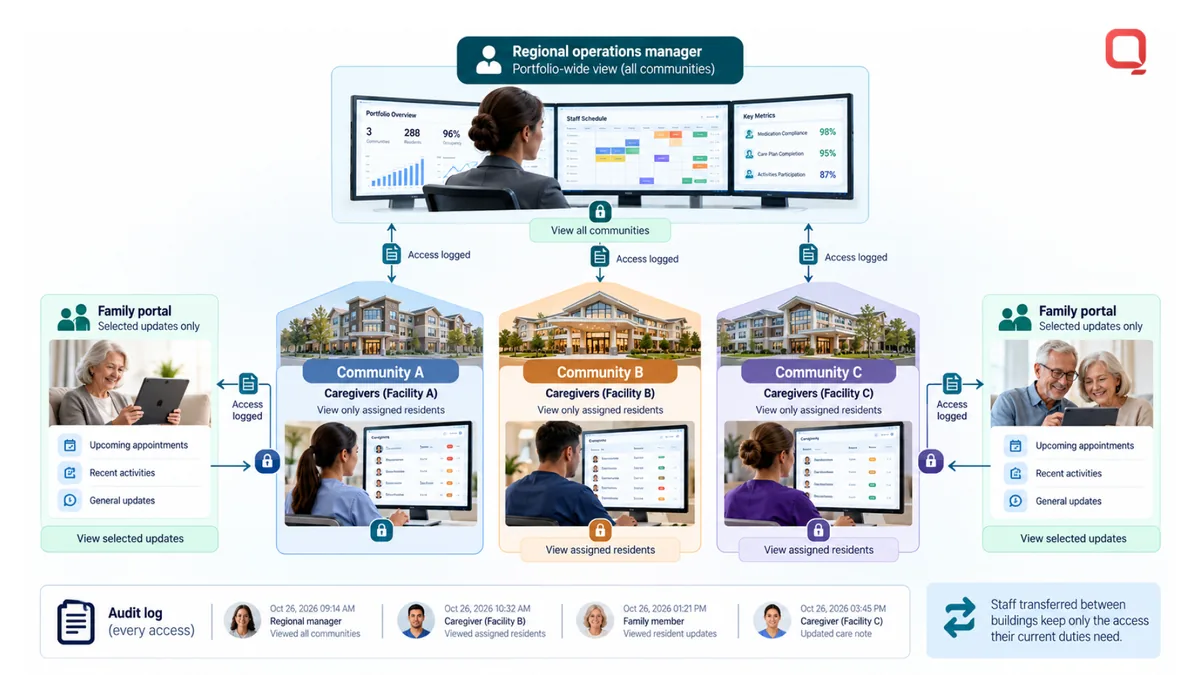
A multi-site system lets separate facilities use shared services while maintaining appropriate boundaries around their records. A regional operations manager might need portfolio-wide scheduling data, while a caregiver should see information relevant to assigned residents.
Use role-based access, facility assignments, and audit records to make those boundaries clear. For example, test whether a staff member transferred between buildings retains only the access needed for current duties. Review account removal, password recovery, session timeout, and access logging as connected operational workflows, not isolated settings.
Mobile access and offline workflows
Mobile access lets caregivers use the system on a phone or tablet during rounds, rather than returning to a central workstation after each task. A practical interface prioritizes frequent actions, such as reviewing a schedule or documenting a completed check.
Offline capability needs deliberate design. If a hallway has weak connectivity, the app can queue permitted updates locally and synchronize when service returns. The system should flag conflicts, show when information is pending, and prevent a delayed update from silently replacing a newer record. Define which tasks can wait safely for synchronization.
Remote access and usability risks
Remote access lets authorized users reach approved workflows away from a facility, such as reviewing scheduling information from another site. It can improve operational coordination, but only when identity checks, permissions, and device handling suit that access pattern.
Developers should address three risks: unauthorized viewing, unreliable connections, and interfaces that slow care work. Test keyboard navigation, readable text, screen-reader labels, and touch controls using real tasks. A crowded screen can hide a care instruction; a confusing status can make staff mistake a queued update for a saved one.
Before rollout, test the system with facility-specific scenarios: cross-site coverage, remote scheduling, lost connectivity, and a user whose role changes. Record the expected result for each scenario, then verify access logs and synchronization behavior. This turns broad security and usability goals into testable operations.
Teams planning remote workflows or mobile synchronization can discuss their software requirements with an engineering team before those decisions become expensive to change.
Data access, analytics, and reporting
Care management analytics turns facility data into reports that help teams understand operations and decide what to do next. A useful platform connects data access, integration, and reporting to decisions staff can act on.
Start by defining who needs each view. A care director may review overdue documentation, while an operations manager tracks staffing patterns across facilities. Configure dashboards around those workflows, with filters for location, date range, and status. The same platform can then serve different roles without giving every user identical access.
Reports should answer specific questions, not just display available fields. A shift-level report might show incomplete tasks, while a monthly view summarizes recurring operational bottlenecks. Define each measure in plain language, including its source and calculation. If “completed” means different things across facilities, comparisons can mislead decision-makers.
Use a reporting cycle that turns evidence into action. First, review a defined measure, such as unassigned tasks. Next, identify where the pattern occurs, such as one building or shift. Assign an operational response, then revisit the same report. This gives leaders a repeatable way to assess whether a workflow change addressed the problem.
Data ownership describes the rights and responsibilities assigned to information in a software relationship. Before implementation, document which party controls resident and facility data, who can access it, and how exports work. For example, specify whether administrators can retrieve records in a usable format when changing platforms. Set retention, backup, and deletion expectations in the governing agreement.
Source-code rights are separate from data ownership. A custom software agreement should state who owns custom code, what rights each party receives, and whether the customer can maintain or modify the system. Distinguish custom work from pre-existing components and third-party dependencies. Clear terms reduce friction if the platform evolves or the operating relationship changes.
Reliable reporting depends on integration quality. If scheduling data comes from one system and care documentation from another, define how records match and updates are handled. Use stable identifiers, record timestamps, and flag missing or conflicting values. A dashboard should show data freshness so users can tell whether a report reflects current workflows.
- Choose measures tied to concrete operational questions.
- Document each measure’s source, definition, and reporting cadence.
- Agree on data access, export, and source-code rights before development.
- Test reports against real facility workflows and sample records.
When a report reveals a recurring issue, assign an owner, record the response, and review the next reporting cycle. This simple loop helps senior living teams make decisions from data instead of collecting charts no one uses.
Aged care software development costs by project complexity
Senior living software development cost follows project scope, not a standard feature list. A focused assisted living tool has different engineering needs from a platform connecting nursing workflows, multiple facilities, and external systems. For senior housing care management software development, define the operational problem first, then estimate the software work needed to address it.
Project price depends on the case and is provided after a quote request. Cost drivers include workflow complexity, modules, integrations, user roles, data migration, security controls, and rollout scope. Each driver adds design, development, testing, or implementation work.
| Project scope | Typical components | Complexity drivers |
|---|---|---|
| Focused module | One defined workflow, such as occupancy management | Reports, permissions, and links to existing systems |
| Operations module | Workforce scheduling and facility-level processes | Shift rules, role assignments, and exceptions |
| Multi-site platform | Shared modules used across a facility portfolio | Local workflow differences, integrations, and access boundaries |
The table shows why feature count alone is a poor estimate. Two projects with similar screens can require different engineering effort if one must support different facility rules or exchange information with external systems. Define which requirements are shared and which vary by location before setting the project scope.
Costs increase when software must reconcile different operating processes. A group might use common scheduling rules but need distinct approval paths at individual facilities. The platform then needs shared workflows with configurable local settings. If those differences are overlooked, staff may have to manage them manually after launch.
Make an estimate more useful by breaking the project into deliverables: discovery, interface design, core workflows, integrations, testing, migration, and rollout. Identify dependencies, such as access to existing system interfaces or decisions about resident data. Then rank features by operational need. An initial release can focus on a defined workflow, with later releases expanding the platform.
Separate development from ongoing operations in the project plan. Hosting, maintenance, post-launch support, and future enhancements need their own planning. For example, a pharmacy connection requires integration testing and monitoring after implementation, not just initial development.
For senior housing care management software development, compare estimates against the same scope: facilities, workflows, integrations, and rollout assumptions. A narrower proposal may cover fewer requirements, while a broader one may include more configuration and testing. Make those differences clear before choosing the project scope.
PLANNING FIGURE
$10,000–40,000+
Full compliance setup for aged care software is estimated to cost 10,000 - 40,000+ in USD.
These estimates provide a broad way to compare project scale, but they don’t replace defining the required workflows, integrations, and rollout scope. Align the estimate with the intended release and the operational work it must support. Plan compliance and ongoing operations separately from initial development costs.
How do senior living care management systems integrate with EHR, billing, and pharmacy software?
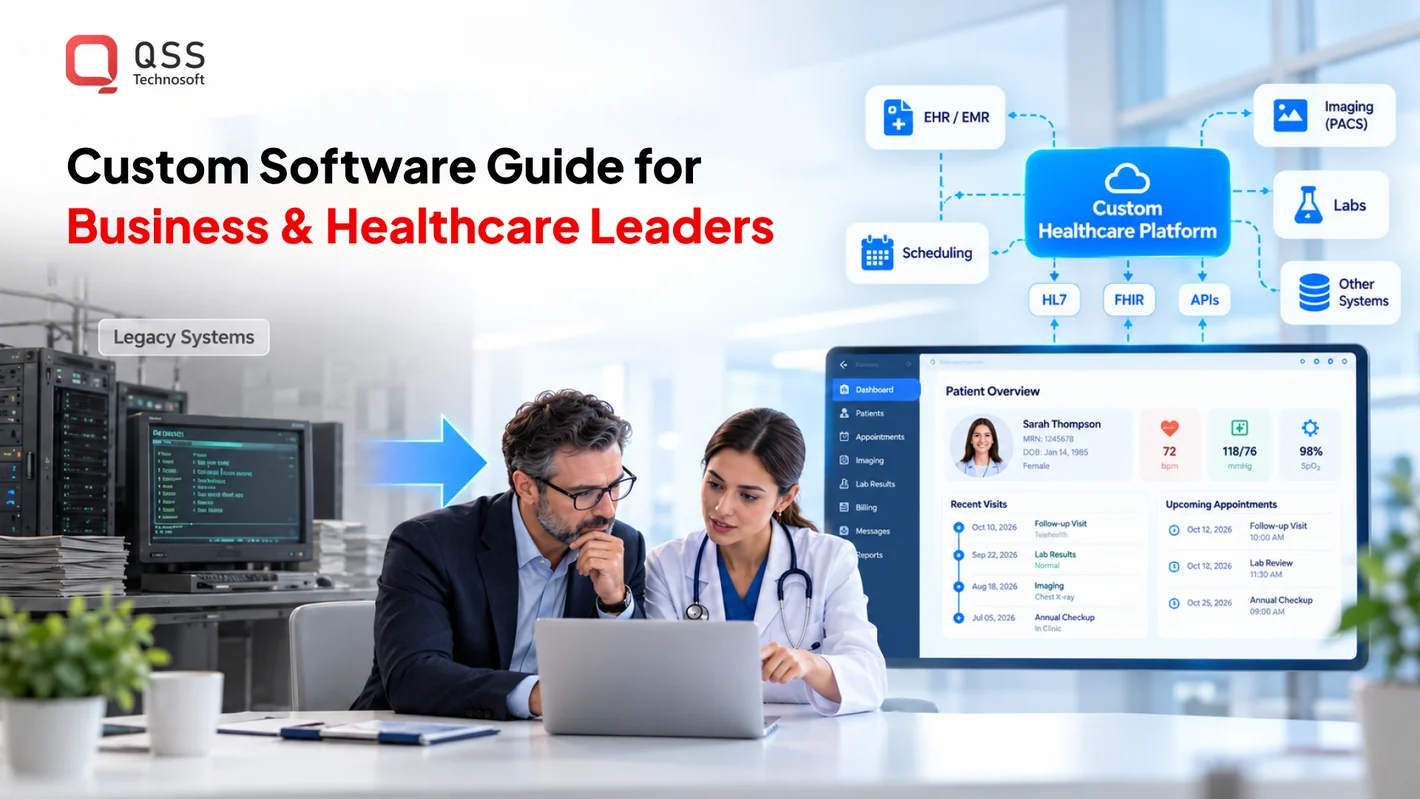
Senior living care management systems integrate with EHR, billing, and pharmacy software by exchanging agreed data through interfaces. The design must define which system owns each record, what information moves, and how staff handle errors. Nursing homes often rely on these connected tools to support residents’ complex healthcare needs.
Start with the workflow, not the interface technology. A change to a resident’s care information, for example, may need to appear in the EHR, while service details may flow to billing software. A pharmacy connection can support medication-related workflows. Map each handoff, identify the responsible system, and specify what happens when information is incomplete or rejected.
HL7 is a standard used to exchange electronic health information in assisted living software. FHIR is a protocol for data exchange among healthcare systems. The United States Core Data for Interoperability, or USCDI, provides a way to standardize patient data exchange. These approaches help teams define shared information, but they don’t remove the need to map fields and workflows between specific systems.
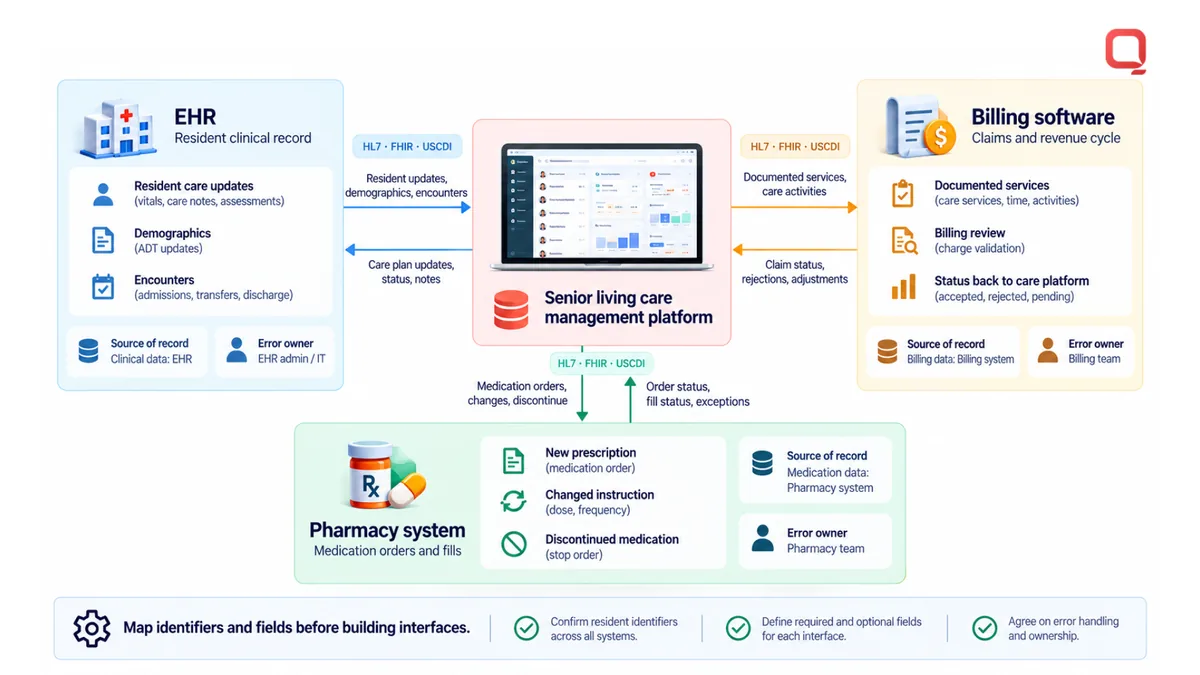
For an EHR integration, document which resident identifiers link records across systems. Map fields such as demographics, care details, and encounter information to the receiving system’s structure. Test valid, missing, and conflicting values. An identifier mismatch can attach an update to the wrong profile, while inconsistent field definitions can make a correct message unusable.
Billing integration needs its own rules. Specify which services or operational events create billing data, which system calculates charges, and how corrections return to the source. For example, a documented service might be sent for billing review, then returned with a status. Keep the workflow traceable so staff can see where an item stalled.
Pharmacy integration should define what medication information is shared, the direction of each exchange, and how updates are handled. A new prescription, changed instruction, or discontinued medication may follow different paths. Test those scenarios with representative records, and make errors visible to the staff responsible for resolving them.
- List each system and its role as the source of record.
- Map identifiers, fields, statuses, and message ownership.
- Test rejected, duplicate, delayed, and corrected information.
- Assign an operational owner to review unresolved interface errors.
Integration work also includes monitoring interface activity after launch. Track failed messages, delayed updates, and repeated corrections, then route each issue to an accountable team. If legacy systems lack consistent interfaces, staged modernization can reduce brittle point-to-point connections. Discuss healthcare system integration requirements when planning connected resident care, billing, and pharmacy workflows.
QSS Technosoft: Generative AI Solutions
QSS Technosoft is a US-based software engineering company focused on healthcare technology for the US market. Its Healthcare IT Engineering supports care software architecture and healthcare data workflows, while Legacy System Modernization can address older applications that complicate system connections.
Generative AI Solutions can support defined documentation workflows, such as organizing information for staff review. AI should assist teams, not replace clinical judgment. Mobile App Development can also bring selected workflows to care teams’ mobile devices.
Share your priority workflow and the systems involved with QSS Technosoft to discuss a practical path forward.
Set the Next Project Decision
Make the next move a scoped decision, not a feature wish list. Choose one operational workflow that currently creates friction, identify who owns it, and define what a successful change should make easier. That gives your team a practical starting point for senior housing care management software development.
QSS Technosoft can support this work through Healthcare IT Engineering, Legacy System Modernization, and Generative AI Solutions. The right starting point depends on the problem: connect fragmented systems, replace a brittle component, or assess a specific AI use case. Keep resident care, staff usability, and maintainability in the same conversation.
Bring your priority workflow and the systems it touches into the discussion. Start a project conversation with QSS Technosoft and shape a clear path from the current process to a system your teams can use. A focused first decision makes the work ahead more manageable.
Get a Scoped Estimate for Your Care Platform
Bring your priority care workflow, the number of communities and user roles, and the EHR, billing, and pharmacy systems it must connect to. Our engineers provide senior housing care management software development and healthcare software development, from resident records software and care plans to mobile offline workflows and healthcare software integrations, so your senior care software costs are tied to a clear release scope for your senior living technology roadmap.
Start a project conversation →