Iguana Integration Engine Services: What Will It Cost
 By Rashmi Kanti
QSS Technosoft
November 10, 2026
14 min read
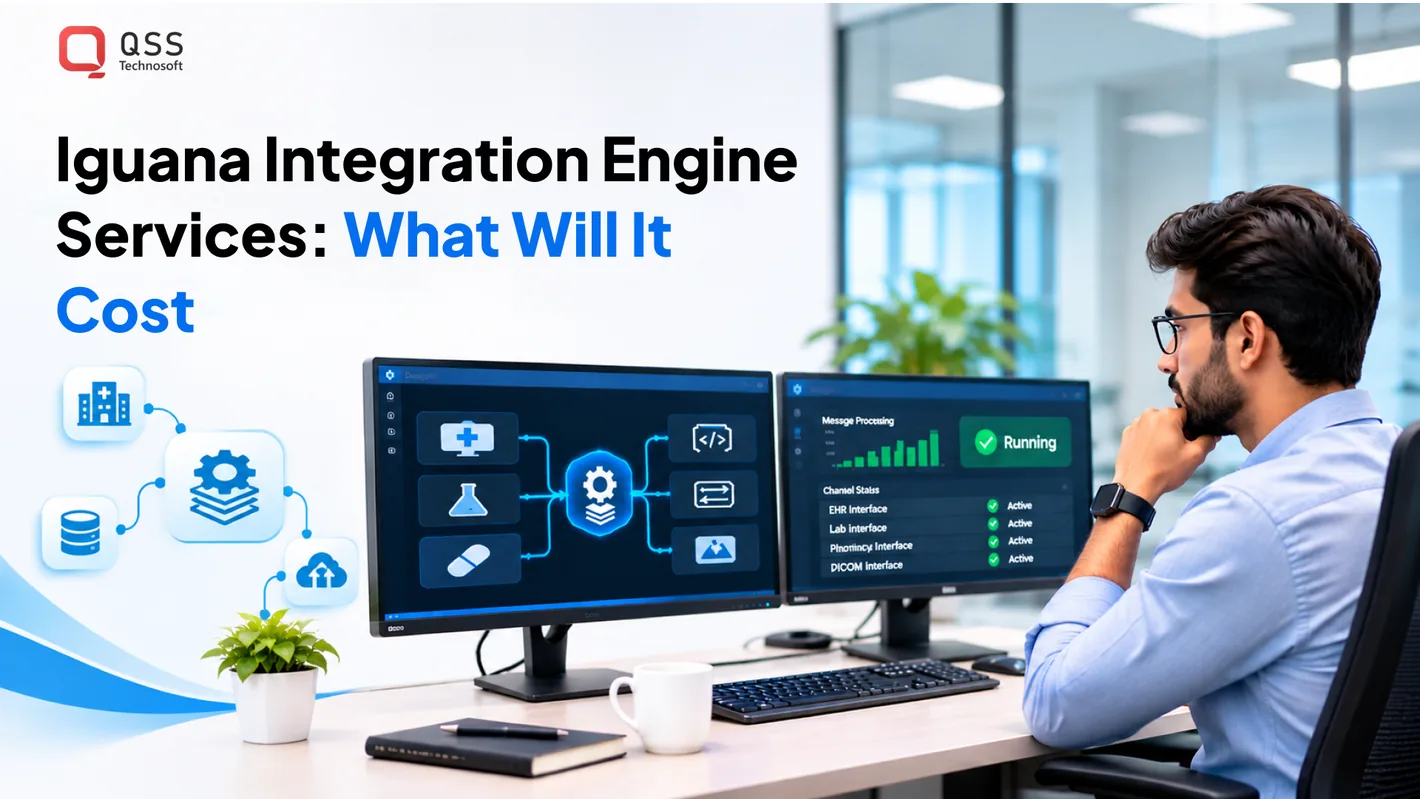
The cost of Iguana integration engine services depends on project scope, hosting, team responsibilities, and implementation work. There is no single figure for every healthcare environment. A useful estimate starts with the systems involved and the outcomes the integration must support.
For CIOs, CTOs, and interoperability leaders, the practical question is what the organization needs to build, operate, and maintain. This article covers the factors that shape that decision, including implementation fit, performance, data formats, technical requirements, and alternatives.
Use this guidance to define requirements and compare approaches. The goal is a project scope grounded in your workflows, not an assumed price or generic estimate.
Quick Answer
There is no single price for Iguana integration engine services: integration engine cost depends on project scope, hosting, team responsibilities, and implementation work, and pricing is provided after a quote request. Build the estimate from an interface inventory: every source, destination, message type, transformation, and error path, including the HL7 integration and FHIR integration workflows your endpoints actually use. Then choose a hosting model your team can operate, plan performance and failover around real message volumes, and test the full path from source to destination. Compare Iguana with other healthcare integration engine options using the same representative workflow, and treat integration implementation, migration, and ongoing operations as separate parts of the scope so the estimate reflects your healthcare interoperability needs.
Hosting, skills, and implementation fit
Iguana implementation fit depends on where the server runs, who maintains it, and how existing interfaces behave. Compare operating models before migration, since hosting affects the work your team owns.
Iguana and Other Healthcare Engines
Iguana, from Interfaceware, connects healthcare systems and processes interface messages. Compare it with other engines based on deployment flexibility, team familiarity, and migration effort, not feature labels alone. Iguana's deployment setup can be tailored to a team's infrastructure and availability needs. That flexibility can suit teams with established infrastructure, but staff still need to configure, monitor, and troubleshoot the environment.
Supported Healthcare Systems and Data Formats
Evaluate Iguana against the systems and formats your interfaces actually use, including HL7 and FHIR. A format name alone does not establish implementation fit: document each source, destination, message type, transformation, and error path. For example, trace an HL7 message from an EHR through processing to its destination, then document how failures are handled. This inventory exposes mapping work before migration begins.
Hosting determines who manages the server, storage, backups, and operating environment. An organization-managed server gives internal teams direct operational control. A managed environment shifts some infrastructure responsibilities, while the organization remains responsible for interface requirements and data governance. Cloud hosting can suit distributed environments, but network paths and operational ownership still need clear design.
| Option | Operational owner | Key fit criterion |
|---|---|---|
| Organization-managed server | Internal IT team | Existing infrastructure and staff skills |
| Cloud-hosted server | Internal team or hosting vendor | Network design and responsibility boundaries |
| Managed environment | Managed-service team for agreed tasks | Defined operations and escalation paths |
| HAProxy failover design | Team managing the load balancers | Failover behavior and recovery procedures |
Choose the operating model that matches your team’s capacity, interface needs, and recovery design.
Team skills shape the real migration workload. Assign owners for interface analysis, message mapping, server administration, testing, and production support. Then inventory every connection, record dependencies, and classify interfaces by business criticality. A well-scoped migration of a mid-size deployment with 20-50 interfaces is estimated to take 3-5 months. Legacy documentation gaps can complicate that work, so validate each interface against live traffic and known workflows.
Iguana security and privacy depend on the deployed configuration and surrounding controls. The engine alone does not establish regulatory compliance. Before production use, assess access management, encryption, auditability, and data handling against your organization’s HIPAA obligations.
Common risks include broken network connections, invalid certificates, mapping errors, and unclear ownership of failed messages. Troubleshoot in sequence: confirm endpoint reachability, inspect the affected interface, compare source and destination payloads, then document the correction. Retest the full workflow, not just the failed step, because downstream systems may process the message differently.
Performance and scalability
Integration performance depends on message volume, transformation complexity, database behavior, and connected-system capacity. For Iguana integration engine services, test the full path from source to destination: a fast channel cannot compensate for a slow downstream application.
Start with a workload map. Identify each source, destination, message type, peak period, and processing step. For example, a laboratory result may pass through validation, field mapping, routing, and a destination database. Record where each stage waits, retries, or fails. This baseline helps pinpoint whether the constraint lies in the engine, network, or another system.
Measure the work that matters to users and operations:
- Throughput: Track messages processed over time, grouped by channel and message type.
- Latency: Record elapsed time from source receipt to destination acknowledgment.
- Backlog: Monitor queued messages and whether the queue drains after a busy period.
- Failures: Classify rejected messages, timeouts, retries, and destination errors.
- Availability: Review service interruptions alongside downstream system availability.
Use these observations to isolate pressure points. If a channel slows during database writes, inspect database response time and connection handling before adding engine capacity. If one large message type consumes disproportionate processing, test its transformation separately. Use representative test payloads, including optional fields and malformed data that could occur in production.
Scalability is an architecture decision, not just a server upgrade. High-availability designs may use load balancing for failover, while deployment options depend on the environment. In an active-passive design, one of two servers is active while the other remains on standby. Define how traffic shifts, how queued work is handled, and how operators confirm recovery. Test failover across connected systems as well as the engine itself.
Before expanding capacity, run controlled tests in environments that resemble production. Increase workload gradually and observe processor use, memory, storage, network behavior, and database response. Test normal operation and recovery after a source or destination becomes unavailable. Record the limits and operational steps so the enterprise team can plan infrastructure based on evidence, not assumptions.
Review capacity whenever a new EHR, interface, or workflow changes message patterns. A growing channel count can increase operational complexity even when each channel processes modest traffic. Keep dashboards useful, name alerts by interface, and document the owner and recovery procedure for each failure class. For architecture planning that connects performance requirements with revenue cycle workflows, teams can discuss healthcare integration planning.
What healthcare systems and data formats does Iguana support, including HL7 and FHIR?
Iguana is used for healthcare integration workflows involving systems such as EHR and EMR platforms, hospital information management systems, and pharmacy applications. HL7 and FHIR are key formats to assess, but fit depends on each endpoint’s message structure, workflow, and interface capabilities.
HL7 is a family of healthcare data exchange standards used to structure messages between clinical and administrative systems. FHIR is a healthcare interoperability standard that represents information as resources and supports exchange through defined interfaces. In an EHR-to-laboratory workflow, for example, document the order, result, and acknowledgment data each system expects. A standard name does not guarantee identical field mappings.
Before designing channels, inventory endpoints. For each source and destination, record:
- System and workflow: Identify the EHR, EMR, HIMS, pharmacy system, or other application, then name the business event.
- Format: Record whether the exchange uses HL7, FHIR, or another documented structure.
- Mapping: Match required fields, identifiers, code values, and optional data between both systems.
- Direction: Specify which system sends information and which receives it.
- Exceptions: Define how missing fields, rejected messages, and duplicate events are handled.
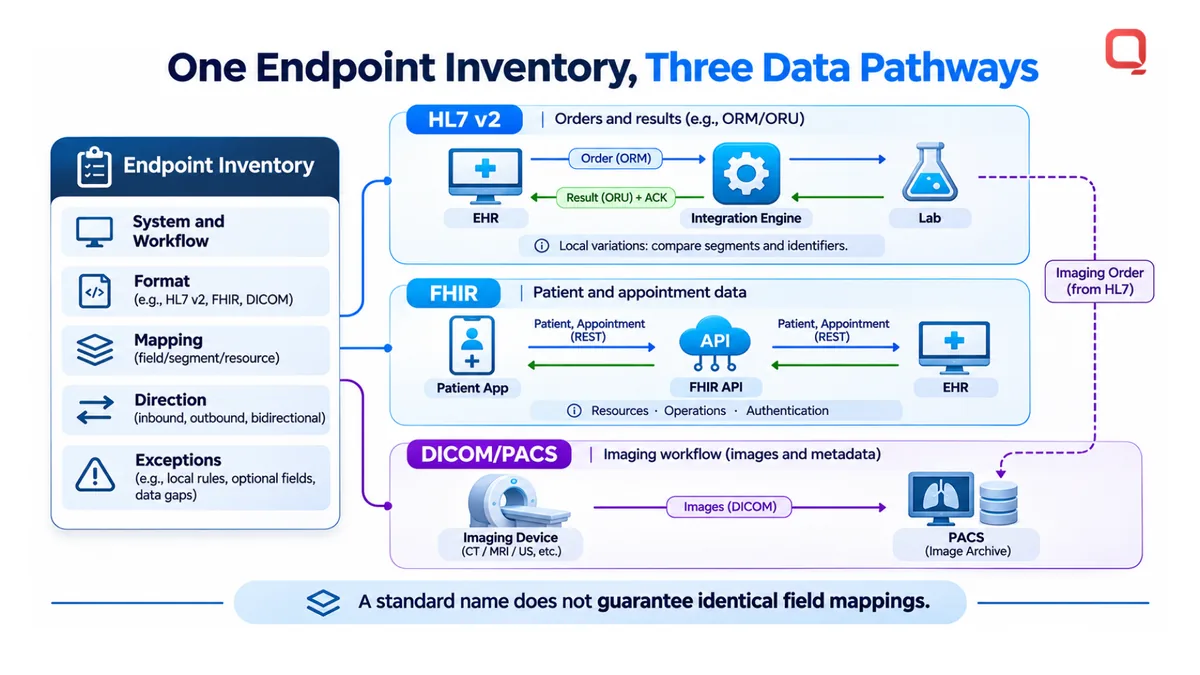
For HL7 workflows, inspect representative messages from both systems. Compare segments, required fields, and local variations before building transformations. A patient registration message may carry different identifiers across facilities, so define which identifier the receiving system treats as authoritative. Test expected messages and rejection paths in a nonproduction environment.
For FHIR workflows, list the resources and operations required for the use case. A patient-facing application may need patient and appointment data, while an EHR integration may exchange clinical records. Confirm that source and destination align on resource definitions, supported operations, authentication, and response handling. Keep endpoint requirements separate from assumptions about the integration engine.
DICOM belongs to imaging workflows, including communication with PACS environments. Treat it as a separate design consideration from HL7 or FHIR messages. For example, a workflow may exchange an imaging order through one interface while image objects remain within a DICOM/PACS pathway. Map both flows and clarify which system owns each step.
Choose an integration design by matching endpoint capabilities to each workflow, then validate mappings with representative data. Iguana integration is a fit when its required interfaces can connect the specified systems and formats without relying on unsupported assumptions in production.
What are the key features and technical requirements of Iguana integration engine?
Iguana implementation requires a server environment, defined interface workflows, and staff who can configure and operate them. Before production, assess message processing, monitoring, recovery, and access controls against specific healthcare workflows.
Start with the interface design. For each Iguana channel, document its source, destination, message type, transformation, and error path. For example, a registration workflow should define how incoming patient data is validated, mapped, and delivered, and how a destination rejection is reported. This clarifies ownership and testing criteria.
Separate engine functions from surrounding infrastructure. A production design needs a server, storage, network connectivity, and a database strategy for related operational data. Assign responsibility for patching and monitoring each component. Record where logs are retained, who can access them, and how operators can investigate a failed message without exposing unnecessary patient information.
High availability requires an intentional recovery model. In an Iguana active-passive setup, one of two servers is active and the other is on standby. Document how the standby server takes over, which queued messages need review, and how the team confirms normal processing has resumed. A standby server does not replace recovery procedures or operational testing.
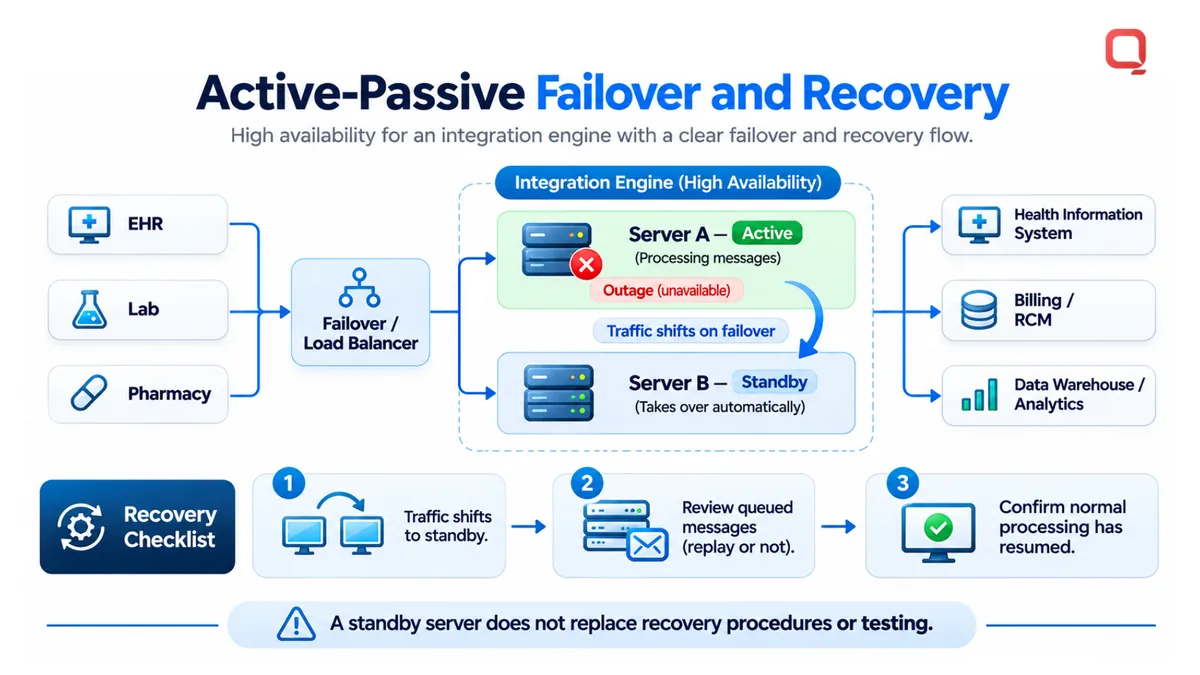
Use this technical checklist during design and acceptance testing:
- Environment: Specify server ownership, supported operating environment, storage location, and network routes to each endpoint.
- Interfaces: Record channel purpose, message formats, mapping rules, and destination acknowledgments.
- Operations: Assign owners for alerts, log review, failed-message investigation, and change approval.
- Recovery: Document restart steps, message replay decisions, and escalation paths for unavailable endpoints.
- Security: Apply least-privilege access, protect credentials, and review audit records under organizational policy.
Test representative data before release. Include valid messages, missing required fields, rejected acknowledgments, and destination outages. For an EHR interface, confirm that correcting a message does not create a duplicate patient event. Record expected outcomes, then compare them with actual processing and logs.
Capacity requirements depend on message volume, transformation complexity, and connected-system response times. Measure these conditions in a test environment rather than estimating from interface count alone. A growing laboratory feed, for example, may create a different workload from occasional administrative updates.
Keep changes controlled. Version interface mappings, record approvals, and test affected workflows after each modification. Even a strong feature set is useful only when administrators can explain how each Iguana channel behaves, who owns failures, and how recovery works.
How does Iguana compare with other healthcare integration engines?
Iguana is one option for connecting healthcare applications, but the right engine depends on existing interfaces, team skills, and operating needs. Compare products using the same workflows and acceptance criteria, not feature claims alone.
Healthcare integration engines route and transform data between systems. Alternatives include Mirth Connect, vendor-native interfaces, custom integration layers, and managed integration platforms. Their suitability depends on who maintains the connections, which systems they must link, and how the organization handles changes and failures.
| Option | Best comparison criteria | Operational trade-off |
|---|---|---|
| Iguana | Interface fit, team familiarity, deployment requirements | Assess internal ownership of configuration and support |
| Mirth Connect | Existing implementations, skills, interface requirements | Evaluate its fit within the organization’s current environment |
| Vendor-native interfaces | Supported endpoints and workflow coverage | Can limit flexibility across different vendors |
| Custom integration layer | Unique transformations and application requirements | Engineering teams own design and ongoing maintenance |
| Managed integration platform | Operational responsibilities and service boundaries | Dependence on defined vendor processes and support |
The table compares evaluation dimensions, not verified product specifications. Confirm capabilities against your target workflows and technical requirements.
Run a structured comparison using a representative workflow. For example, trace an EHR order through validation, transformation, delivery, acknowledgment, and error handling. Test each engine with the same sample messages and acceptance criteria. Record mapping effort, test results, monitoring needs, and the skills required to maintain the interface.
Assess migration effort separately from product fit. An engine may support the required formats but still require substantial redevelopment if existing mappings are undocumented. Conversely, a platform your team already uses may reduce training, but each interface still needs careful testing. Include upgrade procedures, change control, and recovery responsibilities in the evaluation.
Consider these decision criteria:
- Existing estate: Identify current engines, interface artifacts, and vendor dependencies.
- Workflow complexity: Compare transformations, routing rules, and exception paths.
- Team capability: Match configuration and support tasks to available engineering skills.
- Operational model: Clarify who monitors, maintains, and troubleshoots production connections.
- Future change: Assess how new endpoints and changing workflows will be governed.
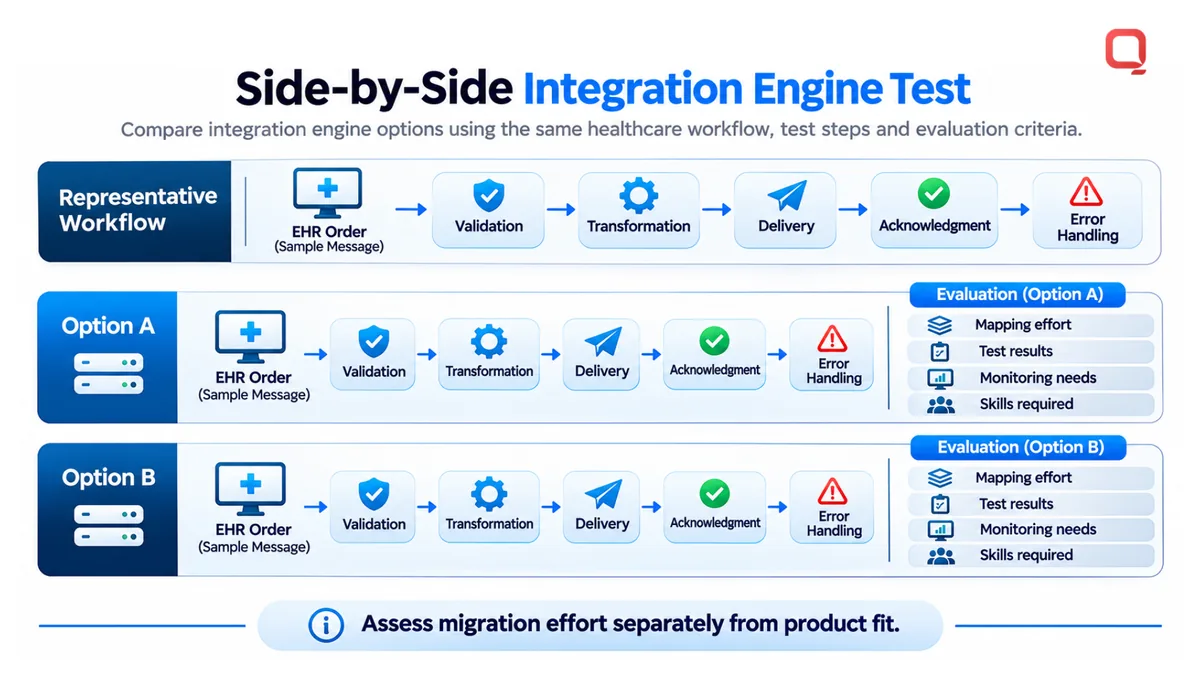
Choose Iguana when its demonstrated workflow fit, deployment approach, and support model align with your requirements. Another option may be more practical when existing systems, staff expertise, or operational constraints favor it. A side-by-side test can reveal differences that product descriptions cannot.
For a grounded comparison, discuss your healthcare integration requirements and the workflows your team needs to evaluate.
Assess migration effort separately from the cost of operating the chosen engine. Treat any estimate as specific to the defined scope, not a universal price. The comparison should reflect the interfaces and work involved in your environment.
Before choosing, document which mappings, tests, and operational procedures must move, and identify who will verify them. Ask each option’s team how it reviews changes, investigates failed deliveries, and handles recovery. Consider those answers alongside representative workflow results rather than treating migration cost alone as a measure of fit. A decision record can capture requirements, trade-offs, unresolved risks, and agreed ownership for ongoing support. This makes it easier to revisit the choice when systems or workflows change, without assuming one engine suits every interface.
QSS Technosoft: Generative AI Solutions
QSS Technosoft is a USA-based company helping healthcare teams address integration and software challenges through Healthcare IT Engineering, Legacy System Modernization, and Iguana Integration Solutions. Turn to the team when healthcare interfaces must work alongside established systems or legacy architecture makes data exchange difficult to maintain.
For organizations with needs beyond integration, Generative AI Solutions and Mobile App Development can support broader product and workflow requirements. Start with a clear view of your systems, interface requirements, and operational constraints to keep the work grounded in what must run in production.
Contact QSS Technosoft to discuss your healthcare integration needs, or visit qsstechnosoft.com.
Turn your integration assessment into an implementation plan
Make the next step a decision record your engineering and healthcare operations teams can use. Name workflow priorities, technical owners, acceptance criteria, and operational responsibilities. This gives your organization a practical basis for evaluating iguana integration engine services and planning implementation without mistaking an initial estimate for a complete delivery plan.
QSS Technosoft offers Healthcare IT Engineering and Legacy System Modernization for teams addressing integration needs alongside existing healthcare software. Its Generative AI Solutions are relevant when AI is also part of broader technology plans. Tie each initiative to a defined business workflow and measurable acceptance criteria.
Bring your integration goals and the constraints your team needs to solve. Contact QSS Technosoft about your integration needs to discuss a practical next step. A clear plan is a strong place to start.
Get an Integration Estimate Built on Your Real Interfaces
Bring your interface list, the systems on each end, and the workflows that cannot fail. Our engineers scope Iguana integration engine services the practical way: interface inventory and mapping, HL7 integration and FHIR integration design, hosting and failover planning, performance testing against real message volumes, and integration implementation through go-live and support, so the integration engine cost you see matches the work your healthcare interoperability goals require.
Discuss your integration project →